 Aftershoot
Free
Aftershoot
Free
Aftershoot provides professional photographers with AI culling, signature-style editing, AI retouching and gallery delivery capabilities, and is suitable for high-frequency batch post-production scenarios.
Aftershoot tool text
Core parameters and statistics
| Parameters | Current public information | Description |
|---|---|---|
| Product positioning | AI photography post-production workflow platform | Extending from film selection to editing, refinement and delivery |
| Main capabilities | AI Culling, AI Editing, AI Retouching, Galleries | Covering the core post-production links of professional photographers |
| Processing method | Local offline priority | Suitable for large-volume RAW/JPEG scenes |
| Public Roadmap | 2026 Workflow Expansion | Official continues to extend to RAW editing and delivery |
| Price Model | Annual Plan + Trial + Add-on | For professional workflows rather than light users |
The core selling point of Aftershoot is not “how stunning a single photo can be”, but rather reducing photographers’ duplication of work in batch selection of photos, unified style in batches, and timely delivery.
User and market recognition
- The official website has long been oriented to professional photography scenes such as weddings, events, portraits, etc., and its product positioning is very focused.
- The official roadmap, product tour, pricing, and about timelines have been disclosed, indicating that the product is more mature than ordinary AI photo retouching test products.
- The public page does not give the total number of customers and ARR, but judging from the completeness of the product line, it obviously serves studio-level high-frequency workflow.
Cost advantage
- C-side/Individual: It is not a free toy for lightweight hobby users. Although there is a 30-day trial, the core value comes from high-frequency commercial workflow.
- Developer/API: No public API product line, primarily photographer and studio tools, not a developer platform.
- Enterprise/Private: Studio/Enterprise requires business communication and is more suitable for team procurement and multi-photographer collaboration.
Its hidden benefit is that it significantly reduces the total man-hours of "first round of rough screening + style unification + delivery finishing"; its hidden cost is that you need to have stable aesthetic standards and style samples first, otherwise the value of the AI profile will be weakened.
Main functions
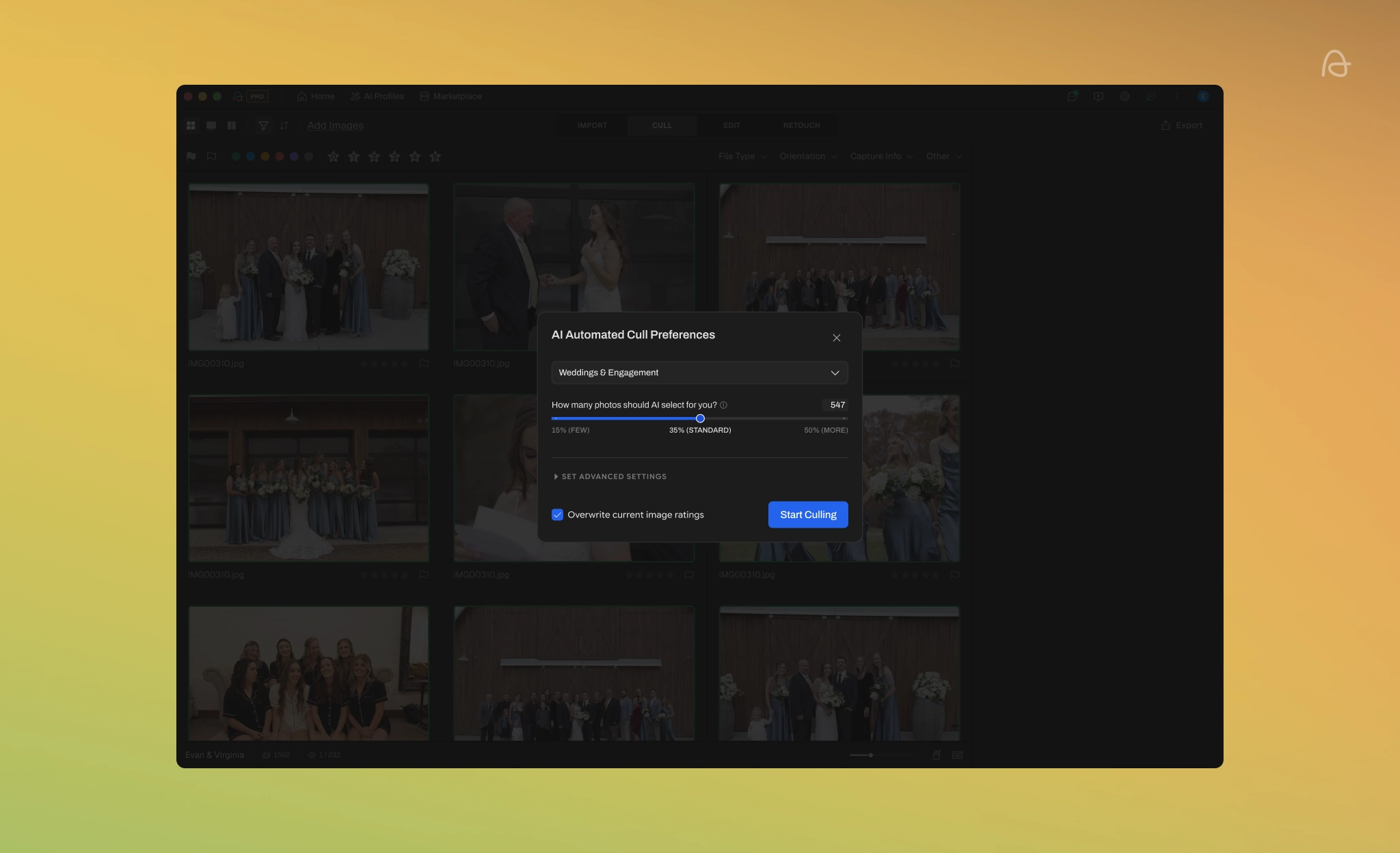
- AI Automated/Assisted Culling: Quickly complete the screening of large batches of materials, reducing the time of manual processing one by one.
- Signature-style Editing: Learn the photographer's style based on personal AI profile, and do unified color grading and basic editing in batches.
- AI Portrait Retouching: Incorporate portrait retouching into the same workflow instead of switching to another tool chain.
- RAW Editor and Export Connection: Supports cooperation with tools such as Lightroom, Capture One, Bridge, ACR, etc.
- Aftershoot Galleries: Incorporate delivery actions such as proofing, client gallery, and print store into the platform.
Model and version evolution
- 2023 / Unlimited AI Culling & Editing: The official About timeline disclosure platform began to provide Unlimited AI Culling & Editing and launched it on the Marketplace.
- 2025 / AI Retouching Early Release: Officially confirmed that AI Retouching has entered Early Release.
- 2026-02-27 / Workflow Expansion Roadmap: Expose RAW Editing, Retouching, Galleries, Tethered Setup and other expansion directions.
Aftershoot’s versioning route is very clear: first make good film selections, and then gradually integrate stylized editing, refinement and delivery into a complete workflow.
Technical advantages
-
Mechanism: Mainly local offline processing.
Effectiveness: All photographic materials do not need to be uploaded to the cloud, batch processing is more stable, and privacy and upload cost pressures are lower.
Applicable scenarios: Large-volume RAW/JPEG processing for weddings, events, and commercial photography. -
Mechanism: Personal AI Profiles + continuous learning of photographer adjustments.
Effect: Batch editing is closer to the photographer's own signature style rather than a unified template style.
Applicable scenarios: Long-term studio style consistency and collaborative output by multiple photographers. -
Mechanism: Make culling, editing, retouching, and galleries into continuous links.
Effect: Reduce tool switching and data import and export back and forth.
Applicable scenarios: high-frequency delivery, studio standardized post-production line.
How to use
- Trial entrance: The 30-day free trial can be opened directly through the account page, no credit card required.
- Typical path: Import material -> AI culling -> Select/train AI profile -> Batch editing -> Refinement -> Deliver to gallery.
- Key points for implementation: First test a set of real projects to see the film selection hit rate, style consistency and rework rate, and then decide whether to promote it to the whole team.
Product Pricing
| Level | Official website price | Description |
|---|---|---|
| Select | $120/year | AI Culling Base Layer |
| Edit | $360/year | Prefer stylized editing |
| Retouch | $240/year | Favor AI Retouching |
| Complete | $540/year | Official original price $720/year, Save 25% |
| Add-on | $10/month | AI Profile Bundle |
Extra Notes: No credit card required for 30-day free trial; Galleries is free during beta and comes with 100GB. This price system shows that Aftershoot is more suitable for people who "rely on post-production efficiency" rather than light users who occasionally edit a few sets of photos.
Application scenarios
- Wedding and Event Photography: Best suited for projects with a lot of material, tight delivery times, and lots of repetitive actions.
- Portrait and Family Photography: Suitable for studios with high requirements for style consistency and a stable rhythm of customer delivery.
- Multi-Photographer Studio: Suitable for unified style, reducing rework and delivery errors.
Applicable people
- Wedding Photographer: Need to quickly sift through a large amount of material to deliver deliverable photos.
- Portrait and Family Photographers: Requires stable stylized batch editing capabilities.
- Studio Leader: Cares about team efficiency, rework rate and delivery process standardization.
Not suitable for boundaries: If the core of your business is advertising-level leaflet refinement, heavy synthesis, and in-depth manual creation, Aftershoot should not be the final post-production tool.
Summary and Outlook
It provides competitive solutions in its field, and its core value lies in lowering the threshold for AI use in this field.
Current limitations: Some advanced features require paid subscription, and the free version has function or usage restrictions; specific technical details and performance benchmarks have not yet been fully disclosed.
Related tools:  Midjourney, stable-diffusion
Version Info
- 2026 Workflow Expansion Roadmap :The official roadmap reveals expansion directions for RAW Editing, Retouching, Galleries, and Tethered Camera Setup, as well as supporting interface diagrams.
- AI Retouching Early Release :The official About timeline clearly states that AI Retouching will enter Early Release in 2025.
User Reviews