 AI for Google Slides
AI for Google Slides (Plus AI) integrates into the existing presentation collaboration process in an expanded form, improving the efficiency of drafting and revising.
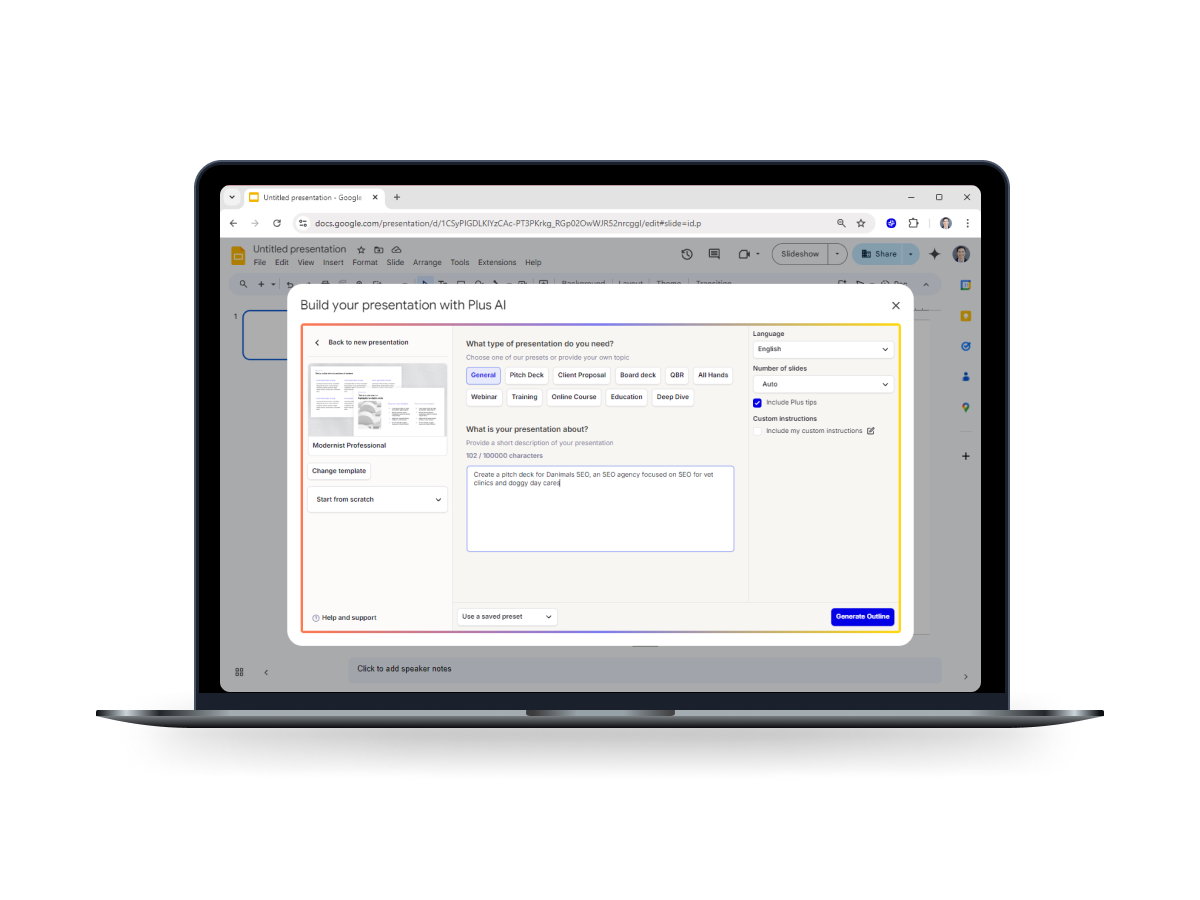
AI for Google Slides
Core parameters and statistics
AI for Google Slides (Plus AI) is an AI presentation tool embedded in Google Slides. The official website claims it is "Free Google Slides AI tool". It is accessed through the Google Workspace Marketplace extension and emphasizes the ability to generate and rewrite presentations in minutes within the existing collaboration process.
| Projects | Public Information |
|---|---|
| Product positioning | Free Google Slides AI tool (Plus AI) |
| Access path | Google Workspace Marketplace extension |
| Page structure | How it works, Use cases, Pricing, FAQ |
| Business Signals | Try it free, Cancel any time |
| Delivery form | Web (Google Slides embedded) |
| Customer size | Full user/customer numbers not disclosed |
Core value: It does not replace presentation tools, but embeds AI generation and rewriting directly into the existing collaboration process of Google Slides.
Deployment Threshold: Installed through Workspace Marketplace, lowering the threshold for organizational deployment and account management.
Evaluation focus: The official website provides a complete structure of How it works, Use cases, Pricing, and FAQ. The evaluation focus should be on improving collaboration efficiency rather than generating a single quality display.
User and market recognition
The official website provides customer evaluation modules and scenario-based use cases, reflecting the maturity of the product for office collaboration, but the complete user scale figure has not been disclosed.
Feedback module: The official website discloses customer reviews, and you can select teams of the same type to conduct usability interviews for cross-validation.
Use case coverage: Expose a variety of use cases to verify the scenario matching against the organization's actual reporting types.
Recognition method: It is recommended to use "team adoption rate" and "revision efficiency improvement" as alternative indicators of recognition, rather than external voice.
Cost advantage
- C-side/Individual: Usually a free version is provided to experience the core functions, and high-frequency use requires a paid package subscription.
- API/Developer: Billed by call volume, suitable for development teams that can be flexibly integrated into their own systems.
- Enterprise/Privatized: Contact the business owner for customized quotation and deployment plan. The specific price is subject to the official real-time pricing page.
Main functions
Product features revolve around presentation production within Google Slides:
- Presentation first draft generation: Quickly generate an editable first draft within Slides.
- Content Rewriting and Reorganization: Expand, rewrite, and adjust the structure based on existing content.
- Use case-oriented entrance: Provides a generation entrance for common business purposes.
- Deployment Support Information: Support deployment evaluation through FAQ and pricing blocks.
Functional evaluation should use the organization's real templates rather than demo samples, focusing on compatibility with existing templates, editing stability when multiple people collaborate, and the degree of editability of the generated content.
Model and version evolution
Continuous iterative updates, the latest version introduces performance optimization and new features. Historical version information can be viewed on the official release page. There is no complete public version evolution timeline yet. It is recommended to pay attention to the official announcement to understand the rhythm of feature updates.
Technical advantages
Its technical advantage lies in the "embedded collaboration experience":
Zero switching: The team does not change the usage habits of Google Slides, but adds AI generation and rewriting to the original work panel to reduce the collaboration loss of tool switching.
Process fit: It fits with the existing reporting and collaboration process, making it easier to reuse within the organization.
Acceptable technical indicators include: compatibility with existing templates, editing stability during multi-person collaboration, and response speed for document processing during peak periods.
How to use
The product is accessed in the form of Marketplace extension, and it is recommended to proceed in four steps:
| Stage | Action | Focus |
|---|---|---|
| Installation | Install via Workspace Marketplace | Permissions and Account Management |
| Pilot | Select a high-frequency reporting scenario to establish a standard template | Changes in delivery time |
| Stabilization | Configure unified prompt word strategy and record data | Template reuse rate |
| Expansion | Promote to more business teams | Team adoption rate |
Real business templates should be used in the pilot phase to avoid judging the quality of production by just demonstration examples.
Product Pricing
The pricing model is subject to the official real-time page. Usually a freemium or subscription system is used, and basic functions can be used for free. Advanced functions or high-frequency use require paid subscriptions, and users are advised to evaluate the optimal solution based on actual usage.
Application scenarios
The product is suitable for high-frequency, standardized presentation production:
- Sales and Marketing Report: Customer proposal and review report.
- Product and Operation Report: Weekly meetings and monthly review materials.
- Training and Education: Standardized courseware production.
Applicable people
The product is suitable for three types of roles:
- High Frequency Reporting Team: Need to produce presentations on an ongoing basis.
- Google Workspace Organization: Already heavily using Workspace.
- Managers seeking to improve efficiency: Want to control the quality and consistency of manuscripts.
Scenarios that are less suitable are: Scenarios that have strong requirements for complex visual effects and highly customized design, and still require in-depth participation of the design team.
Summary and Outlook
The value of AI for Google Slides is to transform document production from "personal skill-driven" to "organizational process-driven", which is suitable for high-frequency reporting organizations. Its advantages are embedded experience and low deployment threshold.
If it is to be implemented, it is recommended to first establish a standard template pilot in a high-frequency scenario such as weekly reporting or monthly review, record the shortening of delivery time and template reuse rate, and then promote it to more teams; before formal procurement, it is still necessary to confirm the openness of seats and enterprise terms, enterprise-level management and security capabilities.
Related tools:  CrewAI,
  LangChain
Version evolution of AI for Google Slides
The official page does not disclose the complete version timeline, so it is expressed in terms of public capability milestones and marked with no official precise date.
Public Milestones
- Initial Public Record (~2026-06): Establishing a snapshot of public capabilities, no official precise date yet.
- Marketplace Milestone (~2026-06): Installable via Workspace Marketplace.
It is recommended to use "organizational internal capability regression testing" instead of version number dependence: use the same template to do quality regression after each key update, and record time-consuming and editability changes.
Version Info
- Public Web Milestone :The current public version is based on the capabilities of the product page, and there is no official precise date yet.
- Initial Public Record :Taking the ability to publish pages as the first milestone record, there is no official precise date yet.
User Reviews