 AI Fusion Video
Free
AI Fusion Video
Free
AI Fusion Video is an open source Agent video creation platform for content creators. The focus is not on single-step generation, but on making scripts, storyboards, reference images, video clips and material management into a creative pipeline that can be deployed, visualized, and switchable models.
AI Fusion Video
Core parameters and statistics
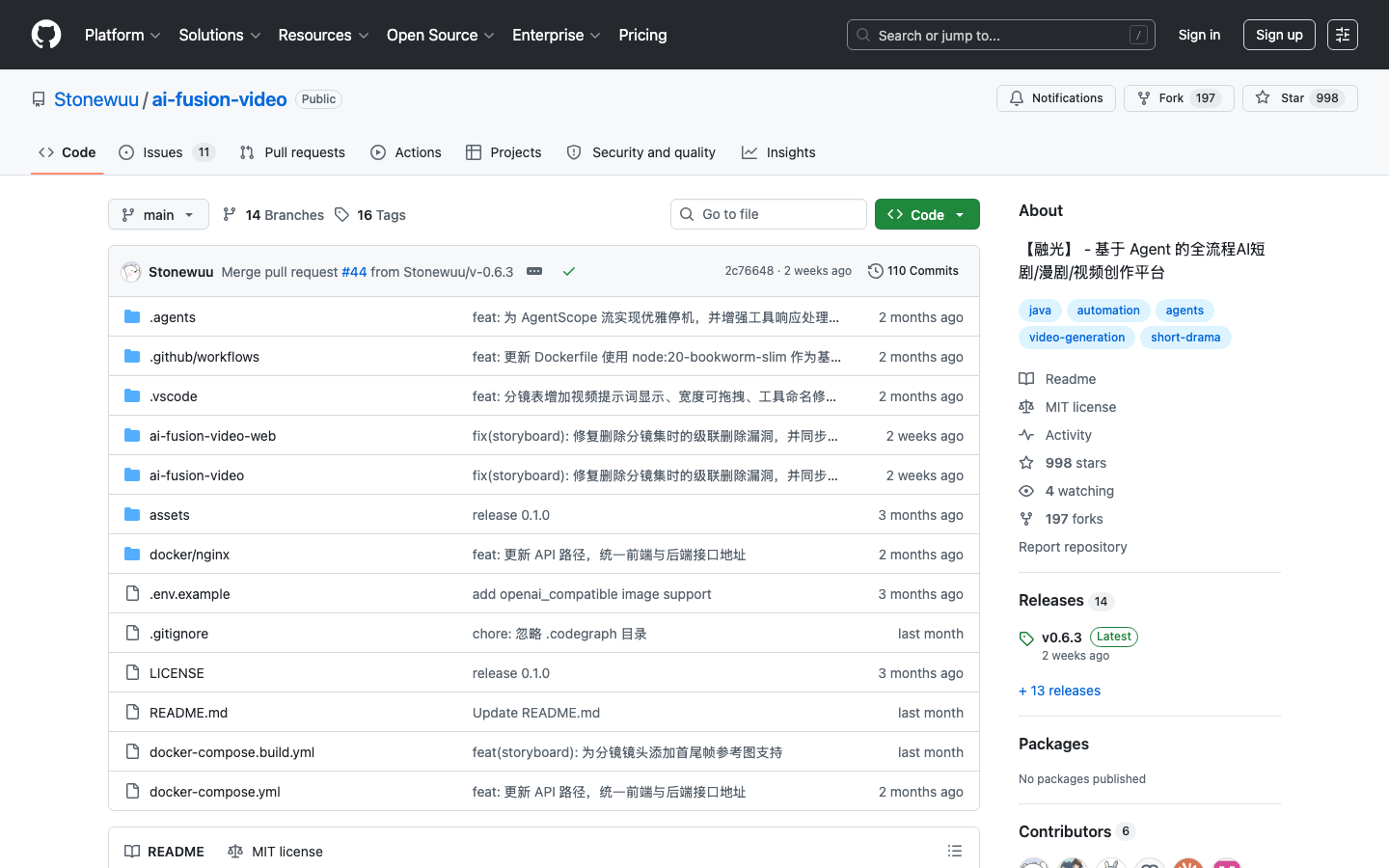
The biggest difference of Fusion Light is not that it can also "make videos", but that it looks at video creation from the very beginning of the engineering process. The public README is very straightforward: you write the script on the platform, and the system automatically splits it into components, then calls different models to generate reference images and video clips, and finally manages the materials in a unified way. This product logic determines that it is not a short and fast single video SaaS, but more like an open source video creation middle platform.
| Projects | Public Information |
|---|---|
| Product Form | Open Source Agent Video Creation Platform |
| Latest version | v0.6.3 |
| Open Source License | MIT License |
| Technology stack | Java 21, Spring Boot 3.5, Next.js 16, React 19, TypeScript |
| Deployment method | Docker Compose, source code development |
| Dependent services | MySQL, Redis, and object storage optional |
| Model support | OpenAI, Claude, Gemini, Tongyi Qianwen DeepSeek, Ollama |
| Community signals | GitHub about 998 stars, 197 forks |
A brief comment: It does not help you "make a video out of thin air", but breaks down video creation into an observable, retryable, and self-deployable Agent process.
Publicity Verification: The official emphasizes "full-process automated workflow". This positioning is basically true, because it does not cover a certain generation node, but a multi-stage process from script to material output.
User and market recognition
As an open source project, Rongguang's market recognition mainly comes from the GitHub community and the Chinese creator/developer scene, rather than enterprise paying customer numbers. The scale of close to a thousand stars and close to two hundred forks at least shows that it has passed the stage of "only used by the author himself", and external developers are willing to continue to work around it.
Expert View: The value of the open source video platform is not to replace all closed source SaaS, but to give the team a basic skeleton that can control the creation rules, model suppliers and storage links in their own hands. For teams that need to continuously iterate storyboards, scripts, and model suppliers, this sense of control is far more important than "the best one time."
Hidden benefits: Because the platform has integrated material management, model switching and process visualization into the same project, when the team changes models, object storage, and creative processes in the future, the cost will be much lower than stacking a pile of scripts.
Current Limitations: Public information shows that team management, multi-user permission control and global intelligent Agent are still on TODO, indicating that it is now more suitable for creative studios, R&D teams or individual deployments, rather than being directly and seamlessly used as a mature enterprise platform.
Cost advantage
The Free Truth: The MIT agreement makes the software itself almost free of licensing barriers, but AI functions are not free. The cost of upstream models such as OpenAI, Claude, Gemini, and DeepSeek, as well as the consumption of image and video generation links, are the main variable costs in daily operations.
C-side/Individual: Individual developers or independent creators can use Docker to quickly start up and verify whether it is worth making a long-term investment in the video workflow. Compared to buying a large closed-source platform directly, the upfront cash outlay is lower.
API/Developer: This is its most valuable layer. Because you can freely switch models, change backends, and add your own business logic, the real cost control is in your own hands instead of being locked in by a single supplier.
Enterprise/Privatization: For teams that need privatization and data controllability, Rongguang has obvious advantages. But what needs to be calculated clearly is the cost of operation and maintenance, database, cache, storage and model gateway, rather than just looking at "open source and free".
Hidden Cost: The most common hidden cost of video agent projects is not deployment, but link stability. Storyboard quality, model return delay, material references, failed retries and context pollution will all directly affect production line availability.
Main functions
- Script Management: Supports structured script management by episode and scene.
- AI Storyboard Generation: Automatically split the script into screen descriptions, shot language and storyboards that can be edited.
- AI Drawing: Call different engines to generate storyboard reference drawings.
- AI Video Generation: Output video clips based on storyboard descriptions and reference images.
- Material Management: Unified management of pictures, videos and in-project resources.
- Multiple model support: Compatible with OpenAI, Claude, Gemini, Tongyi Qianwen DeepSeek, and Ollama.
- Multi-storage backend: Supports local OSS, COS, MinIO, etc.
- Agent Pipeline visualization: Expose the multi-stage generation process to facilitate troubleshooting and retry.
Tool open list: Although the README is not named with MCP, the public process has exposed typical tool behaviors: script_create, storyboard_generate, image_generate, video_generate, asset_store, model_select, project_manage, export. The model does not directly "generate slices", but rather promotes tasks through these tool behaviors.
Model and version evolution
Fusion Light has currently advanced from the early public version to v0.6.3. The version evolution is more like the function rolling of an open source platform rather than the naming marketing of closed source SaaS.
Early public stage
v0.1.0 indicates that the project has reached a minimum runnable form and is no longer just a creative demonstration.
Platform stage
With Agent Pipeline visualization, system initialization wizard, multi-storage backend and multi-model support entering the completed list, the product focus has shifted from "can run a link" to "making this link more stable, observable and maintainable".
Recent stabilization stage
v0.6.3 and the submissions in the past two months focus on storyboard management, deletion of cascades, interface unification and tool naming optimization. This is a typical signal of platform maturity: start spending more effort on improving project stability instead of just adding functions.
Technical advantages
Architecture Link:
User requirements -> Script module -> Agent Pipeline -> Storyboard generation -> Image generation -> Video generation -> Material management/export
LLM/Image Model/Video Model -> Fusion Light Platform Orchestration Layer -> Browser UI/Storage/Project State
The biggest advantage of this link is that the control flow and data return direction are relatively clear, and everything will not be stuffed into an unobservable prompt.
Mechanism: The project divides content creation into several intermediate layers such as scripts, storyboards, reference pictures, and video clips. Each layer can be manually inspected and corrected.
Effect: Compared with directly generating the entire video in one sentence, this hierarchical structure makes it easier to do version control, partial rework and model replacement.
Applicable scenarios: short plays, comics, commercial previews, educational videos, animation prototypes.
Guide to engineering pitfalls:
- Dead-end loops are related to Token inflation control: Multiple rounds of storyboards and model retries are easy to idle. It is recommended to set
max_steps, timeout and repeated action detection for each project task to avoid infinite reruns of the same storyboard after failure. - The equivalent problem of DOM/context overload: This is not the web DOM, but long scripts and multi-storyboard contexts. It is recommended to process it by scene and page, and only feed the current scene and necessary memories to the model, rather than filling up the entire season script at once.
- Security and unauthorized management: When it comes to deleting materials, overwriting projects, or batch exporting, confirmation points and rollback strategies must be added. The most feared thing in the AI generation link is not "not being able to make it", but the bad writing of the existing project status.
How to use
Get started quickly in 3 minutes:
git clone https://github.com/Stonewuu/ai-fusion-video.git
cd ai-fusion-video
cp .env.example .env
docker compose up -d
After startup, follow the public instructions to access http://localhost:8080, configure the AI model key and storage backend on the system settings page to get started.
| How to use | Public entrance | Suitable for the crowd | Points to note |
|---|---|---|---|
| Docker one-click deployment | docker compose up -d | Teams who want to experience it quickly | Prepare the model key first |
| Source code development | Spring Boot + Next.js | Need secondary developers | Depends on MySQL, Redis, pnpm |
| Multi-model configuration | System settings page | People who need to switch models | Pay attention to supplier cost and stability |
| Object storage | Local/S3 compatible | Long-term production users | Plan material storage structure in advance |
Real workflow: Create project -> Write script -> AI generate storyboards -> AI draw reference images -> AI generate video clips -> Manage materials -> Export and deliver. This process is heavier than the "one and done" process, but it's also more controllable.
Product Pricing
The project itself is licensed under the MIT open source license and there are no traditional subscription fees. But this does not mean that the total cost is so low that it can be ignored.
C-side/Individual: The software is free, and the main costs are model calling, server and time.
Developers/API: You can connect to OpenAI, Claude, Gemini, DeepSeek or Ollama according to your preference, which essentially turns the cost from a platform subscription into a controllable supplier bill that needs to be managed by yourself.
Enterprise/Private: License friendly, but additional considerations include database, object storage, logs, permissions, and backup costs.
Dissuade scenario: If the team has no engineering capabilities and just wants to quickly produce a few marketing videos, closed source SaaS is often more labor-saving.
Application scenarios
- Short video and short drama creation: The link from script to storyboard to clip generation is the best match.
- Advertising and Marketing Content: Suitable for multi-version creative verification, rather than one-time high-end production.
- Education and Training Videos: Convert syllabus into structured visual representation.
- Animation and film preview: Quickly create storyboards and dynamic previews to reduce uncertainty before official shooting.
Dimensionality reduction strike scenario: Teams that need to frequently iterate scripts, storyboards, and lens language can enjoy its value more than teams that only pursue "one-click production".
Applicable people
- Technical Content Team: Most suitable because they can be responsible for deployment and model management.
- Independent Developers and Creative Studios: Looking to build their own video production toolchain.
- Education, Animation, Short Drama Prototype Team: Pay attention to storyboard controllability and process transparency.
Dissuaded/not applicable to people:
- People who just want to use it out of the box with zero configuration.
- A team that has no model budget and is unwilling to operate and maintain.
- People who need a mature enterprise collaboration permission system, but must go online now.
Summary and Outlook
Fusion Light's strength is not "the effect crushes all closed source video SaaS", but to provide a truly controllable Agent platform skeleton for video creation. It splits the creative process from black box generation to an observable, reworkable, and self-deployable pipeline through middle-layer splitting. The hidden benefits lie in model switching and process precipitation, and the hidden costs lie in engineering maintenance, failed retries, and long-link stability, all of which need to be paid for by the team themselves.
Current Limitations: Team collaboration, permission systems, and stronger global agents are still evolving. Procurement/Adoption Risk Assessment: It is most suitable to build an internal test platform or creative studio infrastructure first, rather than directly using it as a mature enterprise-level video middle platform to completely replace the existing production system.
Related tools: runway, pika
Version Info
- AI Fusion Video v0.6.3 :The latest version currently disclosed by GitHub is labeled v0.6.3. The main line continues to improve platform stability issues such as storyboarding, deletion of cascades, and unification of front-end and back-end interfaces. There is no official precise date yet.
- Agent Pipeline Visualization Phase :The README has listed the Agent Pipeline visualization process as a completed capability, indicating that the project has begun to evolve from a multi-step call collection to an observable workbench.
- AI Fusion Video v0.1.0 :The history of the GitHub repository shows that the project took v0.1.0 as the early public release node, marking the product's transition from proof of concept to a runnable project stage. There is no official precise date yet.
User Reviews