 AiPPT plugin
Free
AiPPT plugin
Free
The AiPPT plug-in is a local office enhancement component launched by AiPPT.cn. It is embedded in PowerPoint and WPS and brings AI-generated outlines, intelligent typesetting and design resource libraries directly into the user's original presentation workflow, reducing repeated switching between the web page and the desktop.
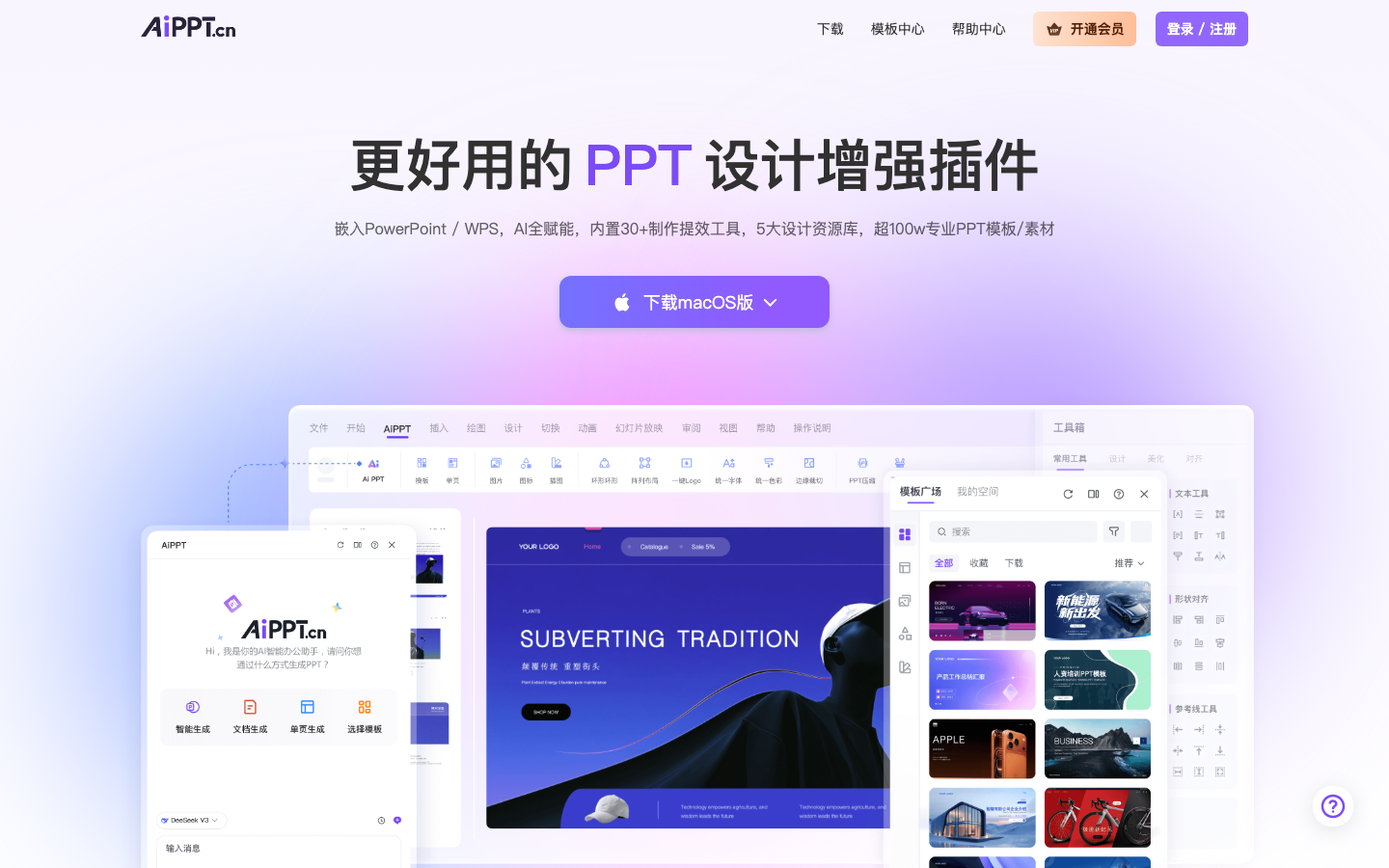
AiPPT plugin
Core parameters and statistics
The AiPPT plug-in is not an independent web application, but a local enhancement component embedded in PowerPoint and WPS. It directly mounts the AI generation and design capabilities of AiPPT.cn into the office software used by users every day. The core pain point it wants to solve is "the separation of PPT generated by web pages from local editing" - users no longer have to export and import back and forth between the browser and desktop software.
| Projects | Public Information |
|---|---|
| Product form | PowerPoint / WPS desktop plug-in |
| Parent product | AiPPT.cn web-side AI PPT generation service |
| Built-in tools | Official page annotation 30+ production efficiency tools |
| Design resources | Official page marked 5 major design resource libraries |
| Template material | Officially claimed to be over 1 million professional PPT templates/materials |
| Running platform | macOS / Windows desktop office software |
| Billing model | Free trial + membership subscription |
Publicity Verification: The first screen of the official website advocates "a more useful PPT design enhancement plug-in, embedded in PowerPoint/WPS, fully empowered by AI", which is consistent with the actual positioning of the plug-in - it is aimed at workplace users who are accustomed to local office software and want to introduce AI generation and typesetting.
User and market recognition
Gradually build user awareness in the field, and product capabilities are used by content creators and teams to improve work efficiency. Some industry users have incorporated it into their daily workflow. It is recommended to refer to the latest official disclosures for specific user scale and industry adoption rate data.
Cost advantage
- C side: Provides free trial quota, in-depth functions and high-frequency generation are unlocked through membership subscription, and the price is subject to the official membership page.
- Hidden Cost: The free quota usually has boundaries for the number of single generation, export and commercial authorization. Batch rendering and commercial scenarios require upgrading the membership.
- Alternative cost perspective: Compared with the multi-step process of "webpage generation → export → local secondary typesetting", the plug-in compresses the links in one software, saving cross-tool switching and rework time, not the simple difference in subscription fees.
Main functions
- AI Outline and Full Page Generation: Enter a topic or paste the copy, and automatically generate a structured outline and expand it into a complete slide.
- Intelligent typesetting and beautification: One-click typesetting and unified style for existing content, reducing manual alignment and color matching work.
- Design resource library call: Built-in icons, pictures, charts and other resources can be accessed directly in the editing interface.
- Effectiveness Tool Set: Officially labeled 30+ tools, covering high-frequency operations such as text processing, layout adjustment, and material replacement.
- Local software built-in: Generate, modify, and export within PowerPoint/WPS without switching to the web page.
Expert View: The real value of the plug-in lies in the "synergistic effect" - the content generated by AI can be immediately dropped into local layout tools and material libraries, avoiding formatting confusion and secondary rework caused by importing the web page into desktop software after it is generated.
Model and version evolution
- Web page generation version (early stage): Taking the AiPPT.cn web page as the core, it establishes the ability and template system to generate PPT with one click.
- Desktop plug-in version (current mainline): Transfer generation and design capabilities to PowerPoint/WPS, forming a fusion form of "local office software + AI".
- The official subdivision version number and version-by-version release date have not been disclosed. The evolution process is subject to the real-time information on the official website and download page.
Technical advantages
- Embedded architecture: Connect to the extended interface of mainstream office software in the form of plug-ins, and perform generation and typesetting directly on document objects to avoid format loss caused by export/import.
- Resource library localization call: Present cloud templates and materials in the editor in the form of panels, reducing the operating costs of material retrieval and replacement.
- Process Compression: The "generation-typesetting-beautifying-exporting" chain is completed in the same process, reducing manual handling across applications. This is the key to saving time compared to pure web tools.
How to use
- Portal Control: The desktop plug-in (within PowerPoint/WPS) is the main usage method, and the web page AiPPT.cn provides an online generation portal.
- Typical steps: Install and log in to the plug-in in the office software → Enter the theme or import copy → Generate outline and slides → Call the resource library and optimize the efficiency tools → Save and export directly locally.
- Adaptation Tips: You need to use a PowerPoint or WPS version that supports plug-ins. For first-time use, you need to register and log in to an AiPPT account.
Product Pricing
- Billing Dimension: Billing is based on account membership level, and the free tier provides a basic trial amount.
- Paid Unlock: High-frequency generation, complete material library and commercial authorization usually require membership subscription.
- Specific packages, limited-time discounts and commercial terms are subject to real-time information on the official membership page.
Application scenarios
- Workplace Report: Quickly produce structured presentations such as weekly reports, monthly reports, project plans, etc.
- Education and Training: Teachers and trainers produce courseware and handouts in batches.
- Business Proposal: The sales and marketing team quickly generates customized proposals based on local templates.
Applicable people
- Individual workplace users: People who need to produce PPT frequently and quickly, and are accustomed to using PowerPoint/WPS.
- Students and Educational Practitioners: Produce course, defense and training materials.
- Not suitable for boundaries: For professional design scenarios that require highly original visual design, strict brand specifications, or complex customized layouts, the templated generation of plug-ins may not completely replace manual design.
Summary and Outlook
It provides competitive solutions in its field, and its core value lies in lowering the threshold for AI use in this field.
Current limitations: Some advanced features require paid subscription, and the free version has function or usage restrictions; specific technical details and performance benchmarks have not yet been fully disclosed.
Related tools:  Notion AI, google-workspace
Business process integration and ROI analysis
As a productivity tool for enterprises or professional positions, the real value of the AiPPT plug-in depends on the depth of integration with existing workflows and the quantifiable efficiency improvement effect. The following is a systematic analysis from three core dimensions.
System integration and data interoperability The ability to interoperate with existing business systems is a key prerequisite for productivity tools to be integrated into workflows. It is recommended to focus on evaluating the following integration dimensions: the openness and documentation quality of the RESTful/GraphQL API (whether a complete API reference and SDK examples are provided), the support scope of Webhook event notifications (which business event types are supported for automatic push), the number and depth of pre-built integrations with common collaboration SaaS tools (WeChat Enterprise, DingTalk, Feishu, Slack, Notion, Jira, etc.), and enterprise-level identity authentication support (SSO/SAML/OAuth and LDAP/AD directory integration). Products that lack integration capabilities are easily isolated into information islands, which in turn increases the cognitive cost and operational friction for teams to switch between different tools.
Efficiency Quantification and ROI Estimation Methodology Before purchasing decisions, it is recommended to quantify the input-output ratio through a structured method: Step 1, choose 3-5 Standardized tasks that are frequently repeated and time-consuming in each team are used as test samples; in the second step, the average time consumption of a single task before and after tool intervention, first-time pass rate or error rate, and the number of links requiring manual intervention are recorded under controlled conditions; in the third step, the saved manpower time is converted according to the comprehensive cost of the position (salary, benefits, management sharing), and soft benefits (increased employee satisfaction, standardization of work quality, and improvement in response speed to core business) are superimposed to obtain a comprehensive ROI estimate. It is recommended to continue tracking ROI trends on a monthly basis, as the value of a tool usually increases over time as team proficiency increases and workflows are optimized.
Phase-based implementation strategy and risk control It is recommended to adopt a three-stage implementation path of "pilot verification-gradual promotion-continuous optimization". In the pilot stage (1-2 weeks), a single team or a single business scenario is selected for small-scale verification. The core goal is to verify technical feasibility and user acceptance, and establish preliminary usage specifications and success standards; in the promotion stage (2-4 weeks), after the pilot verification is passed, the coverage is gradually expanded, and standardized activation processes and training materials are developed; in the optimization stage (continuous), the workflow configuration is continuously adjusted based on actual usage data and user feedback, and more high-value application scenarios are explored. Clear quantitative key result indicators should be set at each stage to avoid blindly expanding the scope of use without data support.
Version Info
- AiPPT plug-in desktop version (PowerPoint/WPS) :Embedded in the plug-in form of PowerPoint and WPS, it has built-in 30+ production efficiency tools and 5 major design resource libraries, and supports AI generation and intelligent typesetting in local documents. The exact release date has not been officially announced, but dates are approximate.
- AiPPT web page generation with one click :The early AI one-click PPT generation service with the web as its core provides the ability to input a topic to generate an outline and a full set of slides, which is the basis for subsequent plug-in forms. The exact release date has not been officially announced, but dates are approximate.
User Reviews