 AnimatedLLM
Free
AnimatedLLM
Free
AnimatedLLM is an open source tool that generates LLM's reasoning process into animated visualization content to help understand and display the model thinking process.
AnimatedLLM
Core parameters and statistics of AnimatedLLM
AnimatedLLM is an open source educational tool developed by Zdeněk Kasner and Ondřej Dušek from the ÚFAL Laboratory at the School of Mathematics and Physics at Charles University in the Czech Republic. It focuses on visualizing the inner workings of large language models in the form of frame-by-frame animations. It is not an AI model per se, but a "meta-visualization layer" - used to display and understand what is happening at each step in the text generation and training process of the Transformer architecture.
| Projects | Public Information |
|---|---|
| Product positioning | LLM internal mechanism animation visualization educational tool |
| Core capabilities | Token-level animation Transformer internal state visualization, training process demonstration |
| Technology stack | D3.js + GSAP animation engine Vite builds JavaScript/CSS/Python |
| Operation method | Pure browser-side operation (based on precomputed data) |
| Deployment Platform | Web (GitHub Pages Hosting) |
| Open Source License | MIT |
| Target Users | AI Educators, Students, Technical Writers LLM Beginners |
| Supported languages | English (interface and content are en-US) |
| Affiliation | ÚFAL MFF UK (Institute of Applied Linguistics, School of Mathematics and Physics, Charles University) |
| GitHub stars | About 15 stars (as of 2026-07) |
| Latest release | v1.0.0 (2025-12-14) |
| Academic Paper | Accepted by EACL 2026 TeachNLP Workshop |
Brief review in one sentence: AnimatedLLM is not another conversational robot, but an "LLM internal structure microscope" - it uses frame-by-frame animation to present the attention distribution and hidden state changes of each Token when Transformer generates text before your eyes. It is suitable for use in classrooms or technical blogs to explain "how the model thinks."
Key boundary: AnimatedLLM displays a precomputed model behavior trace (trace) instead of calling the real LLM API in real time. This means that the animation content is a fixed, manually organized example, and cannot generate real-time visualizations of arbitrary prompt words. This is also its reasonable design as a teaching tool - ensuring that the results of each demonstration are consistent and controllable.
Visual level division: The product provides two paths: "Basic" and "Advanced". The basic path (Text Generation Basics) is aimed at a zero-based audience and shows the step-by-step appearance process of Token generation; the advanced path (How Transformer Generates Text) goes deep into the internal mechanism of Transformer and shows how the attention head allocates weights between different Tokens. This layered design allows the same tool to serve both introductory science popularization and professional teaching audiences.
Users and market recognition of AnimatedLLM
The magnitude of AnimatedLLM is not comparable to general AI products (such as ChatGPT, Claude). It belongs to the highly segmented tool category of AI education visualization, and measurement indicators should focus on academic adoption and penetration of educational scenarios rather than installed capacity.
Academic Publishing Endorsement: AnimatedLLM’s related papers have been officially accepted by the TeachNLP workshop of EACL 2026. TeachNLP is a professional academic seminar in the field of natural language processing (NLP) education. The acceptance of the paper itself is a third-party certification of the teaching effectiveness and technical quality of the tool. The paper has received some attention on arXiv (cs.CL direction), and researchers and educators can obtain a complete method description through arXiv:2601.04213.
GitHub Community Signal: As of 2026-07, the warehouse kasnerz/animated-llm has obtained about 15 stars, MIT open source license, and code quality is guaranteed through ESLint configuration and Husky commit hook. The contribution guidelines (CONTRIBUTING.md) and code of conduct (CODE_OF_CONDUCT.md) are complete, indicating that the project has a clear willingness to build a community. However, 0 fork and low star number also reflect that the current audience scope is limited and an active external contribution ecosystem has not yet been formed.
Institutional Endorsement: The project is produced by the ÚFAL Laboratory of Charles University. ÚFAL is a well-known laboratory in the field of natural language processing in Europe, with long-term accumulation in machine translation, dialogue systems, and language resource construction. Institutional branding provides an implicit endorsement of a tool’s credibility and academic rigor.
Comparison with similar tools: There are currently very few direct competitors on the market - the vast majority of AI educational materials are still mainly static charts, slides or recorded videos. The core differentiation of AnimatedLLM lies in its "interactive, step-by-step, and replayable" dynamic presentation capabilities. Similar tools include LLM Visualization (bbycroft.net), etc., but AnimatedLLM is the only tool that covers the entire link from generation to training and verifies the teaching effect through academic papers.
| Comparative dimensions | AnimatedLLM | Static teaching materials/slideshows | LLM Visualization (bbycroft) |
|---|---|---|---|
| Interactivity | Keyboard control step by frame | No interaction | Click interaction |
| Breadth of content | Generate + train dual link | Depends on instructor orchestration | Generate process only |
| Teaching verification | EACL TeachNLP paper | None | None |
| Open Source | MIT License | Not Applicable | Unpublished |
| Runs locally | Supported (Node.js) | N/A | Web only |
Cost Advantages of AnimatedLLM
As an MIT-licensed open source project, AnimatedLLM's cost structure is extremely simple - there is zero licensing fee, and the cost of use depends entirely on how you run it.
C-side/individual users: Visit animatedllm.github.io to directly use all functions with zero cost and zero registration. All animation data is pre-packaged in static resources, no API Key is required, no login is required, and no need to wait for the model to load. Users can get a complete frame-by-frame demonstration experience when they open the page. The only hidden cost is network bandwidth - the first load requires downloading a static resource package of several MB (including precomputed trajectory data and the D3.js/GSAP animation library), which can then be run completely offline.
Self-hosting for developers/educational institutions: After cloning the repository from GitHub, execute npm install && npm run dev to start the development server locally. Depends only on Node.js (>=20.9.0) and npm, no GPU, no large model inference context requirements. The incremental cost of self-hosting scenarios is almost zero - no API call fees, no cloud service subscription, only basic static file hosting capabilities (GitHub Pages, Netlify, Vercel, etc. are all available, and can even be opened directly locally and offline).
Enterprise/Large-Scale Education Deployment: Considering that AnimatedLLM is a pure front-end static application, large-scale distribution costs are extremely low. It can be distributed to hundreds of teaching terminals with one click through CDN or on-campus mirroring, with no concurrency restrictions and no license audit risks (MIT license allows commercial use and secondary distribution). The only hidden cost is: if you need to modify the demo content and pre-computed trajectories, you need to have Python data processing capabilities and D3.js/GSAP front-end development capabilities, which poses a certain customization threshold for non-technical educational institutions.
Main functions of AnimatedLLM
The functional design of AnimatedLLM closely follows the core proposition of "how to clearly explain the working principle of LLM" and revolves around the two clues of text generation and model training. Each clue is divided into two depth levels: basic and advanced.
-
Text generation visualization (basic): Shows how LLM generates text token by token. The currently generated Token sequence is displayed at the top of the page, and the timeline is used to mark the generation order and speed of each Token at the bottom. Users can use the Space key to play/pause the animation, the →/← keys to step frame by frame, and the N key to jump to the next Token. Hidden linkage: The timeline is linked to the Token sequence - hover over a Token during a pause to view the probability distribution Top-K of that step, making the abstract concept of "the model only predicts the next word at a time" materialized into an interactive element that can be "touched".
-
Transformer internal mechanism visualization (advanced): Go deep into the model to show how the attention (Attention) mechanism works. The position changes of the Token in the Embedding space, the allocation of multi-head attention weights, and the activation state of the Feed-Forward layer are presented in dynamic graphics. Hidden linkage: When the user steps to a certain layer, the underlying Token sequence synchronously highlights the currently processed Token, and the upper-layer attention matrix synchronously displays the attention weight of the Token to other Tokens - the three-layer linkage makes the "Token flow path in the model" clear at a glance.
-
Visualization of the training process: This is a special feature of AnimatedLLM that distinguishes it from most visualization tools. Shows how the model starts with random weights in the pre-training phase and gradually reduces the loss by repeatedly processing training samples. The basic path shows the decreasing trend of the loss curve with the number of training steps; the advanced path goes deep into the microscopic process of backpropagation, showing how the gradient is propagated back from the output layer layer by layer. Hidden linkage: Training steps are synchronized with parameter update animations - each step is a training iteration, and the color change of the model parameter matrix provides real-time feedback on the weight update amplitude, helping students establish the intuition of "training = parameter fine-tuning".
-
LLM Cheatsheet: Provides a downloadable PDF cheatsheet that condenses the core concepts of LLM (Tokenization, Embedding, Attention, Transformer Block, output probability distribution, etc.). Use value: Suitable as a supplementary material for classroom lectures or a self-study reference for students, combining interactive exploration with static reference.
-
Keyboard control system: Provides a complete set of keyboard shortcuts (Space play/pause, →/← step N jump token, G jump to the end R reset T switch light and dark theme L switch language H display shortcut key help), allowing lecturers to smoothly control the rhythm without the need for a mouse during the presentation. Expert View: This may seem like "experience optimization", but in fact it is the core competitiveness of educational tools - lecturers need to explain and control the demonstration while teaching. Mouse operations will interrupt the train of thought, and blind keyboard operation ensures the continuity of the teaching rhythm.
Model and version evolution of AnimatedLLM
The version history of AnimatedLLM is short but clear-the project is currently in the early stages, with only one official release version (v1.0.0) as of 2026-07, but the development history covers the complete link from prototype to academic publication.
Academic prototype stage (2024-2025-12)
The project was first developed on GitHub under the name animated-llm and has gone through several internal iterations and architectural adjustments. Between the end of 2024 and 2025, the author built a core visualization engine around the D3.js + GSAP technology stack, and collected running trajectory data of multiple open source LLMs (such as the GPT-2 series) on carefully selected sample inputs. In December 2025, the research results will be compiled into a paper and submitted to TeachNLP @ EACL 2026.
v1.0.0 officially released (2025-12-14)
This is the first publicly released version of the project. The corresponding Git tag is v1.0.0 and the commit hash is 4a76f65. This version contains:
- Complete text generation visualization (Basic + Advanced)
- Visualization of training process (basic + advanced)
- LLM Cheat Sheet PDF
- Keyboard control system
- Light and dark theme switching
- Responsive layout adaptation
- Complete open source warehouse package (LICENSE, CONTRIBUTING.md, CODE_OF_CONDUCT.md)
Paper revision stage (2026-01)
On January 30, 2026, the paper was updated to arXiv v2 (arXiv:2601.04213v2), with content streamlined and chart optimization based on v1. The paper version update notes that there are no functional changes in the tool itself, but improvements in academic expression.
Current status and subsequent expectations
As of 2026-07, the project is in stable maintenance status on GitHub, and submission activities are mainly focused on bug fixes and dependency updates. No clear roadmap or plans for the next version have been disclosed. The author marks "PRs Welcome" in the README to indicate his willingness to accept community contributions. For educational institutions, the functionality of the current version is complete enough to cover the core requirements for introductory teaching of LLM. Expected update directions for subsequent versions may include: more precomputed model trajectories (such as LLaMA, Mistral series), interface localization in more languages, custom prompt word input support, and richer training dynamic visualization indicators.
| Version Node | Date | Key Changes | Description |
|---|---|---|---|
| Academic prototype | 2024-2025-12 | Core technology development | Build D3.js+GSAP visualization engine to collect LLM trajectory data |
| v1.0.0 | 2025-12-14 | First public release | Full-featured release, supporting paper submission |
| arXiv v2 | 2026-01-30 | Paper update | No changes in tool functions, academic expression optimization |
| Current development version | 2026-07 | Maintenance period | Bug fixes and dependency updates, no new version released |
Technical advantages of AnimatedLLM
The technical implementation of AnimatedLLM revolves around the challenge of "how to efficiently and accurately reproduce the internal state of LLM in the browser". Its solution has design choices at three levels: data preparation, animation engine and interactive control.
Precomputed trajectory strategy: AnimatedLLM does not call LLM in real time to generate content, but uses precomputed models to run trajectory data. The specific process is: use Python scripts to run open source LLM (such as the GPT-2 series) on the server, perform forward inference on carefully selected example inputs, record the hidden state, attention weight, probability distribution and other data of each layer, and then serialize these data into JSON format and package them into front-end static resources. Mechanism → Effect: This strategy completely eliminates the dependence on GPU inference hardware, allowing the entire application to be deployed on a static hosting service with zero computing power; at the same time, it ensures the repeatability of the demonstration results - no matter how many times the same input is demonstrated, the animation trajectory is completely consistent, which is crucial for teaching scenarios. Price: Users cannot enter any prompt words to obtain visualization, and can only choose from preset examples, which limits flexibility.
D3.js + GSAP dual-engine architecture: The front-end animation layer uses both D3.js (data processing and SVG graphics generation) and GSAP (GreenSock Animation Platform, high-performance timeline animation control). D3.js is responsible for mapping JSON trajectory data into visual elements (heat map of attention matrix, position change of Token in Embedding space, probability bar, etc.), and GSAP is responsible for controlling the animation timing of these elements - playback, pause, frame-by-frame stepping, jump, etc. Mechanism → Effect: D3.js's advantage in data-driven documents ensures the strict binding of visual graphics and underlying data, and GSAP's maturity in timeline control ensures frame-level precise playback control - the two complement each other and form the technical foundation of "accurate data + smooth animation". In contrast, if you only use D3.js for animation, its transition mechanism will have difficulties in state management when dealing with complex "pause-step-jump" interaction sequences.
Pure front-end static architecture: The entire application has no back-end services, no database, and no authentication system. The build product is a pure static HTML/CSS/JS file, packaged through Vite. Mechanism → Effect: This means that AnimatedLLM can be deployed on any static file hosting platform (GitHub Pages, Netlify, Vercel, or even the local file:// protocol) without having to maintain a server and worry about concurrency and load. For educational scenarios, lecturers can even use a USB flash drive to copy to the classroom computer and run it directly without a network connection.
Keyboard-driven interaction design: Unlike most web applications that rely on mouse clicks, the core interactions of AnimatedLLM are all completed through the keyboard. Mechanism → Effect: This has practical implications in teaching demonstrations - the instructor should keep his eyes and attention on the students and the screen when explaining, rather than switching back and forth between keyboard and mouse. Keyboard shortcuts (Space, →/←, N, G, R, T, L) form a complete "presentation remote" that instructors can complete through muscle memory.
Attention visualization level: In advanced mode, AnimatedLLM visualizes Transformer's attention mechanism as a dynamic heat map matrix, displaying the attention weight distribution of the current Token to all context Tokens at each step. At the same time, color coding is used to show the evolution of the Embedding space - how the vector representation of Token gradually changes from pure semantic encoding to context-related representation during the layer-by-layer transfer process. Mechanism → Effect: This visualization allows students to intuitively see that "attention is not static, but changes dynamically with the generation process" - in the same sentence, the model pays completely different attention to the context when generating different Tokens. This observation is a key entry point into understanding Transformer’s positional encoding and self-attention mechanisms.
How to use AnimatedLLM
The usage path of AnimatedLLM covers the full spectrum from "zero-threshold online experience" to "local development and customization". Users with different roles can choose the entrance that best suits them.
| How to use | Suitable for the crowd | Operation path | Technical requirements | Cost |
|---|---|---|---|---|
| Direct access online | All users | Visit animatedllm.github.io → Select Text Generation or Training → Press Space to play | None (just browser) | Completely free |
| Run locally | Educators, developers | git clone → npm install → npm run dev |
Node.js >= 20.9.0 + npm | Completely free |
| Self-hosted deployment | Educational institutions | Build static files → deploy to any web server or CDN | Basic front-end deployment capabilities | Hosting fees |
| Source code customization | Developers, researchers | Fork warehouse → Modify precomputed data or visualization logic → Rebuild | Python + JavaScript + D3.js | Completely free |
Typical steps for online use:
- Open the browser and visit
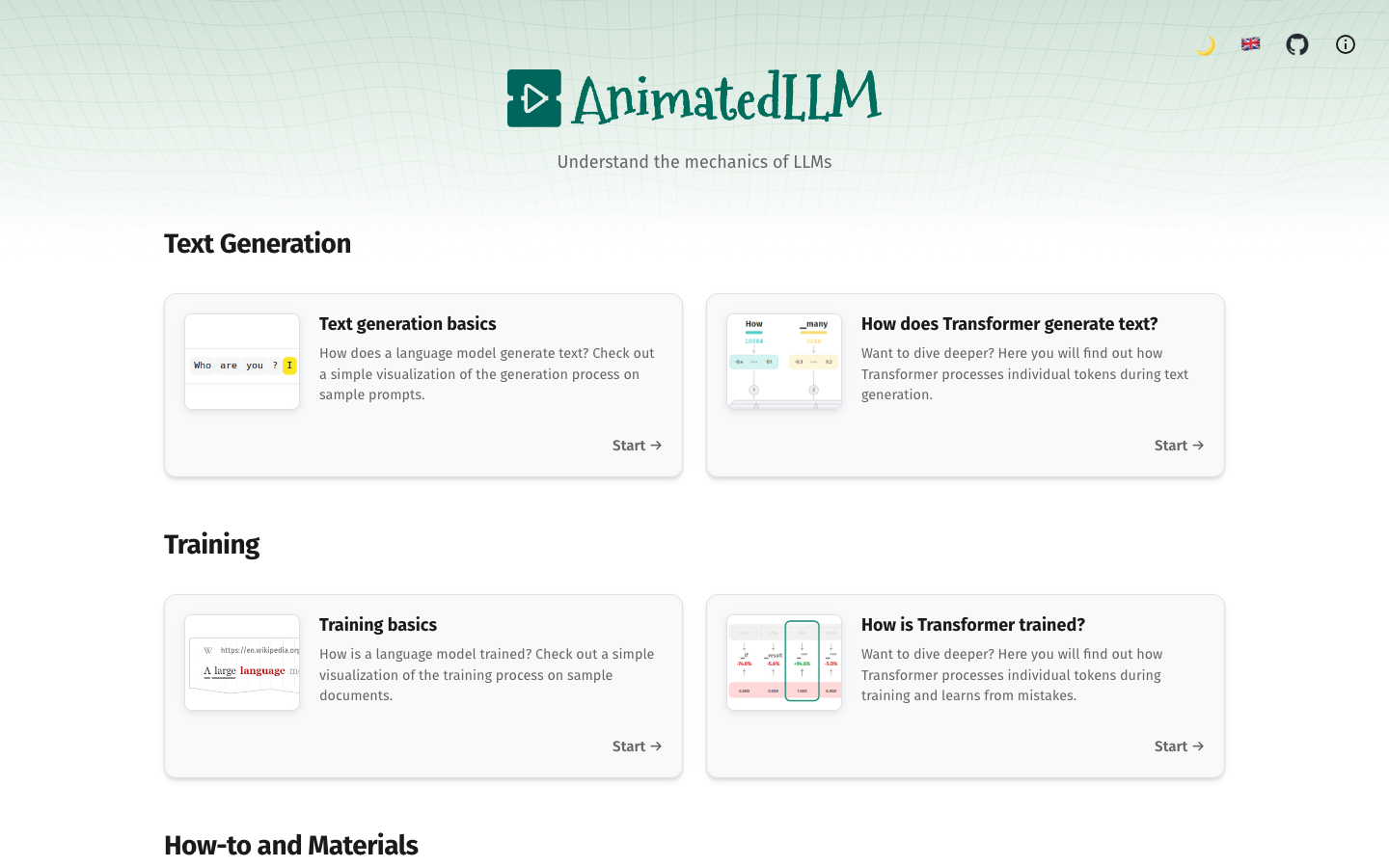
animatedllm.github.io. - The home page displays four learning paths in the form of cards: Text Generation Basics, How Transformer Generates Text, Training Basics, and How Transformer Is Trained.
- Select a path to enter the demo page. The main body of the page is the visualization area, with the control panel and timeline at the bottom.
- Press the Space key to start automatic playback and observe how Tokens are generated one by one or how the training loss gradually decreases.
- For fine control, use the →/← keys to step frame by frame, the N key to jump to the next key step, and the G key to jump to the end.
- Press the T key to switch between light and dark themes to adapt to the lighting conditions of different presentation environments.
- Press the H key to see the full shortcut list at any time.
Local development and construction:
# Clone repository
git clone https://github.com/kasnerz/animated-llm.git
cd animated-llm

# Install dependencies (Node.js >= 20.9.0)
npm install

# Start the development server (default http://localhost:5173)
npm rundev

# Build production version
npm run build
The build product is in the dist/ directory and can be directly deployed to any static hosting service. Key technology stack: Vite is the construction tool, React (inference) is the UI framework, and D3.js and GSAP are the core visualization/animation engines. The specific dependency version is subject to package.json.
Known Usage Limitations:
- Currently only the English interface is provided, and non-English users need to have basic English reading skills.
- Precomputed trajectories are based on specific models (GPT-2 series) and may not represent all LLM behavior patterns.
- The demonstration content is fixed and does not support user-defined input prompt words.
- Long time steps (such as a generated sequence of hundreds of steps) may experience framerate drops on low-end devices.
Product Pricing for AnimatedLLM
AnimatedLLM's pricing structure is extremely simple - it's completely free, with no fee model, value-added services or paid unlocks of any kind.
| Paid tiers | Fees | What's included | Limitations |
|---|---|---|---|
| Personal online use | Zero cost | All visualization paths, all control functions | Unlimited, no registration required |
| Run locally/self-hosted | Zero cost | Full source code + build toolchain | Node.js required |
| Commercial/educational deployment | Zero fee | MIT license permits any use and redistribution | Subject to the terms of the MIT License (copyright notice retained) |
| Customized development | Undisclosed | Modify precomputed data or visualization logic | Requires own investment in R&D manpower |
Sustainability analysis of the free model: AnimatedLLM's freeness is not a commercial strategy but the open sharing of academic results - the project is developed under the leadership of laboratories of academic institutions, and the main goal is education and research dissemination rather than profit. This means that its sustainability depends on laboratory funding and the personal time investment of the project maintainers, rather than on commercial income. For educational institutions with long-term dependency plans, it is recommended to pay attention to the activity frequency and issue response speed of GitHub warehouses, and evaluate the long-term maintenance capabilities of the community.
Hidden Cost Reminder:
- If you need to modify the demonstration content (replace sample input, adapt to other models), you need to prepare your own Python data processing scripts and understand the data binding mechanism of D3.js - this poses a certain learning and time cost for non-technical educators.
- In the self-hosted scenario, although the software costs zero, basic static website deployment skills (or support from the IT department) are required. If access to GitHub Pages is limited on your campus network, self-hosting is almost a must.
Application scenarios of AnimatedLLM
The value of AnimatedLLM is maximized in education and communication scenarios where "making the invisible clear" is most needed. The following four types of scenarios have been verified by target users (through academic paper review and actual teaching trial):
-
College NLP/AI course teaching: In introductory NLP courses at undergraduate or graduate levels, lecturers can use AnimatedLLM to replace static Transformer architecture slides. In the traditional teaching method, students need to understand the Token generation process through multiple static pictures - first talk about Tokenization, then Embedding, and then Attention - abstract and fragmented. AnimatedLLM connects this process into a continuous animation, and students can see the complete flow path of Token from input to output in one interface. Implementation Tips: It is recommended that the lecturer play the complete animation once before explaining to let students establish an overall impression, then step by step to explain the details frame by frame, and finally play it again to consolidate understanding. This teaching rhythm of "whole → part → whole" can significantly improve the efficiency of concept absorption.
-
Technical Speeches and Conference Presentations: In AI Meetups, technical conferences or in-house trainings, lecturers need to quickly establish an intuitive understanding of how LLM works to non-professional audiences. The automatic playback mode of AnimatedLLM can be used as an opening demonstration of "understanding LLM in three minutes", after which the lecturer will start with actual business cases. Floor Tips: Before giving a speech, it is recommended to rehearse the complete playback sequence to confirm that the projector resolution and font size are suitable; press the H key to quickly display the shortcut key list to facilitate the audience to understand the operation logic.
-
AI science popularization and online teaching content production: Technology bloggers, Bilibili UP owners, and content creators of online education platforms can record the AnimatedLLM demonstration process as the core material of the teaching video. Compared with static screenshots, dynamic token generation animation and attention heat map changes can significantly lower the audience's understanding threshold. Falling Tips: It is recommended to use the G key to jump to key steps and then record step by frame to avoid a large number of waiting animations in the screen recording, which wastes the video time. Light themes are more suitable for screen recording (dark themes tend to lose details after compression).
-
How self-study LLM works: For independent learners who want to understand "how large models work", AnimatedLLM provides a barrier-free interactive learning environment. There is no need to register an account, download large data sets, or use a GPU. Learners can play and progress repeatedly at their own pace, pausing when they don't understand and observe changes in the attention matrix and probability distribution. Implementation Tips: It is recommended to use it together with the LLM Cheatsheet PDF - first read the cheatsheet to understand the basic concepts, and then find the corresponding concrete presentation in the visualization.
Unsuitable Scenarios: AnimatedLLM is not suitable for the following situations - scenarios that need to display the private behavior of specific enterprise models (such as Claude, Gemini); teaching procedures that require real-time comparison of the output differences of different prompt words; commercial integration scenarios that require visualization to be embedded into third-party products; commercial training courses that have strict customization requirements for demonstration content.
Applicable groups of AnimatedLLM
The audience of AnimatedLLM is focused on roles that "need to explain clearly how LLM works", rather than daily users of LLM.
-
University AI/NLP Course Lecturer: This is the core target user. Lecturers can use AnimatedLLM as a classroom aid to replace traditional slides to demonstrate the Transformer generation and training process. For courses of 2-4 hours per week, the instructor can switch to the corresponding visualization module of AnimatedLLM at each key concept point (such as attention mechanism, autoregressive generation, loss reduction), compressing 15 minutes of abstract explanation into a 3-minute animated demonstration + 5-minute interactive Q&A. Cost reduction and efficiency improvement: Take the "Transformer Generation Mechanism" section in the NLP introductory course as an example. The traditional teaching model requires 6-8 static pictures + about 20 minutes of oral explanation + students reading supplementary materials after class. The average concept mastery rate of students is about 60% (the correct rate of relevant questions in the exam). After using AnimatedLLM, the instructor can complete the teaching of the same content with a 5-minute demonstration + 3-minute keyframe explanation + 2-minute interactive Q&A. It is expected that students' concept mastery rate can be increased to more than 80%. Misfit Boundaries: For advanced graduate courses that already have a foundation in deep learning, AnimatedLLM's visualization may not be granular enough—it shows macroscopic processes rather than gradient mathematical derivation.
-
Technical writers and AI popular science creators: Bloggers, Bilibili UP owners, and technology reporters from news media can use AnimatedLLM's animation sequences as illustrations or video material when producing LLM-related content. The combination of traditional text + static screenshots is often insufficient to explain dynamic processes such as "attention mechanism", while AnimatedLLM's frame-by-frame animation can be directly converted into GIF or screen recording clips and embedded in articles. Cost reduction and efficiency improvement: Produce a technical article explaining the Transformer attention mechanism. The traditional method takes 3-5 hours to draw the schematic diagram and flow chart. Using AnimatedLLM to record the screen, you can obtain animation materials from 10+ different perspectives in just 30 minutes. Unfit Boundary: AnimatedLLM's fixed precomputed data cannot satisfy scenarios that require highly customized demonstration content (such as comparing differences in different model architectures).
-
LLM Beginners and Career Changers: For self-learners who are switching from traditional software development or other industries to the AI field, AnimatedLLM provides a learning path of "watch the animation first and then read the paper". Recommended learning sequence: First play Text Generation Basics in full (5 minutes) → Read LLM Cheatsheet (15 minutes) → Step by frame How Transformer Generates Text (30 minutes, with a pause to observe changes in the attention matrix) → When you return to the classic paper "Attention Is All You Need", the depth of understanding of the architecture description will be qualitatively improved. Unfit Boundary: Practitioners who are already familiar with the Transformer architecture do not need to learn through AnimatedLLM. Its information density is lower than directly reading papers or doing experiments.
-
Internal AI trainers: When conducting internal training on AI popularization in traditional enterprises (finance, manufacturing, medical), trainers face business personnel and management with non-technical backgrounds. The visualization capabilities of AnimatedLLM can help this group establish a basic understanding that "LLM is not a mysterious black box". Human-computer collaboration boundary: During the training process, AnimatedLLM undertakes 100% of the "dynamic demonstration" sections (fully automated), but the "concept explanation → case mapping → business discussion" part needs to be completed manually by the trainer. AnimatedLLM cannot be expected to replace a trainer's ability to project industry knowledge.
Summary and Outlook of AnimatedLLM
AnimatedLLM occupies a unique position in the "AI Education Visualization" segment - it is not the tool with the most parameters and the most complete functions, but it is currently the only LLM interactive teaching visualization tool that has been verified by academic peer review (EACL TeachNLP).
Core Competencies: The combination of MIT open source + pure front-end operation + D3.js/GSAP dual-engine animation + academic paper endorsement makes it almost no direct competitors in the university NLP education and AI science popularization scenarios. The benefits of the precomputed trajectory strategy in terms of "teaching controllability" (repeatable results, zero dependence on computing power) far outweigh the losses (limited flexibility), and it is a technical trade-off that is highly adaptable to educational scenarios.
Major Current Limitations:
- Fixed demonstration content: Users cannot enter custom prompt words or switch between different models, which limits its application in "model behavior comparison" teaching scenarios. If side-by-side comparisons between multiple sets of precomputed trajectories (such as the different performance of the same prompt word on GPT-2 and LLaMA) are supported in a future version, the teaching usefulness will be greatly expanded.
- Language Barrier: The interface only supports English. For the teaching scenario of Chinese NLP courses, the lecturer needs to provide additional language guidance. If the community contributes Chinese translation or the official provides i18n framework, the adaptability to the Chinese market will be significantly improved.
- Low community activity: The community size of 15 stars and 0 forks means that there are very few external contributors, and long-term maintenance completely relies on the spare time of core authors. If the author stops maintenance due to a shift in academic focus, the project may enter a dormant state of "available but not updated".
- Model timeliness: The precomputed trajectories are based on early open source models such as GPT-2 and cannot reflect the behavioral characteristics of contemporary models (such as LLaMA 3, Mistral, DeepSeek). It has little impact on explaining "general Transformer principles", but it is insufficient in teaching specific components of contemporary models (such as MoE, Grouped Query Attention).
Follow-up observation points:
- Whether the project will gain more academic attention and contributors with the TeachNLP 2026 conference (2026).
- Whether the author plans to add precomputed trajectory libraries for more models, and whether to open channels for the community to contribute trajectory data.
- Whether there will be more active branch projects based on the same concept (such as a version that supports custom prompt words).
Procurement and Adoption Risk Assessment:
- For University Lecturers and Self-learners: Adoption risk is extremely low. It can be used immediately with zero cost, zero deployment and zero registration. Even if the project stops maintenance, the teaching value of the existing functions will still exist. It is recommended to include it in the teaching resource library immediately.
- For educational institutions and online education platforms: the risk is medium. It is recommended to make the following assessments before adoption: (1) Confirm the stability of the campus network's access to GitHub Pages. If it is restricted, the IT department will need to assist in building a self-hosted mirror; (2) Assess the instructor's acceptance of the English interface and prepare a Chinese explanation script if necessary; (3) Develop a backup plan - if the project is not updated within 12 months, is there an alternative tool or a plan to fall back to traditional slide teaching? It is not recommended to be used as the only teaching tool in core courses, but is more suitable as an auxiliary demonstration tool to be used in parallel with existing lesson plans.
- For Businesses that rely on LLM visualization capabilities for commercial product communication: Risk is higher. As an academic open source project, AnimatedLLM has no commercial support, no SLA commitment, and no version compatibility guarantee. If the commercial demonstration scenario requires tool availability and update frequency, it is recommended to evaluate whether to develop an internal version based on the technical ideas of AnimatedLLM (D3.js + GSAP + precomputed trajectories), or use this as a technical verification prototype and then implement a more customized solution on your own.
Related tools:  GitHub Copilot,
  Cursor
Version Info
- current :Current version.
- launch :Product goes online.
User Reviews