 AnkiDecks AI
AnkiDecks AI is an AI learning website that can automatically generate Question-Answer, Cloze, Multiple Choice and Image Occlusion flashcards from PDF, Word, PPT, Excel, EPUB, pictures, handwritten notes, YouTube links or topics, and supports exporting Anki .apkg or reviewing directly on the web page.
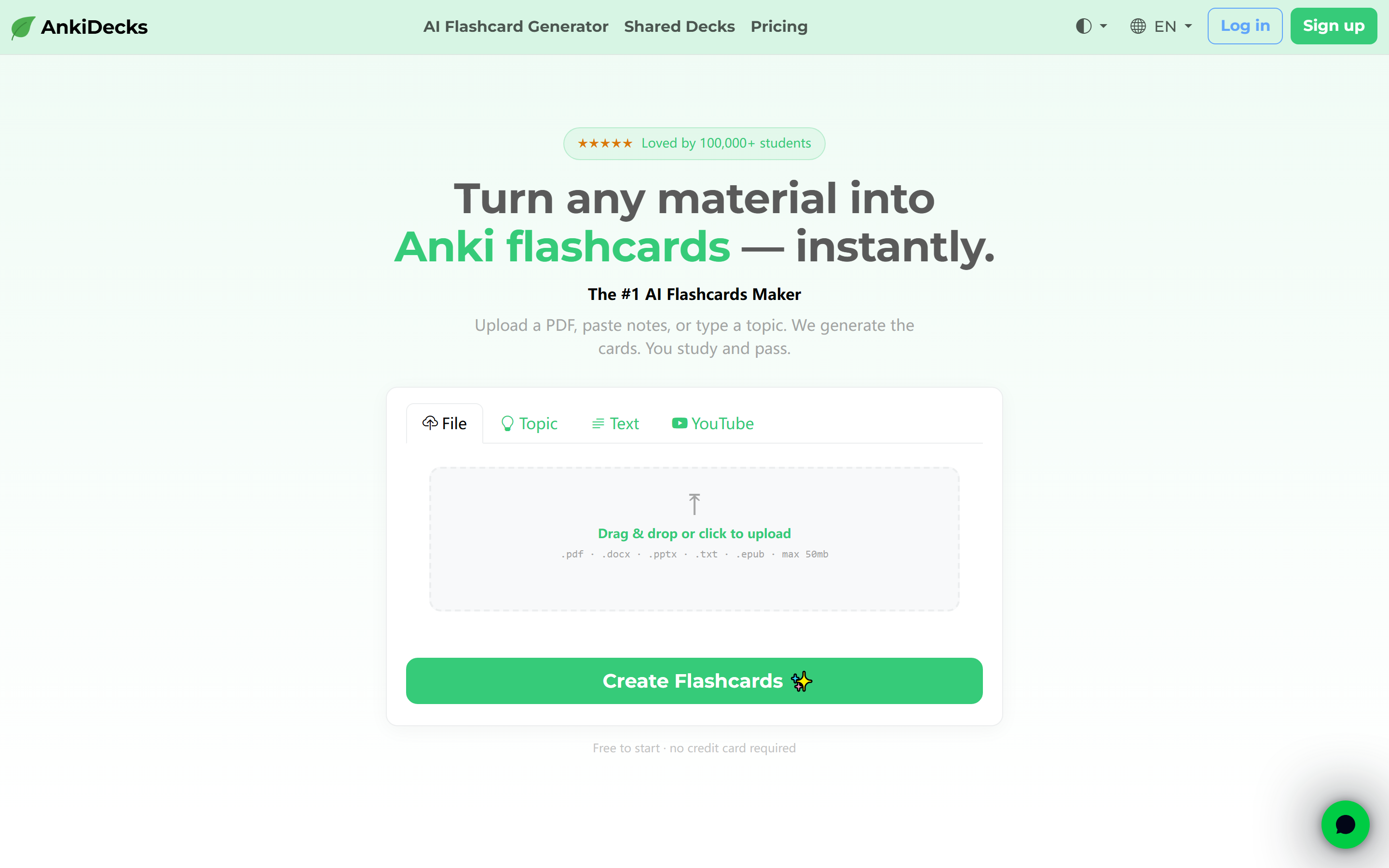
AnkiDecksAI
Core parameters and statistics
AnkiDecks AI is an AI flashcard generation tool for students and learners. The official website is positioned as "The #1 AI Flashcards Maker" and focuses on quickly converting any learning materials into Anki flashcards.
| Projects | Public Information |
|---|---|
| Official positioning | AI Flashcards Maker |
| Input materials | PDF, PowerPoint, Word, Excel, EPUB, pictures, handwritten notes YouTube URL, themes |
| Output Types | Question-Answer, Cloze, Multiple Choice, Image Occlusion |
| Export format | .apkg, can be imported into Anki Desktop / AnkiDroid, etc. |
| Built-in learning | Supports web-based learning and FSRS study mode |
| Language support | 50+ languages |
| Free tier | Generate up to 4 decks per month |
| Community content | The official website claims to have 100,000+ decks to browse |
| User signal | Official website says loved by 100,000+ students, rated 4.5/5, 50 verified reviews |
Product positioning: AnkiDecks AI changes "making flashcards" from manual input to automatic generation. It is especially suitable for course handouts, textbook chapters, YouTube lectures, and medicine/law and other learning materials that require high-frequency memory.
Tool type: According to the main delivery form, it is classified as [Productivity/Business-side Application]. It is not a model API or knowledge base platform, but packages data analysis, question generation, Anki export, and web page review into a learning workflow for students.
Brief review in one sentence: AnkiDecks AI is best suited to solve the problem of "a lot of information but no time to make cards", turning card making from manual input to reviewable first draft generation.
Competency Boundary: AI-generated cards require learners to check accuracy; high-stakes exams or professional fields still need to confirm concepts, definitions and answers against original materials.
User and market recognition
AnkiDecks AI official website shows "Loved by 100,000+ students", community "100,000+ decks", and shows an evaluation module of 4.5/5 and 50 verified reviews. These are its public market signals in the learning tool scene.
Student Feedback: Comments on the official website focused on scenarios such as saving time in making Anki cards, medical exam preparation, language learning and Image Occlusion, indicating that its core users are students, medical students, language learners and exam preparation people.
Community Assets: The shared decks mechanism allows users to browse public decks and save them to their own accounts without having to start from scratch every time.
Information Boundary: The official website does not disclose revenue, number of paying users or team financing information. The business scale must be subject to official real-time disclosure.
Cost advantage
AnkiDecks AI provides a free start-up mode. The official website FAQ clearly states that the free plan can generate up to 4 decks per month; larger files or more decks require upgrading to Pro.
| Scheme | Disclosure capability | Applicable objects |
|---|---|---|
| Free | Generate up to 4 decks per month | Light learning, trial quality |
| Pro | Process larger files, create more decks | High-frequency exam preparation, course learning, long-term use |
C-side/Individual: The free tier is suitable for students to first verify the quality of the cards generated after uploading handouts, notes or YouTube.
Developer/API: The official website does not disclose independent API, and it is mainly used through web pages and PWA.
Enterprise/School: The official website does not disclose the school/team purchasing plan. Educational institutions need to confirm student data, course material copyright, account management and batch usage terms before using it.
Hidden Cost: After AI is generated, you still need to manually screen, correct, and merge duplicate cards, and adjust the card quality according to your own exam focus. Based on a 30-page lecture note, it may take 2-4 hours to manually make 80-120 basic flashcards; by first generating a first draft and then manually proofreading, the card-making preparation can usually be compressed to 30-60 minutes, but the time saved will be transferred to "verifying accuracy, deleting duplications, and rearranging priorities according to the exam syllabus."
Main functions
- PDF to flashcard: Upload lecture notes, textbook chapters or papers, automatically extract key concepts and generate flashcards; it is suitable to generate the first version of the course deck first, and then manually calibrate the key points.
- YouTube to flashcards: Paste the public video link and then transcribe and generate learning cards with timeline sources, suitable for lectures and online class review.
- Multi-format file support: Supports PDF, PPT, Word, Excel, EPUB, pictures and handwritten notes, covering students’ real data sources.
- Multiple question types output: Supports Q&A Cloze, Multiple Choice and Image Occlusion, allowing memory to expand from "memorizing answers" to "completion, recognition and analysis".
- Image Occlusion: Automatically recognize diagrams and labels, suitable for medical anatomy, maps and graphic memory.
- Anki Export: Export .apkg with one click and import into Anki Desktop or mobile Anki application.
- Built-in review: You can use FSRS study mode on the web page to study without installing Anki.
- Shared Card Group: Supports link sharing, cloning and public/private permission settings.
- PWA Installation: Can be added to the home screen on Android or iPhone browsers for an app-like experience.
Hidden linkage: Multi-format input, question generation, .apkg export and web page FSRS review components include: after the data enters the system, not only will you get a batch of cards, but you can also continue to edit, review, share or migrate to Anki. For medical students and language learners, the real benefit comes from the compression of the "card making-review-correction" cycle, rather than generating cards all at once.
Model and version evolution
AnkiDecks AI has not disclosed a semantic version number. Product evolution is mainly reflected in the expansion of input material types, card question types and learning methods.
Public capability nodes
- AI Flashcard Generation Phase (~2024): Automatically generate Anki cards around files or topics, reducing manual card production time.
- Learning closure expansion phase (~2025): The ability is extended to web-based learning, shared deck Image Occlusion and .apkg export, so that the generated results can enter the actual review process.
- Current version (~2026 Q2): Supports YouTube, 50+ language FSRS study mode, PWA installation, free plan with 4 decks per month, and 100,000+ public community decks to browse.
Evolution direction: From "generating cards" to a complete learning system of "generating, reviewing, sharing, and exporting".
Technical advantages
Multi-modal material processing: Supports files, pictures, handwritten notes and video links, covering students’ real learning material sources. The mechanism is to first convert different materials into extractable knowledge points, and then generate question types. The advantage is that it reduces the obstruction of the learning process by the data format, but scanned documents, unclear handwriting, or dense chart materials may still reduce the extraction quality.
Diversified Question Types: Question and Answer Cloze, Multiple Choice and Image Occlusion cover different memory needs and are more suitable for complex subjects than a single question and answer card.
Anki Eco-Compatible: Exporting .apkg allows users to continue using existing Anki Desktop, AnkiDroid and Anki learning habits.
Built-in FSRS: Even if users do not install Anki, they can perform spaced repetition learning directly on the web page.
Boundary: Card quality depends on material clarity and AI extraction accuracy, and professional exam preparation still requires manual review.
How to use
| Steps | Action | Purpose |
|---|---|---|
| 1 | Upload PDF/Document/Image, or paste YouTube URL/Topic | Provide learning materials |
| 2 | Select question type and language | Define card format |
| 3 | AI generated cards | Automatically extract key knowledge points |
| 4 | Review and edit | Fix errors, delete duplicates |
| 5 | Learn from the webpage or export .apkg | Enter the review process |
Usage concerns: When preparing for exams, do not directly use the generated results in full. You should first randomly check the accuracy of concepts, and then import high-quality cards into the main Anki deck.
Human-computer collaboration boundary: What can be automated is data splitting, first version cards, question type conversion and export; what must be manually confirmed is concept accuracy, answer completeness, test scope matching, picture occlusion position and whether the copyright of course materials is infringed. It is recommended to adopt the process of "generate 20 sample cards → check against the original text → adjust the question type → generate in batches → continue to delete and modify during review".
Product Pricing
AnkiDecks AI official website discloses free start-up mode: the Free plan generates up to 4 decks per month. Processing larger files or creating more decks requires upgrading to Pro for a specific price.
Free: Up to 4 decks per month, suitable for light trials and small data processing.
Pro: Supports more decks and larger files, suitable for long-term course learning, medical exam preparation and high-frequency use.
Important Note: The actual price, file size limit and subscription period of Pro are subject to the official real-time page.
Application scenarios
- Medical and Anatomy Learning: Use Image Occlusion to generate image occlusion cards, which are suitable for anatomical drawings and label memory; image cards can significantly reduce manual occlusion operations, but whether the occlusion covers key structures must be manually checked.
- Course handout review: Convert PDF/PPT into core concept cards to reduce manual card making time; a first draft of a chapter of course materials can be generated first, and then it takes 30-60 minutes to complete the screening and revision.
- YouTube Course Learning: Generate reviewable cards from lectures, tutorials and documentaries; suitable for review after long video learning, not suitable as the only notes.
- Language Learning: Supports 50+ languages and can be used for vocabulary, grammar and translation exercises; the naturalness and accuracy of explanations of example sentences need to be spot-checked.
- Exam Preparation: Quickly create the first version of the card set, and then manually refine it according to the exam syllabus; suitable for high-frequency memory-based subjects, not suitable for completely replacing comprehension-based learning.
Applicable people
- Students and test preparation people: People who need to convert a large amount of information into reviewable cards.
- Medical Students: People who need image occlusion and high-frequency memory.
- Language Learners: People who need multi-language flashcards and spaced repetition.
- Teachers and Tutors: People who need to quickly generate practice cards for course materials.
Unsuitable Boundary: Not suitable for completely replacing textbook reading and classroom understanding; AI cards may miss context or generate inaccurate answers, and formal exam preparation must be manually reviewed.
Summary and Outlook
The core value of AnkiDecks AI is to combine data input, flashcard generation, Anki export, and web page review into a learning process. It is especially suitable for students, medical students and language learners who need a lot of memorization and repeated review.
Current restrictions: Pro price and file upper limit required; AI-generated content requires manual review; schools or teams need to confirm data and copyright terms before use.
The follow-up is worthy of attention: card quality control, more question types, teacher/class collaboration Anki synchronization capabilities, and recognition accuracy of complex charts and professional terms.
Purchase/Adoption Risk Assessment: It is recommended to use a course or an exam chapter as a pilot first: check the card accuracy, repetition rate and missing knowledge points on a random basis; expand to the entire set of course materials after the quality is stable; before large-scale use by schools or training institutions, student data, course copyrights, subscription limits, public/private card group permissions and account management terms should be verified. If the course emphasizes reasoning, writing, experimental design, or open-ended question expression, AnkiDecks AI should be used as a memory aid rather than a substitute for teacher explanations, textbook reading, and advanced exercises.
Related tools:  Khanmigo, quizlet
Business process integration and ROI analysis
As a productivity tool for enterprises or professional positions, the true value of AnkiDecks AI depends on the depth of integration with existing workflows and the quantifiable efficiency improvement effect. The following is a systematic analysis from three core dimensions.
System integration and data interoperability The ability to interoperate with existing business systems is a key prerequisite for productivity tools to be integrated into workflows. It is recommended to focus on evaluating the following integration dimensions: the openness and documentation quality of the RESTful/GraphQL API (whether a complete API reference and SDK examples are provided), the support scope of Webhook event notifications (which business event types are supported for automatic push), the number and depth of pre-built integrations with common collaboration SaaS tools (WeChat Enterprise, DingTalk, Feishu, Slack, Notion, Jira, etc.), and enterprise-level identity authentication support (SSO/SAML/OAuth and LDAP/AD directory integration). Products that lack integration capabilities are easily isolated into information islands, which in turn increases the cognitive cost and operational friction for teams to switch between different tools.
Efficiency Quantification and ROI Estimation Methodology Before purchasing decisions, it is recommended to quantify the input-output ratio through a structured method: Step 1, choose 3-5 Standardized tasks that are frequently repeated and time-consuming in each team are used as test samples; in the second step, the average time consumption of a single task before and after tool intervention, first-time pass rate or error rate, and the number of links requiring manual intervention are recorded under controlled conditions; in the third step, the saved manpower time is converted according to the comprehensive cost of the position (salary, benefits, management sharing), and soft benefits (increased employee satisfaction, standardization of work quality, and improvement in response speed to core business) are superimposed to obtain a comprehensive ROI estimate. It is recommended to continue tracking ROI trends on a monthly basis, as the value of a tool usually increases over time as team proficiency increases and workflows are optimized.
Phase-based implementation strategy and risk control It is recommended to adopt a three-stage implementation path of "pilot verification-gradual promotion-continuous optimization". In the pilot stage (1-2 weeks), a single team or a single business scenario is selected for small-scale verification. The core goal is to verify technical feasibility and user acceptance, and establish preliminary usage specifications and success standards; in the promotion stage (2-4 weeks), after the pilot verification is passed, the coverage is gradually expanded, and standardized activation processes and training materials are developed; in the optimization stage (continuous), the workflow configuration is continuously adjusted based on actual usage data and user feedback, and more high-value application scenarios are explored. Clear quantitative key result indicators should be set at each stage to avoid blindly expanding the scope of use without data support.
Version Info
- AnkiDecks AI current version :The current form disclosed on the official website supports multi-format file YouTube, 50+ languages Image Occlusion, .apkg export, built-in FSRS learning mode and PWA installation; there is no official precise version number and release date yet.
- AI flashcard generator stage :The public product form revolves around uploading data to generate Anki flashcards, exporting .apkg and web page review; there is no official precise date yet.
User Reviews