 Arize Phoenix
Free
Arize Phoenix
Free
Arize Phoenix is an open source AI observability platform launched by Arize AI. It covers LLM/agent tracing, OpenTelemetry collection, LLM-as-a-judge evaluation, data sets, experimental playgrounds and prompt management. It is suitable for development teams to debug and improve AI applications locally, in containers Kubernetes or Phoenix Cloud.
Tool text
Core parameters and statistics
Arize Phoenix is an open source observability and evaluation platform for AI engineering teams. The core goal is not to replace the model itself, but to precipitate the running evidence during the iteration process of LLM, RAG, agent and prompt: request link span, token and cost, retrieval context, evaluation results, data set version and experimental results can all be observed in the same system. The official GitHub README positions Phoenix as an open-source AI observability platform, covering experimentation, evaluation and troubleshooting.
| Projects | Public Information |
|---|---|
| Product Name | Arize Phoenix |
| Official entrance | phoenix.arize.com |
| Document entrance | arize.com/docs/phoenix |
| GitHub repository | Arize-ai/phoenix |
| PyPI package | arize-phoenix |
| Current version | 17.9.0, released on 2026-06-19 |
| License | Elastic License 2.0; official documentation explains that self-hosting is free and has no functional threshold |
| Deployment form | Local Jupyter notebook, Docker, Kubernetes/Helm, Phoenix Cloud/Arize AX |
| Core Competencies | Tracing, Evaluation, Datasets, Experiments, Playground, Prompt Management, PXI |
| Observation standards | Tracing and automatic tracking ecosystem based on OpenTelemetry / OpenInference |
| Language and Integration | Python, JavaScript/TypeScript SDK; supports OpenAI, Anthropic, Google, Bedrock, LangChain, LlamaIndex, DSPy, CrewAI and other ecosystems |
| Community size | GitHub about 10.2k stars, about 936 forks; the latest PyPI package requires Python >=3.10,<3.15 |
These parameters indicate that Phoenix is closer to an "AI application debugging and evaluation workbench" than a simple logging platform. It connects observation, evaluation, and experimentation: when a trace shows high latency, poor retrieval, or risk of hallucination, the team can continue to track the corresponding prompt, data set samples, and experimental results to form a repeatable project record.
User and market recognition
Phoenix's market recognition mainly comes from three types of signals. The first is adoption by open source developers: the scale of more than 10k stars on GitHub shows that it is no longer an early concept warehouse, but an infrastructure project that is continuously paid attention to and used in the field of LLM observability. The second is package and image distribution: the official maintains the PyPI package, Docker image Python sub-package and TypeScript package at the same time, indicating that the usage scenarios cover notebook prototypes, server applications, containerized deployment and front-end/Node tool chains. The third is Arize’s commercial undertaking: Phoenix can be self-hosted for free, or you can use the hosted version through Phoenix Cloud/Arize AX, leaving different implementation paths for individual developers and enterprise teams.
The ecological signals given by the official Phoenix page include 3M+ monthly downloads, 10k+ GitHub stars, 7k+ community, and 22M+ OpenTelemetry instrumentation monthly downloads. These numbers are more suitable as a reference for popularity and ecological activity, rather than the number of enterprise customers or revenue data; actual purchases should still be judged based on the team’s traces size, data retention requirements, compliance requirements, and self-hosting capabilities.
From the perspective of user portraits, Phoenix will be more valuable after the growth of AI agent and RAG applications. For a simple chat demo, you only need to print the log for troubleshooting; once the system includes retrieval, tool invocation, multi-agent collaboration, user sessions and automatic evaluation, it is difficult to answer "which step caused quality degradation" with traditional logs. The value of Phoenix lies in structuring these operational evidence so that development, evaluation, product and platform teams can discuss around the same trace.
Cost advantage
Phoenix's core cost advantage is "open source self-hosted for free + managed cloud on demand". The official self-hosting documentation clearly states: Self-hosting Phoenix on your own infrastructure or cloud account is free, there are no license fees, there are no usage limits or feature thresholds, and no data is sent to Arize. This is critical for teams that handle sensitive business data, want to control the retention period, or require intranet deployment.
| Solution | Cost structure | Team fit | Key trade-offs |
|---|---|---|---|
| Local / Notebook | The software itself is free, and the cost is mainly local resources and debugging time | PoC, teaching and quick troubleshooting for individual developers | Not suitable for long-term collaboration and production retention by multiple people |
| Docker / Compose | The software is free and covers server, storage, backup and operation and maintenance costs | Small team, internal pilot, light production | Need to maintain upgrades and security configurations by yourself |
| Kubernetes / Helm | The software is free, and the cost comes from clusters, object storage, databases, monitoring and SRE | Platform teams, data-sensitive enterprises | Operation and maintenance complexity is higher, but governance capabilities are stronger |
| Phoenix Cloud / Arize AX Free | The official pricing page shows that Free is for single developers, including 25k span traces/month, 1 GB, 15-day retention | Individuals or small teams who want to start quickly and do not want to deploy infrastructure | Free quota and retention period are limited |
| Arize AX Pro | The official pricing page shows that Pro is for small teams/start-up teams, includes 50k span traces/month, 10 GB, 30-day retention, and supports additional usage | Requires hosting services and team collaboration | Cost increases with span and data volume |
| AX Enterprise | Customized quote emphasizing support for SLA, SOC2/HIPAA, training, self-hosted add-ons, etc. | Organizations with strong SLA compliance and enterprise procurement processes | Sales communication and contract confirmation required |
Phoenix's self-hosted path significantly reduces the risk of vendor lock-in compared to observability tools that only offer hosted SaaS. The true total cost does not disappear, but moves from the software license to infrastructure, data retention, access control, backup recovery and upgrade processes. For teams with strong engineering capabilities, data sensitivity, or existing Kubernetes platforms, this cost structure is usually more controllable; for small teams without operation and maintenance capabilities, the hosted version is more worry-free.
Main functions
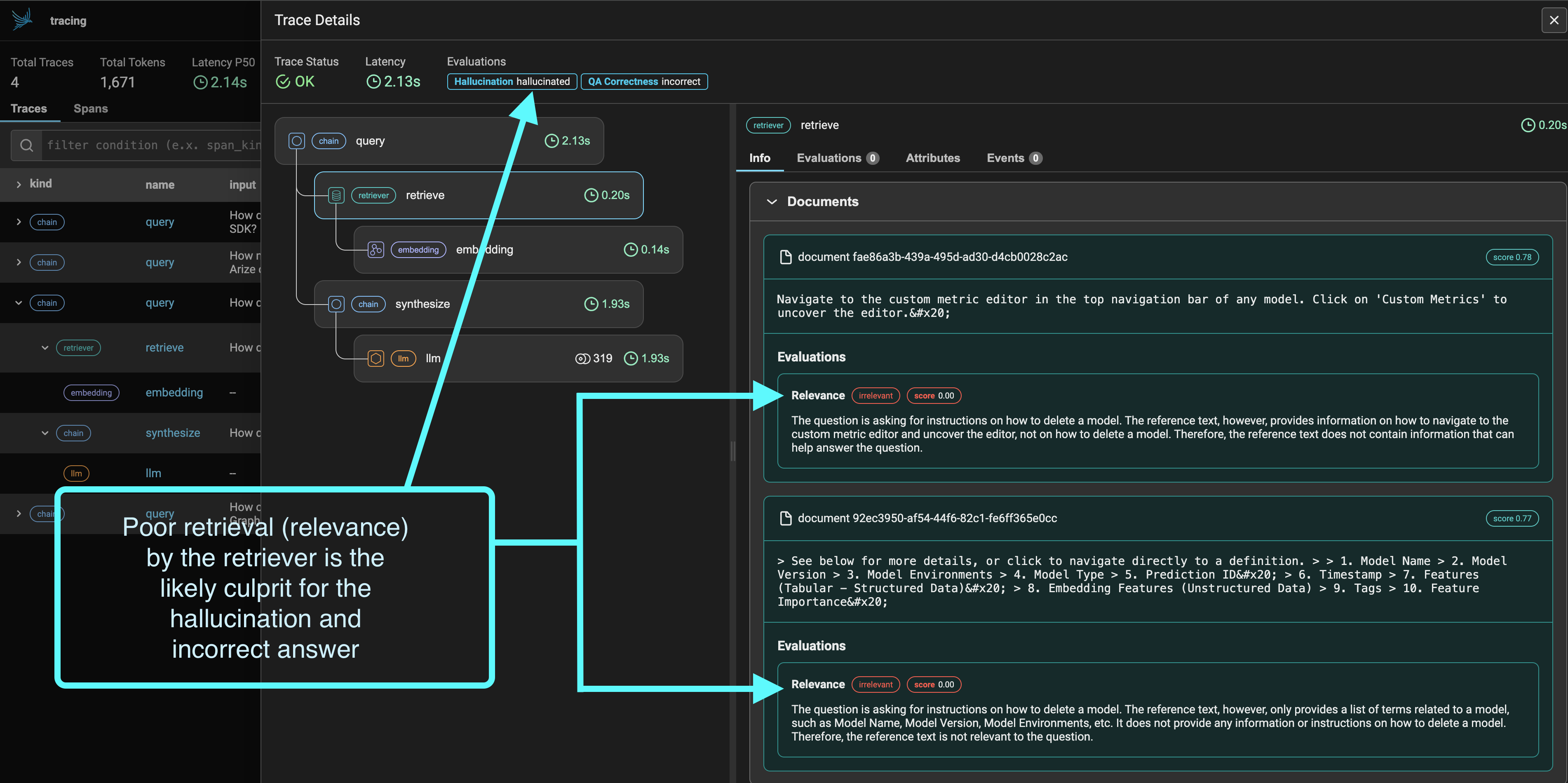
- Tracing: Collect LLM application runtime links through OpenTelemetry/OpenInference, display trace, span, delay token, cost, input and output, retrieval results and tool calls, suitable for troubleshooting quality and performance issues of RAG, agent, and workflow.
- Evaluation: Supports evaluation modes such as response evals, retrieval evals, LLM-as-a-judge, etc., and attaches hallucination, QA correctness, relevance and other indicators to trace or experimental results to help the team convert "not feeling good" into comparable indicators.
- Datasets: Create versioned sample sets for regression testing, fine-tuning evaluation or prompt comparison, reducing the risk of relying solely on manual spot checks after each prompt change.
- Experiments: Track the effect differences caused by changes in prompts, models, retrieval configurations, parameters and code, suitable for comparing multiple plans before going online.
- Playground: Optimize prompts, compare models, adjust parameters, and replay traced LLM calls, suitable for returning to the debugging interface from real failure samples.
- Prompt Management: Perform version control, tag management and systematic testing of prompt so that prompt changes can be recorded and rolled back like code changes.
- PXI / Phoenix Intelligence: The official README describes it as a built-in AI engineering agent for debugging traces, iterating prompts and navigating in the product, which is suitable for lowering the threshold for new members to understand traces.
- MCP and CLI Ecosystem: Officially listed
@arizeai/phoenix-mcpand@arizeai/phoenix-cli, which are used to connect Phoenix capabilities to development contexts or agent workflows such as Cursor and Claude Code.
The combination of these functions allows Phoenix to not only "read logs", but also directly connect observation data to experiments and evaluations. For AI products, the hardest thing is often not seeing an error, but knowing whether the error is reproducible, whether it is fixed by a new prompt, and whether it harms other samples. Phoenix is designed around this problem.
Model and version evolution
Phoenix itself is not a basic model, but an AI application observability and evaluation platform; the version evolution here refers to the iteration of the arize-phoenix package and platform capabilities. PyPI release history shows that Phoenix still maintains high-frequency releases in 2026, 17.9.0 was uploaded on 2026-06-19, 17.8.1 and 17.8.0 were both released on 2026-06-17, and 17.7.0 was released on 2026-06-16.
| Time | Version | Public Signal |
|---|---|---|
| 2026-06-19 | 17.9.0 | GitHub release marked as latest; PyPI provides wheel and source distribution simultaneously |
| 2026-06-17 | 17.8.1 | 17.8 Mainline Maintenance Release |
| 2026-06-17 | 17.8.0 | 17.x mainline feature release |
| 2026-06-16 | 17.7.0 | 17.x mainline feature release |
| 2026-06-02 | 17.0.0 | 17.x is one of the starting points of the major version, indicating that the platform is still evolving rapidly |
From an engineering adoption perspective, high-frequency version iteration has two sides. On the one hand, it shows that Phoenix responds actively to the rapidly changing LLM/agent ecosystem and can quickly follow up with new frameworks, new providers and evaluation workflows; on the other hand, production deployment requires the establishment of version fixing, upgrade verification and data migration processes, especially in self-hosted scenarios, and it is not appropriate to directly follow each small version to automatically upgrade.
Technical advantages
The first technical advantage of Phoenix is that it is OpenTelemetry first. LLM observability If you use a private buried point format, you can quickly produce graphs in the short term, but it is easy to lock the data in one tool in the long term. Phoenix's OTel/OpenInference-based route makes it easier for trace data to flow across languages, frameworks, and services, and also facilitates enterprises to access existing observable pipelines.
The second advantage is that "trace and eval are on the same screen". Many systems can record the call chain, but they cannot explain whether this link is good or not; other evaluation tools can give points, but they may not be able to track down the specific search document prompts, model parameters and tool calls. Phoenix attaches the evaluation results to the trace and can trace a failed answer all the way to the retrieved fragment span and judge results.
The third advantage is experimental. Datasets, Experiments, Playground and Prompt Management allow Phoenix to cover the process from problem discovery to solution comparison. The team can accumulate online failure samples into a data set, and then compare the indicator changes of different prompts, models, or retrieval configurations, instead of just trying again and again in the chat window.
The fourth advantage is deployment elasticity. The official README explains that Phoenix can run on a local machine, Jupyter notebook, containerized deployment, or in the cloud; the self-hosting document also clarifies the paths to Docker, Kubernetes/Helm, etc. This flexibility allows Phoenix to serve both personal debugging and gradually enter enterprise internal platforms.
How to use
The usage path of Phoenix is usually divided into three steps from light to heavy: first running it locally, then connecting to tracing, and finally establishing an evaluation and experimental process.
| Entrance | Suitable for action | Description |
|---|---|---|
PyPI arize-phoenix |
Install notebook locally for debugging and quick trial | pip install arize-phoenix to start Phoenix |
| Docker | Local or server deployment | Suitable for team shared instances or lightweight production verification |
| Kubernetes / Helm | Production, self-hosting, platform | Suitable for teams with existing K8s platform and compliance requirements |
| Phoenix Cloud / Arize AX | Hosted use | For teams that don’t want to maintain infrastructure |
| SDK / OTEL endpoint | Access application traces | Send spans of Python/JS application LLM framework or agent runtime to Phoenix |
The typical getting started process is as follows:
- Choose a deployment method: personal trials can start locally or on Phoenix Cloud, enterprise PoC can use Docker, and production self-hosting is preferred to evaluate Kubernetes/Helm.
- Connect OpenInference/OpenTelemetry instrumentation to the application, such as OpenAI, Anthropic, LangChain, LlamaIndex, CrewAI, DSPy and other integrations.
- View the traces in Phoenix and first confirm whether the span level, input and output, retrieval document token and latency are complete.
- Build evaluations for critical tasks such as retrieval relevance, answer correctness, hallucinations, format compliance, or custom metrics.
- Precipitate the failed samples into the dataset, and use experiments to compare different prompts, models, parameters and retrieval strategies.
- Fix the version and deployment configuration before going online, and confirm access control, data retention, backup, upgrade and sensitive data processing policies.
Product Pricing
Phoenix pricing needs to differentiate between source hosting and Arize hosting services. Open source Phoenix is free to self-host. The official license document states that it is based on Elastic License 2.0, allowing free self-hosting in your own infrastructure or cloud account, and there are no functional thresholds. In other words, if the team is responsible for the infrastructure and operation and maintenance by itself, Phoenix Ontology does not charge per seats, spans or functional modules.
In terms of hosting services, the Arize pricing page places Phoenix under the Arize AX system: Free is for single developers, Pro is for small teams and startup teams, and Enterprise is for customized plans. The public page shows that Free includes 25k span traces/month, 1 GB data retention for 15 days; Pro includes 50k span traces/month, 10 GB, 30 days retention, and has additional span and GB billing; Enterprise is custom, and emphasizes exclusive support for enterprise capabilities such as SLA, SOC2/HIPAA, training, self-hosted add-on, and data residency.
When making the actual selection, it is not recommended to just compare the list prices. The cost of AI observability is strongly related to trace granularity, context length, retrieved document size, retention period, team size, and compliance requirements. The PoC phase can start with free self-hosting or Free Cloud; once you enter production, storage growth, query performance, access control, masking policies, and upgrade maintenance should be included in the budget.
Application scenarios
- RAG application quality troubleshooting: record user questions, retrieve document rerank results, generate answers and evaluation scores, and quickly locate errors from missing retrievals, unclear context-free prompts, or model inference failures.
- AI agent and tool call debugging: Expand the multi-step tool call agent decision, latency, token and failure status into a trace graph, which is suitable for troubleshooting stuck points of long-link agents.
- Prompt Regression Test: Add real failure samples to the dataset, compare new and old prompts, different models and parameter combinations in experiments to reduce the regression risk caused by prompt iteration.
- LLM product pre-launch evaluation: Use response evals and retrieval evals to establish the launch threshold, allowing the product, algorithm and engineering teams to discuss whether it can be released around the same set of indicators.
- Enterprise internal AI platform governance: Self-hosted Phoenix, leaving traces and evals in the intranet or self-owned cloud, while unifying the observation specifications of each business team.
- Developer local debugging: Quickly start Phoenix in a notebook or local service, view the call chain and evaluation results, and it is easier to review than scattered logs.
What these scenarios have in common is that a single output cannot indicate whether the system is reliable, and the input, context, execution link, evaluation and version relationship must be saved. Phoenix is most valuable in this type of work that requires a "chain of evidence".
Applicable people
- LLM Application Developer: Need to see the specific behavior of the model, tool, retrieval and prompt in a call, rather than just getting the final answer.
- RAG/agent engineering team: The system link is long, and the cause of failure may occur in any of retrieval, rerank, tool calling, planning or final answer.
- AI Platform Team: Hope to unify tracing, evals, datasets, and experiments within the organization and reduce the duplication of observation tools for each business team.
- Data Science and Evaluation Team: It is necessary to link artificial sample LLM-as-a-judge, experimental indicators and online traces.
- Compliance or Data Sensitive Enterprises: Want to self-host and control data residency, access control, retention periods, and audit boundaries.
The situations where it is not suitable are also clear: if it is just a one-time demo, low-frequency internal scripts, and a simple chat page without multi-step links, the concept and deployment cost of Phoenix may be on the heavy side. Another boundary is operation and maintenance capabilities: Although self-hosting is free, production use still requires maintenance of databases, storage, backups, permissions, upgrades, and monitoring; small teams without platform capabilities may be more suitable to start with Phoenix Cloud or Arize AX.
Summary and Outlook
Arize Phoenix's core competency is to connect "see the problem" and "prove the fix" of AI applications. Tracing lets the team know how an output is generated, Evaluation lets the team know whether the results meet the standards, and Datasets and Experiments let the team know whether a certain change really improves the system. For rapidly iterative LLM, RAG, and agent applications, this closure is more reliable than simple logs or a single human review.
There are three main limitations that need to be noted at present. First, although Phoenix is open source and self-hosted for free, the license is Elastic License 2.0, which is not equivalent to loose licenses such as Apache/MIT. Commercial redistribution and hosting packaging require legal confirmation. Second, high-frequency releases require the production team to do version fixing and upgrade testing. Third, the effectiveness of Phoenix depends on the quality of buried points; if the trace structure, input and output desensitization, or evaluation sample design are not good, no matter how good the interface is, it can only present incomplete evidence.
It is worth continuing to observe Phoenix's progress on three lines in the future: first, the OpenInference/OTel ecosystem covers more agent frameworks; second, whether AI engineering agents such as PXI, MCP, and CLI can further turn "viewing traces" into "automatic positioning and recommended repairs"; third, whether the boundaries between Arize AX and open source Phoenix remain clear, so that individuals, open source teams, and enterprises can choose the appropriate path based on data governance and cost requirements.
Related tools:  Hugging Face, replicate
Version Info
- arize-phoenix v17.9.0 :Both GitHub Releases and PyPI show the latest arize-phoenix version; the PyPI package summary is AI Observability and Evaluation, and the license is labeled Elastic-2.0.
- arize-phoenix v17.8.1 :17.x mainline maintenance release, released immediately after 17.8.0.
- arize-phoenix v17.8.0 :17.x mainline feature version, used for the continuous iteration of Phoenix platform capabilities.
- arize-phoenix v17.7.0 :17.x mainline feature releases, on a high June 2026 release cadence.
User Reviews