 Bing Image Creator
Free
Bing Image Creator
Free
Bing Image Creator is a free AI image generation tool launched by Microsoft based on the OpenAI DALL-E 3 model. It is deeply integrated into the Bing search engine Microsoft Edge browser and Microsoft Copilot. Users enter text descriptions to generate images, supporting multiple styles, proportions, and AI photo editing capabilities. Its free strategy enables AI image generation to reach the widest user group, but it also comes with hidden costs such as Boost point speed limit, limited output resolution and strict content review.
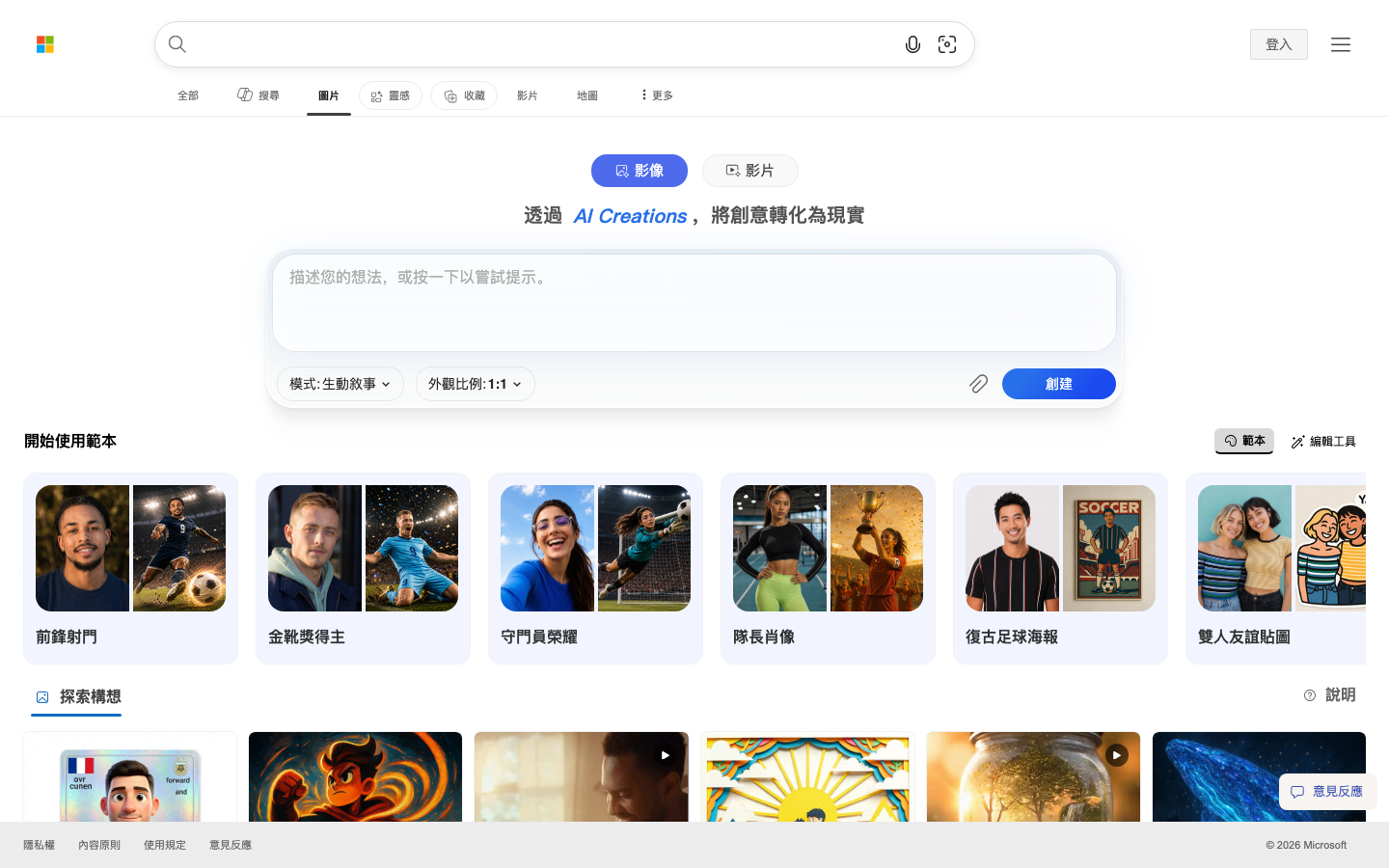
Bing Image Creator
Core parameters and statistics
Bing Image Creator is Microsoft's free AI image generation product based on the OpenAI DALL-E 3 model, which is a productivity/business application (Type D). It is not an independent application, but a functional module embedded in the Bing search sidebar of the Microsoft Edge browser and the Microsoft Copilot ecosystem. Its core competitive strategy is "zero threshold + top model + ecological integration" - users do not need to register additional accounts or learn complex tool chains, and can complete the entire process from "thinking" to "seeing" by opening it in a browser.
| Projects | Public Information |
|---|---|
| Product positioning | Free AI image generation and photo editing tools |
| Underlying model | OpenAI DALL-E 3 (Microsoft self-deployed inference) |
| Core Competencies | Wenshengtu AI photo editing (background removal/repair/expansion/enhancement), template generation |
| Platform | Web (Bing.com + Edge Sidebar + Copilot) |
| Home | US (Microsoft Headquarters) |
| Business model | Free + Boost points (Microsoft Rewards points redemption) |
| Image Mode | Vivid/Natural |
| Supported ratios | Square 1:1, horizontal 3:2, vertical 2:3, wide 16:9, etc. |
| Content Markup | C2PA Digital Credentials (Tagged AI generated source) |
| Language support | 10+ languages, including Chinese, English, Japanese, Korean, etc. |
Brief review in one sentence: Bing Image Creator is not the AI image generator with the strongest parameters, but it is "the one with the widest user reach" - it is free, ready to use when opened in the browser, the bottom layer is DALL-E 3, and it is deeply embedded in the Microsoft Copilot search and office ecosystem.
User and market recognition of Bing Image Creator
Bing Image Creator is currently one of the AI image generation products with the largest number of monthly active users in the world, and its user base far exceeds that of competing products such as Midjourney and Adobe Firefly. This advantage does not come from technological leadership, but is determined by Microsoft's product distribution network.
Source of user scale: Bing Image Creator does not require users to register or pay separately, and any user with a Microsoft account can use it directly. It is embedded in the Microsoft Edge sidebar (Discover panel) of the Bing search results page and the Microsoft Copilot (formerly Bing Chat) conversation - which means that the hundreds of millions of monthly active users of the Bing search engine are naturally potential users of Image Creator. When a user searches for an image on Bing, the search results page will directly display the "Create" entry; when the user describes a visual concept in Copilot, the model will automatically call Image Creator to generate a matching image.
B-side adoption: Bing Image Creator itself does not provide a standalone enterprise version or API service. Enterprise users' AI image generation needs are usually solved through the following paths: first, through the integration of Designer in Microsoft Copilot for Microsoft 365 (enterprise subscription); second, through Azure OpenAI Service, calling DALL-E 3 API to obtain enterprise-level SLA, data isolation and compliance guarantees. Both paths share the same underlying model with Bing Image Creator, but have fundamental differences in billing, rights management, and privacy protection.
Industry benchmarking: In the dimension of "zero-cost experience AI image generation", Bing Image Creator has no direct competitors. Midjourney requires a Discord account and paid subscription; Adobe Firefly has a limited free quota and requires an Adobe account; the open source version of Stable Diffusion requires certain technical deployment capabilities. Bing Image Creator is the only product that allows you to use DALL-E 3 for free by opening a browser. But switching to the "professional creation" dimension, it lags behind Midjourney and locally deployed Stable Diffusion in terms of fine control (negative prompts ControlNet, local redrawing) and output resolution.
Cost Advantages of Bing Image Creator
The cost structure varies depending on the usage method: C-side users can usually experience core functions through the free version, and high-frequency usage requires subscribing to paid packages; developers/API users are billed based on the number of calls; enterprise-level users need to contact the business to obtain customized quotations. The specific price is subject to the official real-time pricing page.
Main functions of Bing Image Creator
The functional matrix of Bing Image Creator revolves around the three lines of "text to image generation + AI photo editing + template system". The three share the same underlying DALL-E 3 model, but are oriented to different creative stages.
-
Text-to-Image: core function. The user enters a natural language description, selects the image mode (Vivid/Natural) and scale, and DALL-E 3 completes the text-to-pixel generation in the background. In Vivid mode, the colors are more saturated and the contrast is stronger, which is suitable for artistic visual content; in Natural mode, it is closer to the real photography style and suitable for product prototypes and realistic scenes. A prompt generates four images for selection by default.
-
AI Photo Editor: An editing suite introduced in 2025, containing four sub-capabilities:
- Background Remover: Remove photo background with one click, suitable for product images, avatar creation and material cutout. The effect is better in complex scenes with non-extreme edges, but fine hair processing is not as good as professional tools such as Photoshop.
- Image Retouch: Automatically optimize the color, exposure and clarity of photos, suitable for quickly improving the quality of photos taken on mobile phones. Selective area repair cannot be done.
- Image Expander: Expand the image boundary with generative AI filling, similar to Photoshop's generative expansion. When expanding with new content, the stylistic consistency of images with the original content sometimes deviates.
- Image Enhancer: Improve the clarity of low-resolution images, suitable for old photo restoration and thumbnail enlargement. The enhancement factor is limited, and obvious artifacts will appear after excessive magnification.
-
Templates: Prompt templates for multiple scenes are preset, including sports posters, anime style, oil painting style, watercolor style, sketch style, Ukiyoe style 3D characters, sticker designs, etc. After selecting a template, users can directly adjust the description text and proportion generation, lowering the threshold for prompt writing. The number of templates is subject to real-time display on the official page, and will be dynamically updated with seasons and marketing activities.
-
Multi-ratio and multi-style support: Supports square (1:1), horizontal (3:2), vertical (2:3), wide (16:9) and other ratios. Styles are driven by art style keywords in Prompt (non-model switching), which means that users' fine-grained control over styles relies on Prompt engineering skills rather than drop-down menus in the graphical interface.
-
Microsoft Copilot integration: In the Copilot conversation, if the user's request contains visual creation requirements (such as "draw a cyberpunk-style city night scene"), Copilot will automatically call Image Creator to generate an image and return it to the user. This integration turns image generation from a "specialized tool" to "part of the conversational capabilities", reducing context switching costs for users.
Expert View: The functional design of Bing Image Creator has a clear hidden logic - it is not a "creative tool" for professional designers, but a "visual expression aid" for ordinary users. This means that it deliberately avoids complex parameter adjustments (such as CFG Scale, Seed value, negative prompt words), but uses a three-step interaction of "select mode + select proportion + write a sentence" to cover 80% of daily image generation needs. The introduction of the template system further lowers the Prompt threshold, but at the cost of advanced users quickly reaching the functional ceiling.
Model and version evolution of Bing Image Creator
The version evolution of Bing Image Creator is highly bound to the upgrade rhythm of the OpenAI DALL-E model, and is also superimposed with Microsoft's self-developed inference optimization and function expansion.
DALL-E first version stage (2023-09 to 2024-02)
- Bing Image Creator v1 (2023-09): Launched simultaneously with the AI functionality of Bing Chat (later renamed Copilot). Based on the OpenAI DALL-E model (not DALL-E 3), it supports basic Vincentian diagrams, and the generation quality is at an upper-middle level among free products at the time, but there is still a clear gap with Midjourney v5. After its launch, it quickly became the AI image generator with the largest number of users. The main driving force is "free + no additional registration required".
DALL-E 3 upgrade phase (2024-03 to 2025-05)
-
DALL-E 3 integrated online (~2024-03): Microsoft deployed the DALL-E 3 model to Bing Image Creator, resulting in a qualitative leap in image quality, prompt understanding accuracy, and text rendering capabilities. The core advantage of DALL-E 3 is "more accurate understanding of long sentences and complex scenes", which is particularly obvious in non-English prompts represented by Chinese - compared with the previous generation, DALL-E 3's ability to parse Chinese natural language descriptions has been significantly improved. During the same period, a Boost points system was launched to manage the rate at which free services are generated.
-
Microsoft Designer integration (~2024-09): The capabilities of Bing Image Creator are integrated into Microsoft Designer (Microsoft's graphic design tool). Users can directly perform layout and text overlay after generating images in Designer, forming a "generate + design" workflow.
AI photo editing stage (2025-06 to present)
-
AI Photo Editor suite online (~2025-06): Microsoft introduces four-in-one AI photo editing tools (background removal, repair, expansion, enhancement), expanding Bing Image Creator from a "pure image tool" to a one-stop platform of "image generation + image editing". A new template system was added at the same time, covering dozens of prompt presets for common scenarios.
-
Copilot Deep Integration (2025-12 to present): With the continuous updates of Microsoft Copilot, the calling frequency and generation quality of Image Creator in Copilot conversations continue to be optimized. Users no longer need to open a separate Image Creator page; image generation can be triggered by describing visual requirements in natural language in Copilot.
Release Notes: Microsoft usually does not release complete version numbers or change logs for updates to Bing Image Creator. The above timeline is a reasonable traceback based on the functional changes on the public page. The exact launch date is subject to Microsoft’s official announcement.
Technical advantages of Bing Image Creator
The technical advantage of Bing Image Creator does not lie in the number of model parameters or architectural innovation (these are the scope of OpenAI DALL-E 3), but in Microsoft's engineering capabilities at three levels: inference deployment, ecological integration, and content security.
Self-deployment optimization of DALL-E 3 inference: Microsoft did not directly forward OpenAI’s DALL-E 3 API. Instead, it deployed the model on its own Azure infrastructure and performed customized optimization of the inference pipeline. This means Microsoft can independently control inference batch sizes, caching policies, and concurrency management to optimize responsiveness and cost while maintaining build quality. The actual effect is: Bing Image Creator's response stability in high concurrency scenarios is better than OpenAI's official DALL-E 3 service (refer to community actual measurement feedback). But this self-deployment also brings about slight deviations in model behavior - the same Prompt may produce detailed differences on OpenAI official DALL-E 3 and Bing Image Creator, which requires attention in strict quality control scenarios.
Ecosystem integration advantages: Bing Image Creator is not an isolated product, it is embedded in a super application matrix covering search, browsing, office, and design.
- Search and generate: When users search for pictures on Bing, the search results page directly provides the "Create" entrance, merging "image search" and "image creation" into one process.
- Browse and generate: The Discover panel of the Edge browser has a built-in Image Creator, allowing users to generate images without switching tabs while browsing the web.
- Conversation is generated: Image generation in Copilot is a "dialogue capability" rather than a "tool call" - users do not need to know the product name Image Creator, they only need to tell Copilot "what kind of picture I want."
C2PA Content Provenance and Compliance System: All images generated through Bing Image Creator come with a C2PA (Coalition for Content Provenance and Authenticity) digital certificate, marking the image's AI-generated source and related metadata. This is Microsoft’s engineering solution to the problem of fake AI-generated content — other AI imaging tools like Midjourney lag behind Bing Image Creator in standard embedding of generated content. For news organizations, educational institutions, and industries that need to trace the source of their content, C2PA compliance is a real procurement plus.
Engineering implementation of content security filtering: Bing Image Creator adopts Microsoft's self-developed multi-layer content filtering system, including the Prompt input layer (to intercept violation descriptions), the model output layer (to detect whether the generated image contains illegal elements), and the user behavior layer (to detect abuse patterns). The actual effect of this system is that it has a high interception rate for content such as violence, pornography, hate speech, etc., but it also means that some "edge case" prompts (such as medical anatomy diagrams, artistic nudes, realistic depictions of specific historical events) may be mistakenly intercepted. For users who require a relaxed content policy (e.g., artistic creators, medical educators), Bing Image Creator's content policy is a constraint.
How to use Bing Image Creator
The usage path of Bing Image Creator is highly unified - all entries ultimately point to the same Bing generation service. The following is organized by entry granularity:
| Entrance | Suitable scene | Typical path |
|---|---|---|
| Bing.com standalone page | Dedicated image generation task | Visit bing.com/images/create → Enter Prompt → Select mode/scale → Generate |
| Bing search results page | Easily generated when searching for images | Search for images on Bing → Click "Create" at the top of the search results page |
| Microsoft Edge Sidebar | Generated while browsing the web | Open Edge Sidebar Discover → Select the "Create" tab |
| Microsoft Copilot conversation | Natural trigger in conversation | Enter "Draw a picture..." in Copilot → Copilot automatically calls Image Creator |
| Microsoft Designer | Further layout design is required after generation | Create a project in Designer → Use "AI Image" to generate images |
Standard operating steps (take an independent page as an example):
- Visit
https://www.bing.com/images/create/ai-image-generatorand log in with your Microsoft account. - Use natural language to describe the image you want to generate in the input box (supports Chinese, English and other languages).
- Select the image mode: Vivid (bright and vivid, suitable for artistic and creative content) or Natural (natural and realistic, suitable for photographic performance).
- Select the output ratio: square (1:1), landscape (3:2), portrait (2:3) or wide (16:9).
- Click "Generate" and wait for DALL-E 3 to return four candidate images.
- Click on any image to view a larger image and download it, or click "Edit" to enter the AI Photo Editor for subsequent modifications.
- If the result is not satisfactory, you can adjust Prompt and regenerate, or use the image repair/expansion function of AI Photo Editor to make secondary adjustments.
Prompt Writing Suggestions: Bing Image Creator’s Prompt optimization strategy for DALL-E 3 is different from traditional Stable Diffusion. DALL-E 3 is better at handling "natural description" - instead of writing lengthy keyword stuffing and negative cues, you should use complete sentences to describe the scene, light, perspective and style. For example, "a golden Labrador dog running on the beach at sunset, photorealistic, wide-angle lens" will have better results than "golden retriever, beach, sunset, realism, wide-angle lens". Microsoft officially provides video and document guidance on Prompt optimization techniques (accessible through the "Inspiration" entrance on the Bing Image Creator page).
Product Pricing for Bing Image Creator
Bing Image Creator's pricing system adopts a "free + speed tiered" model on the C side, and enterprise-level charging is completed on the B side through Azure OpenAI.
C client/individual user pricing:
| Expenses | Description |
|---|---|
| Image generation | Completely free, no hard limit on the number of times to generate |
| Boost points | Redeem through Microsoft Rewards points. When the points are sufficient, computing power will be allocated first and the generation speed will be faster |
| No Boost generation | The generation can continue, but it will enter the slow queue and the waiting time will be significantly extended |
| AI Photo Editor | All editing functions are free to use |
| Microsoft Rewards Cost | Earn points for free through Bing searches, Edge browsing and other activities without paying directly |
Developer/API Pricing (via Azure OpenAI Service):
| Dimensions | Description |
|---|---|
| Billing method | Billed by image quantity + resolution |
| Free quota | Subject to the current free policy of Azure OpenAI |
| Price range | Subject to Azure OpenAI official real-time pricing page |
| Access conditions | Azure subscription required + application for DALL-E 3 model access |
| Concurrency limits | Subject to Azure OpenAI service level and regional deployment limits |
Enterprise/Private Pricing: Enterprise customers obtain DALL-E 3 capabilities through dedicated deployment of Azure OpenAI Service. The fee is composed of four parts: model call fee (same billing standard as public API) + Azure computing power instance fee (if reserved capacity is required) + data residency surcharge (if designated region deployment is required) + Microsoft 365 Copilot enterprise subscription fee (if required to be used through the Copilot portal). Subject to official real-time pricing and business contracts, there is no public standard quotation.
Cost comparison: Bing Image Creator vs mainstream AI image generation tools
| Projects | Bing Image Creator | Midjourney | Adobe Firefly | Stable Diffusion (Web UI) |
|---|---|---|---|---|
| C-side cost | Free (speed tiering) | $10-60/month | Free 25 credits/month + subscription | Free (self-deployment) |
| Underlying model | DALL-E 3 | Midjourney self-developed | Adobe Firefly | SDXL / SD3 series |
| Output resolution | 1024x1024 (typical) | Up to 2048x2048 | Up to 2000x2000 | No hard cap (depends on hardware) |
| Commercial License | User owns copyright, terms of service subject to restrictions | Commercial license for paying users | Included in subscription | Open Source License (subject to Model License) |
| Precise control capability | Low (no negative cues/Seed/CFG) | Medium-high | Medium | High (fully programmable) |
| Learning cost | Very low (natural language is sufficient) | Medium (needs to learn Prompt syntax) | Low | High (needs context configuration) |
| Access threshold | Browser + Microsoft account | Discord account + payment | Adobe account | GPU (local deployment) |
Application scenarios of Bing Image Creator
What Bing Image Creator is best at is the scenario of "quickly obtaining visual materials under dual constraints of budget and time". The following four types of scenarios have been verified on a large scale:
-
Social media content graphics and e-commerce materials: New media operators and e-commerce sellers can use it to quickly generate cover images, illustrations, stickers and poster prototypes. A typical link is: Operation determines the content theme → Generate candidate images in Image Creator → Use Canva or Microsoft Designer to overlay text after downloading → Publish. Compared with finding a library (which requires authorization) or hiring a designer (which has a delay), Image Creator shortens an image matching task from "hours" to "minutes". Implementation Tips: After the generation is completed, it is recommended to check the C2PA source tag to ensure the transparency of the output content in the platform review.
-
Creative Concept Visualization and Brainstorming: Product managers, designers, and entrepreneurs can quickly turn ideas into visual concepts early in the project. For example, when conceiving the App interface design, we used "a mobile weather application homepage with frosted glass effect, simple style" to generate a reference image as a visual anchor for communication with the design team. In this scenario, the value of Image Creator does not lie in producing final materials, but in "reducing communication friction" - an inaccurate image is better than a thousand-word abstract description.
-
Personal Creativity and Entertainment: Daily creative expression of ordinary users - making personalized avatars, holiday greeting cards, PPT covers with pictures for friends circles, etc. This is the scenario with the largest number of users and the most frequent use of Bing Image Creator. The threshold is extremely low: no design foundation is required, no payment is required, and no second software is required. Verification Points: When generating content involving celebrity portraits, trademarks, or copyrighted characters, you need to pay attention to the restrictions of Microsoft's content policy and terms of service.
-
Education and Training Materials: Teachers and trainers can use it to quickly generate teaching graphics - historical scene illustrations, scientific concept visualizations, language learning picture cards, etc. Compared with searching pictures from the gallery, Image Creator can accurately generate the specific scenes required for teaching content, avoiding the dilemma of "not appropriate enough" in the gallery materials. Verification focus: In educational scenarios, if text (such as blackboard writing, test papers) appears in the generated image, you need to check whether the text is correct - DALL-E 3 still has a chance of spelling errors when generating text, and teaching scenarios require higher text accuracy.
Who is Bing Image Creator suitable for?
-
General Internet User: Individuals without a design background who occasionally need image material. The value of Bing Image Creator lies in "solving 70% of the image matching needs at zero cost" - there is no need to learn Stable Diffusion's Prompt syntax, no need to pay to subscribe to Midjourney, and no need to understand professional concepts such as resolution, color gamut, composition, etc. Just write a natural language description. Unsuitable conditions: If the user needs "precise control of every picture detail" (such as specific composition, precise light and shadow angles, character consistency), Bing Image Creator's control granularity is not enough, and it is recommended to turn to Midjourney or local Stable Diffusion.
-
New media and social media operators: Content creators who need high-frequency output of graphics but have limited budgets. Bing Image Creator has obvious advantages in workflow efficiency - after searching for reference images in Bing, you can directly enter the generation on the results page, and you can create while browsing in the Edge sidebar. Prerequisites: Operators need to have a Microsoft account and install the Edge browser for the best experience. For operational scenarios that require brand visual consistency (fixed color scheme, series of pictures with unified style), Image Creator lacks a style consistency mechanism. It is recommended to use Microsoft Designer or Figma to create a unified brand color overlay.
-
Product Managers and Entrepreneurs: People who need to quickly verify visual ideas in the early stages of a project. Bing Image Creator can turn an abstract product concept into a visual reference image with minimal investment, assisting internal communication and early user research. Not suitable for scenarios: If the team needs final visual materials that can be directly used to produce context (such as app icons, store promotional images, printed materials), Image Creator's output resolution (approximately 1024x1024) and lack of vector output limitations mean that it cannot be delivered directly and needs to be used with professional design tools for subsequent processing.
-
Educators and Trainers: People who need to quickly generate visual aids for course content. Bing Image Creator can generate textbook illustrations, presentation graphics, and knowledge point visualizations on demand without being limited by the materials available in copyrighted libraries. Prerequisite: Educational institutions need to confirm the compliance of the Microsoft Terms of Service in their region - in educational scenarios involving minors, data privacy requirements are higher, and it is recommended to give priority to using the Designer integration in Microsoft 365 Education Edition that has been purchased by the school.
Summary of unsuitable boundaries: Bing Image Creator is not suitable for scenarios that require "professional-level output quality + fine control + commercial-level copyright protection". Specifically: ① Print-level materials with a resolution exceeding 2048x2048 need to be output; ② AI painting creations that require advanced control methods such as negative prompt words ControlNet and LoRA; ③ Large-scale programmatic generation (enterprise-level automated pipelines) is required; ④ Artistic creations that require loose content policies (such as human body art, medical anatomy diagrams, and realistic reproductions of historical violence scenes). These scenarios suggest evaluating Midjourney (commercial authoring), Stable Diffusion WebUI / ComfyUI (advanced controls), Adobe Firefly (enterprise compliance), or Azure OpenAI DALL-E 3 API (large-scale integration).
Summary and Outlook
The purpose of Bing Image Creator is not to become "the most powerful AI image tool", but to become "the AI image tool that has been used by the most people." It supports a large number of users' first AI image generation experience at zero cost, and the model capabilities of its underlying DALL-E 3 are still in the first echelon among free products of the same level. For individual users, it is a zero-risk experience entrance; for non-productive image needs within the enterprise (such as internal communication graphics, training materials), it is a low-friction solution.
Current Limitations and Uncertainties:
- Maximum output resolution: The output resolution of the free version (approximately 1024x1024) is sufficient for social media use and screen display, but cannot meet the needs of printing, large posters, and high-quality detail amplification. Microsoft has not disclosed when a free build option for higher resolutions will be available.
- GPU queue unpredictability: There is no clear SLA for slow queue wait times after Boost points are exhausted, which creates uncertainty when creators need to produce according to timelines. Microsoft has not disclosed the specific scheduling strategy for slow queues.
- The fuzzy zone of commercial licensing: Microsoft's service agreement allows users to have ownership of generated content, but there is still some room for interpretation of the terms when it comes to "whether there are any restrictions on commercial use" (especially when it comes to trademarks, celebrity images, and copyrighted characters). Enterprise users are advised to have the legal team review the latest version of the Microsoft Services Agreement before using the generated content for commercial projects.
- Stability of content security policy: Content filtering standards will be dynamically adjusted with policy context and public concerns, which means that prompts that pass review in a certain field may be blocked later, and vice versa. For content policy-sensitive creators, this uncertainty needs to be factored into risk management.
- Model decommissioning and technology dependencies: Bing Image Creator’s model capabilities are tied to Microsoft’s partnership with OpenAI. If the terms of cooperation change in the future, or Microsoft switches to self-developed models, the model performance and experience of the product may undergo fundamental changes.
Purchase/Adoption Risk Assessment: For individual users, Bing Image Creator is a completely risk-free choice - no money, no extra time to learn, and you can give up at any time. For enterprises and organizations, it is recommended to evaluate based on "usage scenario layering": non-productive, internal use image generation (such as internal sharing of illustrations, training materials, rapid prototypes) can be adopted directly with extremely low risk; for scenarios involving customer delivery, brand promotional materials, and printed matter, it is recommended to use Azure OpenAI DALL-E 3 API or Adobe Firefly as a paid alternative to obtain clear SLA, data isolation, and commercial authorization terms. At a time when AI image generation tools are rapidly iterating, "starting with free products and gradually migrating to paid solutions based on actual usage depth" is the lowest-risk adoption route.
Related tools:  Midjourney, stable-diffusion
How to use Bing Image Creator
- Web client: You can use it by visiting the official website and registering an account. Most functions do not require installation.
- API Access: Provides RESTful API, developers can obtain the API Key and integrate it into their own applications.
Version Info
- DALL-E 3 Integration :The current version, based on the OpenAI DALL-E 3 model, integrates AI Photo Editor (background removal, image repair, expansion, enhancement), multi-scale support (square/horizontal/vertical/wide), template system and Microsoft Copilot deep linkage. There is no official precise date yet.
- AI Photo Editor :Introducing the AI Photo Editor suite (background removal, image repair, image expansion, image enhancement), new template system and multi-scale options. There is no official precise date yet.
- DALL-E 3 Upgrade :Upgrading to the DALL-E 3 model significantly improves image quality, text understanding accuracy and prompt following capabilities. There is no official precise date yet.
- DALL-E Launch :The first version of Bing Image Creator is online, based on the OpenAI DALL-E model and supporting basic Vincentian image functions. There is no official precise date yet.
User Reviews