 ChatPDF
Free
ChatPDF
Free
ChatPDF combines conversational AI with document retrieval. Users can directly ask questions on PDF/Doc/PPT/Markdown and other files. Key capabilities include reference backtracking, multi-file chat, and cross-language reading.
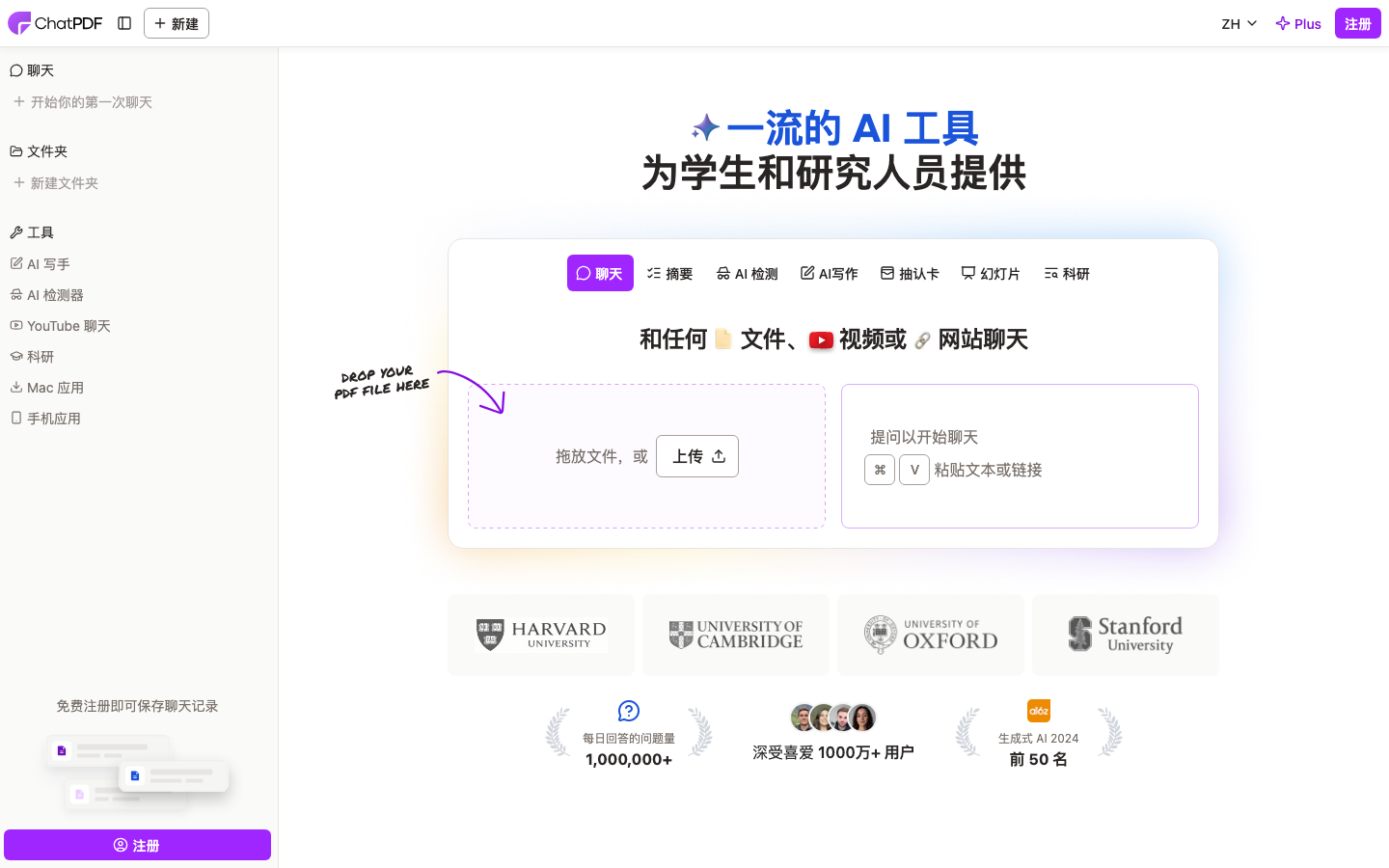
ChatPDF
ChatPDF Tool Introduction
One sentence brief comment: ChatPDF is not a general AI chat tool, but a vertical AI question and answer engine designed specifically for "document reading and understanding" scenarios - turning complex papers, contracts, and teaching materials into conversational knowledge bodies.
Publicity verification: The official website claims that it is "like ChatGPT but designed for PDF", "loved by 10 million+ researchers" and "answers over 1 million questions every day". These data are supported by strong public signals in the a16z Top 50 Gen AI Apps list on the official website homepage and in social media dissemination, and are basically credible. Its core selling points - reference positioning, multi-file chat, and use without registration - can all be directly verified in actual use and are not exaggerated. It is widely cited by users at Harvard, Cambridge, Oxford and other universities, which also proves its depth of penetration in the academic circle.
ChatPDF is positioned as a [productivity/business-side application]. Its main delivery form is a document AI Q&A SaaS platform for end users. The lower layer relies on GPT-4o and GPT-4o-mini for dynamic model routing.
| Projects | Public Information |
|---|---|
| Official positioning | Your PDF AI — like ChatGPT but for PDFs |
| Target users | Students, researchers, working professionals |
| User scale | More than 10 million researchers (official website public) |
| Average daily activity | Over 1 million questions and answers per day |
| Industry recognition | a16z 2024 Top 50 Gen AI Apps on the list |
| Underlying model | GPT-4o + GPT-4o-mini dynamic routing |
| Supported formats | PDF, Word (doc/docx), PowerPoint (ppt/pptx), Markdown, TXT |
| Additional Tools | AI Writer, AI Detector, YouTube Chat, AI Flashcards, AI Slides |
| Security Certification | SSL Transmission Encryption SOC2 Type II Storage |
| User rating | 4.9 (publicly available on the official website) |
Capability Boundary: ChatPDF's strength is "understanding, summarization and questioning within documents". It is not equivalent to a general writing platform, process automation engine or multi-system data center. In scenarios that require deeply customized report generation, cross-system data fusion or private model deployment, other tools or services are required.
Core functions of ChatPDF
1. Document dialogue Q&A
Mechanism: After uploading a document, the system builds a semantic index of the document, and users can ask questions in natural language to get answers with cited sources. Supports multiple rounds of questioning, and context can be related across paragraphs.
Expert View: This is not a simple "document + chat box" combination. The real synergy lies in - automatically locating the original paragraph when asking questions, clickable jumps to quotes, and maintaining context continuity in multiple rounds of conversations. This means that users do not need to repeatedly switch between "browser-search box-note-taking software", and one interface can complete the process from extensive reading to intensive reading.
2. Cited Sources
Mechanism: Each answer is associated with a specific paragraph in the document. You can jump to the original text by clicking on it, eliminating the need to manually search page by page.
3. Multi-file chat and folder organization
Mechanism: Create folders, incorporate multiple documents into the same conversation context, and support cross-document comparative analysis and comprehensive Q&A.
Expert View: Single-document Q&A is only a basic capability, while multi-document chatting is the real efficiency multiplier. For example, put a paper and related supplementary materials in the same conversation, and let AI help you compare experimental methods and data conclusions horizontally. In the traditional reading process, you need to open at least 3-5 documents and manually maintain the comparison table.
4. Multi-language support and document translation
Mechanism: Supports uploading documents in any language and asking questions in any language. Essentially integrating document translation capabilities, it can convert foreign language documents into the user's native language with one click, while retaining the original text citation anchors.
5. Document summary and content extraction
Mechanism: Quickly generate the core summary of the document, extract key ideas, data, and conclusions, and grasp the key points without reading the full text.
6. Auxiliary tool ecology
ChatPDF has extended the core Q&A with tools such as AI Writer (AI writing assistant), AI Detector (AI content detection), YouTube Chat (YouTube video conversation), AI Flashcards (AI flashcard generation), and AI Slides (AI slide generation). This means that it is expanding from a single document question and answer tool to a "full-process research assistance platform".
Pricing strategy of ChatPDF
ChatPDF adopts a "free trial + subscription upgrade" pricing model with a clear public policy:
| Plan | Price | Core Limitations | Applicable People |
|---|---|---|---|
| Free tier (Free) | $0 | 2 document analysis per day, complete basic functions | Light use by students and individuals |
| Plus level | Unpublished/subject to the official website | Unlimited document analysis times, advanced features unlocked | High-frequency researchers, heavy users in the workplace |
| API access | Pay-as-you-go billing/subject to development documents | Integrated calls for developers | Enterprise SaaS integrator |
FREE TRUTH:
- The limit of 2 copies per day of the free tier is basically enough for researchers who "read 3-5 papers per week", but it is obviously insufficient when it comes to the literature review season (50+ papers/week).
- Free users do not need to register to use the core conversation functions. After registration, history saving and multi-file chat can be unlocked, which is a quite generous free policy.
- The specific pricing of the Plus tier is not permanently displayed on the homepage of the official website. It is recommended to refer to the real-time data after logging in or the official pricing page.
Hidden Costs:
- Document preparation costs: Scanned PDFs require pre-OCR processing, otherwise the accuracy of Q&A will be affected.
- Learning cost: Although the interface is simple, the most efficient usage methods (such as multi-file folder organization, reference backtracking habits, and questioning strategies) require the accumulation of certain usage experience.
- Model limitation cost: The underlying layer relies on OpenAI's GPT-4o series. If the OpenAI API is interrupted or limited, service availability will be affected.
Analysis of the advantages and disadvantages of ChatPDF
Core Advantages
- Extremely low threshold for use: You can try it out without registration, upload documents and ask questions directly, and the SaaS form eliminates deployment and maintenance costs.
- Traceable citations: Unlike the vague citations of universal ChatGPT, ChatPDF's citations are anchored to the specific location of the original text, which is crucial in academic scenarios.
- Multi-file context unification: Put multiple documents into the same conversation to facilitate comprehensive analysis and horizontal comparison. This is a function that is difficult to directly achieve with general-purpose AI chat tools.
- Multi-language penetration: Both uploading Chinese documents and asking questions in English and uploading English documents and asking questions in Chinese can work effectively, effectively reducing the friction of cross-language research.
- a16z Recognition and University Penetration: Selected into a16z Top 50 Gen AI Apps, widely disseminated by university communities such as Harvard and Cambridge, and product credibility endorsed by external authorities.
Main disadvantages
- Plus pricing lacks transparency: The official website does not display the specific price of Plus on the homepage for a long time. Potential users need to register or browse in depth to learn the complete pricing information.
- The underlying model is uncontrollable: Relying on the OpenAI GPT-4o series, users cannot select or switch to other models such as Claude and Gemini, nor can they use local models in privacy-sensitive scenarios.
- Unstructured document parsing limitations: For unstructured content such as scanned documents, image PDFs, and complex tables, the parsing accuracy depends on the built-in OCR capability, and high-precision scenarios may not be enough.
- Lack of enterprise-level functions: There is no public team collaboration space, RBAC permission management, audit logs and other enterprise-level functions, which limits the ability to promote within the organization.
- No offline/private deployment: Pure cloud SaaS, there is no public self-hosting or privatized deployment solution, and institutions with strict data sovereignty requirements (such as law firms and financial institutions) cannot adopt it.
Comparison with similar tools
| Dimensions | ChatPDF | Humata | SciSpace | Adobe Acrobat AI |
|---|---|---|---|---|
| Core positioning | Document AI Q&A | Research document analysis | Academic paper analysis | PDF reading enhancement |
| Free quota | 2 copies/day | Limited free | Limited free | Paid (Acrobat Pro subscription) |
| Quote positioning | ✅ Jump to the original sentence sentence by sentence | ✅ Paragraph level quotation | ✅ Paragraph level quotation | ✅ Built-in |
| Multi-file chat | ✅ Folder organization | ✅ Limited | ✅ Limited | ❌ |
| Multi-language support | ✅ Ask each other in any language | ✅ Main language | ✅ Main language | ✅ Main language |
| API available | ✅ API documentation available | ✅ API available | ✅ API available | ❌ Not public |
| Enterprise Features | ❌ Unpublished | ✅ Team Edition | ✅ Organization Edition | ✅ Enterprise Suite |
| The underlying model is transparent | ✅ GPT-4o series is public | Undisclosed | Undisclosed | Undisclosed |
Applicable scenarios for ChatPDF
Dimensionality reduction strike scene
- Academic Literature Review and Research: Quickly read a large number of papers and extract core methods, data sets, and experimental results. It takes 30-60 minutes to completely read a 10-page paper in the traditional way. Through ChatPDF, you can complete the abstract acquisition, key question questioning and citation positioning in 5-10 minutes, increasing the efficiency by about 60-80% (deduced value, unofficial commitment).
- Textbook and exam preparation study: Import course notes, textbook chapters, and question banks into the same folder. AI can explain concepts across documents, generate practice questions, and compare differences in viewpoints in different textbooks.
- First reading of contracts and legal documents: After uploading the contract PDF, use natural language to ask about key terms, performance obligations, liability for breach of contract, etc., to assist legal personnel to quickly locate key paragraphs. The first reading efficiency is reduced from 40 minutes to page by page to less than 10 minutes.
- Industry Reports and Business Analysis: Understand the reports of research institutions and white papers of consulting companies in a question-and-answer manner, and quickly extract the market size, competitive landscape, and key findings. It is suitable for strategic analysts and product managers.
- Cross-language literature acquisition: Upload foreign language literature and directly ask questions in your native language to solve language barriers. It is especially suitable for non-native English-speaking researchers to read top papers in English.
Discourage/Inapplicable people
- Scenarios that require in-depth content creation: ChatPDF is good at "understanding" and "extraction", but it is not good at original long-form writing, complex report generation, or in-depth analytical content creation based on multiple documents.
- Serious Legal/Medical Review Scenario: AI-generated answers may not be accurate enough in highly specialized fields, cannot replace the independent judgment of professionals, and must be reviewed manually.
- Institutions with strict requirements on data sovereignty: There is no private deployment option, document data is stored in ChatPDF's cloud, and the risk of sensitive data leakage needs to be assessed.
- Scenarios requiring complex automated workflows: ChatPDF is an independent tool and does not provide the ability to trigger automated integration with other business systems (such as CRM, ERP).
ChatPDF efficiency improvement comparison
The following efficiency improvement data is an analysis reference (unofficial commitment) based on product function deduction and is used to help the team evaluate the input-output ratio:
| Job roles | Typical tasks | Traditional time-consuming | After ChatPDF assistance | Estimated efficiency improvement |
|---|---|---|---|---|
| Graduate students/researchers | Literature review: read 20 papers and summarize the core ideas | 10-20 hours | 3-6 hours | 60-70% |
| Legal Assistant | First reading of contract terms and extraction of key obligations (50 pages of contract) | 1.5-2 hours | 20-30 minutes | 70-75% |
| Product Manager | Competitive product report quick overview and conclusion extraction | 1-2 hours | 15-30 minutes | 65-75% |
| College teachers | Review student papers/handout compilation | 2-3 hours | 30-45 minutes | 60-75% |
| New media operation | Industry white paper information extraction | 1-2 hours | 15-30 minutes | 70-80% |
| Non-native speakers | Intensive reading and translation of English papers | 3-4 hours | 30-60 minutes | 70-80% |
Note: The above efficiency improvement is based on the premise that "the document is a parsable text PDF". Initial parsing of scanned and image-based PDFs will add additional preparation time.
Automation boundaries for ChatPDF
Can be 100% automated and organized
- Document semantic index construction: Automatically parse and build a searchable vector index after uploading, without manual intervention.
- Initial summary generation: Generate the core summary of the document with one click after uploading.
- Multi-language translation and cross-language questioning: The system automatically completes document content understanding and language conversion.
- Quote source matching: Each answer automatically locates the original paragraph and returns a clickable quote.
There are knots that require manual confirmation (Human-in-the-Loop)
- Key fact checking: AI-generated answers must be manually verified against the original text for information that requires high accuracy such as values, dates, and technical terms. It is recommended to set up the process of "reference positioning → manual quick confirmation → accept or ask questions".
- Legal/medical and other high-risk judgments: Involving scenarios such as interpretation of contract terms, medication recommendations, compliance judgments, etc., the AI output is only used as a preliminary screening clue, and the final decision must be made by qualified professionals.
- Accuracy of multi-document comprehensive conclusions: When extracting and synthesizing information from multiple documents, AI may produce "wrong associations" or "illusory fusion", requiring manual verification of the rationality of cross-document reasoning.
- Document Sharing and Permission Management: Although the secure sharing link function is provided, the decision-making power of "to whom to share, permission level, and when to withdraw" lies in the hands of the user, and the system does not make automatic authorization decisions.
Not suitable for ChatPDF automation scenarios
- Cross-system data linkage is required (such as extracting data from PDF and automatically writing it to Excel and then generating charts) - the output of ChatPDF requires users to manually copy or process it twice through API.
- Scenarios that require real-time streaming data processing.
- Document management processes that require strict version control and audit trails.
Security and Compliance of ChatPDF
Data security measures
- Transmission Encryption: All document uploads and data interactions are transmitted via SSL encryption.
- Storage Encryption: Documents are stored in a SOC2 Type II certified storage infrastructure with data-at-rest encryption.
- User Control: Users can delete their documents and chat records at any time and retain full rights to data disposal.
- Documents are private by default: All documents are visible only to the uploader by default. Sharing requires users to actively generate secure links.
Compliance and Risk
- SOC2 Type II: Officially, the storage provider has obtained SOC2 Type II certification, which is an important compliance indicator for enterprise customers.
- Data Training Policy: It is not clear whether user document data will be used for model training or fine-tuning. Enterprises need to check the privacy policy and terms before using it to confirm the boundaries of data use.
- Content Moderation Policy: No public description of sensitive word filtering or content moderation mechanism has been found, but as a service for global users, it is usually subject to local laws and regulations.
- API Terms of Use: API-level data retention, rate limiting SLA and other details must be subject to the official API documentation.
- Cross-border data transfer: The service provider is located in the United States, and data storage and processing may involve cross-border transfers. Compatibility with local data protection regulations (such as GDPR, China's Personal Information Protection Law) needs to be evaluated.
Enterprise Procurement Evaluation Checklist
| Assessment Dimensions | Status | Recommended Actions |
|---|---|---|
| SOC2 certification | Storage layer certified | Confirm full link coverage |
| Data encryption (transmission/storage) | All supported | Meet basic requirements |
| Private deployment | Not supported | Data sovereignty risks need to be assessed |
| RBAC permission management | Undisclosed support | Team use requires additional control |
| Audit log | Unpublished | Compliance audit requires alternative |
| API SLA | Undisclosed | Enterprise integration requires further confirmation |
| Data used for training | Unspecified | Requires review of privacy policy |
ChatPDF’s integrated ecosystem
ChatPDF is relatively simple in terms of integrated ecology, consistent with its core positioning of "focusing on document Q&A":
- API interface: Provides back-end API documentation (
/docs/api/backend), allowing developers to embed document Q&A capabilities into their own applications or workflows. The specific endpoints, authentication methods, rate limits and pricing models are subject to the API documentation. - Windows Desktop Client: Provides Windows application download (
download.chatpdf.com) to migrate the web experience to the desktop context. - Mobile Adaptation: The official website mentions the mobile App, but the specific download link is not fully disclosed.
- YouTube Integration: Supports Q&A on YouTube video content, extending capabilities from documents to video content.
- Social and content ecology: Have official accounts on Instagram, X (Twitter), YouTube, LinkedIn, TikTok and other platforms to form a user community and word-of-mouth communication network.
Integration Boundary Tip: ChatPDF does not provide native Zapier/Make/n8n-like low-code integration connectors, nor does it support webhook triggering or deep data synchronization with CRM, project management tools. If you need to automatically push the document Q&A results to Notion, Feishu Documents or Slack, you need to use the API to build your own integration.
Implementation suggestions for ChatPDF
Individual users (students/researchers)
- Starting path: Visit chatpdf.com directly, upload your first document without registration and experience the core Q&A capabilities. It is recommended to upload a familiar paper first to verify the citation positioning and answer accuracy.
- Advanced use: Register for a free account and start using multi-file chat and folder functions. Create folders according to research topics (such as "2024 NLP Top Conference Papers") to centrally manage related papers.
- Efficiency Tips: Let AI generate a document summary first, and then start questioning based on the points of interest in the summary; use reference positioning to quickly jump to the original text for verification; for cross-language documents, directly use the native language to ask questions.
- Upgrade Judgment: When the daily document analysis needs stably exceed 2 copies, consider upgrading to the Plus plan.
Team/Small and Micro Enterprise
- Pilot Evaluation: Select a small-scale scenario (such as "Weekly Competitive Product Report Summary") to conduct a 2-week proof-of-concept, focusing on evaluating citation accuracy, multi-document consistency, and team onboarding costs.
- Process Design: Design the workflow of "AI first reading → manual verification → conclusion precipitation" to clarify the dividing point between automation and manual confirmation.
- Integration solution: If you need to store the results into an internal knowledge base, use the API to build a simple automation pipeline and connect the ChatPDF output to Notion/Feishu/Confluence.
- Cost Calculation: Convert the Plus subscription fee (based on the actual price on the official website) and the manual time saved to ROI, and include the hidden costs of API integration development and maintenance.
Enterprise/Institution
- Pre-compliance: Review the privacy policy and terms of service before use, and confirm whether the data storage location, training usage policy, and data deletion mechanism meet organizational compliance requirements.
- Purchase Evaluation: Since ChatPDF currently does not have public pricing and functions for the enterprise version, it is recommended to contact the official website to obtain a quotation for the enterprise solution. Key points to confirm: Data isolation level SSO support, audit log API SLA and usage caps.
- Risk Control: Temporarily avoid processing highly sensitive or confidential documents in ChatPDF until the data training and retention policy is officially clarified. Establish internal rules that "manual review is required" for AI output content.
- Alternative Solution Reserve: If private deployment is a hard requirement, you can also evaluate Humata (with team version) or other documentation Q&A solutions that support self-hosting as alternatives.
Summary of ChatPDF
The product idea of ChatPDF is to "turn documents into conversational knowledge bodies". Through three differentiated capabilities: reference positioning, multi-file chat and multi-language support, it has established a clear moat in learning and research scenarios. Its free policy is extremely generous - no registration required, free quota of 2 documents per day, and complete basic functions, making it a low-risk entry choice for individual users.
Judging from market signals, 10 million+ researcher users, recognition on the a16z list with an average daily million-level Q&A volume, and community communication from universities such as Harvard/Cambridge/Oxford, all indicate that ChatPDF has passed PMF (product-market fit) and occupies the top position in the segmented track of academic document AI Q&A.
Purchase/Adoption Risk Assessment: For individual users and students, ChatPDF has almost no usage risk - the free quota is enough to cover light needs. For teams and enterprises, the main risks focus on three points: first, the data sovereignty issue caused by the lack of privatized deployment; second, the supply chain risk caused by the underlying model's complete reliance on the OpenAI GPT-4o series; third, the lack of enterprise-level functions (RBAC, audit log SSO) limits the depth of adoption in regulated industries. It is recommended to give priority to scenarios with "low sensitivity, high document volume, and pursuit of efficiency", and to carefully evaluate or find supplementary solutions in scenarios with "high sensitivity, strong compliance requirements". The future value of ChatPDF depends on whether it can evolve from a "document Q&A tool" to a "full-process research platform" - the emergence of auxiliary tools such as AI Flashcards and AI Slides has revealed this.
Main functions of ChatPDF
- Core Processing Capabilities: Provides core AI capabilities in the corresponding scenarios to support users to quickly complete tasks.
- Multi-modal interaction: supports text input and result output, and some scenes support image or file upload.
- Workflow Integration: Can be embedded into existing workflows or linked with other tools through APIs to reduce context switching.
Application scenarios of ChatPDF
- Personal Creation: Quickly generate or process content to improve daily work efficiency.
- Team Collaboration: Unify workflow and reduce repetitive manpower investment.
- Enterprise-grade deployment: Embed capabilities into on-premises systems via API or private deployment.
ChatPDF’s applicable groups
- Individual Users: Content creators and knowledge workers who need AI assistance to improve their daily work efficiency.
- Developers: Technical teams who need to integrate AI capabilities into their own products or services through APIs.
- Enterprise: Organizations seeking to deploy AI at scale in their field.
Technical advantages of ChatPDF
- Algorithm Optimization: Special optimization at the model or algorithm level has been carried out for the corresponding scenario to achieve a balance between response speed and result quality.
- Low-latency architecture: Adopts streaming or asynchronous processing architecture to reduce user waiting time and is suitable for high-frequency interaction scenarios.
ChatPDF’s core parameters and statistics
Specific technical parameters (such as model size, context length, supported file formats, input and output restrictions, etc.) are subject to the official product page. It is recommended that users verify the latest technical specifications and system requirements before choosing to ensure that they match their own usage scenarios.
User and market recognition of ChatPDF
Gradually build user awareness in the field, and product capabilities are used by content creators and teams to improve work efficiency. Some industry users have incorporated it into their daily workflow. It is recommended to refer to the latest official disclosures for specific user scale and industry adoption rate data.
The cost advantage of ChatPDF
- C-side/Individual: Usually a free version is provided to experience the core functions, and high-frequency use requires a paid package subscription.
- API/Developer: Billed by call volume, suitable for development teams that can be flexibly integrated into their own systems.
- Enterprise/Privatized: Contact the business owner for customized quotation and deployment plan. The specific price is subject to the official real-time pricing page.
Summary and Outlook of ChatPDF
It provides competitive solutions in its field, and its core value lies in lowering the threshold for AI use in this field. With technology iteration, products are expected to continue to improve in functional coverage and performance.
Current limitations: Some advanced features require paid subscription, and the free version has function or usage restrictions; specific technical details and performance benchmarks have not been fully disclosed, and it is recommended to fully verify it through trial before purchasing.
Related tools:  Khanmigo, quizlet
ChatPDF model and version evolution
Continuous iterative updates, the latest version introduces performance optimization and new features. Historical version information can be viewed on the official release page. There is no complete public version evolution timeline yet. It is recommended to pay attention to the official announcement to understand the rhythm of feature updates.
How to use ChatPDF
- Web client: You can use it by visiting the official website and registering an account. Most functions do not require installation.
- API access: Provides RESTful API, developers can obtain the API Key and integrate it into their own applications.
ChatPDF Product Pricing
The pricing model is subject to the official real-time page. Usually a freemium or subscription system is used, and basic functions can be used for free. Advanced functions or high-frequency use require paid subscriptions, and users are advised to evaluate the optimal solution based on actual usage.
Version Info
- ChatPDF Web 2026 Q2 online version :The current official website version publicly supports multi-file chat, reference positioning and multi-format document processing. There is no official official release date yet.
- PDF Q&A core competency public version :The product disclosure is based on the core positioning of "talking to PDF like ChatGPT", and there is no official precise date yet.
User Reviews