 ChatPRD
Free
ChatPRD
Free
ChatPRD is an AI product management platform for product managers and product teams. It is used to generate and edit PRD, technical design documents, product roadmaps and other documents, and supports team knowledge, templates, integration and MCP workflows.
ChatPRD
Core parameters and statistics
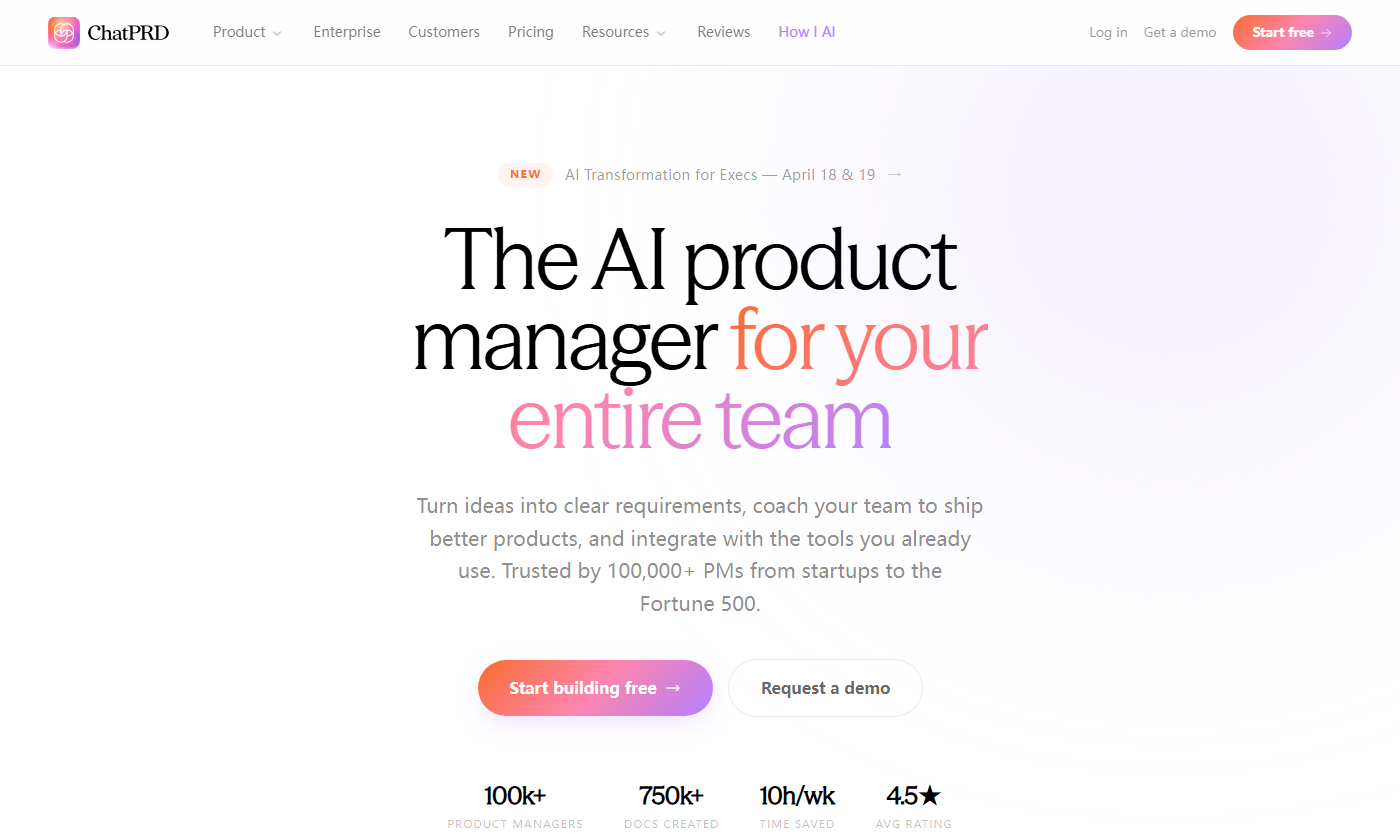
ChatPRD officially positions the product as "AI product manager for your entire team", targeting product managers and product organizations, converting ideas into clear requirements documents, and providing product coaching, team collaboration and workflow integration. The homepage of the official website discloses key indicators as of the time of page display: 100k+ product managers created 750k+ documents, saving 10 hours per week, and average rating 4.5★.
| Parameters | Official information | Source |
|---|---|---|
| Product Name | ChatPRD | Official Home Page |
| Official positioning | AI product manager for your entire team | Official homepage |
| Usage scale | 100k+ PMs | Official homepage |
| Document size | 750k+ docs created | Official homepage |
| Time income | 10h/wk time saved | Official website homepage |
| Platform entrance | Web application | Login and registration entrance |
These indicators are more suitable to be interpreted as product adoption and value signals publicly disclosed on the official website; if used for procurement or financial calculations, corporate contracts, real-time backend usage, and the latest official page should still prevail.
User and market recognition
The primary users of ChatPRD are product managers, product owners, startup founders, cross-functional product teams, and teams that need to quickly turn requirements, research, roadmaps, and technical constraints into structured documents. The homepage of the official website states that it covers PM groups from startups to Fortune 500. The enterprise page also emphasizes that it is oriented to large-scale deployment of product organizations and is suitable for companies that require team collaboration, secure control of SSO, customized workflows and dedicated support.
The official About page reveals that ChatPRD was founded by 3x CPO Claire Vo and originated from her “Automate Yourself” product management workflow practice. The official website Customers, Reviews and homepage testimonial all present user feedback, but do not provide an independently auditable customer list or contract size; therefore, the market recognition part should be based on the official website public indicators and official case page, without additional inference of revenue, retention or paid conversion.
Cost advantage
ChatPRD uses a combination of free trial and subscription model. The official Pricing page shows four types of plans: Free, Pro, Teams and Enterprise under the annual payment view, which are suitable for extending from personal trial to team collaboration and enterprise security management.
| Plan | Official website price/method | Main rights and interests | Applicable objects |
|---|---|---|---|
| Free | $0/mo | 3 limited-length chats Basic AI model, document generation, basic template | Trial and lightweight experience |
| Pro | $15/mo, annual payment $179/year | Unlimited chat Premium AI models, unlimited documents, custom template Projects, file and image upload to Google Drive, Notion export, Slack, priority support | Personal PM and high-frequency document users |
| Teams | $29/mo/seat, $349/seat/year | Pro full capabilities, centralized billing, team workspace, shared projects and knowledge | Product Teams |
| Enterprise | Contact Sales | Enterprise secure SSO, custom AI models, dedicated support, and more | Large organizations |
The cost advantage is mainly reflected in concentrating the first draft of requirements sorting PRD, templated documents and iterative editing on the same workbench, and reducing repeated context sorting through Projects, team knowledge and integration. Actual ROI depends on team documentation frequency, review process, and access to existing knowledge bases.
Main functions
ChatPRD's core capabilities revolve around the full life cycle of product documents: creation, editing, rewriting, version management, export, collaboration and workflow connection. According to the official documentation, Writing Mode can be turned on when writing a document, allowing ChatPRD to generate a document outline based on the selected template and stream content in the document panel; when editing a document, you can request a partial edit or rewrite the entire document.
- Document generation: used for structured documents such as PRD, technical design documents, product strategy, roadmap, release plan, competitive product analysis, etc.
- Template system: supports default templates, custom templates, and team-shared templates in the Teams plan.
- Document Editing: Switch between chat and document editor, retain context and modify documents directly.
- Version management: Official documentation will automatically track versions, support viewing historical versions, switching versions and preventing data loss.
- Team collaboration: Supports team workspaces, shared projects, shared knowledge and centralized billing.
- Integration capabilities: Covers integration portals listed in official documents such as Google Drive, Notion, Slack, Linear, Confluence, Cursor, v0, Replit, MCP, etc.
- MCP Tools: The official MCP document lists document management tools such as Create Document, Update Document, Search Documents, etc.
Model and version evolution
ChatPRD is a continuously iterative SaaS product, and the official website does not use traditional desktop software version numbers. Version evolution is recorded here according to milestones with clear dates in the official blog and documentation.
| Version node | Date | Highlights of changes | Official source |
|---|---|---|---|
| 2026 Q2 official website and product capability update | 2026-02-16 | 7 AI-first templates, smarter file search, Teams self-service seat upgrade, chat performance and stability improvements | Official Blog |
| MCP Connectors | 2026-02-12 | Supports connecting tools such as Notion, Linear, Atlassian, GitHub, Granola, etc. to ChatPRD through MCP | Official Blog |
| Quickstart Guide | 2025-02-14 | Introducing user profiles, templates Google Drive, Notion, Slack, document creation, real-time editing, collaborative sharing and Projects | Official Quickstart |
Version information uses the official release date or the last updated date of the page; no guessing is required for undisclosed underlying model switching, internal prompt arrangement, and infrastructure versions.
Technical advantages
The technical advantage of ChatPRD lies not in a single model parameter, but in the combination of product management context, document structure, team knowledge and tool integration. The official Pricing page mentions that the Pro plan includes Premium AI models, including GPT-4o, Claude, and o1; the official security document states that it uses OpenAI APIs and that submitted data will not be used to train OpenAI models.
MCP is one of the more important technical routes of ChatPRD in the near future. The official MCP document states that its MCP server URL is https://app.chatprd.ai/mcp, supports client configurations such as Cursor, Windsurf, Claude Code, Claude Desktop, VS Code, etc., and completes authentication through secure HTTPS transport and existing ChatPRD session. For product teams, this means that ChatPRD is not just an in-web document generator, but can also become a product documentation tool layer in external AI programming and knowledge workflows.
How to use
Users can enter the registration page through the official website, create an account and use ChatPRD in the web application. The official Quickstart recommends setting up a Profile first to let the system understand the role, industry, goals and communication style, and then create Projects to carry different project contexts.
| Entrance | Operation method | Applicable scenarios |
|---|---|---|
| Official website registration | Visit app.chatprd.ai/sign-up | New user experience and personal subscription |
| Web Application | Login app.chatprd.ai | Daily chat, document generation, editing and project management |
| Docs | Read docs | Learn templates, documentation, integrations, teams, and billing setup |
| MCP | Configure https://app.chatprd.ai/mcp |
Create, update and search documents in clients such as Cursor, Claude Code, VS Code and more |
The typical process is: set Profile, create Project or select an existing project, open Writing Mode, select a template, describe the PRD or document to be generated, wait for the outline and text to be generated, and then continue editing, rewriting, sharing or exporting in the document editor.
Product Pricing
The official Pricing page shows that ChatPRD supports stepped plans from free trial to enterprise purchase. The Free plan is suitable for verifying the document generation effect; the Pro plan is for high-frequency individual users; the Teams plan increases team space, shared knowledge and centralized billing; the Enterprise plan emphasizes secure SSO, customized models and dedicated support.
It should be noted that the official website pricing page may be updated with changes in promotions, annual payment discounts, regional taxes and enterprise contracts; final prices, seats, trials and refund policies should be subject to official pricing, billing documents and contracts. The official MCP documentation makes it clear that MCP integration is available on Pro, Team, and Enterprise plans, and that Basic/Free does not include full MCP access.
Application scenarios
ChatPRD is suitable for the following scenarios:
- PRD first draft generation: Convert product ideas, user research, business goals and constraints into structured product requirements documents.
- Technical collaboration: Use technical design document templates such as bug investigation and refactoring plan to connect the engineering team.
- Product strategy: Generate roadmap, competitive product analysis GTM, release plan and product strategy documents.
- Team knowledge accumulation: Maintain cross-project context through Projects, shared knowledge, and team templates.
- AI programming connection: Connect PRD with AI programming/prototyping tools through integrations such as MCP, Cursor, v0, Replit, Lovable, etc.
- Enterprise Product Organization: Combine SSO, security controls, team workspaces, and dedicated support to extend the AI documentation process to more PMs.
Applicable people
The most suitable users for ChatPRD are those who need to frequently write product documentation, review requirements and promote cross-functional alignment, including product managers, product owners, entrepreneurs, product operations, design/engineering collaborators, and product organizations that need to unify document structure and team knowledge.
Situations that are not suitable include: teams that only need one-time simple copywriting, do not use the English interface at all, cannot use cloud SaaS, have mandatory requirements for underlying models and private deployment but have not yet completed the enterprise procurement evaluation. When dealing with highly sensitive data, you should first review the official Trust Center, privacy policy, data processing agreement, and corporate security terms.
Summary and Outlook
The core value of ChatPRD is to centralize common documentation, coaching, templates and team context for product managers in an AI workbench and connect it to mainstream development/knowledge tools through MCP. Compared with general chat tools, it emphasizes product management context and deliverable documents; compared with traditional document tools, it emphasizes automation from conversations to structured documents.
The focus of follow-up observations includes: whether the coverage of MCP connector continues to expand, whether the team knowledge and permission model is more detailed, whether Enterprise security capabilities are disclosed in more details, whether the template library is continuously updated, and whether multi-language and cross-region support is enhanced. Current public information shows that it has expanded from a PRD generator to an AI product management platform for product teams.
Related tools:  Notion AI, google-workspace
Version Info
- 2026 Q2 official website and product capability updates :The official blog releases 7 new templates for AI builders, smarter file search, Teams self-service seat upgrade, chat performance and stability improvements, and showcases the updated marketing site.
- MCP Connectors :The official blog announced that ChatPRD supports connecting to Notion, Linear, Atlassian, GitHub, Granola and other tools through MCP, and updates the tool experience, speed and reliability.
- ChatPRD Quickstart Guide :The official Quickstart Guide introduces core usage methods such as user profiles, templates Google Drive, Notion, Slack, document generation, real-time editing, collaboration sharing, and Projects.
User Reviews