 ChatWithCloud
Free
ChatWithCloud
Free
ChatWithCloud is an AI tool used to integrate AI capabilities into high-frequency business processes.
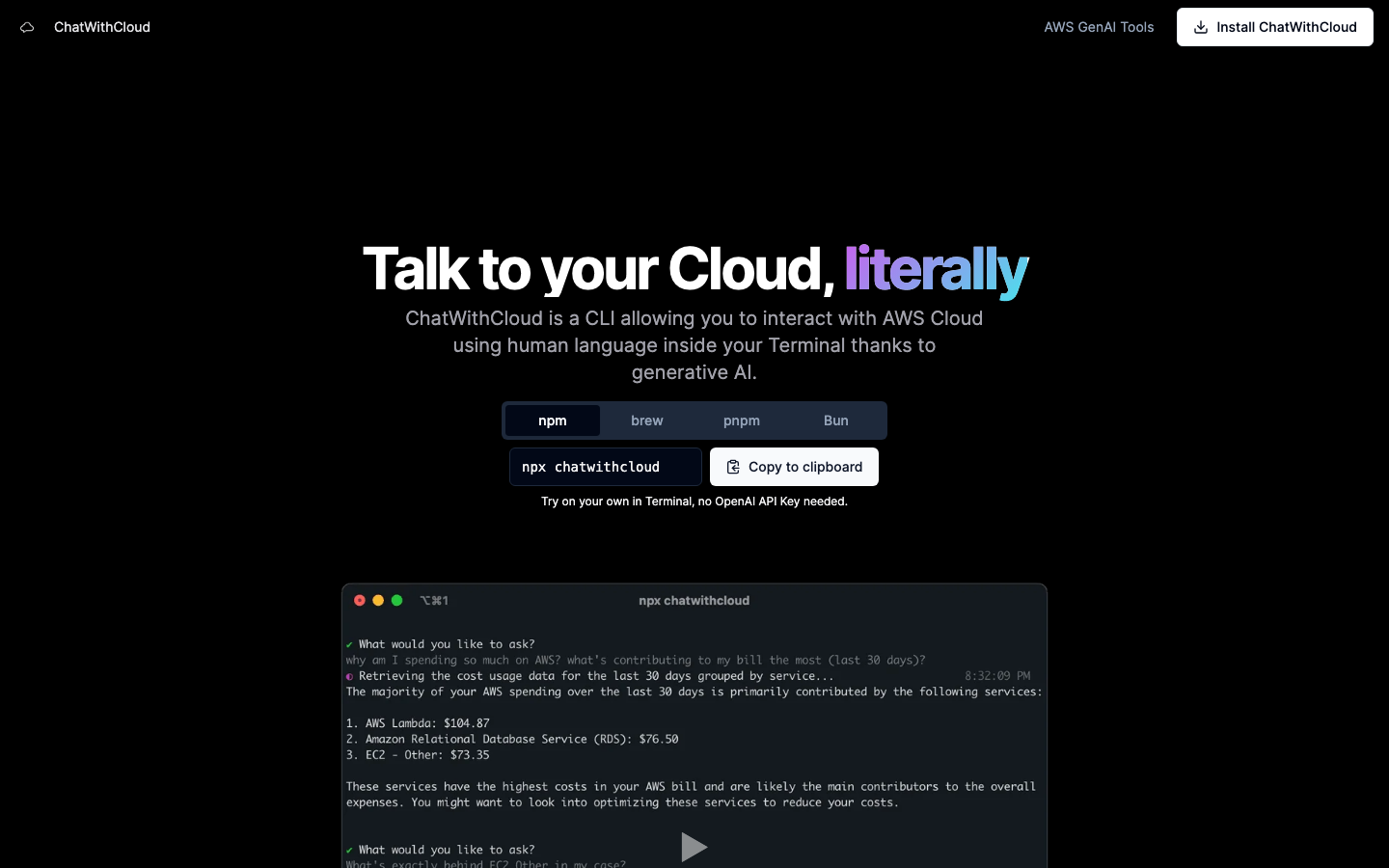
ChatWithCloud: Chat with your AWS cloud infrastructure using natural language
Tool introduction
Brief review in one sentence: ChatWithCloud is not another AI chat toy, but an AWS cloud operation and maintenance assistant rooted in the terminal - you ask it in vernacular "How much did I spend on Lambda this month" and "Why can't EC2 connect to SSH"? It directly calls the AWS API to check data, do analysis, and even help you perform repair operations.
ChatWithCloud was founded by former Zapier AI Agents head Rafal Wilinski (@rafalwilinski) under Spread Capital Corporation. The product is positioned as a CLI-first generative AI cloud interaction tool. The core delivery form is an npm package, which can be started in the terminal through npx chatwithcloud. The biggest difference between it and Amazon Q Developer (formerly CodeWhisperer) is that there is no need to enter the AWS console or IDE plug-in, and cloud resource interaction can be completed directly in the terminal most familiar to developers** (Source: chatwithcloud.ai official website FAQ comparison page).
According to official website data, its Lifetime License (lifetime buyout) has sold 37/50 copies, which is a niche product in the early verification stage. The latest version of npm package chatwithcloud is 0.3.5, open source under ISC protocol, released about 2 years ago (source: npmjs.com/package/chatwithcloud). The product is still in the PMF (Product-Market Fit) exploration period and is suitable for AWS developers who have a strong preference for terminal workflows to try it out.
Core functions
ChatWithCloud is built around four high-frequency pain point scenarios of AWS cloud operation and maintenance. Each scenario corresponds to a complete set of "natural language → API call → result presentation":
1. Cost Analysis
Users use natural language to ask for AWS cost details, such as "ranking the cost of each service last month" or "which EC2 instances were underutilized." ChatWithCloud automatically calls the AWS Cost Explorer API to get billing data and returns it in an end-friendly format (table/summary). Hidden linkage: Cost analysis results can trigger "recommended actions" with one click - for example, after discovering unused EBS volumes, users can be directly guided to clean up or generate savings plan recommendations.
2. Security Analysis
Automatically scan AWS resources, analyze IAM policy configurations, and pinpoint risk points such as excessive permissions, unencrypted resources, and public access to S3 buckets. Expert View: The core value here is not to "find the problem", but to compress the multi-step manual inspection of AWS Trusted Advisor + IAM Access Analyzer into a natural language instruction. For teams that need to meet SOC2/HIPAA compliance audits, this can reduce security baseline self-audit time from hours to minutes.
3. Troubleshooting
When there is an infrastructure problem - such as Route53 domain name resolution failure, CloudFront distribution exception, EC2 SSH connection timeout - ChatWithCloud can diagnose and provide root cause analysis step by step. Hidden linkage: The troubleshooting results can directly enter the "repair" stage, without the need for users to manually copy commands.
4. Automatic repair (Fixing Stuff)
This is the most "radical" and most controversial feature. ChatWithCloud can not only read data, but also write resources - modify IAM policies, adjust security group rules, and delete unused resources. The official website clearly states that "ChatWithCloud can help you fix your infrastructure, and it will do it for you" (Source: chatwithcloud.ai homepage). Expert View: Automation of write operations is a double-edged sword. The risks will be broken down in detail in the "Security and Compliance" chapter later.
5. Free AI AWS Tools
ChatWithCloud official website also hosts a set of AI-driven AWS tool chain (source: chatwithcloud.ai/tools):
- SDK converter: AWS SDK JS v2 ↔ v3, Boto3 ↔ JS SDK, Golang SDK, Rust SDK mutual conversion
- IaC Converter: Terraform ↔ AWS CDK (TS/Python) ↔ CloudFormation ↔ Pulumi
- IAM Policy Generator: Automatically derive minimum IAM permissions from TypeScript/Python/Golang code
- S3 Pricing Calculator: Enter the storage amount, request amount, data transfer amount, and estimate the monthly cost
Although these tools are in the form of Web pages, they form a collaborative matrix of "online assistance + terminal execution" with CLI tools. Expert View: This "free tool traffic + CLI paid conversion" model accurately addresses the two high-frequency pain points of AWS developers' daily "code conversion" and "permission derivation". It is a smart way to acquire customers at low cost.
Pricing strategy
ChatWithCloud adopts a dual-track pricing model, covering two levels: individual developers and heavy users (source: chatwithcloud.ai home page Pricing section):
| Plan | Price | Core Conditions | Suitable for People |
|---|---|---|---|
| Lifetime License (lifetime buyout) | $39 one-time | Comes with OpenAI API Key; limited to 50 copies, 37 copies sold | Individual developers who already have OpenAI quota and want to invest in one time |
| Managed Subscription | $19/month | No OpenAI Key required; Unlimited usage; Use better models; Fully managed service | Team users who don’t want to manage API Keys and want out-of-the-box use |
| Free Trial | $0 | Run npx chatwithcloud to experience, no OpenAI API Key required |
All users, for functional verification |
Free Truth
- Lifetime License's $39 is essentially a "Bring Your Own Credentials (BYOK) model" - you need to bear the cost of OpenAI API calls yourself. For high-frequency users, the API fee can be much more than the $39 buyout price. At OpenAI GPT-4o pricing (~$5/million input tokens + $15/million output tokens), an active DevOps engineer may incur $20-50 per month in API fees.
- Managed Subscription's $19/month includes the cost of model calls, making it a good deal for users whose monthly API fees exceed $19. However, the specific meaning of "unlimited usage" (whether there is a fair use upper limit) has not been officially disclosed.
- Limited to 50 copies of the Lifetime License 37 copies have been sold, a classic scarcity marketing tactic that implies price bonuses for early adopters.
C-side/Developer/Enterprise three-tier cost
| Hierarchy | Cost Structure | Description |
|---|---|---|
| C client/individual | $39 buyout + OpenAI API usage fee, or $19/month all-inclusive | For low-frequency users (occasionally query a few times), it is recommended to try the free trial first, and then choose as needed |
| Developer/API | Core cost = buyout/subscription fee + OpenAI API (Buy Your Own Key model) + AWS API call fee (CloudWatch, etc.) | AWS API calls themselves may also incur fees, and high-frequency use needs to be included in the budget |
| Enterprise/Team | Multi-person License + possible business discounts | There is no enterprise pricing on the public page, please contact [email protected] for inquiries |
Advantages and Disadvantages Analysis
Core Advantages
-
Terminal native experience: Developers do not need to leave the terminal, open a browser, or repeatedly jump to the AWS console. An
npx chatwithcloudcompletes the entire process from "problem description" to "data acquisition" to "result presentation". This experience is extremely attractive to heavy end users (resident users of Vim/Neovim party tmux). -
Natural language reduces the AWS learning curve: For developers who are new to AWS, remembering the CLI commands corresponding to each service (
aws ec2 describe-instances,aws ce get-cost-and-usage…) is itself a cognitive load. ChatWithCloud removes this friction with natural language - you say "check to see if my security group has 0.0.0.0/0 fully enabled" and it is automatically translated into the corresponding API call. -
Lightweight delivery: There are no Agents to maintain and no back-end services to deploy. A single
npxcommand is ready to use. For developers accustomed to the Node.js ecosystem, this is much lighter than installing the AWS CLI + configuring the IDE plug-in. -
Free Tool Matrix Drainage: Online tools such as SDK converter, IAM policy generator, etc. provide a natural traffic entrance for CLI products - developers can convert a piece of code and try the terminal version of ChatWithCloud.
Significant disadvantages
-
Insufficient ecological depth: Compared with Amazon Q Developer (free, supports deep integration of 20+ AWS services, and links with CodeGuru), ChatWithCloud, as a third-party tool, has a natural gap in the depth of integration with AWS native services. Amazon Q can analyze CloudTrail logs and generate CloudFormation templates directly in the Console, while the current capabilities of ChatWithCloud depend on the coverage of the AWS SDK public API.
-
Product activity is questionable: The npm package was last updated 2 years ago (version 0.3.5), with only 1 download per week (source: npmjs.com/package/chatwithcloud). This means that the user base of the product is extremely small and there may be a risk of maintenance stagnation. For corporate procurement, this is a signal that needs to be evaluated carefully.
-
Lack of enterprise-grade features: No SSO/SAML integration, no audit logs, no RBAC (role-based access control), no team workspace. These shortcomings make it difficult to embed it directly into the DevOps process of medium and large enterprises.
-
Potential risks of write operations: Although the automatic repair function is powerful, an incorrect IAM policy modification may cause the production bounded service to be interrupted. AI decision-making with "writable" permissions is still a high-risk operation under the current technological maturity.
Comparison with competing products
| Dimensions | ChatWithCloud | Amazon Q Developer | Warp (AI Terminal) |
|---|---|---|---|
| Delivery Form | npm CLI package | AWS console + IDE plug-in | Standalone terminal application |
| Core Scenario | AWS cloud operation and maintenance Q&A | AWS full-stack development assistance | Generic terminal command generation |
| AWS Integration Deep | Called via AWS SDK | Native deep integration | No proprietary AWS integration |
| Write operation support | Supported (requires user confirmation) | Supported (code generation) | Command suggestions only |
| Pricing | $39 buyout / $19 monthly | Free (Builder tier) | Free + Pro $21/mo |
| User Base | Very small (npm downloads 1 per week) | Millions of AWS users | Rapidly growing |
| Open Source | ISC Protocol | Closed Source | Closed Source |
| Enterprise Features | None | Full (IAM, Audit SSO) | Limited |
Applicable scenarios
Dimensionality reduction strike scene
- Quick troubleshooting of AWS bill anomalies: When the CFO asks "Why did AWS charges increase by 40% this month?", DevOps engineers can use ChatWithCloud to locate specific services, regions, and resources in seconds. Compared with manual drilling in Cost Explorer, the efficiency is increased by 5-10 times.
- IAM policy audit and least privilege transformation: "List all users and roles with
AdministratorAccess, and their API calls in the last 90 days" to quickly complete permission sorting. For scenarios that need to meet compliance audits, this is a typical "from hours to minutes" efficiency jump. - One-time contextual cleanup: Find all unassociated EBS volumes, unused Elastic IPs, expired AMI snapshots, and clean them with one click. This type of batch, patterned, low-risk operation and maintenance operations is the ideal scenario for ChatWithCloud.
- AWS SDK code migration: Use the free conversion tool on the official website to migrate v2 SDK code to v3 in batches, or migrate Terraform to CDK - this is a real cost reduction tool for teams that are upgrading their technology stack.
Discourage/Inapplicable people
- Teams that require cross-cloud (AWS+Azure+GCP) management: ChatWithCloud currently only supports AWS and cannot function in multi-cloud scenarios.
- Enterprises already heavily using Amazon Q: If your team is already using Amazon Q Developer (free, native integration), the incremental value of ChatWithCloud is limited.
- Production context with extremely high security requirements: If the organization has a conservative attitude toward "writable" cloud resources for AI models, and the operation and maintenance process has strict change management (Change Management) and approval chains, ChatWithCloud's automated repair function may have difficulty passing compliance review.
- Non-English users: The product interface and documentation currently only support English, and there are language barriers for non-English user groups such as Chinese and Japanese.
Summarize
The core value proposition of ChatWithCloud is clear and focused: Compress the "natural language intent → API execution" link of AWS cloud operation and maintenance into a single line of commands. It is not a universal cloud management platform, but a niche tool that can significantly improve efficiency in specific scenarios (terminal operation and maintenance, rapid troubleshooting, code conversion).
Product Maturity Assessment: The product is in the early PMF verification stage (npm downloads 1 per week, Lifetime License is limited to 50 copies), and the core functional links (NL → AWS API → Results) have been run through. However, there are obvious shortcomings in enterprise-level features (SSO, RBAC, audit logs), integrated ecosystem (CI/CD, notification system), and product activity (npm package has not been updated in 2 years).
Core Decision Framework:
- If you are an individual DevOps engineer who works with AWS in the terminal every day, the lifetime buyout price of $39 is a low-risk, high-potential return efficiency investment.
- If you are an enterprise procurement decision-maker, you must first solve three issues before considering team-level deployment: ① Confirm the product maintenance plan (contact the founder); ② Assess data compliance risks (AWS metadata export in BYOK mode); ③ Complete 30-day pilot verification in non-production borders.
- If you have already intensively used Amazon Q Developer or AWS Console built-in tools, the incremental value of ChatWithCloud is limited, and repeated investment is not recommended.
Summary in one sentence: ChatWithCloud is a "scalpel" in the AWS terminal operation and maintenance scenario - sharp enough and focused enough, but please don't expect it to do the same thing as the "Swiss Army Knife".
Efficiency improvement comparison
The following is a deduction comparison - a reasonable estimate based on product features and user experience of similar tools, unofficial benchmark data.
| Task scenario | Traditional method is time-consuming | Using ChatWithCloud | Efficiency improvement | Description |
|---|---|---|---|---|
| Troubleshoot EC2 SSH connection failure | 15-30 minutes (manually check the security group, routing table, NACL, system log) | 2-5 minutes (natural language description of the problem, automatic layer-by-layer diagnosis) | ~6x | The effect is more significant for novices, and senior engineers themselves have diagnostic scripts |
| Monthly bill exception tracing | 30-60 minutes (Cost Explorer drill-down level + cross-comparison between services) | 3-8 minutes (one sentence query + automatic aggregation of exception items) | ~8x | Provided that the Cost Explorer API is enabled and the data is updated in a timely manner |
| Comprehensive audit of IAM permissions | 2-4 hours (manual traversal of IAM users/roles/policies, one-by-one analysis) | 10-20 minutes (multiple rounds of natural language interaction + automatic policy analysis) | ~10x | The greatest value for scenarios with high compliance requirements (before SOC2 audit) |
| Unused resource cleanup (EBS/AMI/EIP) | 1-2 hours (service-by-service scan, confirmation, deletion) | 5-15 minutes (automatic scan + batch cleanup after item-by-item confirmation) | ~8x | The risk lies in the misjudgment of automatic deletion, which requires manual confirmation steps |
| AWS SDK v2→v3 code migration (1000 lines) | 4-8 hours (manual modification line by line, need to understand the new API signature of v3) | 5-15 minutes (website paste/CLI call + AI automatic conversion) | ~30x | The conversion tool is currently in online web form, not CLI embedded |
| Generate IaC template (Terraform→CDK) | 3-6 hours (understanding the original template, learning target framework grammar, handwriting migration) | 10-30 minutes (Web tool conversion + manual adjustment) | ~10x | Manual verification of syntax and logical correctness is still required after conversion |
Quantitative summary of efficiency improvement: In common AWS operation and maintenance scenarios, ChatWithCloud can improve the efficiency of information acquisition tasks (query, audit, analysis) by 6-10 times, and improve the efficiency of code conversion tasks (SDK version migration, IaC template conversion) by 10-30 times. But note - the efficiency improvement is most significant in "one-time/occasional" tasks. For daily scripted and automated repetitive tasks, the marginal returns are diminishing.
Automation Boundary
Can be 100% automated and organized
- Read-only query tasks: such as cost query, resource list, and configuration export. The model executes
describe/list/getclass API calls without side effects. - Code/template format conversion: For example, AWS SDK version migration and IaC format conversion. The conversion results are manually verified twice, and AI only performs mechanical grammar mapping.
- Compliance Baseline Scan: Perform automated scans and output reports based on preset rules (such as publicly accessible S3 buckets, unencrypted EBS volumes).
The manual confirmation point (Human-in-the-loop) must be set.
- Resource deletion operation (delete EBS volume, release Elastic IP, delete AMI) → must be confirmed one by one, it is recommended to add
--dry-runpreview mode. - IAM policy modification (adding/removing permissions, modifying trust policies) → Manual review of changes diff is required to prevent excessive expansion of permissions.
- Security group rule changes → must affect scope assessment, especially for production-bound security group operations.
- Operations involving payment or quota changes (such as purchasing reserved instances, modifying the Auto Scaling group size) → Multiple levels of confirmation are required.
Engineering Pitfall Guide
Based on the technical characteristics of ChatWithCloud as an AI + CLI tool, the following are the engineering problems and solutions that may be encountered in actual use:
-
Token consumption and cost are out of control: Each query requires the structured data returned by AWS (which may be large, such as thousands of resource information) to be pieced into the prompt context. If multiple rounds of in-depth investigations are performed continuously, the Token consumption of the OpenAI API may rise rapidly.
- Solution: Set the
max_results/limitparameters in the prompt, and request paged summaries for large result sets instead of returning them in full; pay attention to the actual fair use boundary of "unlimited usage" in Managed Subscription mode.
- Solution: Set the
-
AWS API frequency control and delay: ChatWithCloud relies on AWS SDK to call various APIs. Some APIs (such as Cost Explorer
get-cost-and-usage) themselves have high delays (3-10 seconds) and rate limits. It is easy for users to have the illusion that "the tool is stuck" while waiting.- Solution: Implement progress indication and asynchronous polling mechanism in CLI; it is recommended to enable
--watchmode for time-consuming operations.
- Solution: Implement progress indication and asynchronous polling mechanism in CLI; it is recommended to enable
-
Multi-account/cross-region context loss: ChatWithCloud authenticates through the profile of the current AWS CLI configuration. If your organization's AWS context involves multiple accounts (multiple profiles) and multiple regions (global + multiple regions), the model may confuse the scope of the current operation.
- Solution: Explicitly declare
--profileand--regionevery time you query; solidify the rule of "confirm the current context first, then perform the operation" in the system prompt.
- Solution: Explicitly declare
-
Model hallucination leads to incorrect API calls: If the model has an inaccurate understanding of an AWS API, it may generate parameter combinations that do not actually exist or outdated API signatures.
- Solution: Keep the
aws-sdkdependency of the npm package updated; always generate a two-step process of "preview first and then apply" for write operations.
- Solution: Keep the
Security and Compliance
Data flow and privacy
The architecture of ChatWithCloud determines the following data flows:
- AWS Credentials: Using the local AWS CLI configured Access Key / IAM Role (obtained through the default credential chain), credentials will not be sent to the third-party server**. AWS API calls are made directly from the user terminal.
- Query content: The user's natural language query + the data returned by AWS API will be sent to OpenAI API (Lifetime License mode) or ChatWithCloud managed backend (Managed Subscription mode) for model inference.
- Data retention: In Managed Subscription mode, the user's query history and back-end processing information will be stored in the ChatWithCloud server. The specific retention policy is not disclosed on the public page (Source: chatwithcloud.ai/legal Legal Notice).
Compliance Risk
- AWS API Call Charges: AWS API calls (CloudWatch, Cost Explorer, IAM, EC2, etc.) generated by ChatWithCloud itself will be billed to the user's AWS bill. High-frequency usage may incur unexpected API fees.
- OpenAI API Data Transfer: When using Lifetime License (BYOK), AWS resource metadata will be sent to OpenAI. For enterprises with data residency compliance requirements (e.g., GDPR, financial regulations), you need to evaluate whether AWS resource information (although not customer data, but may include infrastructure topology information) can be exported.
- Audit trail of write operations: ChatWithCloud records all API calls through AWS CloudTrail, but the CLI itself does not provide "pre-preview" and "operation rollback" functions. A wrong call to
put-role-policycan lead to a loss of permissions.
Security Advice
- Enable
--dry-runmode for all write operations: Preview the AWS API calls that ChatWithCloud will make before executing them. - Use IAM read-only policy as the default configuration: Only switch to a Profile with write permissions when repair operations are clearly needed to minimize the radius of misoperations.
- Regular review of CloudTrail logs: Monitor API call records generated by ChatWithCloud through the AWS SDK to establish a baseline for anomaly detection.
- For Managed Subscription mode: Confirm the data processing and retention policy in writing to the official, especially whether the data is used for model training (the official website statement does not cover this topic).
Integrated Ecosystem
ChatWithCloud is currently in the "single point tool" stage and has not yet built a rich integration ecosystem. However, around its core capabilities, there are already the following linkable ecological elements:
Existing integrations
| Integration Object | Type | Description |
|---|---|---|
| OpenAI API | Model backend | In Lifetime License mode, users bring their own Key to call GPT-4o and other models |
| AWS SDK / AWS CLI | Infrastructure | All AWS API calls are based on a local AWS credential chain, supporting all public AWS services |
| npm / npx | Distribution channel | Distributed through npm package, supports npx chatwithcloud without installation and running |
| Homebrew | Distribution channels | Support installation via brew |
| Terminal | Run with context | Cross-platform terminal application (macOS / Linux / Windows WSL) |
Missing ecological capabilities
- CI/CD integration: Pipeline integration such as GitHub Actions, GitLab CI, and Jenkins is not supported. If you can embed security scanning in the CI/CD process in the form of
chatwithcloud check-security, it will greatly expand its enterprise value. - Terraform / Pulumi integration: Although the official website has an IaC conversion tool, the linkage between the CLI itself and Terraform state and Pulumi is missing - for example, the difference between the resources in Terraform state and the current AWS resources cannot be directly queried.
- Slack/Teams Notification: Pushing anomaly detection results to instant messaging tools is not supported, limiting collaboration capabilities in the team dimension.
- PagerDuty/Opsgenie linkage: Integration with the alarm/duty system is not supported, and work orders cannot be automatically created as a result of troubleshooting.
- Webhook/Plug-in System: There is no public webhook or plug-in SDK, and third-party developers cannot extend its capabilities.
Integrated Ecological Suggestions:
- Short term: Add
--json/--outputparameters to support structured output, making it easier to use in combination with other tool chains (such as jq, CI scripts). - Mid-term: Launch GitHub Actions Action to provide integration of CI scenarios such as "PR automatic security scanning" and "pre-deployment compliance check".
- Long term: Open plug-in API to allow the community to contribute custom diagnostic rules and action templates.
Implementation suggestions
Pilot Strategy (30-Day Evaluation Plan)
| Phase | Time | Activities | Acceptance Criteria |
|---|---|---|---|
| P0: Functional Validation | Day 1-3 | Executed 5 read-only queries (costs, resource lists, security group rules) using npx chatwithcloud |
All queries returned correct results |
| P1: Scenario Adaptation | Days 4-10 | Select 2-3 pain point scenarios in actual work (such as billing exception troubleshooting and IAM auditing) for in-depth testing | Cover the core scenarios and the output is usable |
| P2: Write Operation Assessment | Days 11-15 | Test the fix in a non-production environment (development/Staging AWS account) | Write operations are executing normally and within control |
| P3: Cost Measurement | Days 16-20 | Record OpenAI API usage for a week (if using BYOK) or evaluate whether to upgrade to Managed Subscription | Costs within budget |
| P4: Team Promotion | Days 21-30 | Invite 2-3 team members to try it out and collect feedback | Obtain at least one quantifiable efficiency improvement case |
Procurement/Adoption Risk Assessment
- Product stagnation risk (high): The npm package has not been updated for 2 years and has only 1 download per week, which is the largest hidden cost. It is recommended to confirm the maintenance plan and roadmap of the product by email ([email protected]) before purchasing. If the team expects a long-term maintenance product, ChatWithCloud may not be suitable as a core dependency at this stage.
- Data Compliance Risk (Medium): If the organization's AWS resource metadata is sensitive information (such as financial, medical, defense industries), it needs to confirm with the official in writing that the data will not be used for model training, and is required to sign a DPA (Data Processing Agreement).
- Vendor lock-in risk (low): ChatWithCloud’s core capabilities are built on the AWS SDK and OpenAI API, with no proprietary formats or proprietary protocols. Even if a tool goes down, existing AWS knowledge and workflows are not lost.
- Cost Visibility Risk (Medium): The $39 for Lifetime License is just the admission ticket. The real cost is the OpenAI API call fee. It is recommended to establish a cost tracking mechanism during the pilot stage to avoid "buying out is a temporary pleasure, but the end-of-month bill is panic."
Final recommendations
ChatWithCloud is a niche tool with clear usage scenario boundaries. It is not suitable as a formal procurement project for the team, but is very suitable for individual developers / small team DevOps engineers to use as a productivity tool at their own expense. The lifetime buyout price of $39 is a no-brainer investment for any developer who spends more than $100 per month on AWS - as long as you understand the implicit cost structure of "bring your own OpenAI Key" before using it.
If after a 30-day pilot, ChatWithCloud finds a clear, irreplaceable place in your workflow (e.g. “save 2 hours every time you do an IAM audit”), then it’s worth using it long-term. On the other hand, if you only check your bills occasionally, AWS's own Cost Explorer and Amazon Q may be enough.
Main functions of ChatWithCloud
- Core Processing Capabilities: Provides core AI capabilities in relevant scenarios to support users to quickly complete tasks.
- Multi-modal interaction: supports text input and result output, and some scenes support image or file upload.
- Workflow Integration: Can be embedded into existing workflows or linked with other tools through APIs to reduce context switching.
Application scenarios of ChatWithCloud
- Personal Creation: Quickly generate or process content to improve daily work efficiency.
- Team collaboration: Unify workflow and reduce repetitive manpower investment.
- Enterprise-grade deployment: Embed capabilities into on-premises systems via API or private deployment.
ChatWithCloud’s applicable groups
- Individual Users: Content creators and knowledge workers who need AI assistance to improve their daily work efficiency.
- Developers: Technical teams who need to integrate AI capabilities into their own products or services through APIs.
- Enterprise: Organizations seeking to deploy AI at scale in their field.
Technical advantages of ChatWithCloud
- Algorithm Optimization: Special optimization at the model or algorithm level has been carried out for the corresponding scenario to achieve a balance between response speed and result quality.
- Low-latency architecture: Adopts streaming or asynchronous processing architecture to reduce user waiting time and is suitable for high-frequency interaction scenarios.
ChatWithCloud’s core parameters and statistics
Specific technical parameters (such as model size, context length, supported file formats, input and output restrictions, etc.) are subject to the official product page. It is recommended that users verify the latest technical specifications and system requirements before choosing to ensure that they match their own usage scenarios.
User and market recognition of ChatWithCloud
Gradually build user awareness in the field, and product capabilities are used by content creators and teams to improve work efficiency. Some industry users have incorporated it into their daily workflow. It is recommended to refer to the latest official disclosures for specific user scale and industry adoption rate data.
Cost Advantages of ChatWithCloud
- C-side/Individual: Usually a free version is provided to experience the core functions, and high-frequency use requires a paid package subscription.
- API/Developer: Billed by call volume, suitable for development teams that can be flexibly integrated into their own systems.
- Enterprise/Privatized: Contact the business owner for customized quotation and deployment plan. The specific price is subject to the official real-time pricing page.
Summary and Outlook of ChatWithCloud
It provides competitive solutions in its field, and its core value lies in lowering the threshold for AI use in this field. With technology iteration, products are expected to continue to improve in functional coverage and performance.
Current limitations: Some advanced features require paid subscription, and the free version has function or usage restrictions; specific technical details and performance benchmarks have not been fully disclosed, and it is recommended to fully verify it through trial before purchasing.
Related tools:  DeepSeek,
  ChatGPT
ChatWithCloud’s model and version evolution
Continuous iterative updates, the latest version introduces performance optimization and new features. Historical version information can be viewed on the official release page. There is no complete public version evolution timeline yet. It is recommended to pay attention to the official announcement to understand the rhythm of feature updates.
How to use ChatWithCloud
- Web client: You can use it by visiting the official website and registering an account. Most functions do not require installation.
- API Access: Provides RESTful API, developers can obtain the API Key and integrate it into their own applications.
ChatWithCloud Product Pricing
The pricing model is subject to the official real-time page. Usually a freemium or subscription system is used, and basic functions can be used for free. Advanced functions or high-frequency use require paid subscriptions, and users are advised to evaluate the optimal solution based on actual usage.
Version Info
- ChatWithCloud Web Latest :The official semantic version number has not been disclosed. It is recorded according to the public page status. There is no official precise date yet.
- ChatWithCloud Public Milestone :There is currently no official precise date for historical nodes, and the minimum version context is established based on public milestones.
User Reviews