 Maker post AI
Free
Maker post AI
Free
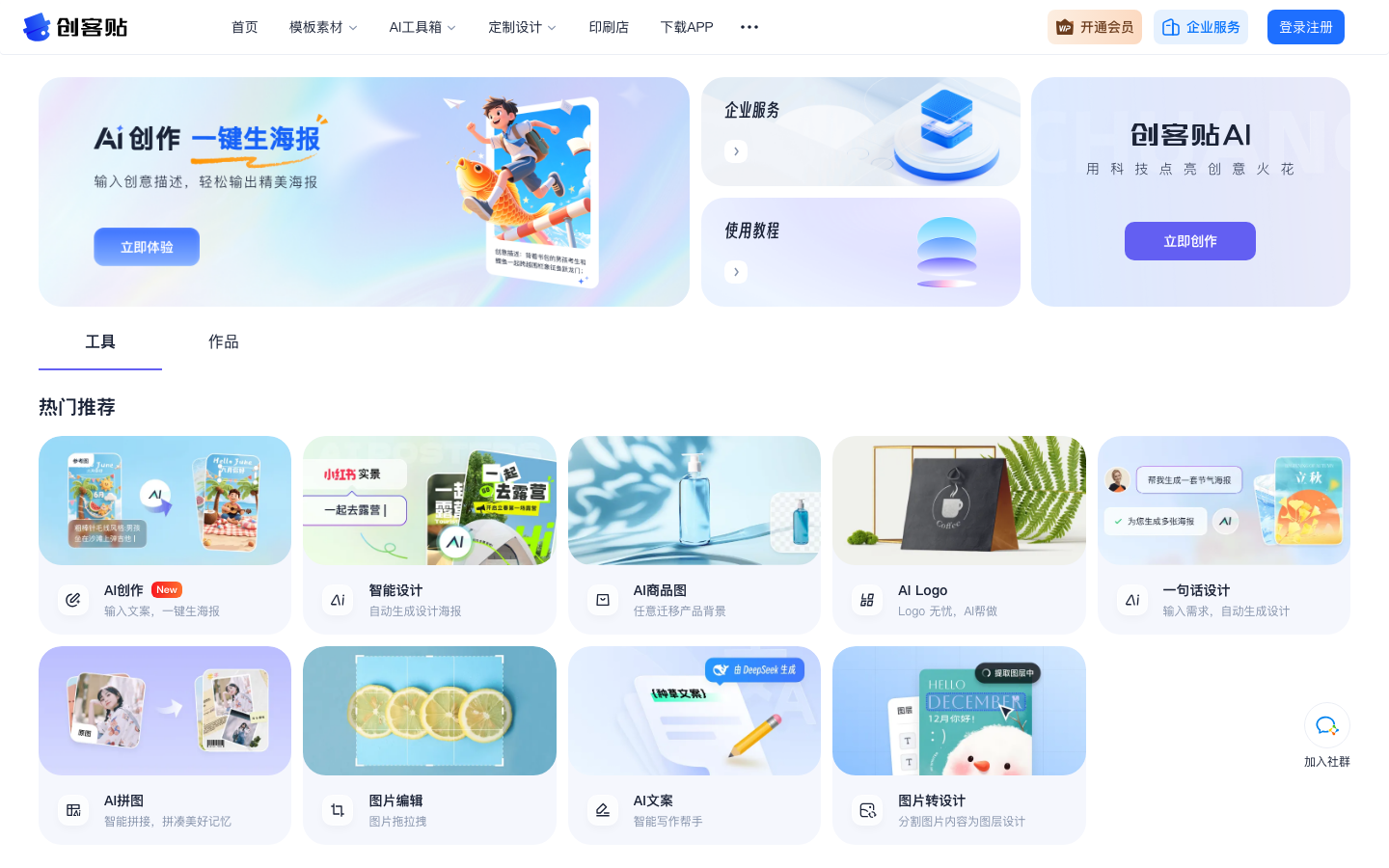
Maker Post AI is an AI creation toolbox launched by the online design platform Maker Post. It provides the ability to input creative descriptions to generate visual materials such as posters with one click. It is connected with Maker Post’s template material library and online editor to meet the high-frequency design needs of operations, e-commerce and small and medium-sized businesses.
Maker Post AI
Core parameters and statistics of Maker Post AI
Chuangke AI is not an independent drawing application, but an AI creation toolbox embedded within the Chuang Kit online design platform (chuangkit.com). Its core value lies in "seamlessly connecting AI generation and editable design" - AI-generated visual materials such as posters, product images, logos, etc. can be directly entered into the Maker Post's online editor to adjust text, layout, and brand elements, solving the common industry problem of pure image-generating tools that "the image is the final destination and cannot be edited again."
| Projects | Public Information |
|---|---|
| Product Form | AI Creation Toolbox in the Maker Post Platform (Modular Integration) |
| Core capabilities | Input copy/description and generate visual materials such as posters, product pictures, logos, etc. with one click |
| Collaboration capabilities | In-depth connection with the maker post template material library (tens of millions of templates) and online editor |
| Running platform | Web, App (iOS/Android) |
| Licensing model | Free basic version + membership subscription + enterprise service |
| Place of Attribution | CN (Beijing Yiyuanku Technology Co., Ltd.) |
| The user base of the parent platform | The number of registered users of Maker Post has not been disclosed, and it is one of the leading online design platforms in China |
| AI toolbox independent data | Undisclosed (subject to real-time information on the official website) |
Publicity verification: The official page advocates "using technology to light up creative sparks, input creative descriptions, and easily output beautiful posters". The core selling point is "enter copywriting and generate posters with one click." The real pain point in this statement is the scenario where non-designers (operations, e-commerce operations, small and medium-sized businesses) do not have the budget to hire designers and need to produce consistent visual materials at a high frequency. It does not promise to replace professional designers, and its positioning clearly points to "templating + rapid output".
Product Form Classification: Maker Post AI belongs to Productivity/Business Application (Type D) - it is a productivity module that enhances the existing design platform with AI capabilities, rather than an independent large model or API infrastructure. Its main delivery form is a toolbox interface for end users, not a model service. On this basis, it also has some Agent-oriented features: it can directly transform user intentions into editable design documents through portals such as "One Sentence Design", forming a process from demand understanding to finished product delivery.
Users and market recognition of Maker Post AI
The market positioning of Chuangkit AI is based on the existing users of the parent platform Chuangkit, forming a customer acquisition path of "platform diversion + AI value-added". Its user stratification is clear, but independent operational data has not yet been made public.
C-side Ecology: As one of the leading online design platforms in China, Chuangke Post has accumulated a huge personal user base and template consumption habits since its launch in 2014. The AI toolbox (i.e. Maker Post AI) launched in 2025 is a value-added transformation of the existing user base - users who already have the habit of using templates are naturally potential consumers of AI generation functions. The core user profile is working people aged 22-40 (operations, e-commerce operations, new media editors, administration). These people are already familiar with the editing process of maker posts. The AI-generated "intelligent design" and "AI creation" entrances reduce the switching cost from "finding templates to change" to "description generation".
B-side coverage: Chuangke post’s enterprise services are geared towards brand visual management, team collaboration and copyright compliance procurement. The AI toolbox plays the role of "reducing draft costs" in this scenario - the marketing department or operations team uses AI to generate the first draft, which is then standardized and adjusted through the brand specifications of the corporate space (font, color, logo placeholder). The specific customer list and access volume of enterprise services have not been officially disclosed.
Market Signal: Third-party data platforms (such as Analysys QuestMobile) have not separately disclosed the MAU/DAU of Maker Post AI. Maker Post as a whole has formed a competitive pattern with Canva drawable and draft design in the online design track. The AI toolbox will be a functional overlay after 2025. Its user penetration rate and satisfaction rate are based on the actual experience on the official website and in the app. Officials have not disclosed financing information or revenue data.
Implementation Judgment: The value of Maker Post AI relies on the user stock and design assets (templates, materials, fonts) of the parent platform, rather than independent customer acquisition. For teams that are already Maker Post users, the AI toolbox is a zero-threshold capability upgrade; for non-users, the AI function itself is not enough to constitute a single reason for migrating to Maker Post—it needs to be comprehensively evaluated in conjunction with the template library and editor.
The cost advantage of maker post AI
The cost structure of Maker Post AI revolves around the three layers of "free experience + membership value-added + enterprise customization". Its hidden costs mainly exist in the boundaries of commercial authorization and the scope of material availability.
Cost structure for C-side/individual users:
- Free Tier: You can experience the basic capabilities in the AI toolbox (such as the basic scenario of AI posters generating AI product images), and the generated results can be downloaded directly. The core limitations of the free tier are: the range of commercially available materials is limited, the HD export resolution is limited, and some AI functions (such as AI Logo and AI copywriting) may require payment to unlock. For non-commercial scenarios such as personal social media graphics and lightweight content creation, the free tier can cover most needs.
- Member Subscription: Pay to unlock commercial material libraries (including fonts, illustrations, templates), high-definition batch export, watermark removal and other capabilities. Membership is divided into monthly fee/annual fee models, and the specific price is subject to real-time information on the official website. Comparison with competing products: Canva's China membership for drawing is about 30-50 yuan/month, and the final design fee is about 25-40 yuan/month. The membership price of Maker Post is in the same range. The difference lies in the focus of template styles on each platform (Maker Post is more focused on domestic marketing/e-commerce scenarios).
Cost structure of B-side/enterprise team:
- Enterprise Services: Quotation based on team size and asset requirements, including brand space (unified brand specifications), team collaboration, centralized purchase of copyrighted materials, exclusive customer service, etc. The price is subject to business communication, usually with an annual payment model.
- Hidden costs: When an enterprise uses AI to generate materials, it needs to pay attention to whether the materials (pictures, fonts) in the generated content are included in the enterprise's commercial authorization scope. During the AI generation process, the model may use material elements from the training data. The copyright ownership of these elements still exists in a legal gray area. It is recommended that enterprises establish an internal review process of "AI generation + manual replacement of key materials" to avoid selecting high-risk elements from unknown sources.
Quantification of cost reduction and efficiency improvement (deduction):
- New media operation writing weekly reports/social media illustrations: The traditional process requires waiting for the designer to schedule, and it takes an average of 2-4 hours from demand communication to final draft. After using the Maker Post AI, the operator inputs the copy in 30 seconds to generate the first draft, and then fine-tunes it in the editor for 5-10 minutes before delivery. The single material output time is reduced from 2-4 hours to 10-15 minutes.
- E-commerce big promotion batch main images: Under the traditional model, 10 product main images require 1-2 working days from the designer. Using the AI product image function (background changing, one-click generation), operators can operate in batches and complete the first draft image selection within 1 hour, and then hand it over to designers to refine key pages, increasing overall production capacity by 4-8 times.
- Daily marketing for small and medium-sized businesses: For businesses without full-time designers, the traditional solution is to outsource (50-200 yuan for a single poster) or learn design software by yourself (low efficiency). Maker Post AI can reduce the cost of a single poster to almost zero (free tier), and the average monthly expenditure on visual materials from 1000-5000 yuan to 0-200 yuan (deduced value, based on the free tier + a small amount of paid materials).
The above values are engineering deductions based on product characteristics and are unofficial promises. Actual efficiency is affected by factors such as user proficiency and material complexity.
Main functions of Maker Post AI
Maker Post AI disassembles AI capabilities into nearly 20 functional modules, covering the "full link from idea to editable design." The following is a description grouped by capability domain.
Generating class (AI core output)
- AI creation (input copywriter to generate poster): core entrance, input marketing copywriting or creative description, AI automatically matches the template and layout, and outputs an editable poster design. Synergy effect: The generated result is not a picture, but an editable file with layer groups. You can modify text, replace pictures, and adjust colors directly in the editor without having to redo it from scratch.
- AI Product Image (Intelligent Background Changing): Upload the product image, and AI will automatically identify the subject and migrate it to the preset/customized background scene (such as driftwood countertops, lakeside snow-capped mountains, sunny countertops and other high-frequency e-commerce scenes). Synergy effect: The generated results maintain the original image resolution and retain the flexibility of subsequent editing adjustments, which is suitable for e-commerce batch image replacement scenarios.
- AI Logo Design: Enter the brand name and industry, and AI will generate multiple sets of logo plans, supporting online fine-tuning and vector export. Synergy effect: The generated logo can be directly entered into the editor's brand space and reused as a standard element for all subsequent materials, thus avoiding the problem of inconsistent logo styles for the same brand in materials.
- AI Copywriting: an intelligent writing assistant that generates supporting copywriting for posters, social media, and promotional materials. Synergy effect: After copywriting is generated, it can be applied to the AI-created poster editor with one click, achieving one-time alignment of "text-visual-typesetting" without manual copying and pasting.
Editing and enhancement categories (AI-assisted refinement)
- Intelligent Design (Automatically Generate Posters): Intelligently recommends layouts and color schemes based on existing content, suitable for users who already have materials but lack a sense of design.
- Picture Editing/Editor: Basic image editing capabilities (cropping, color correction, watermarking, resizing), seamlessly connected with AI generation.
- One-click cutout/AI elimination/AI watermark removal: Intelligent recognition of the subject and background, automatic detection and filling of watermark removal. Synergy effect: The processed pictures can be directly entered into the editor as materials, without the need for intermediate conversion by third-party photo editing tools.
- Image HD/AI enlargement/lossless resizing: Intelligent amplification of low-resolution images, screen extension and completion, and resizing while maintaining clarity. Synergy effect: Lossless resizing is particularly suitable for the multi-standard image requirements of e-commerce platforms (different sizes for different platforms), and can be adapted in batches once generated.
- Partial redraw: Paint the selected area, and AI will regenerate the content of this part without changing other areas. Suitable for replacing an unsatisfactory element without having to regenerate the entire image.
- Picture Translation: Extract the text in the picture, translate it into other languages and restore it to a layered design. Suitable for cross-border merchants to process multi-language product images.
Creative gameplay (AI content creation)
- Wen Sheng Picture Books/Wen Sheng Characters/Line Draft Coloring/Photo Adaptation to Comics/Character Posture Recognition: AI production tools for education, entertainment, and social media content creation. Synergy effect: Picture book and character generation results can be directly used for IP content production on platforms such as Xiaohongshu and Douyin, without the intervention of professional painters.
- AI Puzzle: Intelligently stitch together multiple pictures and automatically lay them out, suitable for social media grids, product comparison pictures and other scenarios.
- Wensheng Materials: Find or generate picture materials that meet the requirements through text descriptions, replacing traditional material library searches.
Expert View: The true competitiveness of Maker Post AI does not lie in the power of a single AI capability, but in the "internal circulation" between the 20+ functional modules - the cutout pictures can be directly dragged into the editor as poster material, the copy written by the AI copywriter can enter the poster generation process of AI creation with one click, and the multi-language version of the picture translated can directly enter the output pipeline of lossless resizing. This kind of data connectivity between modules is the essential difference between "AI function set" and "AI design workbench".
Maker post AI model and version evolution
The version evolution of Maker Post AI is deeply bound to the overall iteration of the parent platform Maker Post. AI capabilities serve as a functional layer superimposed on the platform and do not release version numbers independently. The following is a timeline of events based on publicly observable milestones.
| Time Node | Version/Milestone | Change Points |
|---|---|---|
| ~2014 | Maker Post V1.0 (template design platform) | The online design tool with template + drag and drop editing as the core is launched, positioning "making design easier" |
| ~2016-2023 | Continuous iteration (template ecosystem construction) | Expanded template categories (over 10 million sets), improved editor functions, launched mobile App, and launched enterprise services |
| ~2023-06 | AI function exploration period | Begin to integrate basic AI editing capabilities such as AI cutout, AI watermark removal, etc. as an auxiliary tool for the editor |
| ~2024 | Prototype of AI toolbox | AI creation (copywriting posters), intelligent design and other generative AI functions are online, and the toolbox module has been initially formed |
| ~2025 | AI toolbox is officially released | Nearly 20 AI functions such as AI Logo, AI product images, AI copywriting, and Wensheng picture books are all online, and AI appears as an independent function entrance in the platform navigation |
| ~2026-05 | Current version (full version of AI toolbox) | Full-featured coverage of the "Generate-Edit-Enhance-Output" link, deeply connected with the editor, template library, and brand space |
Version Note: As a functional module within the platform, Maker Post AI does not have an independent version number. The above time nodes are publicly observable platform function launch nodes. The precise date is subject to the official announcement and update log of Maker Post. The core evolution logic is a three-stage transition of "from AI-assisted editing → AI generative design → AI full-link creation".
Technological advantages of maker post AI
The technical advantage of Makerpost AI lies not in the parameter scale of the underlying model, but in the depth and maturity of the engineering capability of "data interoperability between AI generated results and design platform".
Generate-edit isomorphic architecture: This is the core difference between Maker Post AI and pure drawing tools (such as Midjourney, Stable Diffusion online version). The results generated by the AI enter the Maker Post Editor in an editable layer format (text layer, image layer, shape layer) rather than a flat bitmap. Achieving this requires post-processing analysis at the model output - reversely parse the pixel-level results generated by the model into structured design elements (text content, fonts, font sizes, colors, image positions, layer levels), and then map them to the editor's data model. This means that the success rate of each AI generation depends not only on the quality of the generated image, but also on the accuracy of the "parsing-mapping". When parsing fails, text may be converted to images instead of editable text.
Template engine + AI dual-track generation: Maker Post AI's "intelligent design" and "AI creation" are not completely generated from scratch, but are semantically matched on the basis of its tens of millions of template libraries - after AI understands user input, it first selects the most matching layout structure from the template library, and then fills in specific content (copywriting, pictures, color matching) through the generated model. This strategy has three engineering benefits: reducing the degree of freedom of the generated model (reducing the probability of out-of-control problems such as crooked faces and deformities), ensuring that the output results comply with the design specifications (layout, bleeding, font installation), and shortening the generation time (the template provides the skeleton, and the AI is only responsible for local filling rather than global pixel calculation). The trade-off is less responsiveness to innovative typography or unconventional size needs that don’t exist in the template library.
Material Compliance Engine: In response to the commercial copyright risks in the Chinese market, Maker Post AI has embedded material compliance checks in the generation link: it can detect whether the picture materials used in the generated results fall within the scope of commercial authorization and whether the fonts require additional authorization. A brand-specific compliance whitelist (allowed font libraries and image library logo versions) can be configured in the corporate space. This mechanism reduces the legal risk of non-designers inadvertently using pirated materials, but the coverage and accuracy of compliance checks have not been officially disclosed.
Multi-terminal continuous creation: Keep design files synchronized between the Web and the App. Users can use AI to generate a first draft on the App side, and use the editor on the Web side to make fine adjustments, or vice versa. This cross-end collaboration capability is important in China's office scenarios - operators may use their mobile phones to generate ideas while commuting, and then go to the computer to refine the output.
Technical Boundaries: Maker Post AI is not suitable for scenarios that require extremely high originality in AI-generated results. Due to the reliance on template matching strategies, the "template traces" of the generated results are obvious - there are limited variations of poster templates of the same type, and high-frequency users may quickly encounter a sense of visual repetition. In addition, the layer analysis of AI-generated results is not 100% perfect. In complex scenes (such as multi-layer overlay text, custom gradient background), it may be necessary to manually re-adjust the layer structure.
How to use Maker Post AI
The usage path of Maker Post AI is divided into two modes: "direct generation by AI toolbox" and "find template first and then AI assistance". Users can choose freely according to the type of task.
Entry and path comparison:
| Entrance | Applicable tasks | Typical steps |
|---|---|---|
| Maker Post Web (chuangkit.com) → AI Toolbox | Create design materials from scratch (posters, product images, logos, etc.) | 1. Log in to the Maker Post → 2. Click on the AI Toolbox → 3. Select functions (AI creation/AI product images, etc.) → 4. Enter description/upload materials → 5. Directly enter the editor for refinement after AI generation → 6. Export/share |
| Maker Post Web → Template Library → Intelligent Design | Quickly adjust content based on existing templates | 1. Select the appropriate template in the template library → 2. Use intelligent design/AI to create replacement content → 3. Confirm the layout and export |
| Maker Post App | Lightweight Creation on Mobile | 1. Download the App (iOS/Android) → 2. Use the AI toolbox function → 3. Synchronize to the web to continue editing |
| Corporate services/brand space | Team collaboration and brand material management | 1. Create corporate space → 2. Configure brand specifications (Logo, fonts, color matching) → 3. Team members share materials and templates → 4. AI generation is subject to corporate brand specifications |
Typical workflow (taking e-commerce operations to generate product main images as an example):
- Open the Maker Post Web and enter the AI toolbox → AI product image
- Upload product photos (or select from the library)
- Select a background scene (such as "Driftwood Countertop", "Rainbow Countertop"), or customize the background description
- AI automatically migrates the main body of the product to the new background to maintain light and shadow consistency.
- Enter the editor: adjust product position, overlay promotional copy (font selected from brand space), and add discount tags
- Use "lossless resizing" to batch output the required sizes for each platform (Taobao main image, JD.com main image, Pinduoduo main image)
- Export high-definition PNG/JPEG, or publish directly to the bound e-commerce platform (if supported)
Human-machine collaboration boundary (Type D mandatory):
- Can be 100% automated: AI generation of first draft, intelligent cutout AI watermark removal, lossless scaling, image high-definition repair AI puzzle. These procedures do not involve brand compliance judgments or irreversible operations and can be executed in batches.
- Manual confirmation is required: whether the generated copy conforms to the brand tone (manual review is recommended after AI copy is output), whether the edges of the product body in the product image are smooth (visual verification is required before exporting), whether the font size and prominence of key promotional information are appropriate.
- It is recommended that manual execution be carried out in an orderly manner: high-value materials (such as home page promotion banners, brand image posters) before final release are recommended to be finalized by the designer or the person in charge of operations; the use authorization of commercial copyright materials is recommended to be independently verified by corporate legal affairs/purchasing, and does not rely on AI compliance engines.
Product pricing of Makerpost AI
The pricing strategy of MakerPost AI is shared with the membership system of the parent platform. The AI function is a value-added module in membership rights and is not billed separately. The following is organized according to publicly observable price brackets.
Individual membership (C-side):
- Free version: You can experience the basic functions of the AI toolbox (AI creation, intelligent design, etc.), the basic resolution of the generated results, and commercial materials and fonts require additional authorization. Suitable for lightweight use in non-commercial scenarios.
- Member Edition (monthly/annual fee): Unlocks full AI functions, commercial material library (including genuine fonts), high-definition batch export, watermark removal of all AI product images, etc. The monthly fee is about 30-50 yuan (specifically, please refer to the real-time information on the official website), and annual payment usually enjoys a discount.
- Learning/Education Scenario: Maker Post has educational discounts for students, which are subject to official policies.
Enterprise Services (B-side):
- Quotation based on team size and functional requirements, including: brand space (unified brand specifications), team collaboration (multiple people editing/reviewing at the same time), centralized procurement of copyrighted materials, exclusive customer service API interface (if applicable). The price needs to be confirmed through business communication.
- The AI functions of the enterprise version are aligned with the personal version, and additional AI generation is added under the constraints of brand specifications (such as AI generation automatically using the company's preset colors/fonts).
Price comparison with competing products:
| Dimension | Maker Post AI | Canva Drawable | Draft Design |
|---|---|---|---|
| Free tier AI capabilities | Basic AI creation, intelligent design | Basic AI functions (some require trial) | Limited free AI functions |
| Monthly fee for individual membership (approximately) | 30-50 yuan (public range) | About 30-50 yuan | About 25-40 yuan |
| AI product images | Support (including multiple scene backgrounds) | Partially supported | Partially supported |
| Scope of commercial materials | Tens of millions of templates + genuine materials | Global material library (restricted in China) | Rich domestic scene materials |
| Enterprise service pricing | On-demand quotation | Per-seat quotation | On-demand quotation |
The above prices are publicly observable market range values, and the accurate prices are subject to the real-time page of the official website of each platform. Maker Post AI does not sell API access rights separately. Its AI capabilities are consumed through functional modules within the platform. There is no developer pricing model based on token billing.
Application scenarios of maker post AI
The scene coverage of Maker Post AI focuses on the visual output needs of "high-frequency, template-based, and non-professional designers". The following four types of scenarios have relatively mature implementation paths.
- E-commerce operations and promotional materials: Batch generation of product main images (AI product image changing background), promotional posters (AI creative input promotion copy generation), event banners, store homepage decoration. Actual benefits: Operators can complete in 30 minutes the workload that previously required designers for 1 day (10 product main images + 3 promotional posters), especially during e-commerce promotions. Key points to verify: Whether the edges of the main body of the generated product image are natural, whether the font of the promotional information is clear and readable, and whether the layout is consistent when outputting in multiple specifications.
- Social media operation and content marketing: Xiaohongshu cover picture/image (AI creation supports Xiaohongshu special template), Douyin/Kuaishou short video cover, official account picture, and circle of friends poster. Maker Post AI's preset templates such as "Xiaohongshu Big Character Cover" and "Xiaohongshu Copywriting with Pictures" are directly optimized for this scenario. Actual benefits: New media operations can batch generate social media images for a week, and the content release rhythm is no longer stuck by design schedules. Key points to check: Whether the text accompanying the picture has been cropped, and whether the size adaptation for different social media platforms is accurate.
- Brand construction for small and medium-sized businesses: Logo design (AI Logo), business card production, brand color specification establishment, flyer and coupon design. Actual benefits: Start-up businesses without a design team can complete the construction of basic brand visuals (Logo + business cards + flyers) within 1 day, and the cost is only the membership fee, while traditional outsourcing requires 2,000-5,000 yuan. Key points of verification: Whether the AI-generated logo is too similar to other brands, it is recommended to conduct a trademark duplication check before official use.
- Internal corporate administration and HR: recruitment posters, corporate culture wall design, internal notification posters, event invitations, training certificate templates. Actual benefits: HR and administrative staff can complete the company's internal visual materials by themselves, without waiting in line to set up
designers to shorten internal response cycles. Key points of verification: Whether the corporate brand specifications (colors, fonts) are correctly reflected in the design, and corporate service users can be automatically constrained through the brand space.
- Education scenes: courseware covers, teaching posters, event leaflets, graduation albums, picture book creation (wensheng picture books are suitable for kindergarten/elementary school scenes). Actual benefits: Teachers or educational institutions can quickly produce teaching and promotional materials, and picture book generation can be used as a creative tool for classroom teaching. Key points of verification: Whether the generated content (especially when picture books/characters are used by children) has been reviewed for content safety.
Applicable groups of Maker Post AI
The core target users of Maker Post AI are working people and small and medium-sized businesses who have high-frequency visual output needs but do not have professional design skills. It also provides efficiency improvement value to professional designers.
- Operation and e-commerce operation: The core user group needs a large number of product images, promotional posters, and social media images on a daily basis. The AI product pictures and AI creation functions of Maker Post AI directly correspond to the high-frequency tasks of this group. Floating conditions: A certain amount of copywriting ability is required (the quality of input ideas directly affects the AI generation effect), as well as knowledge of basic design common sense (knowing the meaning of font copyright and image resolution). Not suitable for the boundary: For brand flagship stores that have extremely high quality requirements for design (such as luxury goods and high-end beauty products), the "template sense" generated by AI may lower the brand tone. It is recommended that professional designers lead the AI and only assist in drafting.
- Small and medium-sized businesses and entrepreneurs: If there is no full-time designer or the design budget is limited, commercial materials can be completed by themselves through Maker Post AI. Implementation requirements: Willing to spend a small amount of time learning the operation of the AI toolbox (it takes about 30 minutes to get started), and can accept templated design styles. Not suitable for boundaries: For merchants who need differentiated brand vision to establish market recognition, long-term use of AI templates may lead to a convergence of visual styles. It is recommended to ask designers to make customized adjustments to key elements based on the first draft of AI.
- New media editors and self-media people: Content creators on public accounts, Xiaohongshu, Douyin and other platforms need high-frequency graphics. Implementation conditions: Maker Post App is suitable for mobile creation, and simple picture matching can be completed during commuting time. Not suitable for boundaries: Highly original illustrations or hand-drawn style illustrations are required. The ability of AI to generate images is limited by the model training data and template library style, making it difficult to produce a unique personal painting style.
- Internal corporate HR and administrative personnel: internal needs such as corporate cultural materials, recruitment posters, event notices, etc. Landing Conditions: The enterprise has purchased the Maker Sticker enterprise service, and the brand space has been configured with enterprise specifications. **discomfort
Configuration boundary**: For materials involving highly confidential or sensitive information (such as undisclosed organizational adjustments), cloud processing of the AI generation process involves data privacy risks. It is recommended to use local design tools or self-built templates.
- Professional Designer (auxiliary role): Designers can use Maker Post AI to quickly generate first drafts or materials, saving time on basic material production and focusing on creativity and polishing key visuals. Not suitable for boundaries: For highly customized business illustrations, brand visual system (VI) design, and complex layout innovation scenarios, AI tools are more suitable for assisting rather than leading.
Summary and Outlook
The essence of Maker Post AI is not "another AI drawing tool", but "a systematic project that embeds AI generation capabilities into a mature online design platform." Its core competitiveness lies in the three-level relationship: Generation-Editing-Material data interoperability relationship (AI output is not the end but the starting point), Copywriting-Visual-Typesetting content production relationship (AI copywriting to AI creation one-click flow), and Template-AI-Brand Standards quality control relationship (releasing AI freedom under template and brand constraints). For user groups such as operations, e-commerce and small and medium-sized businesses who "highly produce templated visual materials", it provides a path from "waiting for designers" to "self-service instant production".
Major Current Limitations:
- Obvious traces of templating: Reliance on template matching strategies leads to insufficient visual differentiation of generated results. After frequent use, it is easy to produce a "template" look and feel, which is not suitable for brands that require strong visual recognition.
- Boundary of original generation capabilities: In scenes not covered by templates (such as specific artistic styles, 3D rendering styles, complex synthesis effects), the quality of AI generation drops significantly, and professional tools are still needed to supplement it.
- Insufficient data transparency: Key operational indicators such as the number of independent users of the AI toolbox, generation power, and coverage of the material compliance engine are not disclosed, which affects the quantitative evaluation of corporate procurement.
- Copyright gray area: The source of material elements used in AI-generated results (copyrighted materials in training data) is still legally controversial. In commercial scenarios, companies need to assess legal risks by themselves and cannot completely rely on the platform's built-in compliance checks.
Follow-up observation points:
- Whether the accuracy of layer analysis of AI-generated results has been improved (it may be necessary to manually repair the layer structure in current complex scenarios)
- Whether to launch a more open custom template/AI model capability (allowing users to upload their own design specifications as AI generation constraints)
- The evolution of copyright protection mechanisms (whether to introduce copyright traceability/digital watermarking of generated content)
- The industry depth of enterprise services (whether there are vertical solutions for specific industries, such as catering, beauty, etc.)
Procurement and Adoption Risk Assessment:
- Individual Users: Zero Risk. Experience the whole process in the free tier. Once you are satisfied, you can decide whether to upgrade your membership. It is recommended to first use 3-5 actual tasks to test whether the AI generation quality meets daily needs.
- Small and medium-sized merchants: low risk. The investment in membership fees is low, but internal usage regulations need to be established - clarifying the commercial boundaries of AI-generated materials, the review process for key materials, and the legal copyright review mechanism for generated content. It is not appropriate to leave core brand materials entirely to AI generation without human intervention.
- Enterprise Medium and Large Teams: Moderate risk. Three verifications need to be completed before enterprise service procurement: ① The actual coverage of the material compliance engine of the AI-generated results in the target industry (it is recommended to use 10-20 actual business scenarios for A/B testing); ② The degree of normative constraints of the brand space (whether it meets the accuracy requirements of the enterprise's visual recognition system); ③ Data storage and privacy compliance (whether the storage location and retention policy of the original materials and edited drafts generated by AI comply with the enterprise's data governance policy). It is recommended to conduct a 4-8 week pilot verification in a single department (such as the social media operation group of the marketing department), and then decide whether to promote the whole company based on the pilot data (efficiency improvement ratio, rework rate, team satisfaction). It is not recommended to directly sign an annual enterprise contract without conducting a pilot project.
Related tools:  Midjourney, stable-diffusion
Version Info
- Maker Post AI Toolbox (Web) :The AI creation toolbox in the Maker Post platform supports inputting creative descriptions to generate visual materials such as posters with one click, and can directly enter the online editor for secondary adjustments. The official unified version number and exact date have not been disclosed, and the dates are approximate.
- Maker Post Online Design (Template + Editor) :Maker Post is a design platform with a template library and online editor as its core, which is the foundation of the AI toolbox. The exact date has not been officially announced, but is an approximation.
User Reviews