 Claude Code
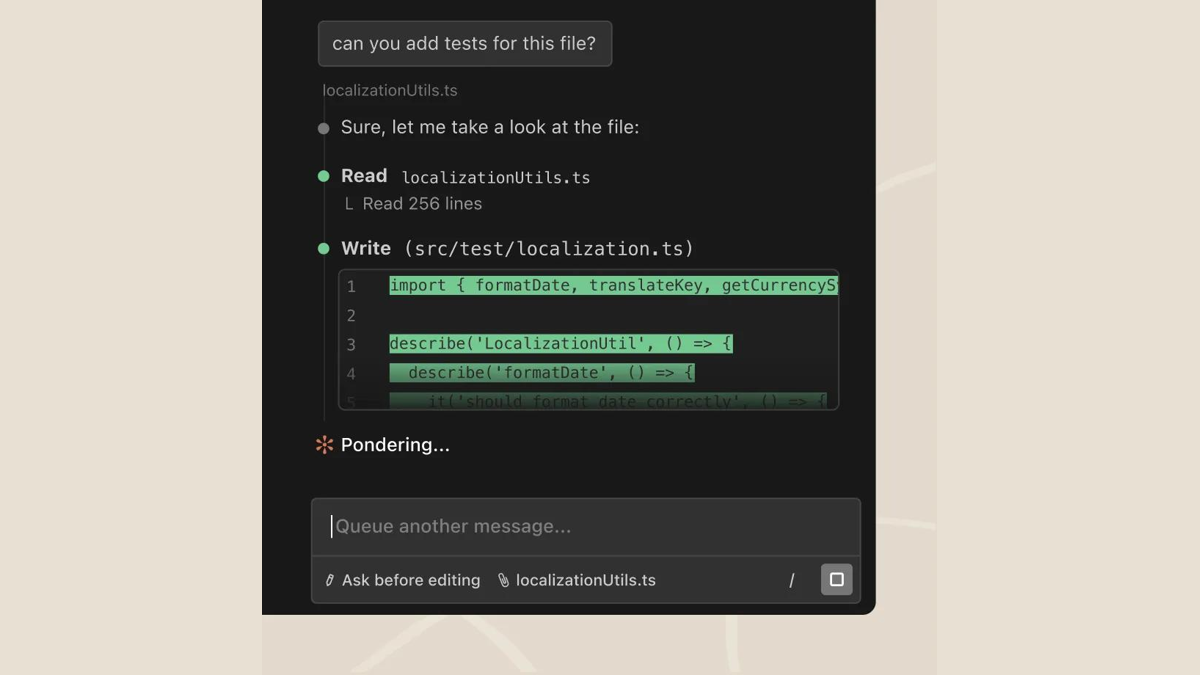
Claude Code is a terminal-native AI programming Agent launched by Anthropic. It directly connects the Claude model to the command line and development environment. It can read the entire code base, plan tasks, and automatically complete editing, running tests and submissions.
ClaudeCode
Core parameters and statistics
Claude Code is a terminal-native AI programming agent launched by Anthropic for developers. It is positioned as an "engineer living in your command line." It does not rely on an independent editor interface, but runs directly in the terminal, reads the entire project structure, and completes multi-step coding tasks according to natural language instructions.
| Projects | Public Information |
|---|---|
| Official positioning | Terminal native AI programming Agent |
| Base Model | Claude Series (Sonnet / Opus) |
| Running form | Command line CLI, IDE extension (VS Code / JetBrains) |
| Core Competencies | Code base understanding, automatic editing, running tests Git submission |
| Access | Claude Subscription or Anthropic API |
| Supported platforms | Desktop (macOS/Linux/Windows), API |
Running form: Unlike graphical IDE plug-ins, Claude Code uses CLI as the main entrance and can run in an interface-less server or CI environment, making it suitable for scripting and automation scenarios.
Model driven: Its capabilities are directly improved with the Claude model upgrade, and the long context window allows it to be incorporated into a large code base for reasoning at one time.
Agent Features: It is not a single-round completion, but an agent that can autonomously dismantle tasks, call tools, run commands, and iterate based on the results.
User and market recognition
Claude Code's recognition mainly comes from the developer community's reputation for Claude's model coding capabilities. The official has not disclosed specific user numbers or revenue figures.
Model reputation: Claude has been in the first echelon for a long time in multiple code evaluations (such as SWE-bench), which is the basis of Claude Code's capabilities.
Ecological adoption: It has been integrated into a variety of terminal workflows and CI processes, and provides official VS Code and JetBrains extensions, covering usage scenarios from individual developers to engineering teams.
Prerequisites for implementation: For agent-style programming to truly improve efficiency, the project usually requires a clear directory structure, runnable tests, and clear task descriptions. Otherwise, the verification cost of automatic changes will increase.
Cost advantage
The cost of Claude Code is not free, but the integration of programming capabilities into Claude subscription and API billing, allowing teams to pay based on actual usage.
Subscription integration: Claude Pro/Max subscribers can directly use Claude Code within the quota, and individual developers do not need to purchase it separately.
API billing: Enterprises can access the Anthropic API by token billing, and the cost fluctuates with the size of the code base and task complexity.
Real cost structure: Long context tasks will consume more tokens, so the key to the total cost is not the unit price, but whether the task design is streamlined, whether the context is reused, and the manual review investment for automatic changes.
Main functions
Claude Code's capabilities are designed around "complete end-to-end coding tasks within the terminal":
- Code Base Understanding: Automatically read the project structure and dependencies, and answer cross-file code questions.
- Automatic Editing and Refactoring: Directly modify multiple files according to instructions and maintain consistency.
- Command Execution and Testing: Run build and test commands and iteratively fix based on the results.
- Git workflow: generate submission information, create branches and PRs, and serial version management.
- IDE and extension integration: Bring Agent capabilities into the graphical interface through VS Code and JetBrains extensions.
The actual effect depends on three points: whether the project has runnable tests, whether the task description is clear, and whether key changes are included in manual review.
Model and version evolution
Continuous iterative updates, the latest version introduces performance optimization and new features. Historical version information can be viewed on the official release page. There is no complete public version evolution timeline yet. It is recommended to pay attention to the official announcement to understand the rhythm of feature updates.
Technical advantages
The technical advantages of Claude Code come from the combination of model capabilities and Agent architecture:
Long context reasoning: Claude's large context window allows it to include a large amount of code at one time for cross-file reasoning, reducing "only partial views" of erroneous changes.
Tool call function: It can run commands autonomously, read output and iterate, converging "generation-execution-verification" into one cycle.
Terminal native: With CLI as the core, it is easy to embed server CI and automation scripts without being bound by the graphical interface.
The price is that the more autonomous the Agent, the more testing and review are needed as a safety net, otherwise automatic changes may introduce hidden regressions.
How to use
Claude Code is installed and connected to the Claude account or API through the command line:
| How to use | Suitable for people | Features | Cost |
|---|---|---|---|
| CLI command line | Developers who prefer terminal | Talk directly in the project directory after installation | Subscription or API billing |
| IDE extension | Graphical interface user | Calling Agent within VS Code / JetBrains | Subscription or API billing |
| CI/Automation | Engineering Team | Execute automated coding tasks in the pipeline | API pay-per-use |
Implementation is usually carried out according to "small task pilot → add test guardrails → expand scope": first use it to handle low-risk tasks such as bug fixing and writing tests, and then hand it over to more complex refactoring after confirming the quality of the changes.
Product Pricing
The pricing model is subject to the official real-time page. Usually a freemium or subscription system is used, and basic functions can be used for free. Advanced functions or high-frequency use require paid subscriptions, and users are advised to evaluate the optimal solution based on actual usage.
Application scenarios
Claude Code is suitable for coding tasks that can be clearly described and verified by testing:
- Defect repair and test completion: locate bugs, complete unit tests, and the scope of changes is controllable and easy to verify.
- Cross-file refactoring: Perform consistent renaming and interface migration across large code bases.
- Automated engineering tasks: Run code generation, dependency upgrades and regression fixes in CI.
Applicable people
Claude Code’s terminal native design serves three types of roles:
- Professional Developer: Hope to get an Agent assistant that can run commands and change codes in the terminal.
- Engineering Team: Need to embed AI programming capabilities into CI and automation processes.
- Heavy Claude user: Subscribed to Claude and want to reuse the same model to complete coding tasks.
Scenarios that are not suitable are: beginners lack code review capabilities, the project has no test guardrails, or only simple code completion is needed - in these scenarios, lightweight completion tools are more worry-free.
Summary and Outlook
The core value of Claude Code is to deliver the leading Claude coding capabilities in the form of a terminal native Agent, allowing AI to truly enter the engineering context of "running commands, changing code, and running tests". It is not the easiest completion tool to use, but it is more practical for engineering teams that pursue automation and have test guardrails.
If you want to implement it, it is recommended to pilot it on low-risk tasks first, establish test and review guardrails, and then gradually expand to complex reconstruction; before purchasing, enterprises should focus on confirming API usage costs, code data processing boundaries, and team seat strategies.
Related tools:  GitHub Copilot,
  Cursor
Version evolution of Claude Code
The iteration of Claude Code advances simultaneously with the Claude model, and its capabilities leap with the generational upgrade of the underlying model.
Mainline release
- 2.0 (~2025-09): Upgrade to a new generation of Claude model to enhance long-context code base reasoning, sub-task planning and IDE integration.
Earlier version
- 1.0 (~2025-05): The first official version, establishing the terminal’s native Agent form and code base editing and command execution capabilities.
Since the version is strongly bound to the model, the production team is more suitable to lock a model version for evaluation, and then verify the regression performance when upgrading.
Version Info
- Claude Code 2.0 :Upgrade to the Claude Sonnet/Opus new generation model, strengthen long-context code base understanding, sub-task planning and IDE integration, and provide VS Code extensions. There is no official precise date yet, please refer to the official real-time page.
- Claude Code 1.0 :The first officially released version provides code base understanding, file editing, command execution and Git operation capabilities in the terminal. There is no official precise date yet.
User Reviews