 ClickPrompt
Free
ClickPrompt
Free
ClickPrompt is an open source online AI prompt word design tool led by developer Phodal. It helps users view, run, share and learn various prompts. It organizes scattered prompt word techniques into visual and reusable paradigms and lowers the entry threshold for prompt projects.
ClickPrompt
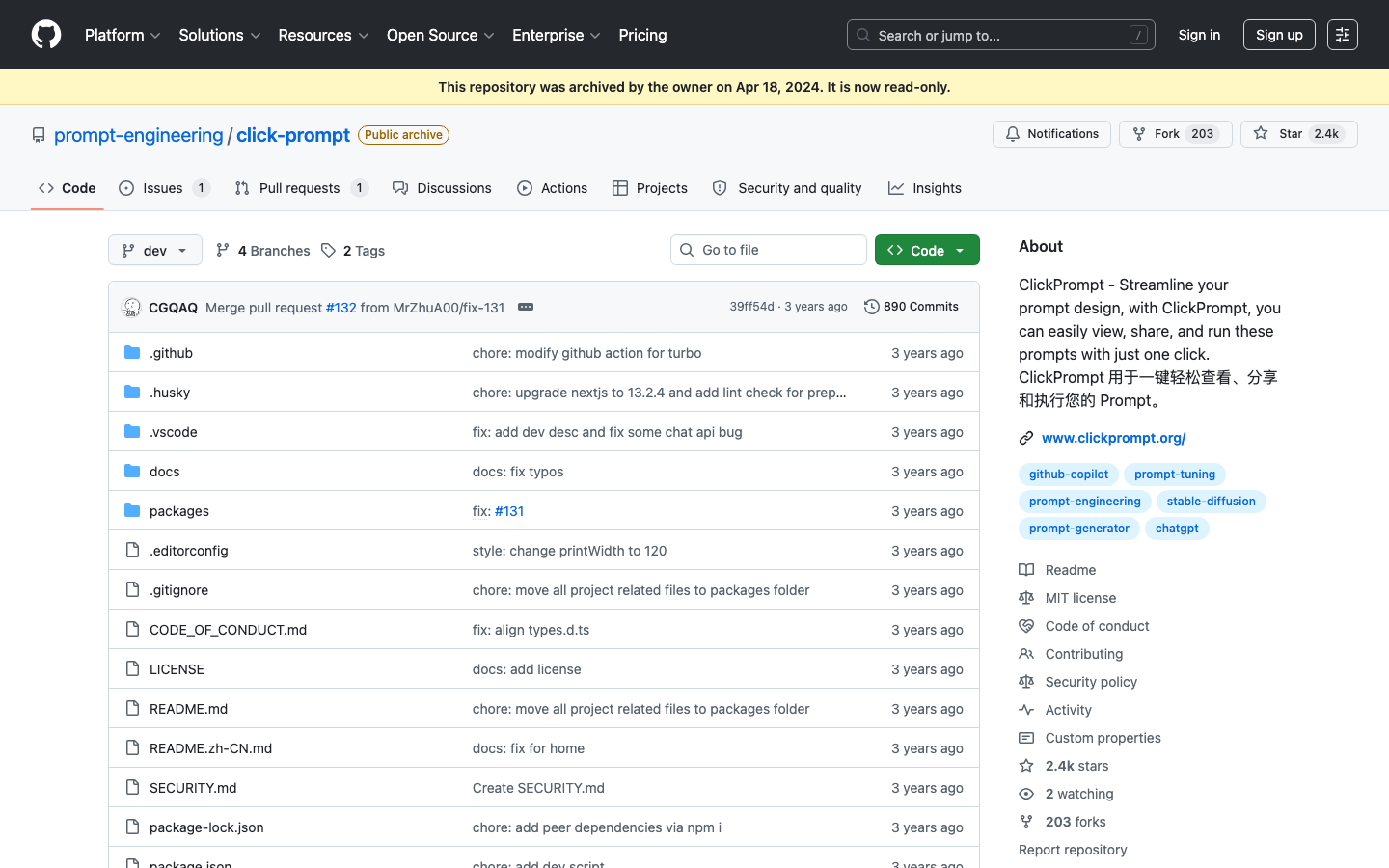
Core parameters and statistics of ClickPrompt
ClickPrompt is not a commercial prompt word management SaaS, but an open source tool for Prompt learning and design. It is positioned to "make the paradigm of the Prompt project visible, runnable, and shareable." The core pain point it solves is the lack of a systematic and reproducible entry path for beginners when faced with scattered prompt word skills. The project is built based on the React + Next.js + TypeScript technology stack. The code is open sourced under the MIT license and hosted on GitHub. The warehouse is currently archived (will enter read-only status in April 2024), but the source code and documentation are still available to the community for long-term use.
| Projects | Public Information |
|---|---|
| Tool type | Open source online AI prompt word design tool |
| Core Competencies | View, run, share and learn with one click Prompt |
| Open Source License | MIT |
| Technology stack | React + Next.js + TypeScript, Chakra UI, Tailwind CSS |
| Affiliated organization | prompt-engineering (led by Phodal) |
| Running platform | Web (supports self-hosting) |
| Hosted site | https://www.clickprompt.org/ (stability not guaranteed) |
| Code repository | https://github.com/prompt-engineering/click-prompt |
| Community size | GitHub Stars ~2.4k, Forks ~201, 14 contributors |
| Warehouse Status | Archived April 2024, read-only |
| Latest Release | v0.2.0 (2023-03-12) |
| Billing model | Free and open source |
Publicity Verification: The project is positioned as an "online AI prompt word design tool", emphasizing design and learning support for Prompt, consistent with its open source and example-driven attributes. The hosting site clickprompt.org is still accessible, but the repository archive means the project has ceased active development. This is a premise that cannot be ignored when assessing adoption risk - it is more suitable as a learning reference and a basis for secondary development, rather than an active product that continues to receive feature updates.
User and market recognition of ClickPrompt
ClickPrompt's market influence is mainly concentrated in the Chinese Prompt engineering learner community, and its attributes as a "teaching tool" have earned it a certain reputation among beginners.
-
GitHub Community Metrics: As of the date of archiving, the project has received about 2.4k Stars and 201 Forks, which is a medium-to-high level of attention among domestic open source projects in the Prompt engineering direction. The scale of participation of 14 contributors shows that it has a certain community base, but it is not a high-traffic star project. Contributors include Phodal (project sponsor), CGQAQ and other individuals who are well-known in the domestic developer community.
-
Citation from the Chinese Prompt Learning Community: In some Prompt engineering tutorials on Zhihu Bilibili, Minority and other platforms, ClickPrompt is often used as an example reference and introductory recommendation. Its value lies in "visualizing Prompt's design ideas" rather than providing the latest model capabilities. This allows it to find a differentiated position in the competition with official resources such as ChatGPT's official Prompt sample library OpenAI Cookbook - it is closer to the understanding habits and usage scenarios of Chinese users.
-
Horizontal comparison with similar open source projects: In the open source Prompt tool ecosystem, ClickPrompt is positioned to complement rather than directly compete with tools such as Promptimal and PromptPerfect. ClickPrompt focuses on "teaching and example display", while the latter focuses more on "Prompt automatic optimization". Compared with commercial products such as Jasper AI and Copy.ai, there is a natural generation gap in the depth of functionality and usability of ClickPrompt, but its open source attributes and zero cost make it still valuable in entry-level scenarios.
-
Boundary Note: After the warehouse was archived, community activity has basically stagnated. Issues and PRs are no longer responded to, which limits their value as "continuous optimization tools". However, for querying and learning existing knowledge, the archive status does not have a substantial impact - the documents and code are still complete and available.
ClickPrompt’s cost advantage: zero licensing fees and three-tier cost structure disassembly
As an MIT-licensed open source project, ClickPrompt has an absolute zero-cost advantage in terms of explicit expenses, but the specific cost structures faced by different usage levels vary significantly.
C-side/individual users: Free use with zero threshold. Visit clickprompt.org to experience it online, with no registration or payment required. For individual users who just want to learn and refer to Prompt examples, the cost of use is zero. The only hidden cost is the availability of the hosting site - if the site fails, individual users need to build it themselves or wait for the community to recover. The experience will be affected if the individual lacks independent operation and maintenance capabilities.
Developers/Self-deployment users: Code is available for free (MIT license), but self-deployment requires infrastructure investment. ClickPrompt's front-end project is based on React + Next.js. It is recommended to deploy it on Vercel's free tier to run it, and the average monthly cost is close to zero. If you need to customize backend integration or model API access, you need to configure an additional API Key (such as OpenAI API Key). The cost of this part is determined by the model service selected by the user and has nothing to do with ClickPrompt itself. In terms of engineering investment, deployment and configuration require about 1-2 hours of basic front-end engineering capabilities. Developers familiar with Next.js can complete the launch within 30 minutes.
Internal use of the enterprise/team: Zero software licensing fee, but the following cost items need to be evaluated: (1) Server and domain name fees for private deployment (if you use the Vercel free tier, you can ignore it. Enterprises usually choose their own servers, with a monthly fee of about 50-200 yuan), (2) If you need to deeply customize the interface or functions, front-end developers need to invest 2-5 Man/day of transformation work, (3) Long-term maintenance cost - since the warehouse has been archived, the workload of the enterprise to fix security vulnerabilities or adapt to new model APIs cannot be ignored. Compared with commercial Prompt management tools (such as PromptLayer, LangSmith, etc. starting at $49/month), ClickPrompt's hidden investment in deployment and customization may offset its advantage of zero licensing fees.
| Cost dimension | Personal online use | Developer self-deployment | Enterprise customization |
|---|---|---|---|
| Software License Fee | Zero | Zero (MIT License) | Zero (MIT License) |
| Infrastructure | Zero | Vercel free tier / own server | Own server (monthly fee 50-200 yuan) |
| Engineering investment | Zero | 1-2 hours deployment | 2-5 people/day custom development |
| Long-term maintenance | Not involved | Follow up as needed | Self-maintenance required (warehouse has been archived) |
| Commercial Support | None | None | None |
Core Tips on Hidden Costs: ClickPrompt's "free" is mainly reflected in the software licensing level. Its true total ownership cost depends on the user's engineering capabilities - a team with zero engineering capabilities can directly use the online site, but once self-deployment or customization is required, the hidden engineering costs will rise rapidly. This is a common "free pitfall" when choosing open source tools.
Main functions of ClickPrompt
ClickPrompt's functional design revolves around the four-step process of "view → run → share → learn", covering the complete link of Prompt design from input to feedback. The actual value and limitations are broken down one by one according to the functional modules.
-
One-click Execution: Supports directly calling ChatGPT and Stable Diffusion models, running Prompt with one click in the ClickPrompt interface and viewing the output results. Actual value: Users do not need to frequently switch windows between ChatGPT and Stable Diffusion, and can directly compare the output differences of the same Prompt under different models. Limitations: The execution capability is limited by the API Key provided by the user, and ClickPrompt itself does not optimize the output quality and is only a "transparent transmission channel" for Prompt. The support for ChatGPT is relatively complete, and calling Stable Diffusion requires basic API configuration capabilities on the user side.
-
Prompt Online Generator (Prompt Generator): Provides character generator for Stable Diffusion and Stable Diffusion → ChatGPT cross-model Prompt converter. Actual value: Lowers the threshold for writing prompts in specific fields - users only need to select preset parameters to generate structured, high-quality prompts without having to remember complex prompt syntax rules. The cross-model converter is the highlight feature: it converts SD-style prompts into descriptive prompts understandable by ChatGPT, solving the actual pain point of incompatible prompt syntax between different models. Limitations: The coverage of the preset templates is limited. For unconventional needs (such as specific artistic styles, professional terminology), the output of the generator requires manual fine-tuning.
-
Prompt Sample Library: A collection of Prompt examples contributed by community users, covering three types of models: Stable Diffusion, ChatGPT and GitHub Copilot. Actual value: This is the most "teaching attribute" function of ClickPrompt - it not only provides prompt text, but also displays the design ideas and output effects of each prompt. Users can directly Fork and modify. Expert view: The value of the example library does not lie in the "large amount", but in the fact that each example comes with a reproducible context - users can see "under what model this Prompt is under, what parameters are input, and what results are output." This is a "reproducible learning experience" that a simple Prompt list cannot provide.
-
Industry-specific Prompt Generator: Focuses on the three areas of programming, writing, and design, and provides prompt templates based on roles and scenarios. Actual value: Prompt role templates are preset for different positions (such as "as a Python developer" and "as a technical writer"), which reduces the mental burden of conceiving system prompts from scratch. Limitations: Only covers three industries, and has limited help for users in other fields such as law, medical care, education, etc. The template content is mainly in English, and there is room for improvement in the quality and richness of the Chinese Prompt template.
-
Prompt Optimizer (PoC Phase): A feature listed in the project roadmap designed to help users improve Prompt quality through algorithm analysis. Actual Status: This feature is in the proof-of-concept stage before being archived in the repository and is not fully shipped in the official release. This means that ClickPrompt currently does not have the ability to automatically optimize Prompt - this is a "planned but not yet implemented" feature and users should not use it as a basis for selection.
Expert perspective - Functional synergy: The core competitiveness of ClickPrompt is not a single function, but the teaching concept formed by "sample library → generator → one-click execution". The user sees a Prompt in the sample library → click Fork to modify the parameters in the generator → execute it with one click to view the effect → re-share the optimized Prompt back to the sample library. This block is often split into independent modules in commercial Prompt tools (for example, PromptBase only does transactions and Jasper only does generation). ClickPrompt implements a complete link through open source. Although the depth of each module is limited, for learning scenarios, "link integrity" has more teaching value than "single point depth".
ClickPrompt model and version evolution
The version history of ClickPrompt is relatively simple. After the project completed the MVP release in 2023, it entered the maintenance period after a small version iteration and was subsequently archived. The following summarizes its evolution by stages.
Initial open source release (2023-03)
The project was first released as open source on GitHub in March 2023, and a stable station (clickprompt.org) and a development station (dev.clickprompt.org) were deployed at the same time. The first batch of features include: one-click execution support for ChatGPT and Stable Diffusion, a basic prompt generator, and user example demonstrations. The technology stack adopts a monorepo architecture (turbo + pnpm workspace) and includes three sub-packages: click-prompt (main application), click-prompt-assets (material library) and click-prompt-i18n (multi-language).
v0.2.0 version (2023-03-12)
The first and only official release. Updates include: bug fixes, UI interaction optimization, and new support for GitHub Copilot Prompt examples. This version confirms the product direction of "cross-model Prompt support" - extending from the initial ChatGPT + Stable Diffusion to Copilot, covering the three mainstream Prompt scenarios of dialogue generation, image generation and code generation.
Project Archives (2024-04-18)
The warehouse is archived by the owner and enters a read-only state. This means that new Issues, PRs, or Discussions will no longer be accepted, dependencies will not be updated or security holes fixed, the hosting site will continue to run but without feature updates, and community forks can continue development but will not be merged back into mainline.
Version summary:
| Stage | Time | Key events |
|---|---|---|
| Project start | 2023-03 | Initial open source, MVP released |
| v0.2.0 Release | 2023-03-12 | First official version, added Copilot support |
| Maintenance period | 2023-04 ~ 2024-03 | Minor bug fixes, no major feature updates |
| Project Archives | 2024-04-18 | Warehouse read-only, active development stopped |
Comparison of version rhythm with competing products: In contrast, the similar open source project PromptPerfect maintains a feature update rhythm every 2-3 months, while the commercial product PromptLayer continues to undergo weekly iterations. ClickPrompt has a version history of only two Releases, indicating that it is more of a "proof of concept + teaching project" rather than a product-level project with continuous investment. For users, this means that it should not be expected to track prompt syntax changes for recent models such as GPT-4o, Claude 3, etc.
Technical advantages of ClickPrompt
ClickPrompt's technical design revolves around the three principles of "lightweight, scalable, and low threshold." Its technical advantages do not come from algorithm innovation, but from the precise matching of engineering selection to the target scenario.
Rationality of technology stack selection: A full-stack solution based on React + Next.js + TypeScript, equipped with Chakra UI as the component library and Tailwind CSS as the atomic style solution. This selection is a mainstream configuration in the front-end community around 2023, ensuring a low threshold for contributor participation - developers familiar with the React ecosystem can participate without any barriers. For self-deployment users, Next.js's SSR capability and Vercel's one-click deployment support make the online process extremely simple, and the process from git clone to site online can be completed within 30 minutes.
Monorepo architecture supports multi-package management: The project uses turborepo + pnpm workspace to organize three sub-packages (main application, material library i18n), achieving separation of concerns at the code level. The independent sub-package of the material library means that the community can update the Prompt sample library independently without affecting the main application code; the i18n sub-package provides an independent path for multi-language contributions. This architecture may seem "over-designed" in the MVP stage, but in community contribution scenarios, it actually reduces the psychological burden on participants - translation contributors only need to pay attention to the i18n package and do not need to understand the main application logic.
Model-independent Prompt execution layer: The core technical advantage of ClickPrompt lies in the design of its "model adaptation layer" - it not only binds a specific model, but connects the APIs of different models through a unified interface layer. This design allows the project to support new AI models by adding new adapters (theoretically it can be extended to GPT-4, Claude, Wen Xinyiyan, etc.) without modifying the core logic. From mechanism to effect to applicable scenarios: Because of the adapter mode, ClickPrompt's Prompt execution layer is decoupled from the model. Users can compare the responses of different models to the same Prompt in a unified interface, which is crucial for the "model behavior comparison" teaching scenario in the Prompt project. Limitations: Only two adapters, ChatGPT and Stable Diffusion, are actually provided. Support for other models remains at the theoretical level. This scalability advantage can no longer be realized after the warehouse is archived.
Internationalization and Community Contribution Infrastructure: The project has built-in complete i18n translation guides and contributor manuals (CONTRIBUTING.md, TRANSLATING.md), indicating that the project designers considered the issue of multi-language community building in the early stages. This is relatively rare in Chinese open source projects - most domestic open source projects are "Chinese first", and internationalization is an afterthought. ClickPrompt has provided a bilingual README in English and Chinese from the beginning, and planned a complete translation process. Actual effect: This "internationalization first" approach gives it a certain visibility in the overseas Prompt engineering community. However, due to the low overall visibility of the project, the actual multi-language contribution is limited.
Technical comparison with competing products:
| Technical Dimension | ClickPrompt | PromptPerfect | LangSmith |
|---|---|---|---|
| Open Source | MIT License | Commercial Closed Source | Commercial Closed Source |
| Model Adaptation Layer | Adapter Pattern (Theoretically Extensible) | Focus on Prompt Optimization | LLM Observability |
| Self-deployment | Support | Not supported | Enterprise version support |
| One-click execution | ChatGPT + SD | Optimization only | Not supported |
| Technology Stack | React + Next.js | Unpublished | Python backend |
| Warehouse Status | Archived | Active | Active |
How to use ClickPrompt
The usage path of ClickPrompt is divided into two modes: "online experience" and "self-deployment". The former is suitable for zero-based users to get started quickly, and the latter is suitable for technical teams that require customization or data isolation.
Online experience (recommended entry method):
- Visit https://www.clickprompt.org/
- Browse the Prompt sample library directly in your browser, no registration required
- Click the "Run" button in the example, and you need to configure the OpenAI API Key or Stable Diffusion API endpoint yourself
- Use the Prompt generator to create custom prompts that can be copied to the clipboard with one click
Self-deployment (for technical and customization needs):
# Clone repository
git clone https://github.com/prompt-engineering/click-prompt.git

# Enter the project directory
cd click-prompt

# Install dependencies
npm install

# Configure contextual variables (if Hugging Face integration is required)
echo "NEXT_PUBLIC_HUGGING_FACE_ACCESS_TOKEN={Your Token}" > .env.local

# Start development service
npm rundev
It is recommended to use Vercel (integrated by default for the project) to deploy to the production environment. You can also deploy to your own server (requires Node.js environment). After deployment, the model API Key needs to be configured, and users need to prepare valid API credentials for OpenAI/Stable Diffusion and other services.
Core configuration item description:
- NEXT_PUBLIC_HUGGING_FACE_ACCESS_TOKEN: Optional, Access Token for Hugging Face model integration
- Model API Key: Configured in the ClickPrompt interface rather than through contextual variables, and the API Keys of different users are isolated from each other
- Custom Prompt templates are stored in the packages/click-prompt-assets/ directory and can be edited directly.
Usage suggestions and acceptance concerns:
- For first-time users, it is recommended to start from the "Sample Library", browse the ready-made Prompt samples, and understand their design ideas.
- The "Generator" function is most suitable for scenarios where you have vague requirements but don't know how to express them as prompts - first use a template to generate the first version, and then manually fine-tune it
- "One-click execution" requires confirmation of the quota and permissions of the API Key - some model APIs may require paid subscription. Note that ClickPrompt itself does not consume quota, and the quota consumption comes from the called model service
- Self-deployment users need to pay attention: the project has been archived. If the Node.js version is too new, you may encounter dependency compatibility issues. It is recommended to use the LTS version (Node 18 or 20)
Product Pricing for ClickPrompt
ClickPrompt itself is completely free (MIT open source license), but the cost of its use is determined by the model services integrated by the user. The following is a detailed breakdown of the three-tier cost structure:
C client/individual users:
- ClickPrompt Software Fee: Zero
- Model API fee (if "one-click execution" is required): OpenAI API Key is required to use ChatGPT, and new users have a $5 free quota; to use Stable Diffusion, you need to deploy it yourself or use a third-party API
- Completely zero cost if you just browse and generate prompts (no execution)
- The online site is ready for immediate use, no need for self-deployment
Developers/API Users:
- Software license: zero
- Self-deployed infrastructure: Choose Vercel free tier (100GB bandwidth, 100 build hours per month), then Hobby plan $20/month
- Model API: billed according to the official pricing of each model and has nothing to do with ClickPrompt
- Engineering time: about 1-2 hours for initial deployment, subsequent maintenance will be invested as needed
Business/Team:
- Software License: Zero (MIT license, no commercial use restrictions)
- Customized development: Depending on the complexity of the requirements, usually 2-5 people/day front-end development investment is required
- Private deployment server: Based on lightweight cloud server (2C4G), the monthly fee is about RMB 50-200
- Compliance audit: Since the project has been archived, corporate legal affairs need to evaluate the long-term risks and dependency strategies of using archived open source code.
Pricing comparison table (comparing similar tools):
| Tools | Base Fees | Execution/API Fees | Self-Deployment Options | Commercial Support |
|---|---|---|---|---|
| ClickPrompt | Free (MIT) | Per-model API billing | Support | None |
| PromptPerfect | Starting from $9/month | Monthly quota included | Not supported | Email support |
| LangSmith | Starting at $49/month | Pay-as-you-go | Enterprise Edition | Enterprise Support |
| PromptBase | Free browsing | Purchase at Prompt unit price | Not supported | Market platform |
| Jasper AI | Starting at $49/month | Monthly word quota included | Not supported | Chat support |
Core Judgment on Pricing: ClickPrompt's "free" advantage is most obvious in a scenario with zero quota restrictions (only browsing and learning); once it enters a "high-frequency one-click execution" scenario, the model API fee will become the main expense, and ClickPrompt's open source free attribute will be relegated to a secondary decision-making factor.
ClickPrompt application scenarios
The value of ClickPrompt is maximized in the "teaching and learning" scenario, but there are obvious shortcomings in the "production-level Prompt management" scenario. The following four types of scenarios have been verified by the community:
-
Prompt engineering introductory teaching: Convert scattered Prompt skills into browsable and runnable examples, suitable for training institutions and internal corporate trainers as teaching aids. Students can directly view examples in ClickPrompt → understand design ideas → perform verification effects with one click → modify and share their own Prompt. Implementation Tips: It is recommended that instructors prepare the Prompt sample set corresponding to the course in ClickPrompt in advance, so that students can start learning without setting up any context. Archive status does not affect this scenario - Prompt basics from 2023 are still valid for beginners.
-
Cross-model Prompt behavior comparison: The output difference of the same Prompt under different models (ChatGPT vs Stable Diffusion vs Copilot) is a core knowledge point in Prompt engineering teaching. The multi-model adapter provided by ClickPrompt allows comparative experiments to be completed in a single interface, avoiding the inefficiency of switching between multiple browser windows. Implementation Tips: This scenario requires users to have API Key access rights for multiple models. Teaching institutions can purchase API quotas and allocate them to students.
-
Open Source Project Secondary Development Base: Developers can Fork the ClickPrompt repository and build Prompt tools for specific fields or specific teams based on it. For example, the e-commerce team can add the "E-commerce Copywriting Prompt" category to the sample library and preset product description templates in the generator. Pre- and post-conditions: Secondary development requires front-end React development capabilities, and self-maintenance of compatibility with the latest model API - the archived warehouse means that it will not receive upstream security updates and compatibility fixes.
-
Internal Prompt knowledge base construction: Precipitate the effective prompts accumulated by team members into the ClickPrompt sample library to form the team's prompt knowledge assets. Compared with using shared documents to manage Prompt, ClickPrompt provides structured display and one-click execution capabilities, greatly increasing the probability of "knowledge utilization". Risk Warning: Self-deployment is a required option, and data isolation assessment needs to be completed before deployment - ClickPrompt itself does not provide user authentication and permission management, and requires additional access to identity authentication middleware.
Not suitable for scenarios (clear boundaries): ClickPrompt is not suitable for the following scenarios - workflows that require enterprise-level Prompt version management and A/B testing (LangSmith or PromptLayer should be selected), market scenarios that require large-volume Prompt transactions and copyright protection (PromptBase should be selected), and scenarios that require real-time tracking of the latest model Prompt syntax (ClickPrompt has been archived and cannot track the prompts of new models such as GPT-4o changes), and non-technical team scenarios that have hard requirements for zero-configuration out-of-the-box use.
ClickPrompt is suitable for people
ClickPrompt's "teaching first + open source and free" positioning determines that its core user group is "people who are learning Prompt engineering" and "technical teams who need a lightweight Prompt tool base", rather than enterprise users who pursue production-level efficiency.
-
Prompt Engineering Beginners and Enthusiasts: This is ClickPrompt’s most precise target group. What they need are visual learning paths and reproducible examples, not complex feature matrices. ClickPrompt's sample library + generator + one-click execution completes the complete learning link of "seeing and doing". Not suitable for boundaries: If learners have mastered the basic syntax of Prompt and start to need advanced skills (such as Few-shot Chain-of-Thought, ReAct mode writing), ClickPrompt's example library may not be deep enough, and they need to turn to more advanced resources such as OpenAI Cookbook or Anthropic Prompt documentation.
-
Technical Trainers & Educators: Need a set of low-cost, demonstrable teaching tools to supplement Prompt engineering courses. ClickPrompt's online site does not require students to install any software to use, and the MIT license allows training institutions to incorporate it into their own teaching platforms. Implementation Tips: It is recommended that trainers create a course-specific Prompt sample package in ClickPrompt in advance, and write the deployment method (online site or self-deployment) into the course description document. The archive status does not affect its value as a teaching tool, but the applicable version range of the tool needs to be stated in the course.
-
Front-end developers and technical teams: For front-end developers who are learning or practicing Prompt engineering, ClickPrompt's React + Next.js technology stack makes it easy to understand and extend. Developers can fork and modify Prompt assets, customize UI layout, and even access new model APIs. Not suitable for boundaries: If the team does not have front-end development capabilities, or needs an "out-of-the-box" Prompt management backend, ClickPrompt's self-deployment threshold will exceed its endurance. In this case, it is recommended to use SaaS solutions such as PromptLayer or Helix.
-
Teams in need of lightweight Prompt asset management: For small teams of 3-10 people, the self-deployed version of ClickPrompt can serve as the team's Prompt knowledge base. Compared with using Feishu/Notion document management Prompt, ClickPrompt provides structured display and execution verification capabilities, turning Prompt assets from "static documents" into "runnable tools". Prerequisite: At least one person in the team must have the ability to deploy Next.js projects; when the team size exceeds 15 people, ClickPrompt's lack of user rights management and audit logs will become a bottleneck.
Clearly discouraged people: ClickPrompt is not a suitable choice for the following groups - enterprise procurement decision-makers who need enterprise-level SLA and commercial support; advanced users who need to track the latest AI model Prompt syntax changes in real time; functional teams who need Prompt version management and team collaboration auditing; and non-technical individual users who expect "zero configuration and zero learning costs like using ChatGPT".
Summary and Outlook
As an early open source exploration project in the Prompt engineering field, ClickPrompt anchored a precise entry point in 2023 - "lowering the threshold for Prompt learning in a visual and runnable way." It shows good design ideas in terms of technology selection, functional integration and community co-construction mechanism, but limited by the scale and activity of the project, its actual influence remains at the level of a medium-sized learning community.
Current Core Value: The biggest contribution of ClickPrompt is not to be used as a "tool", but as a "teaching case" to show what modules a complete Prompt engineering tool should have - example display, parameterized generation, cross-model execution, and community sharing. This design idea has a reference value for Prompt management tools that appeared later (including commercial products and open source projects). For individual learners, the clickprompt.org online site is still available and is a lightweight learning aid for getting started with Prompt.
Current major limitations: (1) The repository has been archived, the project has stopped active development, and new models and new Prompt technologies cannot be tracked; (2) The official hosting site has no commitment to stability and long-term availability is at risk; (3) Functional coverage is limited - lacks enterprise-level capabilities such as Prompt version management A/B testing, team collaboration, etc.; (4) The sample library is mainly based on Prompt knowledge in early 2023, and there is no guarantee for Chain-of-Thought, Function Calling, MCP Technologies that have emerged subsequently are not covered; (5) There is no user authentication and permission management, and it is not suitable for multi-person collaboration scenarios.
Procurement and Adoption Risk Assessment: For individual learners and educational scenarios, ClickPrompt’s zero cost and low barrier to entry make it still worth using today, with extremely low risk—even if the hosting site becomes unavailable, the source code and documentation of the GitHub repository can be completely replaced. For the technical team to consider using it as a base for secondary development, it needs to be carefully evaluated: Warehouse archiving means that Fork must be maintained independently, including solving issues such as security vulnerabilities, outdated dependencies, new model API compatibility, etc. on its own. This maintenance cost may exceed the cost of developing a lightweight Prompt tool from scratch. It is recommended that the team do a "minimum maintainability assessment" before Forking - confirm whether at least one team member is familiar with the Next.js technology stack and is willing to assume subsequent maintenance responsibilities. For enterprise procurement decision-makers, ClickPrompt is not suitable for evaluation as an "enterprise-level Prompt management solution"; if you need an auditable, collaborative, and SLA-enabled Prompt engineering platform, it is recommended to turn to continuously active commercial products such as LangSmith, PromptLayer or Helix.
Version Info
- ClickPrompt (GitHub open source version) :An open source online prompt word design tool that provides prompt viewing, running, sharing and learning capabilities. The code is hosted on GitHub and can be self-deployed. The official online hosting site has been suspended, and the warehouse is a long-term verifiable entrance; the official has not disclosed the unified version number and precise date, and the date is an approximation.
- ClickPrompt initial release :The project was initially open source and established the core capabilities of prompt word visual design and example library. The exact date has not been officially announced, but is an approximation.
User Reviews