 Cursor
Cursor is an AI code editor produced by Anysphere. It is built based on the VS Code core and provides Agent, Composer, Tab automatic completion, Cmd-K inline editing, Bugbot, Desktop, Cloud Agents, MCP and enterprise-level management and control. Models can be switched between the Composer range and officially available models from several major model vendors.
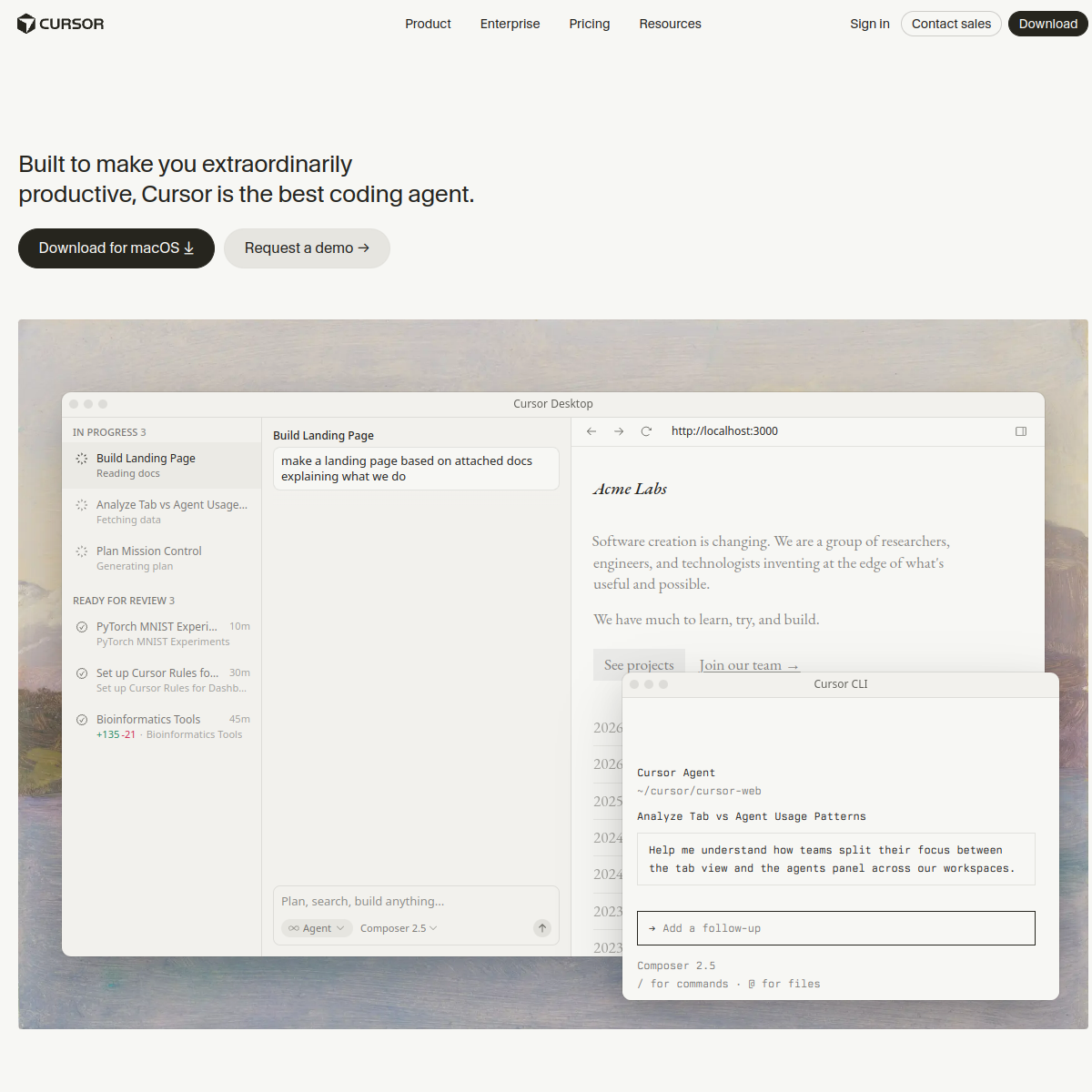
Cursor
Core parameters and statistics of Cursor
Cursor is an AI native code editor produced by Anysphere, Inc., built based on the VS Code kernel fork. Its core design concept is to use AI as a "first-class citizen" in the editing process - not a chat plug-in attached to the sidebar, but a native capability embedded in every interaction touchpoint such as Tab completion, Cmd-K inline editing, Composer multi-file rewriting, and Agent autonomous programming.
| Dimensions | Key facts |
|---|---|
| Product positioning | AI native code editor Agent coding platform |
| Main capabilities | Tab automatically completes Cmd-K, Chat, Composer, Agent, Background Agents, Cloud Agents, Bugbot, Desktop, MCP |
| Self-developed model | Composer 1 (Anysphere self-developed coding model, focusing on speed and multi-step task quality) |
| Optional third-party models | Cutting-edge coding models from suppliers such as OpenAI, Anthropic, Google, xAI, etc. The specific list is subject to the official Models & Pricing page |
| Client form | macOS / Desktop / Desktop desktop, Cursor Desktop (terminal Agent), Web Agent dashboard |
| Protocol support | Model Context Protocol (MCP) native support |
| Company Headquarters | San Francisco, USA |
| Established | 2022 |
| Investors | A16z, Thrive Capital, NVIDIA, Google, Accel, Benchmark, etc. |
| Enterprise Adoption | More than half of Fortune 500 companies have deployed Cursor (official public caliber) |
Substantial difference in product form: The essential difference between Cursor and plug-in AI assistants such as GitHub Copilot and Amazon Q Developer is that it is not an extension running in the VS Code process, but directly modifies the editor core. This means that Tab completion can be aware of the cross-file context of the entire project, Cmd-K can directly modify the AST of the selected area, and the Agent can freely shuttle between the file system and the terminal - the "context gap" caused by plug-in API limitations no longer exists in Cursor.
Type determination: The delivery form of Cursor is a desktop IDE + cloud Agent platform. Its core value is to embed AI capabilities into developers' daily coding workflow, so it belongs to Productivity/Business-side Application (Rule D); at the same time, its Agent, MCP, Cloud Agents and other capabilities make it have the secondary characteristics of Agent/MCP/Automation Tool (Rule A). The analysis in this article focuses on type D deepening and is supplemented by type A deepening.
Cursor’s users and market recognition
Cursor has established a strong brand recognition and paying user base in the AI programming track. Its market position does not come from marketing, but from word-of-mouth among developers and Fortune 500's large-scale procurement.
Individual Developer Adoption: Hobby free files and Pro individual subscriptions are available for public download at cursor.com. Individual developers are the earliest disseminators of Cursor - the experience leap of Tab completion and Composer's multi-file rewriting have been repeatedly discussed on Twitter/X and Reddit, forming a strong social validation of "you can't go back once you use it". This kind of grassroots spread made Cursor quickly become one of the most downloaded products on the AI programming track without large-scale advertising investment.
Professional developers and small teams: Pro / Pro+ / Ultra individual subscription + Team team profile provides higher usage of Background Agents, Bugbot and Cloud Agents. Typical users include independent developers, tech entrepreneurs, and hard-coding engineers, who often upgrade to Pro within the first week of trying the Hobby tier. For this type of user, the value of Cursor is not "an extra assistant", but "saving 1-2 hours a day on repeated editing and context switching."
Breadth and depth of enterprise-level adoption: Official public reports claim that more than half of Fortune 500 companies have deployed Cursor. Public examples include Shopify, Instacart, OpenAI, Perplexity, Vercel, Ramp, Mercury, Brex, Replicate, Notion, Stripe, Datadog, Snowflake, NVIDIA, and more. These cases cover areas such as Internet SaaS, finance, retail and infrastructure. A noteworthy signal is that CTOs and VPEs of many companies have stated in public that Cursor is not a "permitted tool" but a "recommended default editor" - this marks the transition of AI coding tools from "experimental introduction" to "production and standard configuration".
Enterprise Product Matrix Maturity: Team/Enterprise provides SSO, SCIM, domain takeover, auditing, privacy mode, model and data control, organization-level Bugbot, Cloud Agents and Background Agents control. When companies purchase Cursor, they usually start from the Team level and pilot it for 1-2 sprints within a range of 10-50 people. They compare it with three indicators: PR integration speed and code review cycle bug introduction rate, and then decide whether to expand to the entire organization. This set of "pilot → comparison → expansion" procurement path itself also reflects that Cursor's enterprise products are mature enough for large-scale replication.
Ecological Cooperation Network: Maintain cooperation with mainstream model manufacturers such as Anthropic, OpenAI, Google, and xAI. Cutting-edge models are available in Cursor as soon as possible; MCP protocol is natively supported. Cursor's multi-model aggregation strategy not only reduces users' dependence on a single model supplier, but also makes it a key distribution channel for model manufacturers to reach developer users - this is a two-way network effect.
Cost advantage of Cursor
Cursor's cost structure must be dismantled in layers, because "whether it is expensive or not" depends entirely on the user's role and usage intensity.
Individual Subscription Tier: Hobby ($0) provides limited Agent and Tab usage, suitable for developers who use it occasionally or in the evaluation phase. Pro (approximately US$20/month) is the main level for most individual developers, including Agent, Composer, Cloud Agents, Bugbot personal quota and Pro model options. Pro+ (approximately US$60/month) and Ultra (approximately US$200/month) are mainly targeted at developers with high-frequency Agent calls and heavy use of Cloud Agents. For developers who code for more than 4 hours a day and frequently use Agent to handle multiple file rewrites, Pro+ is the most cost-effective solution to save time and reduce frustration.
Team and Enterprise Subscription Tier: Team (approximately $40/seat/month) includes SSO, organizational management, unified billing, organizational-level Bugbots and Cloud Agents, suitable for teams of 5-50 people. Enterprise is negotiated by seat and compliance needs, including SSO/SCIM, domain takeover, privacy mode, auditing, model and data control, and dedicated support. The real cost at the enterprise level is often not in the subscription fee itself, but in the post-deployment governance cost—including hidden human investment such as model usage specifications, Agent behavior auditing, and data flow compliance review.
Cost Trap for Model Call Usage: Cursor subscription has a certain amount of built-in Premium model calls. The specific available models, rates and amounts are subject to the official Models & Pricing page. Once you exceed your quota, you can choose to continue using pay-as-you-go, or fall back to Composer 1 / the lower cost model. Composer 1 (Anysphere's self-developed model) is generally provided with a high quota within the subscription, which is Cursor's core lever to control user costs - try to use Composer 1 in daily development, and only switch to third-party flagship models in scenarios that require stronger reasoning capabilities (such as complex algorithm implementation, architecture-level reconstruction), which can significantly reduce excess costs.
Quantitative deduction of cost reduction and efficiency improvement (The following is an estimation deduction based on public cases, unofficial commitment): For an intermediate front-end developer with a monthly salary of about 8,000 US dollars, after using Cursor Pro+ (60 US dollars/month), Tab completion can save about 30-45 minutes of repeated input time every day, Agent processing cross-file modification can save about 1-2 hours/day of context switching costs, and Bugbot can reduce the PR review cycle from an average of 8 Hours reduced to less than 2 hours. In total, tool costs account for only 3-5% of labor cost savings, and the ROI is extremely high. But if the team only has 1-2 people and the coding intensity is not high, the Hobby or Pro files are enough, and the marginal returns of the Ultra files will be significantly diminishing.
Main functions of Cursor
The functional system of Cursor is not an isolated feature, but is designed around the complete coding link "from input to merge". What really creates synergy is the way these functions are connected.
-
Tab auto-completion: Cursor's self-developed Tab model is sensitive to multi-file context. It can not only complete a single line, but also predict cross-file call chains and parameter patterns. Its practical experience is better than most plug-in completions because Cursor can read the complete AST and item index directly in the editor core, rather than getting fragmented information through the plug-in API. Acceptance concerns: Whether the latency of tab completion is less than 150ms, and whether the accuracy of multi-file context is stable in large monorepo.
-
Cmd-K inline editing: Select a piece of code and press Cmd-K, enter natural language commands to rewrite, explain or complete. It compresses the three-step process of "writing comments → AI understanding → manual modification" into one step. Hidden linkage: The result of Cmd-K can be directly completed by Tab, or captured by Composer as the starting point for multi-file rewriting - the data flow between the three editing modes is seamless.
-
Chat / Ask: Chat with AI in the IDE sidebar and answer project-level questions through context injection mechanisms such as @codebase, @files, @docs, etc. The real value of Chat does not lie in a single round of Q&A, but in the connection between it and Composer - after confirming an implementation plan in Chat, you can start multi-file changes with one click "Send to Composer".
-
Composer (Multiple File Editing): Initiate an editing session across multiple files at once to generate a unified diff preview. Combined with the Composer 1 self-developed model, Composer's success rate and diff quality are significantly higher than the general model for medium and large changes involving 5-20 files. Synergy effect: Composer is the backbone of the Cursor functional system - Tab provides local precision, Cmd-K provides inline fine-tuning, Chat provides solution verification, Agent provides execution links, and finally all are gathered in the form of diff in Composer.
-
Agent: A natural language-driven multi-step coding task that automatically calls the file reading and writing Shell to execute the MCP tool. The Agent Center of Cursor 2.0 supports parallel execution of multiple Agents. Tool behavior list: The core tools exposed by the Agent to the model include
Read/Write/Edit File,Terminal Command,Codebase Search(grep/file/definition),MCP Tool Call, andGit Operation (commit/diff/checkout). A typical Agent interaction is: user requirements → Agent disassembly steps → read relevant files → perform editing + run tests → submit diff → user review and integration. -
Background Agents and Cloud Agents: Submit coding tasks to the cloud for execution, developers can close the notebook, and the results are returned in the form of PR or comments. Architecture Link:
Developer Prompt → Cursor Desktop/Local IDE → Cursor Cloud → Cloud Agent Runtime (remote container) → File Operations + Shell + MCP → PR/Callback → Developer Review. -
Bugbot: Automatically initiate defect detection and repair suggestions on GitHub PR. Bugbot is not a simple lint check, it can understand the semantic intention of PR and detect logical errors, missing boundary conditions, regression risks, etc.
-
Cursor Desktop: The terminal version of Cursor Agent, which can be called in scripts and CI. This means that AI coding capabilities are no longer limited to desktop IDEs, but can exist as a step in the CI pipeline.
-
MCP and external tools: Connect to databases, documents, design drafts, and third-party SaaS through Model Context Protocol. Cursor is one of the first mainstream editors to natively support MCP and can directly connect to dozens of MCP servers in the community.
Cursor model and version evolution
Cursor's model strategy is a dual-track model of "self-developed main force + aggregated supplement", and the version evolution clearly reflects the transformation path from AI-assisted editor to AI Agent platform.
Composer 1 (self-developed coding model): Launched on 2025-10-29 with Cursor 2.0, it is a model specially trained by Anysphere for coding scenarios. Its core optimization directions are speed (low first token latency) and multi-step task quality (maintaining consistency in Agent tasks of 5-20 steps). Composer 1 is available with high quota within Cursor subscriptions and is the default model for daily Agents and Composers. It exists so that Cursor is not dependent on any single third-party model provider - even if OpenAI or Anthropic's APIs experience a large-scale outage one day, Composer 1 can still maintain the basic coding experience.
Third-party flagship model aggregation: Cutting-edge coding models from vendors such as OpenAI, Anthropic, Google, xAI, and more are available in Composer/Agent/Chat. Cursor is typically plugged in within 1-2 weeks of a new generation flagship model being released. The value of this multi-model strategy is: run Composer 1 (low cost, high speed) for simple tasks, switch to Claude Sonnet or GPT-4o (high inference quality) for complex tasks, and switch to the Gemini series when ultra-long context is required. Specific available models, context windows, rates and platform restrictions are subject to the official Models & Pricing page.
Main historical nodes:
- 2023-03: Cursor is publicly released, introducing Cmd-K and AI chat sidebar based on the VS Code core. At this time, Cursor is essentially a "VS Code fork with an AI sidebar".
- 2024: Key capabilities such as Tab auto-completion Composer, Background Agents, and Memory will be gradually implemented. This year Cursor evolved from an "AI chat editor" to an "AI native editor".
- 2025-06: Cursor 1.0 + Bugbot is online, announcing that the product has entered the maturity stage. 1.0 is a clear signal - Anysphere believes that the core capabilities are ready and can be officially sold to enterprises.
- 2025-08: Cursor Desktop is online, and Agent capabilities can go out of the editor and enter the terminal and CI scenarios.
- 2025-09: Cursor 1.7, Hooks and permission model upgrades, strengthening the controllability of Agent in the enterprise context.
- 2025-10: Cursor 2.0 + Composer 1 is online. This is the most important version of Cursor to date - the three-fold combination of multi-Agent parallel execution of Cloud Agents upgrades and the implementation of self-developed models, making Cursor officially evolve from "IDE + AI assistant" to "IDE + Agent platform".
Technical advantages of Cursor
Cursor's technical advantage lies not in the performance of a single model, but in the integration of capabilities achieved through architectural design - this is the most fundamental difference between it and plug-in AI tools.
AI native experience in editor form: Plug-in AI coding tools are limited by the Extension API of VS Code and cannot deeply intervene in the core process of the editor - they cannot accurately perceive the complete AST at the cursor position, cannot obtain the latest content when the file is not saved, and cannot establish an accurate mapping between the terminal output and the editor. Cursor directly forks the VS Code kernel and modifies these underlying interfaces so that AI capabilities can precisely control every editing atom. Mechanism → Effect: AST-level code awareness → Tab completion accuracy is significantly higher than plug-in solution/kernel-level file system access → Agent can accurately read, modify and create files without relying on the LSP polling mechanism.
Cost and performance balance of self-developed models + multi-model aggregation: Composer 1 is the cost base of Cursor - it bears 70-80% of the AI calls in daily coding, is fast enough, low enough in cost, and stable enough in coding quality. Third-party flagship models exist as "turbos" for difficult missions. This dual architecture ensures that users are not forced to change their usage habits due to price increases or performance fluctuations in one model.
Unified orchestration layer of polymorphic Agents: Cursor's Agent is not a single-entry tool, but a hierarchical orchestration system - Agent in IDE (interactive), Background Agents (background execution), Cloud Agents (cloud execution), Desktop (terminal call), Bugbot (PR trigger). These five types of Agents share the same Tool behavior set and execution engine, but differ in triggering methods, execution context, and life cycle management. Architecture link diagram: User Intent → Agent Orchestrator → Step Planner → Tool Executor (File/Shell/MCP/Git) → Output Collector → Diff/PR/Notification → User Review.
Engineering Pitfall Guide—Three Key Issues for Agent Implementation:
- Agent infinite loop and Token inflation control: Agent may fall into an infinite loop of "read-modify-test-fail-read again" when performing complex tasks. Solutions include setting
max_steps(recommended upper limit of 25-50 steps), enabling repeated action detection (automatically pausing the same operation 3 times in a row), and setting a maximum run time for Cloud Agents (recommended 15 minutes). - Context Window Overload: The file tree and code base index of large projects may far exceed the model context limit. Cursor's coping mechanisms include: only injecting files related to the current Agent step into the context, using project summary cache instead of full index, and controlling the amount of context in a single call through the paging summary policy. When using it, you should try to split large tasks into multiple small Agent tasks instead of cramming the entire module to the Agent at once.
- Security and irreversible operation protection: Agent can directly execute Shell commands, modify the file system and call MCP tools, which means it has the ability to perform destructive operations. Cursor reduces risks through permission models (allow/deny/ask), irreversible operation confirmation points (secondary confirmation of commands such as
delete,drop,rm -rf, etc.), and Enterprise audit logs. In the production environment, it is recommended to set the execution mode of the Agent to read-only (review mode) and let the developer manually merge the diff.
How to use Cursor
Cursor covers multiple entrances from desktop IDE to terminal CLI to cloud Agent. Different entrances serve different scenarios.
Desktop (main entrance): Download the macOS / Desktop / Desktop installation package from cursor.com. After installation, you can directly import the settings and extensions of VS Code, and the migration cost is extremely low. Daily coding agent and multi-file rewriting suitable for individual developers and teams. When using it for the first time, it is recommended to spend 15 minutes to become familiar with the following shortcut keys: Tab (auto-completion), Cmd-K (inline editing), Cmd-I (Composer), Cmd-L (Chat), Cmd-Shift-A (Agent Center).
Cursor Desktop (Terminal Agent): Install CLI tools via cursor.com/cli. Suitable for calling Agent in terminal and script CI. Typical usage: Run cursor agent "fix all lint errors in src/" in CI, and the Agent will automatically fix it and then submit a PR through Bugbot. It needs to be authenticated with the API Key. The specific configuration method is subject to the official documentation.
Cloud Agents Dashboard: Open the Agent Center in Cursor or visit the cursor.com web page. Suitable for long-term task monitoring, multi-device collaborative PR/comment automatic postback. After you submit a Cloud Agent task on the desktop, you can use your mobile browser to open the dashboard to view the progress - this cross-device usage is the key differentiating experience between Cursor and Agents in other IDEs.
Bugbot (GitHub integration): Complete GitHub app installation at cursor.com/bugbot. Once configured, every new PR within your organization automatically triggers a Bugbot review. It is recommended to enable only some warehouses during the pilot phase, observe Bugbot's false positive rate and developer acceptance, and then decide whether to fully promote it.
Phase-based implementation path: When the team introduces Cursor, it is recommended to proceed in the following stages - Phase 1 (pilot, 1-2 weeks): Select 5-10 developers, use the Pro level, focus on verifying the experience of tab completion and Cmd-K in daily coding; Phase 2 (expansion, 1 month): Open Composer and Agent permissions, and test multi-file rewriting and Agent in 1-2 medium-complexity functional developments Orchestration; Phase 3 (scaling, 2-3 months): Enable Cloud Agents and Bugbot, establish organizational-level model usage specifications and Agent behavior audit processes, and switch to the Enterprise level as needed.
Product Pricing for Cursor
Cursor's pricing strategy is "tiered by capability, billed by usage", covering a complete price spectrum from free to enterprise level.
| Package | Price | Main benefits |
|---|---|---|
| Hobby | $0 | Limited Agent/Tab usage, base model optional |
| Pro | About $20/month | Agent, Composer, Cloud Agents, Bugbot personal quota Pro model optional |
| Pro+ | About $60/mo | Higher usage and additional model credits for Pro |
| Ultra | About $200/month | Large model usage Background/Cloud Agents High quota, early access to new features |
| Team | About $40/seat/month | Organization management, unified billing, organization-level Bugbot, Cloud Agents |
| Enterprise | Negotiate on demand | SSO/SCIM, domain takeover, privacy mode, auditing, model/data control, dedicated support |
Personal level: The Hobby file is sufficient for developers to complete a complete evaluation of Cursor within 1-2 weeks. The Pro level is the "sweet spot" for most individual developers - the $20/month pricing is less than the average daily cost of a cup of coffee, but it can save 1-2 hours of time every day. The core premium of Pro+ and Ultra comes from the increase in model usage and early access to new features, making them suitable for heavy Agent users.
Team level: Compared with Pro, the increments of Team level ($40/seat/month) are organization management, unified billing and organization-level Bugbot. For teams of more than 10 people, the organizational management and control capabilities of Team files are far more valuable than the patchwork solutions of individual Pros - administrators can see the model usage distribution, Agent execution statistics and Bugbot coverage of the entire team.
Enterprise Level: Enterprise pricing is negotiated by seat and compliance needs. Before purchasing, enterprises need to confirm the following terms: whether the data does not leave the enterprise network at all in privacy mode, the retention period and export format of the audit log, the purpose of the model call data (whether it is used for model training), and the physical area where Cloud Agents are executed. These terms typically require a joint review with corporate IT and legal.
Risk warning of usage billing: The quota for subscribing to the built-in Premium model is fixed, and you will be charged according to usage after exceeding it. If you have 2-3 heavy Agent users on your team heavily using high-cost models like Claude Sonnet or GPT-4o, monthly overage charges can quickly exceed the subscription itself. It is recommended that teams set a budget cap for model usage in the early stage, and encourage daily development to use Composer 1 as the default model, and only switch to third-party flagship models when higher inference quality is required.
Cursor application scenarios
Cursor's capability span enables it to cover all scenarios from one-handed completion to fully automatic PR, but the implementation maturity and ROI of different scenarios vary greatly.
Daily coding - the scenario with the highest ROI and the most painless implementation: including function implementation, code completion, cross-file modification, and code understanding. Tab and Cmd-K have almost no learning cost in this scenario - developers only need to maintain their original coding habits, and AI provides continuous, low-latency completion in the background. Quantitative deduction: For an engineer who writes 500 lines of effective code every day, Tab completion can cover about 40% of the characters, which is equivalent to saving about 45 minutes of mechanical input time every day. This part of the released time will not be consumed by "fishing", but will be invested more in architectural thinking and code review.
Complex function development and refactoring - Cursor's differentiated capability area: Involving new feature development or cross-module refactoring of 5-20 files, traditional methods require hours or even days of context switching and manual coordination. Composer + Composer 1 can compress this time to 30 minutes to 2 hours - the developer enters the requirement description into Composer, AI generates a diff across files, and the developer reviews and adjusts block by block. Acceptance Concerns: Large-scale diffs generated by Composer require special attention to boundary condition coverage (error handling, null checking, concurrency safety) and consistency with existing code (naming style, architectural patterns).
Long-term tasks and automation - governance framework support required: Large-scale reconstruction, batch repair, dependency upgrade, migration tasks and other scenarios that require several hours of continuous operation are suitable for Background/Cloud Agents. However, the premise for such a scenario to be implemented is that the team has established clear Agent task specifications and execution audit processes - otherwise it may face the dilemma of "AI changed 200 files but no one can confirm whether it is correct."
PR Review – Reduces review burden but does not replace humans: Bugbot automatically detects potential defects and regression risks on GitHub PRs. Its value does not lie in "replacing manual review", but in "shifting the reviewer's attention from formatting problems and low-level errors to architectural design and logical completeness." Best Practice: Configure Bugbot as a mandatory check for PRs, but set manual review as the final merge threshold - PRs passed by Bugbot still need to be reviewed by at least one person, and PRs with errors reported by Bugbot are manually judged whether to ignore them.
CI / Automated Operations - Extending Boundaries, but Dependent on Maturity: Call Cursor Desktop within CI and scripts to perform AI editing or automated repair testing. The maturity of this scenario is currently lower than that of the desktop agent - the error prompts in CLI mode are not friendly enough and the visibility of cloud execution logs is limited. It is recommended to start with auxiliary tasks (such as automatic formatting, simple lint fixes) and gradually expand to more complex CI integration.
Cursor is suitable for people
Cursor's "have it all" product strategy allows it to reach a wide range of people from independent developers to large enterprises, but it does not mean that it is suitable for everyone.
-
Individual Developers: The Hobby/Pro package gets you the full AI-native IDE experience, including tab completion for Cmd-K, Chat, Composer, and Agent. Developers who code more than 4 hours a day and need to switch between multiple projects and languages are the ones who will benefit the most - Cursor can eliminate the cost of context reconstruction every time you switch. Less suitable situations are: developers who rarely actively write code (mainly reading and reviewing), or who rely heavily on a specific IDE plug-in ecosystem (such as IntelliJ's Java deep integration).
-
Start-ups and small and medium-sized teams: The Team level provides organizational management and shared quotas, and is suitable for technical teams of 5-50 people. Cursor has the least resistance to implementation in such teams - the decision-making link is short, the model selection is flexible, and the agent's usage boundaries are easy to negotiate. It is recommended that the team introduce a concise AI coding specification when introducing Cursor: what scenarios allow Agents to be directly integrated, what scenarios must be manually reviewed, and what types of data are not allowed to be processed by Cloud Agents.
-
Enterprise R&D Organization: Enterprise provides SSO/SCIM, privacy mode, model and data control, and audit logs. The implementation of Cursor in large-scale enterprises requires a process of architecture review-security review-legal review, which usually takes 1-3 months. Prerequisites: Enterprises need to have sufficient internal tools and platform engineering capabilities to support the large-scale deployment of Cursor - including but not limited to a unified Git platform (GitHub/GitLab), organizational-level CI/CD pipelines, and a complete code review process. If the company currently does not even have these infrastructures in place, Cursor’s input-output ratio will be greatly reduced.
-
Open Source & Community Contributors: Free Hobby stalls + multi-model aggregation strategy make Cursor naturally attractive among this group. Open source contributors generally don’t care much about model vendor lock-in – Cursor’s multi-model option fits this mindset nicely.
-
Clearly unsuitable people: Organizations that have strong demand for completely offline or private deployment and cannot accept Enterprise terms (such as military industry, high-security government scenarios), Cursor currently does not have an independent offline deployment solution; developers who are deeply bound to IntelliJ IDEA (Java/Kotlin), Neovim or Emacs and are unwilling to switch IDEs, Cursor's main client form is not attractive to them (although Cursor Desktop (can be used as a supplement); and, if there are a large number of members in the team who are obviously resistant to AI coding tools, the commercial value of Cursor may be diluted by internal friction - tool selection sometimes depends not only on capabilities, but also on the technical culture and acceptance of the team.
Summary and Outlook
Core Competencies: Cursor's product moat is not a single function point, but a combination of a four-layer structure of "editor kernel-level AI deep integration × self-developed model base × multi-form Agent orchestration × enterprise compliance control". In the AI coding track, Cursor is currently the only company that can achieve product-level delivery of these four layers at the same time.
Current limitations and risks: The continuous iteration of self-developed models (Composer series) requires huge computing power and engineering investment. If the gap between model capabilities and third-party flagships widens, users may return to the ChatGPT/Claude native client. Multi-model aggregation brings flexibility but also increases selection complexity - different developers within the team may use different models, resulting in inconsistent experiences. The lack of fully private deployments has left organizations with extreme data sovereignty concerns on the sidelines. In addition, the availability and latency of Cloud Agents depend on Cursor's cloud infrastructure. If Anysphere's infra scale cannot keep up with user growth, the execution experience of long-term tasks may be affected.
Follow-up key observation points: The subsequent performance of the Composer series on coding benchmarks such as HumanEval and SWE-Bench, as well as the change in the gap with next-generation flagship models such as GPT-5 and Claude 4; whether the available regions of Cloud Agents are expanded to more compliance areas (currently mainly the United States and Europe); whether there is an independent private deployment solution (VMware- or device-level) on the enterprise side; and whether Cursor will further expand from IDE to Vercel A full-link "development to deployment" platform - this determines its valuation ceiling in the next five years.
Procurement and Adoption Risk Assessment (for decision makers): Cursor is suitable for introduction as a tool to "improve the coding efficiency of existing teams", but not as a silver bullet to "solve team engineering culture problems". It is recommended to clarify three points before purchasing: the team's acceptance of AI coding tools (whether at least 30% of core developers are willing to actively use it), the completeness of the existing code infrastructure (whether CI/CD, Code Review, and Git processes are in place), and model data compliance requirements (whether there is data that cannot be moved to the cloud). If any of the three points are not met, you need to complete the prerequisites internally before starting the procurement evaluation - otherwise, there may be a waste of resources like "Buying Enterprise but less than 10% of active users".
Related tools:  GitHub Copilot, Cursor
Comparison of competing products
| Comparison dimensions | The tool | Competitor A | Competitor B |
|---|---|---|---|
| Core Differences | — | — | — |
| Price | — | — | — |
| Target User | — | — | -- |
Version Info
- Cursor 2.0 + Composer 1 :Cursor 2.0 introduces Composer 1 (Anysphere's self-developed coding model, focusing on speed and multi-step task quality), new Agent Center Cloud Agents upgrade and multi-Agent parallel execution, evolving from "IDE + AI Assistant" to "IDE + Agent Platform".
- Cursor 1.7 :Introduce Hooks and upgrade the permission model to expand the controllability of Agent in the enterprise.
- Cursor 1.5 :Strengthen Background Agents and Cloud Agents to support long-term task execution in the cloud and return PRs.
- Cursor Desktop :The terminal version of Cursor Agent can be called in scripts and CI to realize "Agent coding outside the editor".
- Cursor 1.0 :Cursor officially released version 1.0, announcing that the product has entered a mature stage, with key capabilities such as Bugbot, Background Agents, and Memory in place.
- Bugbot :Automatic PR review agent can automatically detect potential defects on GitHub PR and give repair suggestions.
- Cursor Public Release :Anysphere unveiled the Cursor editor for the first time, introducing Cmd-K and AI chat sidebar based on the VS Code core.
User Reviews