 Dia
Free
Dia
Free
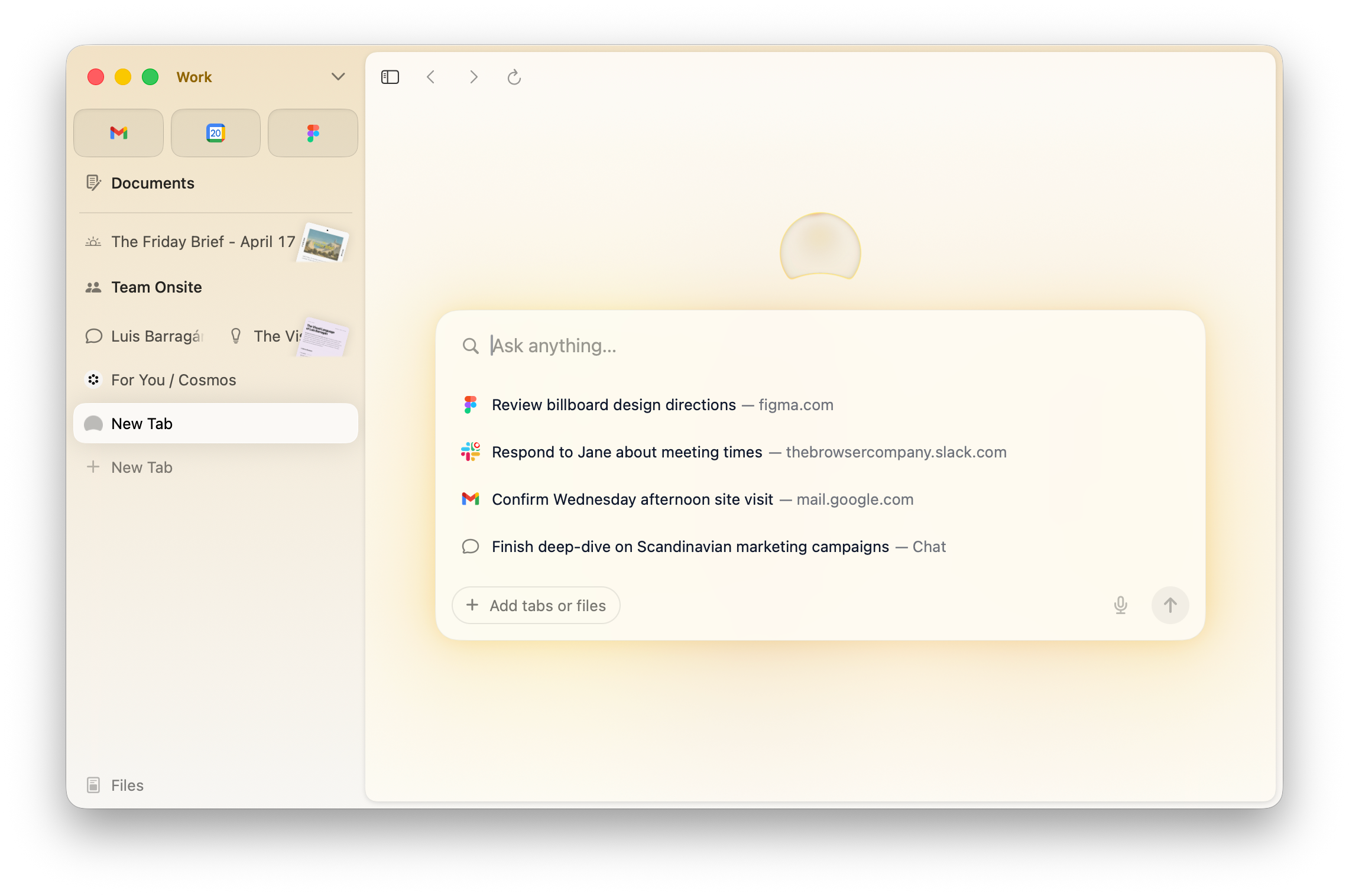
Dia is a browser product redesigned by The Browser Company for the AI era. The core idea is to let the browser understand the current page, tab page and the context the user is dealing with, and complete search, summary, writing, Q&A and task assistance in the sidebar/address bar. At this stage, Dia is mainly used as a desktop browser, and the download, version, available regions and business terms are subject to the official real-time page.
Dia
Core parameters and statistics
Dia is an AI browser launched by The Browser Company. It is not positioned as a chat box next to a traditional browser. Instead, it integrates the current page, tabs, search intent and user writing context into the same AI interaction portal. Users can ask about the current web page, summarize the content, rewrite the text, find historical clues, or let the browser continue to complete the next task based on the page information during browsing.
| Dimensions | Current public information |
|---|---|
| Official entrance | https://www.diabrowser.com/ |
| Product positioning | AI browser, contextual browsing assistant, built-in browser AI |
| Development Team | The Browser Company |
| Home | US |
| Main platform | Desktop; the current public download entrance is mainly macOS desktop browser, and other platforms shall refer to the official page |
| Latest public version | App v1.34.1, official Release Notes date is 2026-06-08 |
| Main public information | Official website Getting Started, Security, Privacy, For Work, Release Notes, Download FAQ |
When choosing, you should regard Dia as a "browser entry-level AI product": its value comes from the continuous understanding of the context of the web page, rather than the quality of a single question and answer. If the team only needs an independent chatbot, a general AI Chat tool may be more straightforward; if a large amount of work occurs in web pages, documents, form SaaS consoles and search links, Dia's browser-native form is more valuable for evaluation.
User and market recognition
Dia’s market signals mainly come from The Browser Company’s public product shift: the team put its core focus on Dia after Arc Browser, and advanced the product narrative from “new browser interaction design” to “AI native browser”. The official page has separate information pages around students, work, downloads, privacy and security, indicating that Dia is no longer just a concept demonstration, but a desktop product that can be downloaded, tried and continuously updated by users.
Publicly verifiable adoption data remains limited. The official website does not disclose the total number of users, number of paying users, number of corporate customers or retention indicators on the main page, so third-party popularity lists, social media discussions or media titles should not be used as a basis for purchasing. A more reliable way to judge is to use the official Release Notes update frequency, download entrance, privacy and security instructions, team public routes and actual trial performance as the first level of basis.
In the AI browser track, Dia faces comparisons including Perplexity Comet, Microsoft Edge Copilot, Google Chrome’s built-in Gemini capability Arc Browser’s historical user base, and various browser plug-in AI assistants. Dia’s differentiation lies in The Browser Company’s product capabilities for the browser experience itself, and its integrated design that places AI in the address bar, page context, and everyday browsing actions.
Cost advantage
- C-side/Individual: Usually a free version is provided to experience the core functions, and high-frequency use requires a paid package subscription.
- API/Developer: Billed by call volume, suitable for development teams that can be flexibly integrated into their own systems.
- Enterprise/Privatization: Contact the business owner to obtain customized quotation and deployment plan. The specific price is subject to the official real-time pricing page.
Main functions
Web page contextual Q&A: Users can ask questions around the current page, allowing Dia to understand the content they are reading and give a summary, explanation or next step suggestions. Suitable for reading long articles, understanding help documents, comparing product pages, and organizing research materials.
AI Search and Browsing Assistance: Dia combines search, address bar and chat-style questions, which is suitable for continuous questioning before and after opening a web page, instead of scattering search results and AI answers in multiple tools.
Writing and Rewriting: In web input boxes, emails, documents, and form scenarios, Dia can help draft, polish, condense, or transform the tone. Especially useful for students, researchers, marketing and operations positions.
Tabs and historical context: A key advantage of AI browsers is understanding browsing sessions rather than just processing individual text snippets. Dia's long-term value depends on its ability to reliably read pages, tags, and historical threads within the scope of a user's authorization.
Work scene entry: The official For Work page describes Dia in tasks such as reporting, real-time work, and meetings, indicating that its goals are not limited to personal search, but also attempts to enter the team productivity process.
Privacy & Security Notes: The official Security, Privacy page provides priority reading for users and organizations when evaluating data handling, permissions, and security practices.
Model and version evolution
Dia is a continuously iterative desktop product and does not have a stable semantic API version system like traditional open source libraries. Currently the official Release Notes should be used as the source of truth for releases.
| Version Node | Date | Description |
|---|---|---|
| App v1.34.1 | 2026-06-08 | The latest public version recorded by the official Release Notes; specific fixes and experience improvements are subject to the official page |
| Dia public beta is open | 2025-06-11 | Dia has entered a wider public testing and download stage, and the official website has begun to provide download, student, work, security and privacy information |
| Dia early preview | ~2024-12 | The Browser Company publicly demonstrates AI browser direction, marking the team's move from Arc experience to Dia |
From the perspective of evolution path, the core of Dia is not a single model name, but a combination of browser shell, page context AI interaction portal and continuous product iteration. When evaluating, focus on updates in Release Notes related to contextual understanding, search, stability, shortcuts, data permissions, and enterprise controls, rather than just tracking model parameters.
Technical advantages
Dia's technical advantage first comes from the browser location itself. Traditional AI assistants usually require users to copy the page content, manually describe the context, and then paste the results back into the original workspace; the browser's built-in AI can directly access pages, input boxes, and browsing sessions within the scope of user authorization, thereby reducing context loss.
The second advantage is The Browser Company's browser product experience. Arc has made a lot of interactive experiments around space, tag management and browsing workflow, which gives Dia a stronger product foundation on the issue of "how to embed AI into the browser". Rather than simply adding a sidebar, it attempts to rearrange the relationship between searching, opening a page, reading, writing, and continuing.
The third advantage is the sustainable official version rhythm. Release Notes allows evaluators to track stability, repairs, and the launch of new capabilities; the Security and Privacy pages provide preliminary governance basis for enterprises or educational institutions. For high-privilege entrances such as browsers, disclosure of security information itself is an important selection threshold.
How to use
| Usage portal | Applicable objects | Verification key points |
|---|---|---|
| Official website download page | Individual users, students, knowledge workers | System version, available regions, account requirements, download package source |
| Getting Started | First time users | Browser basics AI entry, migration and daily operations |
| Students page | Students, researchers, teaching scenarios | Whether to cover reading, writing, data collection and learning scenarios |
| For Work page | Teams, business positions, managers | Whether workflows such as reports, meetings, and real-time collaboration match |
| Security / Privacy | IT, Security, Compliance Teams | Data Processing, Permission Boundaries, Security Practices and Organizational Requirements |
| Release Notes | Product Evaluators | Update frequency, stability fixes, new feature maturity |
The actual trial is recommended to start with three types of tasks: one is to let Dia summarize and explain a long web page; the other is to organize a comparative conclusion among multiple tabs; the third is to draft or rewrite a piece of content in the real input box. After completion, record the time saved, result availability, manual modifications, and whether context misreading occurred, and then decide whether to replace the default browser.
Product Pricing
The pricing model is subject to the official real-time page. Usually a freemium or subscription system is used, and basic functions can be used for free. Advanced functions or high-frequency use require paid subscriptions, and users are advised to evaluate the optimal solution based on actual usage.
Application scenarios
Data research and web page reading: Researchers, students and analysts can directly ask questions, summarize and extract key points while reading web pages, reducing the time spent switching between the browser and the AI chat window.
Content drafting and rewriting: Marketing, operations, sales and students can complete the first draft, tone adjustment and summary compression in the input boxes of emails, documents, form CMS and other web pages, and embed AI writing in the original work location.
Multi-tab information integration: When users open multiple information pages, product pages or documents at the same time, Dia's contextual capabilities make it easier to form cross-page judgments, which is suitable for competitive product comparison, purchasing research and itinerary planning.
Meeting and work reports: The official For Work page emphasizes reporting, real-time work and meeting-related capabilities, and is suitable for knowledge workflows that connect web page materials, team information and output documents.
Education and Learning: The Students page shows that Dia focuses on student scenarios and is suitable for use in literature understanding, course material organization, writing feedback, and learning question inquiry.
Applicable people
Personal knowledge worker: Suitable for people who search, read, write and organize information in the browser every day. Dia's value comes from frequent use, rather than turning on the AI once in a while.
Students and Researchers: Suitable for reading long materials, organizing citation clues, comparing ideas and drafting study materials. It is necessary to pay attention to academic integrity and citation verification, and AI abstracts cannot be directly regarded as original evidence.
Business Team: Suitable for sales, marketing, operations, customer success and other positions that rely heavily on web SaaS and public information. Low-risk processes should be selected during the pilot to avoid initial contact with high-privilege accounts and sensitive data.
IT & Security Teams: Good for evaluating how next-generation browser portals are entering your organization. You need to focus on account, data processing, logs, permissions, extension compatibility and compliance instructions.
Not Fit Boundary: If your organization must use controlled browsers, strong proxies, disable external AI, or work with highly sensitive data, Dia will need to go through a security review and a small-scale sandbox pilot first.
Summary and Outlook
Dia’s core competency lies in putting AI back into the real working portal of the browser: web pages, tabs, searches, input boxes and historical context all revolve around the same browsing link. It's for people who see AI as a daily browsing layer, not just as another chat site.
Three things need to be observed at present: first, whether the official version iteration can continue to improve stability and contextual accuracy; second, whether the terms of commercialization and corporate governance are clear enough; third, whether Dia can maintain product differentiation in the AI browser track outside of strong distribution rivals such as Perplexity Comet, Edge Copilot, and Chrome Gemini. For most teams, the safest way is to pilot it with an individual or a small team to verify the real efficiency before deciding whether to move to the default browser or enterprise-level deployment.
Related tools: perplexity, you-com
Comparison of competing products
| Comparison dimensions | The tool | Competitor A | Competitor B |
|---|---|---|---|
| Core Differences | — | — | — |
| Price | — | — | — |
| Target User | — | — | -- |
Version Info
- App v1.34.1 :The latest public version recorded in the official Release Notes. Updates include Pittsburgh Field Week related fixes and user experience improvements; specific changes are subject to Dia's official Release Notes real-time page.
- Dia open beta open :Dia has moved from the invitation/waiting list stage to a broader public testing and downloading stage, and the official page has begun to provide public information around the AI browser, student portal, work scenarios and safety instructions.
- Dia Early Preview :The Browser Company publicly demonstrates the direction of Dia, shifting its focus after Arc to AI native browsers; early information is based on the official page, public demonstrations, and subsequent Release Notes.
User Reviews