 Elephas
Free
Elephas
Free
Elephas is an AI tool product for business and content teams, suitable for quickly verifying generation capabilities and collaboration efficiency in real tasks.
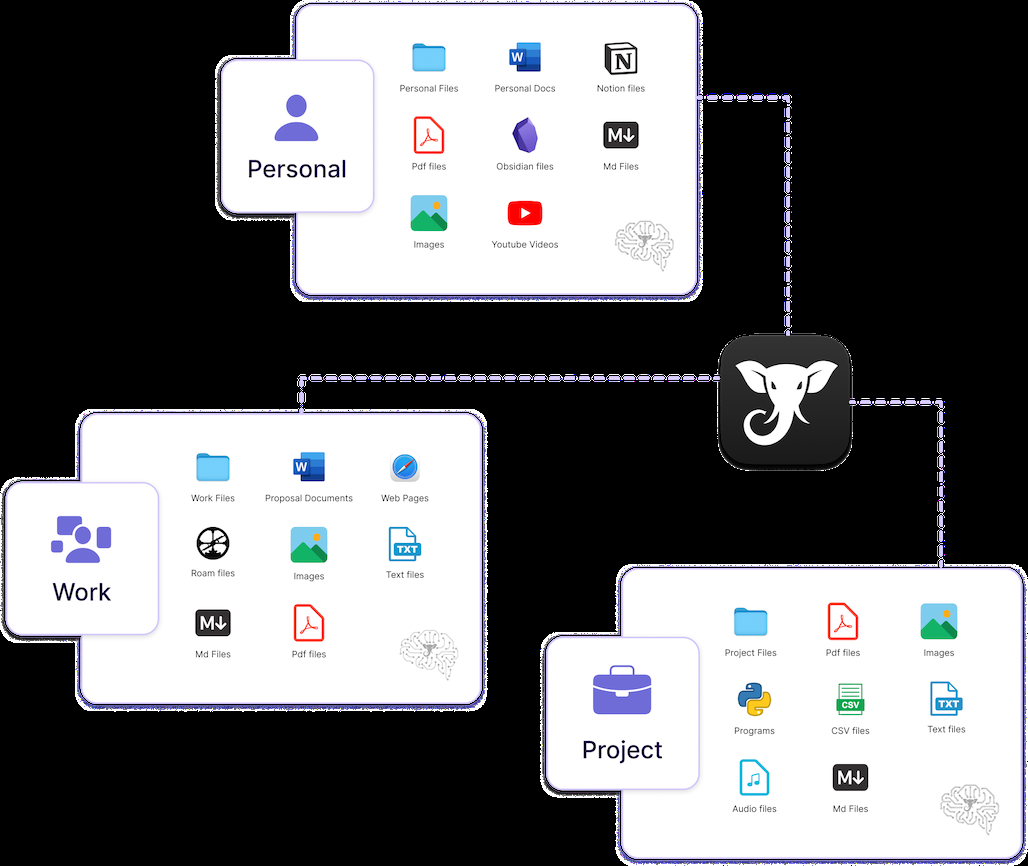
Elephas
Core parameters and statistics of Elephas
Elephas is a native AI knowledge workspace for Mac and iOS, officially positioned as "Secure AI Knowledge Workspace". Its core value lies in solving the real hidden danger of "customer data has flowed into ChatGPT" - it allows knowledge workers to enjoy AI efficiency without having to choose between confidentiality obligations and productivity. The product revolves around three keywords: Local priority index, Automatic desensitization of sensitive information, Optional offline and cloud AI.
| Projects | Public Information |
|---|---|
| Official positioning | Secure AI Knowledge Workspace |
| Product form | Mac native desktop application + iOS App |
| Deployment method | Local index is preferred, cloud AI is optional / completely offline / bring your own API Key |
| Core differences | 28 types of sensitive data are automatically desensitized and then cloud AI is called |
| Supported file formats | PDF, Word, Excel, Apple Notes, Notion, Obsidian, Zoom transcription Markdown, etc. 20+ formats |
| Underlying AI support | OpenAI (GPT-5/4.1-mini), Anthropic Claude, Google Gemini 3 Pro, Groq, DeepSeek, Ollama local models |
| User scale | 3,000+ professionals (official public data) |
| Community Rating | Capterra / GetApp / Software Advice Overall 4.6/5 |
| Latest version | 11.5 (2026-01-21) |
| Platform support | macOS 13+, iOS (iPad/iPhone) |
| Company | Liberation Softwares LLP, established in 2021 in Chennai, India |
Positioning Interpretation: Elephas is not another online chat window, but an AI knowledge layer embedded at the Mac operating system level. It was designed on the premise that a knowledge worker’s core assets (contracts, client files, research output, meeting transcripts) should not be pasted into a public AI chat box. Through local indexing + automatic desensitization + optional complete offline operation, it provides a project-implementable compromise between "AI efficiency" and "data sovereignty".
Users and market recognition of Elephas
Market Signal: The official page publicly displays "Trusted by 3,000+ professionals worldwide", has a 4.6/5 overall rating on Capterra, GetApp and Software Advice, and has won the Capterra 2025 "Best Value", Software Advice "Frontier Runners" and "Best in Support" badges. These indicators come from third-party evaluation aggregation platforms, rather than official self-reports, and have certain reference value.
User Portraits: Judging from the user reviews published on the official website, typical users include:
- Independent Consultant: Needed to handle client proposals and deliverables subject to NDA, and in the past had to choose between AI efficiency and confidentiality obligations.
- Lawyers and Legal Affairs: Handle contract terms, litigation materials and confidential client documents, and are highly sensitive to data leaving the country.
- Accountants and Tax Experts: Involving client tax returns, audit drafts and financial statements, industry regulations require that the data does not go out of the domain.
- Researchers: Managing unpublished papers, peer-reviewed materials and research references requires a persistent knowledge base rather than a single conversation.
- Financial Advisor: Processing client investment portfolios and compliance memorandums, which need to meet the data protection requirements of financial regulations.
Disclosure Boundary: The number of corporate customers, annual revenue or financing information is not officially disclosed. The company is registered in Chennai, India. The team size, organizational structure and commercialization stage are subject to official real-time information.
Cost Advantages of Elephas
Elephas's cost structure needs to be dismantled from three levels: individual, team and enterprise. The core logic is to "use explicit subscription fees in exchange for implicit risk avoidance of data leakage".
C-side / personal
| Plan | Monthly fee | Credit limit/month | Applicable scenarios |
|---|---|---|---|
| Free | $0 | 20 credits | Experience the core functions and verify whether they meet your personal workflow |
| Standard | $19 | 100 credits | Daily writing, basic document Q&A and note management |
| Professional | $39 | 500 credits | Multi-source knowledge base (Super Brain), full format integration |
| Pro+ | $49 | 1,000 credits | Confidential work, requiring complete desensitization audit and offline AI |
All paid plans save approximately 17% on annual payment. New users get 7 days of free Pro trial** by default (no credit card required), which will be automatically downgraded to Free after expiration.
Hidden Cost Analysis: Elephas’ credits are the key differentiator from typical SaaS per-seat or per-word billing. Credit consumption is related to the selected AI model and the length of the content processed - when using more advanced models (such as GPT-5) or processing very long documents, a single operation consumes more credits. After exceeding the monthly quota, there are two ways to expand: purchase a credit upgrade package, or bind your own OpenAI / Anthropic / local model API Key (the latter two options actually transfer the inference cost from Elephas to the user's own bill).
Developer / API self-built
Elephas is not a pure API product and does not support an independent API access mode. However, users can bind 15+ model providers (OpenAI, Claude, Gemini, Groq, DeepSeek, etc.) through the built-in own API Key function to achieve:
- Unlimited use: AI inference fees are charged to your own API bill and are not subject to Elephas credit limit restrictions.
- Completely offline: Run local models through Ollama integration, with zero network dependencies and zero data out of the device.
- Cost Cover: For heavy users, bringing your own API Key plan is usually more economical than purchasing the highest-end Pro+ subscription - but at the cost of losing the zero data retention promise (you need to check the data usage terms of each API vendor yourself).
Enterprise/Team
The official pricing page shows that the enterprise plan requires contacting the business through a form. Core considerations for corporate procurement should include:
- Relationship between seats and credit limit: Whether billing is based on the total credit limit or based on stacked seats.
- SSO and permission control: Whether to support SAML/OIDC and enterprise directory integration.
- Audit Log: How long can the audit traceback capability of desensitization operations be retained at what scale.
- Data Geolocation: The data center region option selected during cloud processing.
Cost comparison: similar solutions
| Products | Personal Getting Started | Knowledge Base Persistence | Sensitive Data Protection | Completely Offline |
|---|---|---|---|---|
| Elephas | Free (20 credits) | Super Brain Permanent Index | Automatic desensitization of 28 categories of PII | Ollama Local Model |
| ChatGPT Plus | $20/month | Does not support long-term knowledge base | No built-in desensitization | Not supported |
| Claude Pro | $20/month | Limited Projects | Basic content review | Not supported |
| NotebookLM Plus | $20/month | Only in Google ecosystem | No desensitization function | Not supported |
| Obsidian + Copilot | Free (plug-in) | Need to build your own RAG process | Depends on plug-ins | Completely local |
Conclusion: In the market segment of "knowledge workers who need to process confidential documents", Elephas' explicit pricing ($19–49/month) is comparable to mainstream AI subscriptions, but it provides data security compliance capabilities that ChatGPT/Claude does not have through local indexing + automatic desensitization + offline mode. For scenarios involving NDAs, GDPR, financial regulations, or legal confidentiality obligations, this subscription fee essentially purchases a "data leakage risk hedge."
Main functions of Elephas
Elephas's functional system revolves around "the things you can't do on ChatGPT". The core consists of four layers of capabilities:
First layer: Super Brain — persistent RAG knowledge base
Essence of function: Establish a private, globally searchable vector knowledge base on the local Mac. After the user imports any document (20+ formats such as PDF, Word, Excel, Apple Notes, Notion, Obsidian, Zoom transcribed Markdown, web pages, etc.), Elephas completes word segmentation, embedding and indexing locally, supports natural language question and answer and automatically annotates citation sources.
Expert View: The key difference between Super Brain and other RAG products is the separation of indexing and inference. The indexing phase is completed locally (data does not leave the device), and only when the user selects cloud AI, the desensitized content fragments are sent to cloud models such as OpenAI/Claude for inference. This means that Super Brain’s embedding vector library is always under user control. Even if the cloud API is compromised, all the attacker can obtain is the desensitized text fragment, not the original document.
Use Value: A typical consultant can create multiple Super Brains - one for each client, and each Brain contains the client's contracts, proposals, meeting minutes, and research reports. In daily work, Super Brain can be used to retrieve historical decision-making basis, generate weekly customer reports, and extract key terms of contracts. There is no need to flip through hundreds of PDF pages one by one, or paste customer confidential information into ChatGPT.
Second level: Super Command — global AI writing assistant
Function essence: Use the preset shortcut keys (default Option + Space) to call up the Elephas writing tool panel in any Mac application. After selecting the text, perform rewrite, polish, translate, grammar correction, summary, expansion, custom Snippet and other operations. Works seamlessly in nearly all Mac apps, including Mail, Safari, Slack, Teams, Notion, Outlook, Discord, and more.
Expert View: The "hidden linkage" of Super Command lies in its cooperation with Super Brain. For example, when a user is writing an email, they can call up Super Command and reference the knowledge in a specific Super Brain to generate a reply - this means that the information in the email comes not only from the general model knowledge, but also from the customer-specific document library, while PII desensitization is automatically performed in the background. This link solves two major pain points of traditional AI writing tools: context separation (needing to switch between browser and editor) and data streaking (copying and pasting content without protection).
Value of use: In daily work, users can select a team discussion on Slack and generate a draft meeting minutes with one click; when composing a customer email in Mail, historical proposal data in Super Brain is called to supplement key information; when reading an English research report in Safari, the selected paragraph is directly translated into Chinese and the format is maintained. All operations do not leave the current application.
The third layer: PII automatic desensitization and data protection
Functional Essence: Elephas has a built-in 28 types of sensitive entity recognition engine (including name, email, phone number, address SSN, tax number, credit card number, bank account, passport number, legal case number, medical record number, etc.). Before the content is sent to the cloud AI, detection and replacement are completed locally (such as [PERSON_1], [ORG_1], [LOCATION_1]).
Expert’s View: This is the core technical barrier of Elephas and the fundamental difference between it and general AI products. Instead of being done in the cloud "after submission", desensitization is done locally on your Mac before being sent - meaning the raw data never leaves the device. The Pro+ plan goes one step further and provides a complete desensitization checker. Users can view the specific entities, types, and desensitized replacement text in each message one by one.
Value in use: When a lawyer needs to ask AI "Where is our room for concessions in the upper limit of compensation in this confidentiality agreement?", sensitive entities such as client name, counterparty information, contract amount, and jurisdictional court in the contract are automatically replaced with placeholders such as [PERSON_1], [ORG_1], [AMOUNT_1], etc. AI can still understand the context and give meaningful analysis, but the original confidential information will not be exposed to the cloud model.
Level 4: Agent Mode (Beta) and Instruction-Only Brain
Functional Essence: The Agentic mode introduced since version 11.2 allows Elephas to handle multi-step complex tasks (such as "search project documents for the past three months, extract all unfinished action items, sort by priority, and generate a Markdown weekly report"). Version 11.5 further introduces Instruction-Only Brain, allowing users to create custom AI assistants only through instruction descriptions (without uploading documents), realizing a new interaction paradigm of "prompt words are knowledge base".
Expert View: The implementation strategy of Agent Mode embodies the tool-first design concept - it is not a general Agent platform, but limits the Agent's capabilities to indexed personal knowledge, which fundamentally avoids the Agent's "illusion diffusion" problem: every step of the Agent's reasoning and action is based on the user's own documents, and the source can be traced.
The fifth layer: multi-model open ecosystem
Functional Nature: Elephas is not a service bound to a single model. It has a built-in Elephas AI engine (driven by OpenAI + Anthropic, zero data retention), and supports users to bind 15+ providers’ own API Keys, including OpenAI, Claude, Gemini, Groq, DeepSeek, and fully local models accessed through Ollama.
Use Value: Users can choose different models based on task sensitivity, such as:
- Daily email polishing → Built-in Elephas AI (default configuration, zero data retention)
- Confidential contract analysis → Ollama local model (completely offline, data does not leave the device)
- In-depth analysis of long documents → Prepare your own GPT-5 API (higher context limit, billing based on volume)
- High-throughput batch processing → Groq API (low-latency inference)
This ability to "switch models on demand" makes Elephas an AI model gateway rather than a single AI application.
Elephas model and version evolution
As a native Mac application, its version evolution reflects the product strategy upgrade from "AI writing tool" to "AI knowledge workspace". The following are the major version nodes publicly confirmed by the official blog:
Version pedigree
| Version | Release Date | Core Changes |
|---|---|---|
| 11.5 | 2026-01-21 | New Dashboard homepage, interface redesign, improved Agentic Mode, Advanced Context-3 embedded model Instruction-Only Brain, Gemini 3 Pro supports Word/.pages file support |
| 11.3 | 2025-09-11 | File processing speed increased by 5 times, built-in offline AI model (no third-party software required), in-app customer service chat, usage visual tracking, website structure analysis |
| 11.2 | 2025-07-15 | Search algorithm upgrade (result relevance doubled), Apple Notes integrated Zoom transcription retrieval Agent Mode Beta, Credit limit doubled OpenAI 4.1-mini model support |
| Public Launch | ~2024-01 | The product will be publicly launched initially, the specific date will be subject to official records |
Evolution Trend Analysis
From writing assistant to knowledge work platform: Before version 11.2, the core positioning of Elephas was "AI writing assistant for Mac". 11.2 introduces Super Brain's in-depth functions (Apple Notes/Zoom integration) and Agent Mode, marking a shift in product focus from "helping users write" to "helping users manage knowledge." 11.3’s offline AI model and speed optimization further reduce cloud dependence. 11.5’s Dashboard, Advanced Context-3 embedding model and Instruction-Only Brain enable the product to evolve towards the direction of “AI knowledge middle platform”.
Embedding model iteration: The Advanced Context-3 embedding model introduced in 11.5 is an important upgrade of Elephas at the RAG infrastructure level. It directly affects Super Brain’s retrieval accuracy—better embedding means more precise semantic matching and more relevant citation results. This change may not be as obvious to users as the UI revision, but it will have a more fundamental impact on the quality of daily use.
Progressive implementation of Agentic capabilities: From Beta in 11.2 to "improved" in 11.5, Agent Mode is still in its early stages. The current Agent capabilities are limited to "multi-step tasks based on indexed knowledge" rather than general browser/system operation Agents. This makes a rational trade-off between reliability and functional boundaries.
Elephas’ technical advantages
Elephas's technical advantages do not come from its self-developed large models or unique reasoning architecture, but from its engineering solution to the contradiction between privacy protection and AI efficiency.
Mechanism 1: Separated architecture of local index + cloud reasoning
Core Design: Document reading, parsing, chunking, embedding, and indexing are all done on the user's local Mac (using the device's CPU/Neural Engine). Only when the user actively initiates an AI query, the desensitized text fragments are sent to the cloud AI model for inference. After the cloud model returns results, Elephas restores the desensitized placeholders to their original content locally.
Engineering value: This architecture solves the most difficult "data sovereignty" problem in the RAG system - even if Elephas's cloud service is breached, all the attacker can obtain is desensitized fragment vectors and text fragments, rather than the complete original document. For organizations subject to NDAs, governed by GDPR, or subject to industry regulations (e.g., HIPAA, FINRA), this is a prerequisite for introducing AI into sensitive workflows.
Mechanism 2: Local entity identification and desensitization engine for 28 types of PII
Core Design: Elephas’s built-in entity recognition model runs locally and covers 28 types of sensitive data types. The recognition engine runs on the Mac's Neural Engine or CPU and does not rely on cloud APIs. The desensitization strategy is not simple deletion, but replacement with typed placeholders (such as [PERSON_1], [EMAIL_1]) to retain contextual semantics.
Engineering value: Unlike enterprise-level data leakage prevention (DLP) tools such as Vanta and Nightfall, Elephas' desensitization is real-time and embedded in the AI interaction process, rather than scanning after the fact. This means that when a lawyer asks an AI for analysis of contract terms, desensitization happens between "the enter key is pressed" and "the request hits the cloud," with zero additional actions.
Mechanism three: pluggable AI model gateway
Core Design: Elephas is not tied to a single model provider. Users can choose in settings:
- Built-in Elephas AI (powered by OpenAI + Anthropic, zero data retention - no user data is recorded, stored or used by the provider to train)
- Own API Key (supports 15+ providers, including OpenAI, Claude, Gemini, Groq, DeepSeek)
- Local Ollama Model (completely offline, zero network dependencies)
Engineering value: This architecture allows Elephas to become an "AI model switch" - users can dynamically select the most appropriate inference backend based on task type, data sensitivity and budget. For example, use the built-in Elephas AI for daily low-risk tasks (the cost is included in the subscription), switch to the Ollama native model for confidential tasks (zero additional cost), and use the self-prepared GPT-5 API for high-complexity analysis (pay-as-you-go, no credit limit).
Mechanism 4: Super Brain’s multi-source unstructured data processing
Core Design: Super Brain’s indexing pipeline supports 20+ file formats and 6+ external knowledge bases (Apple Notes, Notion, Obsidian, Zoom, etc.). The indexing strategy performs differentiated processing for different formats - PDF as plain text + table extraction, Zoom transcription for speaker separation and summarization, and Apple Notes for incremental synchronization.
Data Boundaries: For text in scanned PDFs and images, Elephas’s indexing accuracy is limited by macOS’s built-in OCR capabilities. Retrieval recall may decrease for handwritten notes, complex table layouts, or low-resolution scans. In addition, the real-time nature of the index incremental update strategy when documents are frequently updated is subject to official documents.
How to use Elephas
The usage path of Elephas varies depending on the deployment method (official website direct version vs Mac App Store version) and AI running mode (online/offline/self-contained API).
Download and Installation
| Channel | Link | Description |
|---|---|---|
| Official website direct version | https://elephas.app/ | Full functionality, including Super Command (global AI writing) and all AI functions |
| Mac App Store | App Store Search Elephas | Limited version (sandbox restrictions, does not include Super Command and text insertion functions) |
| iOS App | App Store Search Elephas | Supports Super Brain cross-device synchronization (requires Pro/Pro+ subscription) |
Key reminder: If you need Super Command (call up the AI writing panel in any Mac application) and Smart Reply (smart reply to emails/messages), you must download the direct version from the official website. Due to sandbox restrictions, the Mac App Store version only supports the Super Brain knowledge base function.
Quick start process
Step 1: Download and install
- Download the
.dmginstallation package from the official website and drag it into the Applications folder. First launch requires granting Accessibility permission (for Super Command to read selected text from other apps).
Step 2: Select AI operating mode
- Online mode (default): Use built-in Elephas AI (zero data retention), no additional configuration required.
- Offline mode: Settings → Select the Ollama local model. After downloading the model, you can use it offline.
- Prepare your own API Key: Settings → Add API Key (OpenAI, Claude, Gemini, etc.), and AI calls will charge your own bills.
Step 3: Create the first Super Brain
- Click "New Super Brain" and enter a name (e.g. "Q3 Consulting Project").
- Drag in relevant documents (PDF, Word, notes, etc.) and Elephas automatically completes local indexing.
- Supports direct import from Apple Notes, Notion, Obsidian, Zoom and other sources.
Step 4: Daily use
- Q&A: Enter questions directly into Super Brain, and AI will answer based on indexed documents and mark the source.
- Writing: Press Option + Space to bring up Super Command in any Mac app, select the text and choose Rewrite/Translate/Polish/Summary.
- Customized Snippet: Create commonly used writing instruction templates (such as "Change this content to a formal business email style") and call them with one click.
Typical workflow deduction
Take, for example, an independent consultant handling a client strategy consulting project subject to an NDA:
- Establish project knowledge base: Create a Super Brain named "Acme Q3 Strategy" and import the customer's RFP, historical contracts, meeting transcripts, and industry research reports (about 200 pages of PDF). Indexing completes locally within 5 seconds.
- Daily retrieval: When a customer asks "What were our assumptions about pricing in last year's Q4 proposal" and searches in Super Brain, AI automatically locates page 23 of the historical proposal document and gives the source of the quote. The entire process of PII desensitization is performed automatically.
- Generate Deliverables: Use Super Command to call up Elephas when writing a proposal in Keynote, quote the industry data in Super Brain to generate a chart description paragraph, and insert it into the presentation after desensitization.
- Knowledge Precipitation: After the project is completed, Super Brain will be archived. Subsequent similar projects can reference the historical experience of this Brain to form a reusable knowledge asset for individuals or teams.
Product Pricing for Elephas
The pricing model is subject to the official real-time page. Usually a freemium or subscription system is adopted, basic functions can be used for free, and advanced functions or high-frequency use require payment.
Application scenarios of Elephas
Scenario 1: Contract review and knowledge management between law firms and legal departments
Task Description: Lawyers need to handle a large number of confidentiality agreements, cooperation contracts, and litigation materials. Each document contains dozens of sensitive entities such as client name, counterparty information, contract amount, and jurisdictional court. The traditional approach is to manually review each document piece by piece, or risk pasting confidential content into a general-purpose AI tool.
Elephas Value:
- Import the historical contract library into Super Brain to establish a contract knowledge base exclusive to the law firm.
- After the new contract is uploaded, AI automatically compares the differences in historical terms and highlights risk items (such as changes in the compensation limit, changes in jurisdiction).
- PII desensitization ensures that customer information is not exposed: Even with cloud AI, sensitive data such as customer names, case numbers, etc. are replaced before being sent.
- Cost Reduction and Efficiency Increase Deduction: A junior lawyer’s initial contract screening time is reduced from 45 minutes to 8–10 minutes per contract, which is mainly used to review the risk points marked by AI rather than reading line by line. For a law firm handling 60 contracts per month, the equivalent savings is approximately 37 hours/month of junior attorney hours.
Human-machine collaboration boundary: AI is responsible for preliminary screening, clause extraction, historical analogy and risk identification; the final legal validity determination of clauses, negotiation strategy formulation and signature authorization still need to be confirmed by a practicing lawyer. AI output is only for auxiliary reference and does not constitute legal advice.
Scenario 2: Multi-client knowledge asset management of consultants
Task Description: Independent consultants or boutique consulting teams serve multiple clients at the same time. Each client has an independent NDA, project documents, industry research, and meeting minutes. There is a serious risk of data segregation when using general-purpose AI tools (customer A’s data could be exposed to customer B during AI training).
Elephas Value:
- Create an independent Super Brain for each customer, and the data is strictly isolated locally.
- When responding to customer questions, AI only retrieves the documents in the corresponding Brain to ensure that the information does not leave the boundary.
- When the deliverable is generated, Super Command references the corresponding customer's knowledge base and outputs it after desensitization.
Cost reduction and efficiency improvement: An independent consultant changed from "manual browsing of documents → manual writing of emails" to "AI search → manual review → one-click sending", and the customer's regular consultation response was shortened from 4 hours to 45 minutes. Based on 20 customer interactions per month, this saves approximately 65 hours/month.
Scenario 3: Long document analysis and report generation by the enterprise research team
Task Description: Industry researchers are required to read numerous PDF research reports, market data, industry white papers, and regularly generate analytical summaries and internal briefings.
Elephas Value:
- Batch import industry PDFs to Super Brain, and AI automatically generates classification summaries.
- Cross-document retrieval through natural language questions: "Among the reports on the Southeast Asian market in the past two years, which ones that mentioned compliance risks listed what specific recommendations?"
- Agent Mode can automatically complete the multi-step task of "search→extract→sort→document".
Cost reduction and efficiency improvement: The researcher changed from 30 minutes of intensive reading of the full text of each report to 5 minutes of AI summary + review of key findings. In the scenario of processing 40 reports per month, the equivalent saving is about 17 hours/month.
Scenario 4: Academic writing and document management in universities and research institutions
Task Description: Graduate students and academics need to manage hundreds of papers and repeatedly switch between PDF readers, note-taking software, and writing tools while writing literature reviews. Unpublished research data are subject to strict confidentiality.
Elephas Value:
- Import the paper library into Super Brain, and AI supports cross-document subject retrieval and citation extraction.
- When writing, Super Command directly calls the content of the literature library to generate paragraphs in Word/Pages, and annotates the citation sources.
- Offline mode ensures that unpublished experimental data and grant applications are not leaked.
Not suitable for boundaries: For scenarios that require strict DOI metadata management and automatic generation of standard reference formats (APA/MLA/Chicago), Elephas does not have professional document management functions and needs to be used in conjunction with Zotero/EndNote.
Scenario 5: Team collaboration and knowledge inheritance (cross-scenario)
Task Description: When team members move frequently, tacit knowledge (reasons for project decisions, historical negotiation strategies, preferences of old customers) is lost as people leave.
Elephas Value:
- The team's Super Brain serves as an "organizational knowledge base" - meeting records, project reviews, and customer communication history are all indexed.
- After new members join the company, they can directly check the historical decision-making background through Super Brain, without having to consult the old employees one by one.
- Cross-device synchronization (Mac + iPhone/iPad) makes knowledge accessible anytime, anywhere.
Human-computer collaboration boundary: The establishment of a knowledge base requires the team to actively import documents and regularly maintain index content. AI cannot automatically pick up unrecorded tacit knowledge (such as informal discussions in the tea room). This part still requires the team's cultural and process guarantees.
Applicable groups of Elephas
Preferred group
- Professionals in confidential industries: lawyers, accountants, tax advisors, financial advisors, compliance officers. The core pain point for this group of people is the "conflict between AI efficiency and confidentiality obligations" - Elephas's PII desensitization, local indexing and offline mode directly solve this contradiction. Not sensitive to monthly subscription fees of $19–49, but highly sensitive to data breach costs.
- Independent Consultants and Freelancers: Need to manage the intellectual assets of multiple clients simultaneously, each client subject to an independent NDA. Elephas’ multi-Super Brain isolation solution is a natural fit for this population’s workflow.
- Academic Researcher: Manage large volumes of unpublished papers, research data and peer-reviewed materials. The combination of offline mode + self-prepared API Key allows research data to be always on the device, while enjoying AI-assisted retrieval and writing.
- Mac users in knowledge-intensive positions: Mac users who need high-frequency document processing and cross-application writing, such as product managers, operations leaders, and content strategists. Super Command's global shortcut key invocation is its core source of efficiency.
Applicable people but require additional conditions
- Small team (2–20 people): The team's Super Brain sharing requires a unified knowledge management culture - if the team does not have the habit of document precipitation, the value of Elephas will be significantly diluted. It is recommended to use the personal version for verification first, and then promote team standards before upgrading to the enterprise solution.
- Education and training field: Suitable for teachers to prepare lesson plans and manage research materials, but not suitable for K12 student scenarios (depending on English interface and Mac hardware).
Discourage/Inapplicable people
- Windows Ecosystem Dependent: Elephas is currently Mac-only (including iOS auxiliary), and there is no Windows or Web version planned. Please refer to the official announcement. This tool is not available if your primary work device is Windows.
- Users who need professional bibliographic management capabilities: If your core needs are to automatically generate APA/MLA/Chicago references, manage DOI metadata, and synchronize cross-PDF annotation notes, Elephas is not suitable. For such needs you should choose Zotero, EndNote or Paperpile.
- Users who only need a general AI chat: If the work does not involve confidential documents and just need a general AI chat assistant, the free plans of ChatGPT, Claude or DeepSeek will be enough. Elephas’ privacy protection capabilities are at a premium for this type of user.
- Organization with Strong Auditing and Compliance Supervision: For enterprises that require formal compliance certifications such as SOC2, HIPAA, FedRAMP, etc., Elephas' compliance certification status is not fully disclosed in public information. You need to contact the official to confirm the certification coverage before purchasing.
Summary and Outlook of Elephas
It provides competitive solutions in its field, and its core value lies in lowering the threshold for AI use in this field.
Current limitations: Some advanced features require paid subscription, and the free version has function or usage restrictions; specific technical details and performance benchmarks have not yet been fully disclosed.
Related tools:  Notion AI, google-workspace
How to use Elephas
- Web client: You can use it by visiting the official website and registering an account. Most functions do not require installation.
- API access: Provides RESTful API, developers can obtain the API Key and integrate it into their own applications.
Version Info
- Elephas Web Rolling Release :The official update of online services is through continuous delivery. There is no official precise semantic version number and release date yet.
- Elephas Public Launch :There is no official precise date yet, but historical milestones are recorded according to the publicly accessible stage.
User Reviews