 EZRemover
Free
EZRemover
Free
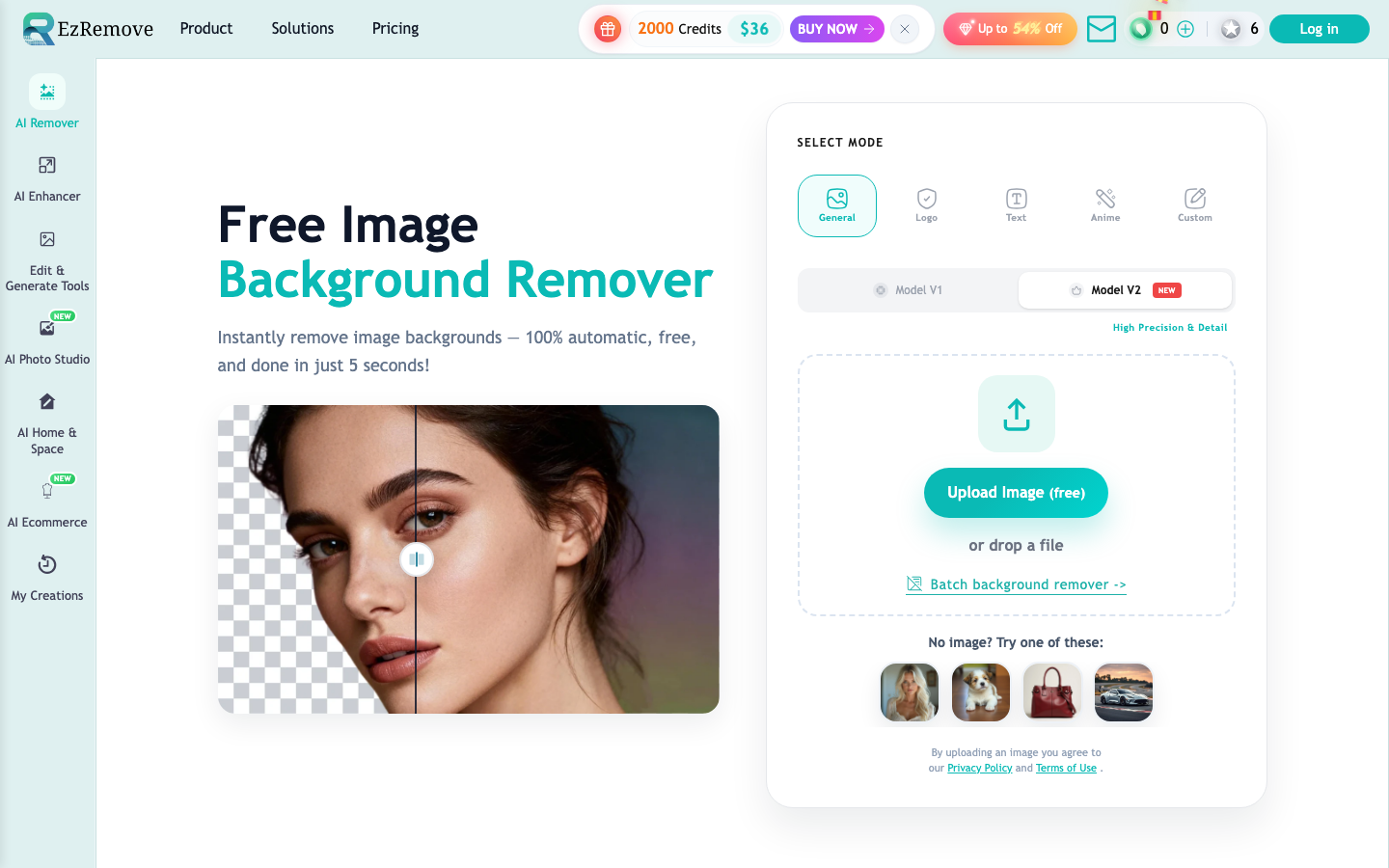
EZRemover is an AI picture tool that focuses on one-click background removal online. It supports JPG, PNG, and HEIC input, covering general photo logos, text screenshots, animation materials, and batch processing, and extends to background replacement, object erasure, and transparent PNG export.
EZRemover
Core parameters and statistics
EZRemover's positioning is very pragmatic: it is not an all-in-one image retouching platform, but an online tool that turns the most common image pipeline of "clean cutting, transparent background, easy background change, and batch processing". The public page directly writes the usage scenarios very clearly, and product pictures, avatars, social media materials and logos are all within its target scope.
| Project | Current Public Information |
|---|---|
| Official claim | Free online AI image background removal tool |
| Support input | JPG, PNG, HEIC |
| Output focus | Transparent PNG, white/solid color background, new scene background |
| Processing Mode | General, Logo, Text, Anime, Custom |
| Expansion capabilities | Batch background removal and object erasure AI Background Generator |
| Speed caliber | The page states "under 3 seconds" |
| Typical users | E-commerce sellers, designers, content creators |
A brief comment: EZRemover is not used for complex creations. Its value lies in automating a large number of small image processing actions that are "not worth opening PS in the first place".
Publicity verification: The main promotion points of the official website are fast speed, clean cutout, and support for batch and background replacement. These selling points are basically consistent with the functions displayed on the page, and there is no obvious problem of "only writing copy but no function entrance". The core pain points it addresses are also very specific: a large number of product images, portrait logos, and social media images all need to be clean and transparent, but users usually don’t want to pay the cost of learning complex software for this step.
User and market recognition
EZRemover is currently more of an online tool for a broad range of long-tail needs than an enterprise-grade vision platform. Its recognition comes from "whether it allows ordinary users to complete tasks immediately", rather than endorsement from large brand customers.
Expert’s point of view: There are many background removal tools, but what really affects retention is not how stunning the first cut is, but whether complex edges, batch consistency, and mode switching are practical enough. EZRemover openly provides Logo, Text, Anime and Custom modes, which shows that it is aware of the differences in edge processing of different materials, rather than stuffing everything into a universal cutout button.
Hidden benefits: For operations and e-commerce teams, once the tool can stably process batch materials, product image preparation, social media cover cleaning, and event poster element splitting will be smoother. The actual benefits are usually reflected in "less rework" and "less cross-tool switching", rather than a single processing that seems to be a few seconds faster.
Current Limitations: It lacks more enterprise-oriented market signals, such as public narratives such as APIs, public cloud SLAs, collaboration permissions, brand asset management, etc., so it is more suitable as a personal and light team tool rather than directly as an enterprise visual middle-end capability.
Cost advantage
The cost advantage of EZRemover is straightforward: free online background removal. This kind of positioning is very attractive to individual users, but it is also the most likely to cause misunderstanding, so it must be taken apart and viewed.
The Truth About Free: Free usually means that the core moves can be completed, but it doesn’t necessarily mean that there are no limitations. The page emphasizes free, downloadable and transparent PNGs, but does not stably display the complete commercial authorization, high-definition export limit or advanced usage terms on the public first screen. Therefore, you still need to confirm the latest terms before actually using it for bulk business.
C-side/Individual: If you only occasionally process avatars, resume photos, social media pictures and a small number of product pictures, the cost of EZRemover is almost negligible, and what is saved is time and software threshold.
Team/Business: For e-commerce sellers and operations teams, the key is not “free”, but “whether it can be done in batches and stably”. As long as it can reduce the manual processing of single image background removal from 3 to 5 minutes to automatic processing in 10 to 20 seconds, the time cost of the entire batch of product images will be significantly reduced. This is a scenario playout, not an official commitment.
Hidden Cost: Decontextualization is only the first step. Complex edges, transparent materials, glass, hair, shadow preservation, and uniform style backgrounds may still require manual review. If the team mistakes "automatic cutout" for "automatic filmmaking", rework will come back.
Hidden benefits: It puts background removal, color background change, scene change, and object erasure into the same link, reducing the back-and-forth switching of "cut out the image first, then change the tool to repair, and then use another tool to change the background."
Main functions
- One-click background removal: Automatically identify the subject after uploading the image and directly get the transparent background result.
- Multi-mode processing: General is suitable for regular photos, Logo is suitable for brand graphics, Text is suitable for screenshot text, Anime is suitable for illustration materials, and Custom allows you to specify objects to be removed with prompt words.
- Background Replacement: Continue switching from transparent background to white background, solid color background or new scene background.
- AI Background Generator: Not only deletes the background, but also generates a new context for the subject.
- Batch background removal: Process multiple images at one time, suitable for product images and batch marketing materials.
- Object Erase: Remove clutter, passers-by or unnecessary parts from the screen.
Expert View: The real synergy of these functions is that "cutting out images is not the end". EZRemover does not stop at transparent PNG, but continues to extend to background replacement and object cleaning, which is more in line with real workflows.
Model and version evolution
EZRemover does not disclose the semantic version number, but its product evolution direction can be seen from the page capabilities: first, one-click background removal, then split modes, and then background generation and batch processing.
| version node | time | public changes |
|---|---|---|
| Batch and background generation stage | ~2025-12 | Demonstrate batch removal, background generator, pattern processing |
| One-click background removal | ~2025-12 | Focus on transparent PNG and quick background clearing |
| Multi-mode expansion phase | ~2025-12 | Add Logo, Text, Anime, Custom and object erasure |
Publicity Verification: This evolution shows that it is not an isolated cutout widget, but an extension towards a lightweight image pipeline. For long-tail users, this is a more sticky path.
Current limitations: There is a lack of fine-grained changelog and no public model iteration instructions, so it is more suitable to be understood in terms of "functional milestones" rather than in terms of strict version management.
Technical advantages
The technical advantage of EZRemover does not lie in the abstract model name, but in its pattern differentiation for different material types.
Mechanism -> Effect -> Scene: Logo mode and Text mode mean that it has special processing for flat graphics and text screenshots. The effect is cleaner edges, suitable for splitting brand image PPT materials and promotional image elements.
Mechanism -> Effect -> Scene: Anime mode shows that it takes into account the edge and block style of illustrations. The effect is that secondary element materials are not easily cut by mistake according to the logic of real-life photos.
Mechanism -> Effect -> Scene: Custom prompt word mode allows it to expand from "cutting out the entire picture background" to "removing specified objects". The effect is to handle more detailed needs such as photobombers, desktop clutter, local redundant elements, etc.
CURRENT LIMITATIONS: Transparent objects, complex reflections, hair, translucent shadows, and extremely thin outlines are still difficult areas for all background removal tools, and EZRemover is no exception. It is suitable for high-frequency 80-point tasks, but not suitable for taking on the entire 100-point retouching responsibility.
How to use
The path to getting started with EZRemover is pretty standard, but because there are so many modes, strategy is more important than with a single-button tool.
| Steps | Operations | Points of concern |
|---|---|---|
| Upload pictures | Support JPG, PNG, HEIC | The clearer the subject, the more stable the automatic results will be |
| Select mode | General, Logo, Text, Anime, Custom | When the wrong mode is selected, the edge quality will be significantly compromised |
| Export or continue editing | Download transparent PNG, or change the background/erase the object | For complex materials, it is recommended to manually enlarge to check the edges |
Human-machine collaboration boundary: Simple white background product images, social media avatars, and active element splitting can be highly automated; complex product main images, large advertisements, printed materials, and visual delivery that require extremely high edge accuracy still require manual review.
Expert View: The real way to improve efficiency is not to "click General", but to choose the right mode according to the type of material. This small action often determines whether you need to rework later.
Product Pricing
EZRemover currently focuses on "free". But for any business tool, more important than price are permissions, export, commercial and batch boundaries.
The truth about free: Free shows that the entry barrier is low, but it does not mean that it will be unrestricted for a long time. The boundaries of high-definition export, commercial terms, batch thresholds, or advanced background generation capabilities should still be subject to the official real-time page.
Hidden benefits: For individual users, free means "do things first and then decide whether to pay"; for team users, free can at least reduce the cost of trial and error, and first conduct a round of quality verification with real materials.
Current Limitation: The page does not stably display the complete enterprise-level price list and contract items, so it is more suitable for tool trial first, rather than directly making large-scale purchase judgments.
Application scenarios
- E-commerce product image processing: Quickly cut out the original image into a transparent or white background to unify the product display style.
- Social media and marketing materials: Separate the avatar, event elements and product body, and quickly change the background to create the picture.
- Logo and text material cleaning: Remove the background color and redundant background to facilitate secondary design and typesetting.
- Illustration and animation element processing: Split characters or illustration elements to facilitate the creation of posters and content.
Quantified cost reduction and efficiency improvement: In the scenarios of batch product images and social media small images, it has the opportunity to compress the background processing of a single image from 3 to 5 minutes of manual operation to 10 to 20 seconds of automatic operation, and reduce the preparation time of dozens of images from half a day to half an hour. This is a deduction, not an official commitment.
Applicable people
- E-commerce sellers: Often need to prepare product main images, white background images and multi-platform materials.
- Content Operation and New Media: Requires high-frequency processing of social media covers, event poster elements and avatar images.
- Freelancers and Light Design Users: Don’t want to learn complex software, just want to quickly get usable transparent images.
Dissuade Scenario: If you are making jewelry-grade highly reflective products, complex hair portraits, printing-grade refined posters, or the main visual of a big brand campaign, EZRemover should not be the only tool. Another group of people that it is not suitable for are large teams that need API, permission management and asset collaboration. The current public product form is still relatively light.
Summary and Outlook
The value of EZRemover lies in automating the background processing work that "should not consume professional design time", and conveniently adds background replacement, object erasure and batch processing, making it more like a complete small image pipeline, rather than just a cutout button.
Current limitations: Complex edges, batch consistency, commercial boundaries and enterprise-level collaboration capabilities still need to be checked by the user. Procurement/Adoption Risk Assessment: The safest way to adopt is to first run a control test with a set of real product images, portrait images and logo materials, focusing on whether complex edges, batch stability and transparent PNGs are clean enough; if these basic qualities pass, it is very suitable for use as a lightweight production tool, otherwise it should be positioned as a pre-processing tool rather than a final delivery tool.
Related tools:  Midjourney, stable-diffusion
Version Info
- Batch background removal and background generation online stage :The public page has demonstrated batch background removal, background color switching AI Background Generator, custom prompts and multi-mode background removal capabilities. There is no official precise date yet.
- Go to the background stage with one click :The core selling point is fast online background removal and transparent PNG export, covering regular product images and portraits. There is no official precise date yet.
- Multi-mode and object erasure phases :Expanded to General, Logo, Text, Anime and custom prompt modes, and added object erasure and background generation capabilities. There is no official precise date yet.
User Reviews