 Fathom
Free
Fathom
Free
Fathom is an AI office tool for individuals and teams that records meetings such as Zoom, Google Meet, Microsoft Teams and more, automatically generates transcripts, summaries, action items, snippet playlists and searchable meeting knowledge base, and provides integrations such as CRM, Slack, Notion, Asana, Zapier, Make, ChatGPT, Claude and MCP.
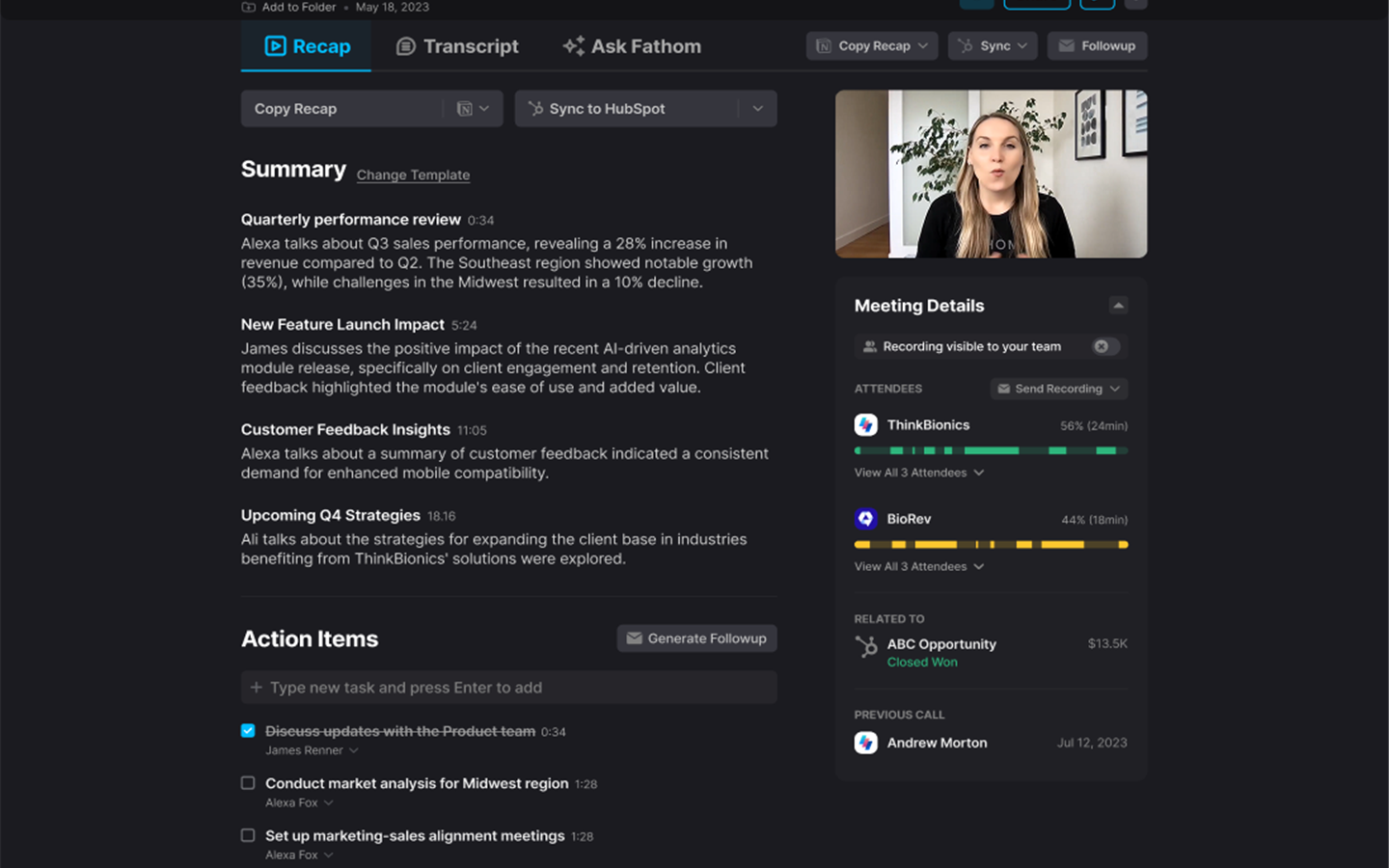
Fathom — AI meeting note taking, transcription and team conversation insights tool
Core parameters and statistics
| Parameters | Details |
|---|---|
| Product positioning | AI meeting partner, AI meeting notes, meeting transcription and team insight tools |
| Capture method | Supports bot capture; the official website marks bot-free as Mac beta |
| Applicable meetings | Zoom, Google Meet, Microsoft Teams, as well as customer meetings, internal synchronization, strategy meetings |
| Main capabilities | Unlimited recording and transcription of AI summaries, action items, follow-up emails Ask Fathom, segment playlists, keyword reminders |
| Team capabilities | Global search, team folders, comments, Deal View, AI Scorecards, CRM field synchronization |
| Integration Ecosystem | Slack, Salesforce, HubSpot, Notion, Asana, Zapier, Make, ChatGPT, Claude, Public API, MCP |
| Free benefits | The official website pricing page shows that the personal Free plan supports permanent free, unlimited recordings + transcriptions |
| Public price | Premium annual payment is $16/month, Team annual payment is $15/month/user, Business annual payment is $25/month/user |
Resource review: images/fathom-logo.png uses the official logo-wordmark-new.svg loaded on the homepage of Fathom's official website to render the color graphic logo as 200 x 200 PNG; images/fathom-screenshot.png comes from the public product page image on the official website, with a size of 1440 x 900.
The core value of Fathom is to transform meetings from "one-time calls" into searchable, reusable, and transferable work assets. Individual users can use it to reduce the time spent making up notes and writing follow-ups after meetings; teams can centralize customer conversations, internal decisions, sales opportunities and risk signals into shared view CRM and automated processes.
User and market recognition
Fathom’s official website emphasizes that it is suitable for teams ranging from 1 to 1,000 people, and gives user benefit indicators on the homepage: 95% of users believe that Fathom helps them stay focused in meetings, team members save 6+ hours of follow-up work every week, and the speed from meeting insights to action items is increased by 3 times. The official website also highlights that individual users save an average of 38 minutes of administrative time per meeting.
These indicators are suitable for selection reference, but enterprises should still conduct small-scale pilot verification when purchasing: whether the meeting type is stably identified, whether the summary structure conforms to the team template, whether the CRM synchronization is accurate, and whether sensitive meetings can be managed according to permissions and data retention policies.
Cost advantage
| Plan | Official website price | Main benefits |
|---|---|---|
| Free | $0, forever free | Unlimited recording and transcription with bot-free or bot capture options, instant AI summary clips, playlists, cross-session search |
| Premium | $20/month, annual payment $16/month/user | Based on Free, it adds advanced summary AI action items, conversational conference assistant, and custom conference robot |
| Team | $19/month, annual payment $15/month/user, starting from 2 people | Team global search, meeting highlights playlist, comments, folders, keyword reminders, custom vocabulary SSO |
| Business | $34/month, annual payment $25/month/user, starting from 2 people | CRM field synchronization Deal View, AI Scorecards, customized data retention policy, professional services |
Compared with AI conferencing tools such as  Fireflies.ai, Otter.ai, Fathom's free plan is more attractive: the official website directly labels unlimited recordings + transcriptions. For individual high-frequency meeting users, free or Premium can first cover the main meeting organization needs; for sales, customer success and management teams, the value of Team/Business is more reflected in shared search CRM synchronization and team execution.
Main functions
- Meeting Recording and Transcription: Supports recording Zoom, Google Meet, Microsoft Teams and other meetings, and generates searchable meeting transcripts and recordings.
- AI Summary and Action Items: Automatically generate summaries, key points, action items and follow-up emails after the meeting, reducing manual organization.
- Ask Fathom: Users can ask questions in a conversational manner in a single meeting or across historical meetings to quickly find out commitments, customer feedback and decision-making basis.
- Clips and Playlists: Organize the key clips in the meeting into clips or highlights playlist, suitable for training, customer feedback accumulation and team synchronization.
- Keyword Alerts and AI Search Alerts: Automatically monitor key topics or search terms to alert teams to risks, opportunities or customer signals in new meetings.
- CRM and Workflow Synchronization: Synchronize meeting summaries, action items, and field information to CRMs such as Salesforce and HubSpot, or through tools such as Slack, Notion, Asana, Zapier, Make, etc.
- Sales and Customer Success Capabilities: The Business plan provides Deal View, CRM field sync, coaching metrics and AI Scorecards for sales review and team coaching.
- AI and developer integration: The official website pricing page is marked with Claude / ChatGPT integrations, Public API and MCP, making it easy to connect the meeting context to external AI applications.
Model and version evolution
| Milestone | Time | Description |
|---|---|---|
| Productization of AI meeting notes | ~2024 | Fathom cuts into meeting efficiency scenarios with AI meeting notes, automatic summaries and meeting clips |
| Team workspace enhancement | 2024-2025 | Add team global search, folders, comments, keyword reminders and shared meeting views |
| Sales and CRM Capability Expansion | 2025 | Deal View, CRM field sync, coaching metrics, and AI Scorecards to enhance sales/customer success scenarios |
| Bot-free and AI integration | 2026 | The official website pricing page shows bot-free Mac beta, Claude / ChatGPT integration with Public API and MCP |
Technical advantages
More flexible capture methods: Fathom’s official website emphasizes “bot or no bot”. The pricing page shows that you can choose between bot-free or bot capture types, of which bot-free is Mac beta. For scenarios where meeting robots are concerned about joining the meeting, this provides a lightweight experience closer to Granola; for scenarios where explicit recording and team visibility are required, robot recording is still suitable.
Team Shared Memory Layer: Fathom not only generates a summary of a single meeting, but also aggregates all meetings into a searchable team knowledge base. Global search, Deal View, keyword alerts and Ask Fathom allow teams to discover customer needs, project risks and follow-up commitments across meetings.
Sales and customer success are related: CRM synchronization CRM field sync, AI Scorecards, coaching metrics and Deal View directly connect meeting records to sales opportunities and customer operation processes, reducing the problem of "the meeting is completed but the system is not updated".
AI Application Contextual Connection: Claude/ChatGPT integrations, Public API, and MCP allow Fathom’s meeting data to become context for external AI assistants, suitable for writing follow-up emails, generating project plans, summarizing customer trends, or driving automated workflows.
How to use
| Entrance | Description |
|---|---|
| Official website | Visit fathom.video to learn about features, examples and pricing |
| Registration portal | fathom.video/users/sign_up Create an account and start using it for free |
| Meeting Platform | Connect to Zoom, Google Meet or Microsoft Teams to record meetings |
| Team workspace | Configure team search, folders, comments, keyword alerts, and shared meeting views |
| Integration portal | Connect with Slack, Salesforce, HubSpot, Notion, Asana, Zapier, Make, ChatGPT, Claude or MCP |
Typical steps:
- Visit the Fathom official website to register an account and choose an individual or team plan.
- Connect the calendar and common meeting platforms, set up bot capture or support bot-free capture under the circumstances.
- After the meeting starts, let Fathom capture the meeting content so that users can focus on the discussion.
- Review the AI summary, transcript, action items, and follow-up email after the meeting.
- Organize the key clips into clips or playlists and share them with colleagues, clients or team folders.
- Use Ask Fathom to search historical meetings for customer commitments, project risks, or cross-meeting trends.
- Sync summaries and fields to CRM, or plug into workflows through Slack, Notion, Asana, Zapier, Make, and MCP.
Product Pricing
Fathom operates on a freemium and team subscription model. The pricing page of the official website shows that the personal Free plan is permanently free and supports unlimited recording and transcription; Premium monthly payment is $20, annual payment is $16/month/user; Team monthly payment is $19, annual payment is $15/month/user, starting from 2 users; Business monthly payment is $34, annual payment is $25/month/user, starting from 2 users.
There are three types of cost evaluations when selecting:
- Individual cost: The Free plan covers basic recording, transcription, summary clips and search, which is suitable for verifying the efficiency of meeting organization first.
- Team Cost: Team plan is suitable for organizations that need global search for teams, meeting highlights, comments, folders, keyword alerts, and SSO.
- Business Cost: The Business plan is suitable for sales and customer success teams and focuses on evaluating the ROI of CRM field synchronization Deal View, AI Scorecards and custom data retention policies.
Application scenarios
1. Sales meetings and customer follow-up Sales teams can use Fathom to automatically record customer requirements, competitive mentions, objections and follow-up commitments, and sync summaries and fields to CRM, reducing time spent manually updating opportunity records.
2. Customer Success and Renewal Management Customer success teams can track risk signals, feature requests, and historical commitments through customer views, keyword alerts, and Ask Fathom to make renewal, expansion, and support collaboration more contextual.
3. Product and Engineering Team Product managers and engineering leaders can record user interviews, requirements reviews, incident reviews, and roadmap discussions, and turn customer feedback, decision-making basis, and action items into searchable team knowledge.
4. Management and cross-team synchronization Managers can use team folders, comments, and global search to organize cross-team meetings to reduce missing information and allow people who can’t attend to quickly fill in context through summaries and snippets.
5. Training and Team Coaching Sales managers can use clips, playlists, AI Scorecards, and coaching metrics to collect excellent call clips as new employee training and sales coaching materials.
Applicable people
- Individual users who meet frequently: Need free or low-cost storage of meeting notes, summaries, action items, and searchable transcripts.
- Sales and Customer Success Team: Need to sync meeting insights into CRM and collaborate as a team around accounts, opportunities, and risks.
- Product, operations and research teams: User interviews and cross-meeting feedback need to be organized into reusable knowledge assets.
- Enterprise IT & Admin Teams: Requires SSO, custom data retention, team permissions, workflow integration, and auditable meeting knowledge base.
- Unsuitable Scenarios: If the organization requires not to use cloud conference processing at all, requires strict localization deployment, or is highly sensitive to conference robots, it should first verify the Fathom bot-free support scope, data processing links, and enterprise security terms.
Summary and Outlook
Fathom is a type of AI conferencing tool that combines free personal use with team sales collaboration. It lowers the personal trial threshold with a free plan for unlimited recording and transcription, and then expands meeting content into a team knowledge and execution system through Team/Business's global search, keyword reminder CRM synchronization AI Scorecards, Claude/ChatGPT integration and MCP.
What needs to be noted currently is that: the official website of bot-free capabilities is marked as Mac beta, and the specific available scope needs to be subject to the real-time product; the actual value of the team and business depends on whether the CRM, permissions, data retention, and meeting template configurations can be implemented; AI summaries, action items, and field synchronization still require manual inspection. It is worth paying attention to Fathom's expansion in robot-free recording, cross-meeting agents and MCP workflows in the future, and whether it can further upgrade from a meeting recording tool to an AI work partner that actively promotes subsequent tasks.
Version Info
- Bot-free Capture, Claude / ChatGPT Integrations and MCP :The pricing page of Fathom's official website shows the new bot-free and bot capture type options, of which bot-free is Mac beta; it also provides Claude and ChatGPT integration with Public API and MCP, allowing users to connect meeting context to external AI and automated workflows.
- AI Meeting Notes :Fathom expands in the form of an AI meeting recording tool, providing automatic transcription of AI summaries, meeting snippets, search and automatic follow-up capabilities, and gradually strengthening team collaboration, CRM synchronization and sales/customer success scenarios.
User Reviews