 Wondershare Filmora
Wondershare Filmora is an AI video editing software owned by Wondershare Technology. It provides content creators with AI text-to-video AI color correction, smart subtitles, audio noise reduction and other capabilities, and enters the desktop video editing market with a "lightweight professional" positioning.
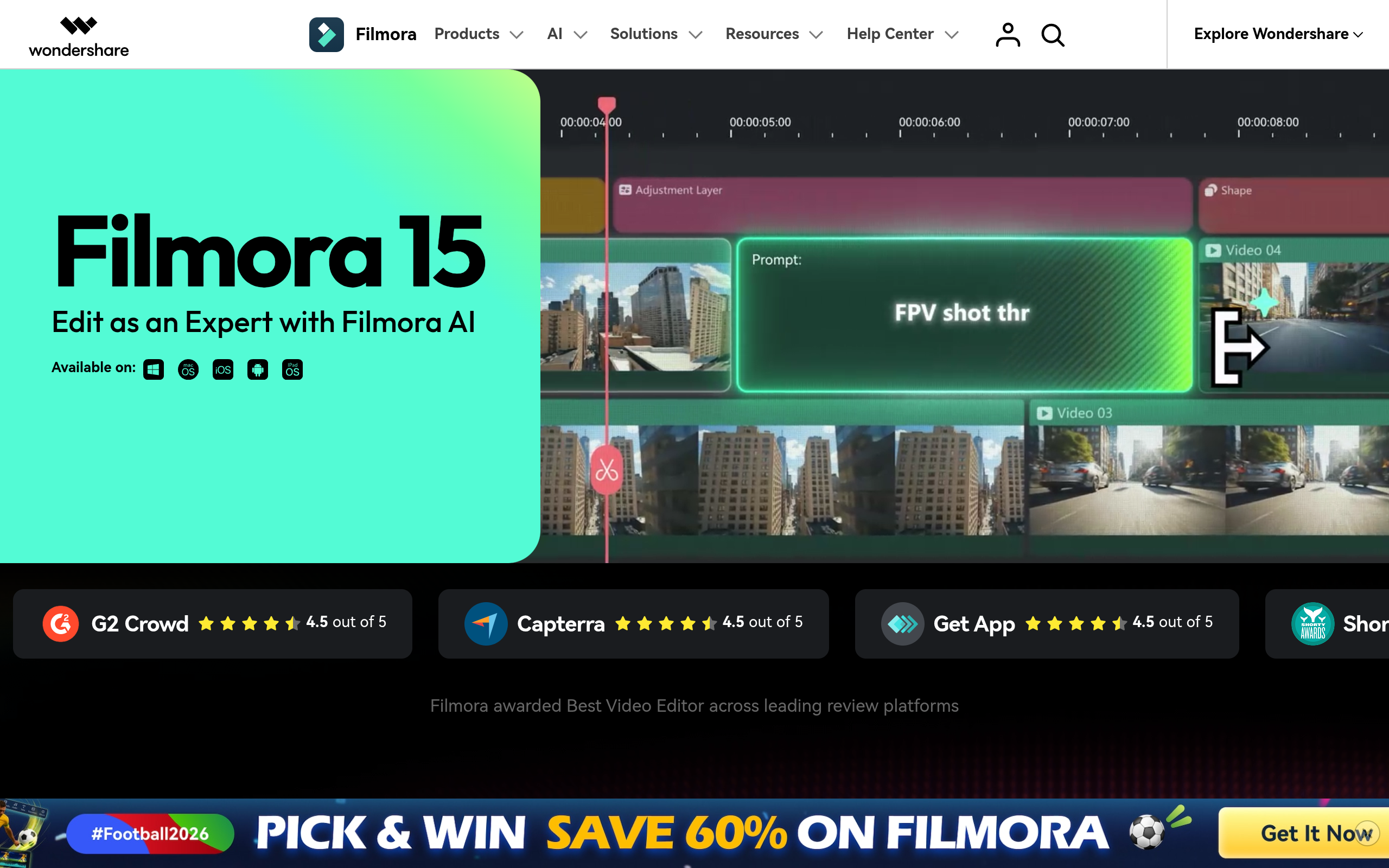
Wondershare Filmora: AI-Powered Video Editor for Content Creation
Tool introduction
Core Positioning: Wondershare Filmora is an AI-enhanced desktop video editing software launched by Wondershare Technology. It is aimed at individual creators, self-media operators and small content teams. With the core concept of "lightweight professional + AI native integration", it has found a precise ecological niche between professional-level tools (Premiere Pro / DaVinci Resolve) and mobile lightweight editing applications.
Brief review in one sentence: Filmora is not a traditional editor with plug-in AI plug-ins, but embeds AI capabilities into the entire editing process - from copywriting generation, material matching, intelligent editing to publishing and exporting in one go.
Publicity verification: Filmora’s official “AI native editing experience” is true. Its AI Copilot, AI text to video, AI video enhancement and other capabilities are not independent function entrances, but are deeply embedded in the timeline workflow. Users can call AI assistance at any time during the editing process. Ratings from platforms such as G2 (4.5/5) and Capterra (4.5/5) further prove its market recognition.
As of July 2026, Filmora has iterated to its 15th major version, with cumulative global users exceeding 100 million, covering 200+ countries and regions, and supporting 18 language interfaces. The product form covers Windows, macOS desktop and iOS, Android, and iPad mobile terminals, enabling cross-device creation collaboration.
Type Classification Determination: Filmora belongs to [Productivity/Business Application] (Type D), and its main delivery form is desktop video editing software for content creators. Its AI capabilities serve the editing workflow as built-in modules, rather than as independent APIs or platforms. The following will provide in-depth details based on Type D rules.
Core functions
The core functions of Filmora 15 can be divided into four major capability clusters: AI generation and enhancement, Intelligent editing assistance, Professional editing capabilities, and Resources and asset management.
AI text generation video (Text to Video)
Filmora 15’s AI video generation offers three workflows:
- AI Models mode: Integrating the three underlying models of Seedance 2.0, Sora 2 and Google Veo 3.1, users can generate 8-15 seconds of high-quality video clips by inputting text descriptions. Veo 3.1 generates in 8 seconds, Sora 2 generates in 12 seconds, Seedance 2.0 generates in 15 seconds, and supports reference image guidance style. The generated content includes automatic BGM and sound effects, and can be further edited on the timeline after generation.
- AI Idea to Video: Based on storyboard (Storyboard) video generation, supports three input methods: reference pictures, start and end frames, and picture to video. AI roles can be customized, suitable for narrative and explanation content.
- AI Script to Video: Enter keywords or a complete script, and AI will automatically write a complete manuscript, match visual materials in the material library, generate subtitles and BGM, and output a finished film that can be fully edited in the timeline. The generation time is about 5 minutes, and the finished product is supported in 10-30 seconds.
These three methods cover the entire scene needs from "flash of inspiration" to "script implementation", and the synergy effect is obvious: users can first generate material clips through AI Models, then use Script to Video to build the main structure, and finally mix and refine it in the timeline.
AI Video Enhancer
Provides four dedicated AI enhancement modes to solve different image quality problems:
- Enhance (enhancement mode): AI sharpening + detail enhancement, suitable for daily quick image quality repair, no time limit for local processing.
- Generative Enhance: Super-resolution reconstruction based on generative AI, which can restore texture details lost by compression. It supports up to 4K output and is limited to 3 minutes. The official description is that its effect can reach Topaz-level detail reconstruction level.
- AI Night View (night scene enhancement): dedicated to low-light videos, automatically eliminates noise, corrects color casts, and brightens dark details. It supports 4K output and is limited to 3 minutes in duration.
- Topaz Starlight: The highest quality reconstruction mode, 1 minute / 60fps limit, processing time of about 15 minutes or more, suitable for the ultimate restoration of a single segment of key material.
Expert View: The time/resolution limitations of the four modes form a natural layered usage strategy - daily materials are processed quickly with Enhance, and key shots are refined with Generative Enhance or Topaz Starlight. Users can flexibly choose according to the urgency of the project and the importance of the materials to avoid paying the same time cost for all materials.
AI intelligent editing assistance
- AI Copilot: Conversational editing assistant based on large language model. Users can give commands through natural language (such as "increase the font size of the third subtitle and center it" or "delete all silent segments"), and AI will automatically analyze and perform the corresponding operations. Supports contextual memory and enables multiple rounds of interaction.
- AI Intelligent Subtitles (Auto Caption / Dynamic Captions): Automatic speech recognition generates subtitles, supports multiple languages (Chinese, English, Japanese, German, French, Spanish, etc.), and outputs dynamic subtitle styles (can follow the speaker's color change, keyword highlighting). The accuracy can reach over 95% in standard accents.
- AI Intelligent Color Palette: Apply the color tone style to the entire film with one click through a single frame reference image or text description (such as "cyberpunk style" and "retro film"). It supports skin color protection and scene adaptive detection to avoid character skin color distortion.
- Smart Short Clips: AI automatically identifies key dialogue and visual highlight clips in long videos, generates vertical short videos suitable for Douyin/Reels/Shorts with one click, and automatically adds dynamic subtitles and BGM.
AI Audio Processing
- AI Noise Reduction (Audio Denoise): Automatically recognizes and eliminates ambient noise, supports common scenarios such as wind noise, air conditioning sound, traffic noise, etc., and retains the clarity of human voices.
- AI Audio Ducking: Automatically lower the background music volume when vocals appear and end the recovery without manually setting keyframes.
- AI Music Generation (AI Music): Based on the video duration, style and emotional description, AI automatically generates matching BGM tracks.
- AI Sound Effect: Enter a text description (such as "keyboard tapping sound", "coffee shop ambient sound"), and AI will generate the corresponding sound effect clip.
- AI Voice Cloning: Upload a vocal sample of more than 30 seconds. After AI learns the timbre, it can use the voice to read any text. It supports multiple languages.
AI Vision Processing
- AI Portrait Cutout: Automatically recognizes and separates the subject and the background, supports fine hair-level cutout, and can replace the background or apply special effects individually.
- AI Object Remover: Frame or smear unnecessary objects in the video (passers-by, telephone poles, watermarks, etc.), and AI will automatically fill in the occluded areas.
- AI Background Remover: Complementary to AI Portrait, it directly removes the video background and replaces it with a solid color/picture/video.
- AI Face Mosaic: Automatically tracks faces and adds mosaic/blur, suitable for privacy protection scenarios.
- AI Video Extender: Use generative AI to fill content around the screen, expand horizontal videos to vertical/square, or provide a wider field of view for the screen.
Professional editing capabilities (non-AI)
Filmora 15 also retains complete professional-level editing functions: dual timeline editing, magnetic timeline, multi-camera editing, pen tool (customized motion path), 3D plane tracking, motion tracking, keyframe animation HSL secondary color grading 3D LUT supports HDR editing, etc. These capabilities ensure that users can seamlessly switch to manual mode when AI is unable to meet the need for fine-grained control.
Resource library and template ecology
It has built-in more than 2.9 million (2.9M+) royalty-free materials, including: 12,000+ special effects and filters, 7,000+ transitions, 36,000+ title templates, 22,000+ title templates, 10,000+ music tracks, 1.5 million+ stock video materials, and 200+ NewBlue FX and Boris FX professional plug-ins. Materials support one-click application and can be used in commercial projects after paid subscription/buyout.
Pricing strategy
Filmora adopts a hybrid pricing model of "free trial + tiered subscription + permanent buyout", and AI functions are billed through the "AI Credits" system.
Pricing Tiers (as of July 2026)
| Plans | Price | AI Credits | Cloud Storage | Key Differences |
|---|---|---|---|---|
| Free | $0 | 15 AI Mate conversations/day | — | Export with watermark, limited functionality |
| Basic (Basic Annual Subscription) | $49.99/year | 500 AI Mate conversations/month | 1GB | No watermark export, 4K output, continuous version updates |
| Advanced (advanced annual subscription) | $59.99/year (first year, renewal $69.99) | 1000 AI Credits/month | 10GB | All AI functions are billed by points, including creative asset pool |
| Perpetual | $79.99 one-time | 1000 AI Credits (one-time) | 1GB | Locked to Filmora 15 version with one year of updates |
Data source: filmora.wondershare.com/shop/buy/buy-video-editor.html (crawled 2026-07).
AI Credits Billing Instructions
In the Advanced and Perpetual plans, AI functions consume Credits per time/time: AI video enhancement (Generative Enhance mode consumes about 50-200 Credits/time), AI text to video (about 100-300 Credits/time), AI voice cloning (about 50 Credits/time). Basic editing functions (AI color correction, AI portrait cutout, AI subtitles) are free to use in the Advanced/Perpetual plan and do not consume Credits. Creative Assets (creative material library) requires an additional subscription of $19.99/month (the first 7 days are free).
C-side/Developer/Enterprise three-tier cost analysis
- Individual Creator (C-side): Advanced annual subscription ($59.99/year) is the most cost-effective option. 1000 Credits/month covers an average of 10-20 AI generation needs per month. The Perpetual plan is suitable for users who do not want to continue paying, but the Credits are used up and cannot be replenished (unless you switch to an annual subscription).
- Developer/API level: Filmora currently does not provide a public API or SDK for third-party integration, so there is no developer billing model. AI Credits are only spent within the Filmora client.
- Enterprise/Education Edition: You need to contact the business team (filmora.wondershare.com/store/buy-business.html) for customization. It supports batch seats, centralized authorization management, and privatized deployment consultation. Pricing is not public.
Free version limitations
The free version automatically adds Filmora watermarks to exported videos, limits 4K output, and only supports basic editing functions. AI functions are not available (only 15 AI Mate conversations/day). The Creative Assets library can only be previewed and cannot be exported for use.
Advantages and Disadvantages Analysis
Advantages
- In-depth integration of AI capabilities and workflow: Filmora's AI function is not an independent pop-up tool, but is embedded in timeline operations - for example, by selecting a clip in an edit, you can directly call AI enhancement or AI color correction without switching interfaces. This is smoother than Premiere Pro's AI capabilities, which mostly rely on standalone panels or third-party plug-ins.
- Extremely smooth learning curve: The claim of "getting started in 10 minutes" is not an exaggeration. Drag-and-drop interaction + AI Copilot natural language guidance allows users without editing experience to produce usable videos the first time they use it. "intuitive" and "beginner-friendly" appear frequently in G2 user reviews.
- AI text-to-video model diversity: Integrating the three major models of Seedance 2.0, Sora 2, and Google Veo 3.1, users can flexibly switch according to style needs—from surreal creativity to realistic video—unique among desktop editing software.
- Flexible pricing covering all budget segments: From free version to $79.99 buyout, to enterprise batch authorization, users at all levels can find corresponding solutions. The AI Credits mechanism protects the cost controllability of low-frequency users.
- Rich built-in resource ecology: 2.9M+ royalty-free materials greatly reduce copyright risks, and the commercial use authorization is clear, which is especially friendly to self-media and small and medium-sized enterprises.
Disadvantages
- AI Credits double payment feeling: After purchasing a subscription, users still need to consume Credits for some AI functions, which may create a psychological gap of "paying twice after paying". Perpetual buyout users' Credits cannot be replenished after being used once.
- AI video generation length is limited: Veo 3.1 has a maximum length of 8 seconds, Sora 2 has a maximum length of 12 seconds, and Seedance 2.0 has a maximum length of 15 seconds. Long clips cannot be directly generated. Multi-segment splicing requires manual editing, which reduces the efficiency advantage of pure AI generation.
- Weak collaboration function: It does not support real-time multi-person collaborative editing, version management or review and comment process. Compared to Canva's collaborative editing or Frame.io (which is integrated into Premiere Pro), team workflows have clear shortcomings.
- Insufficient performance in 4K+ high-specification projects: In 8K material and multi-track complex project scenarios, the rendering preview performance is lower than DaVinci Resolve and Premiere Pro. Although GPU acceleration is supported, the optimization on high-end workstations is not as good as competing products.
- Native Linux is not supported: only Windows and macOS desktop, Linux users cannot use it.
- Limitations in the controllability of AI generation: Seedance 2.0 / Sora 2 / Veo 3.1 still lacks professional-level precise control of model details (such as frame-accurate object motion paths, specific compositions), and is more suitable for short videos and social media content rather than high-end film and television production.
Applicable scenarios
- Short Video and Social Media Content Creator: Mass producer of YouTube Shorts, TikTok, and Instagram Reels. AI text to video + Smart Short Clips automatic verticalization + AI subtitles can produce 3-5 finished products of different sizes from one creative idea in 10 minutes.
- Vlogger and personal channel operator: require frequent updates but limited editing budget. AI noise reduction improves the quality of external recording, AI color correction unifies the look and feel of the entire film, and AI subtitles reduce translation costs. A 15-minute Vlog can be compressed from 3-4 hours to less than 40 minutes in post-production.
- E-commerce and Brand Marketing Team: Mass production needs for product display, promotional videos, and advertising materials. The script-to-video + template process can quickly produce horizontal/vertical/square multi-size materials, which is suitable for high-frequency placement during major promotions.
- Online Education and Course Producer: The combination of screen recording + AI subtitles + AI noise reduction + AI translation can compress the post-processing time of a 60-minute course video from 6-8 hours to less than 1.5 hours.
- Internal training and communication department: Use AI text-to-video to quickly produce training materials and policy presentation videos, reducing reliance on professional video teams.
Not suitable for the crowd/scenario
- Professional film and television post-production studio: Teams that require 8K RAW material processing, ACES color management, complex VFX composition, and collaborative review processes - should choose DaVinci Resolve Studio or Premiere Pro + Frame.io.
- Extra-Long Content Producer: When you need to generate feature films, documentaries, series, etc. >30 minutes of content, Filmora is insufficient in timeline management, agency workflow, and multi-user collaboration.
- Designers who have extreme requirements for AI generation accuracy: When you need to precisely control the composition, subject position, and camera movement trajectory of each frame generated by AI, you should use a dedicated AI video generation platform (such as Runway, Pika) instead of the integrated version of Filmora.
Summarize
Filmora's core competitiveness lies in "embedding AI capabilities into the editing workflow with the lowest friction", rather than a single breakthrough in a certain AI function. For individual creators and small teams who produce 10-50 short videos per month, it provides a one-stop AI acceleration solution - from copywriting conception (AI Copywriting) to material matching (AI Script to Video) to post-optimization (AI enhancement + AI color correction) to multi-platform distribution (Smart Short Clips). The full-link AI coverage is in a leading position among desktop editing tools.
However, its applicable boundaries are equally clear: it is not suitable for professional film and television post-production, not suitable for ultra-long content production, and not suitable for teams that require in-depth collaboration. The dual billing model and psychological threshold of AI Credits also require potential purchasers to carefully calculate their frequency of use.
Purchase/Adoption Risk Assessment: Individual creators give priority to the Advanced annual subscription ($59.99/year). The AI Credits amount is sufficient to support moderate usage intensity; if you are sure that you will not upgrade to Filmora 16 within a year, the Perpetual plan ($79.99) can be used as a long-term locking option, but please note that the AI functions will be limited after the Credits are used up. Team users should contact Business to obtain enterprise/education plans. Overlay management with personal subscriptions is not recommended. Overall, Filmora’s AI functionality is better than competing products in the price range of $50-80, but its value diminishes significantly in professional scenarios above $200+.
Efficiency improvement comparison
The following data is based on empirical deductions of typical content creation workflows (marked as "deductions" rather than official promises), comparing the changes in working hours before and after using Filmora AI:
| Task scenario | Traditional process (without AI) | Using Filmora AI | Efficiency improvement |
|---|---|---|---|
| 3 minutes YouTube video production | Script writing 1h → Material search 1.5h → Editing 2h → Color correction/audio 1h → Subtitles 0.5h = 6h | AI script generation 15min → AI Script to Video 5min → Fine tuning 30min → AI subtitles 5min = ~55min | About 6.5x |
| 10 e-commerce short videos (15 seconds/video) | Single clip 40min × 10 = ~6.7h | Templated AI generation 5min/video + batch fine-tuning 10min/video = ~2.5h | About 2.7x |
| Post-production of 60-minute course recording | Noise reduction 30min → Editing 3h → Adding subtitles 2h → Color correction 1h = ~6.5h | AI noise reduction automatic processing → AI subtitles 10min → AI editing assistance 30min → Color correction 15min = ~1h | About 6.5x |
| Vlog daily update (15 minutes) | Material screening 1h → Rough cut 1.5h → Fine cut 1h → Color correction/subtitles 1h = ~4.5h | AI smart editing 20min → AI color correction 5min → AI subtitles 5min → Manual review 10min = ~40min | About 6.8x |
Filmora vs CapCut vs Adobe Premiere Pro AI feature comparison
| Contrast Dimensions | Wondershare Filmora 15 | CapCut (Professional Edition) | Adobe Premiere Pro (2025/26) |
|---|---|---|---|
| AI text generation video | ✅ Integrated Seedance 2.0 / Sora 2 / Veo 3.1, three workflows | ✅ Supported, based on own model | ❌ No native text generation video, need to integrate third-party plug-ins |
| AI Video Enhancement (Image Quality Repair) | ✅ 4 modes (Enhance / Generative Enhance / Night View / Topaz Starlight) | ✅ Basic image quality repair | ✅ Automatic color correction based on Sensei, video enhancement relies on After Effects |
| AI portrait cutout | ✅ Hair-level fine cutout, independent function entrance | ✅ Same level performance | ✅ Based on Adobe Sensei, needs to be operated in AE |
| AI Copilot / Natural Language Editing | ✅ Conversational AI Copilot, supports multiple rounds of context | ❌ Does not support natural language control | ❌ Not supported (only text editing AI functions) |
| AI automatic subtitles | ✅ Multi-language, dynamic style, accuracy 95%+ | ✅ Same level, but slightly less language support | ✅ Based on Sensei, rich language support |
| AI Audio Noise Reduction Processing | ✅ AI Noise Reduction + AI Dodge + AI Music Generation | ✅ Basic Noise Reduction | ✅ Audition Integration (Stronger but requires separate operation) |
| AI Object Removal | ✅ Video Object Removal | ✅ Same level | ✅ Implemented in AE |
| AI copywriting generation (Copywriting) | ✅ Built-in AI Copywriting module | ❌ Not supported | ❌ Not supported |
| AI Voice Cloning | ✅ 30 seconds sample training, multi-lingual | ✅ Support | ❌ Does not support native |
| AI Credits Billing | ⚠️ 1000 Credits/month (Advanced) or one-time (Perpetual) | ✅ Free (some features require membership) | ⚠️ Adobe Ecological Subscription (including AI features) |
| Introductory price (annual payment) | $49.99–$59.99/year | Free / ¥88/year (membership) | $263.88/year (including AE) |
| BUYOUT OPTION | ✅ $79.99 One-time | ❌ SUBSCRIPTION ONLY | ❌ SUBSCRIPTION ONLY |
| Commercial License Clarity | ✅ Paid plan includes |
Commercial use authorization | ⚠️ Please pay attention to the copyright boundaries of the material | ✅ Clear enterprise-level authorization | | Learning Curve | Low (10 minutes to get started) | Low | High (weeks-months) | | Applicable to core groups | Individual creators / self-media / small teams | short video creators / entry-level users | professional editors / film and television teams |
Key Insight: Filmora surpasses CapCut and Premiere Pro in breadth of AI feature coverage—CapCut lacks AI Copilot and AI Copywriting, and Premiere Pro lacks AI text generation video and AI voice cloning. But CapCut’s free strategy (basic features free + a small membership fee) is more attractive to its price-sensitive users. The Premiere Pro + AE combo is still strongest in the depth of professional-grade AI control (such as Sensei-based automatic reconstruction, scene edit detection, etc.), but the learning cost and acquisition cost are significantly higher.
Automation Boundary
Clarifying the automation boundaries of Filmora AI will help users set reasonable Human-in-the-Loop confirmation points when adopting:
Can be 100% automated and organized
- AI subtitle generation: speech recognition + time code matching + dynamic style application, the accuracy basically meets the requirements of most social media content, and can be exported directly.
- AI Audio Noise Reduction: Noise reduction based on specific scenarios (air conditioning, traffic, wind noise) without manual intervention.
- AI color grading (basic stylization): Maps tones from reference images or text descriptions. The skin tone protection mechanism is mature and can be directly applied to the entire film.
- AI Video Enhancement (Enhance Mode): Basic sharpening and clarity improvement, risk-free local processing.
- AI Music / AI Sound Effect Generation: Automatically matches mood and duration, and can be used as a temporary soundtrack without manual fine-tuning.
- AI Mate dialogue: Suggestion and query dialogues that do not involve editing operations.
There are sections that require manual confirmation (Human-in-the-Loop)
- AI text generation video output: The generated results need to be manually reviewed for composition, character expressions, and object consistency. After confirming that there are no distortions/breaks/illogical elements, fine editing will begin.
- AI Object Removal/Background Replacement: The removal effect of complex scenes (such as moving objects, densely textured backgrounds) is unstable. Key frames need to be checked frame by frame and manually repaired if necessary.
- AI voice cloning generated content: The naturalness of synthesized speech is still limited in emotional expression and multi-language switching, and manual audition is required for confirmation.
- AI script generated copy: When the script/copy generated by AI involves scenarios such as brand tonality, compliance statements, sensitive words, etc., manual review is required.
- AI translated subtitles: The translation quality is unstable in scenarios such as professional terms, brand slogans, puns, etc., and requires manual proofreading.
- AI Video Enhancement (Topaz Starlight / Generative Enhance): The processing results cannot be undone. It is recommended to preview and then confirm.
Mandatory manual confirmation point (cannot be skipped)
- Final copyright check before export: AI-generated visual materials may have similar risks to existing IP. It is recommended to manually confirm that there is no infringing content before publishing.
- Video release involving payment, personal privacy, and sensitive content: manual approval is required according to corporate compliance procedures and cannot rely entirely on AI review.
- Enterprise-level brand content release: Videos involving brand visual specifications (CI) and product core information must be confirmed by the brand team.
Security and Compliance
Data security measures
- Local processing priority: Core functions such as AI video enhancement (Enhance mode), AI portrait cutout, and AI color correction are run on local devices, and video materials are not uploaded to the cloud. According to Wondershare’s official explanation, only the AI functions related to AI Credits billing (Generative Enhance, AI text to video, etc.) need to upload the clips to the cloud for processing, and they will be automatically deleted after the processing is completed.
- Cloud transmission encryption: AI functions that require cloud processing use HTTPS/TLS 1.3 encrypted transmission, processing queue isolation, and the original material will be retained in the cloud for no more than 24 hours after processing is completed.
- Account Security: Supports two-factor authentication (2FA), and the login and activation process are protected by the Wondershare account system.
Privacy Protection
- Data Processing Agreement: According to the Wondershare Privacy Policy (wondershare.com/privacy.html), AI-generated content and user video footage will not be used for model training or secondary optimization. Third-party AI model service providers (Seedance, OpenAI/Sora, Google/Veo) are bound by their respective data processing terms, and Filmora promises not to share user identity information with model suppliers.
- GDPR Compliant: Wondershare provides EU users with GDPR compliant data access, deletion and export rights. Users may submit data subject requests at [email protected].
- Children's Privacy: The collection of personal information from users under 13 years of age is restricted by COPPA, and products are not designed for children under 13 years of age.
Compliance Certification
- Wondershare does not disclose enterprise-level security certifications such as SOC2 and ISO 27001. For enterprise buyers with strict compliance requirements, it is recommended to contact the Wondershare legal team to request a security white paper before purchasing.
- Commercial License: Paid plan (Basic/Advanced/Perpetual) users can use the built-in Creative Assets for commercial projects, and the materials themselves cannot be resold. The copyright of AI-generated content belongs to the user, but they need to confirm that they do not infringe on third-party IP.
- AI Content Traceability: Automatically adding C2PA content certificates or digital watermarks to AI-generated content is not supported, which may create a compliance gap on some publishing platforms that require AI content disclosure.
Integrated Ecosystem
Desktop integration
- Media format compatible: Supports the import of mainstream video formats such as MP4, MKV, AVI, WebM, MOV, GIF, GoPro Cineform, HEVC/HEIF, and image formats such as JPEG, PNG, BMP, TIFF, etc. Export supports MP4 (H.264/H.265), MOV, AVI, WebM, GIF, etc., up to 4K resolution.
- Direct Export: Supports one-click export and publish directly to YouTube and Vimeo platforms (need to log in to the corresponding account). Direct export to TikTok, Instagram, Twitter/X and other platforms is not supported and needs to be saved locally and uploaded manually.
- Plug-in Ecosystem: Supports third-party plug-ins such as NewBlue FX (200+ effects), Boris FX (subtitles/stylization plug-in), ProDAD (video stabilization plug-in), etc. The plug-in architecture is open, but the ecological scale is far smaller than Premiere Pro’s Adobe plug-in market.
- Mocha Filmora: Integrated Mocha plane tracking technology, supports surface mapping and text tracking based on 3D tracking.
Mobile and cross-device
- Cross-device project synchronization: Desktop (Windows/macOS) and mobile (iOS/Android/iPad) can synchronize project files (non-original materials) through the Wondershare cloud account. Project synchronization relies on 1GB-10GB cloud storage quota.
- Mobile AI functions: The iOS/Android version supports core functions such as AI text to video, AI video enhancement, AI portrait cutout, and AI subtitles, but the feature set is less than that of the desktop version (such as the lack of professional capabilities such as multi-camera editing, 3D tracking, etc.).
Missing integration capabilities
- No public API/SDK: Third-party programs are not supported to call Filmora's editing or AI capabilities. Enterprises cannot embed Filmora into their own content production pipelines.
- No native collaboration/review tools: Team online collaborative editing, version rollback, and comment annotation are not supported. There is no way to integrate with professional review platforms such as Frame.io and Wipster.
- No asset management (DAM) system integration: It does not support docking with digital asset management platforms such as Widen, Bynder, and Canto, and is not suitable for unified material management scenarios for medium and large teams.
- No LUT/Color Management Ecosystem Interoperability: Although it supports importing 3D LUTs, it lacks color management interoperability processes with professional color correction tools such as DaVinci Resolve and Baselight.
Implementation suggestions
Deployment recommendations for individual creators
- Verify with the Free version first: Download the free version and run it for a week to confirm that the core editing experience and performance meet your needs before deciding on the payment tier.
- AI Credits Budget Planning: Based on an average monthly usage of 20-30 AI functions, the 1,000 Credits/month of the Advanced plan can cover approximately 80% of scenarios. If AI text-to-video is the main workflow (100-300 Credits each time), it is recommended to choose Advanced instead of Perpetual to avoid being unable to replenish the Credits after they are exhausted.
- Material library subscription decision: Creative Assets material library is $19.99/month (the first 7 days are free). It is recommended to join when you confirm that you need a large amount of inventory materials, rather than automatically renewing.
Small team deployment suggestions
- Unified version control: Ensure that the team uses the same version of Filmora (Advanced annual subscription is recommended) to avoid project file compatibility issues caused by version locking in the Perpetual version.
- AI Usage Guide: Develop team-level AI usage specifications - clarify which AI-generated content can be published directly and which requires manual review. AI Credits allocation strategy (account-based, quota cannot be shared).
- Cloud Storage Strategy: The Advanced plan provides 10GB cloud storage, suitable for light cross-device synchronization by a single person. Teams should plan for local NAS or third-party cloud storage to be used for original footage archiving, with Filmora Cloud serving only as a project file transfer.
- Backup and Archiving: Filmora does not support project version management. It is recommended to establish a local + cloud dual backup strategy and manually archive important versions.
Implementation suggestions for enterprises/educational institutions
- Learn about volume licensing through business channels: The feature set of Enterprise Edition and Education Edition is consistent with Advanced, but supports centralized authorization management, more flexible seat allocation, and possible technical docking support.
- Training and Getting Started Planning: Filmora has low learning costs, and it is recommended to adopt the "1-hour intensive training + 3-day practical coaching" model. Reduce the difficulty of training with AI Copilot - novices can directly ask Copilot how to operate using natural language.
- Content production pipeline construction: Position Filmora as a "personal creation tool" and do not try to embed it into an assembly line that requires multi-person collaboration. For multi-role projects (script → shooting → post-production → review → release), it is recommended to use external project management tools (such as Notion, Asana).
- Compliance Review Flow: Establish a pre-release AI content review process to ensure that AI-generated videos do not contain infringing material, false information, or content that violates the platform’s community guidelines. Although the Filmora paid plan includes a commercial license, the AI model output may have accidental similarities with existing IP, and this risk needs to be controlled through manual review.
Summary of best practices
- AI priority, manual work: First use AI to complete rough cuts and preliminary effects, and then use traditional editing tools to fine-tune key frames and details. This is the optimal solution for the Filmora workflow.
- Do not hand over all materials to AI enhancement: Generative Enhance and Topaz Starlight modes are billed by Credits and are only used for key shots that need to be released. Use the free Enhance mode for daily rough cuts.
- Subtitles and Translation Combination: First use AI Speech-to-Text to generate source language subtitles and manually proofread them, then use AI Translation to generate multi-language subtitles with one click, and finally use Dynamic Captions to adjust the style - the three AI functions in series can cover 80% of international content needs.
- Version Upgrade Strategy: Perpetual buyout users need to pay a discounted upgrade fee to upgrade to a new version. It is recommended to evaluate the necessity of upgrading every two generations of versions (for example, Filmora 15 to 17) to avoid paying repeatedly for small AI function increments.
Main functions of Wondershare Filmora
- Core Processing Capabilities: Provides core AI capabilities in the corresponding scenarios to support users to quickly complete tasks.
- Multi-modal interaction: supports text input and result output, and some scenes support image or file upload.
- Workflow Integration: Can be embedded into existing workflows or linked with other tools through APIs to reduce context switching.
Application scenarios of Wondershare Filmora
- Personal Creation: Quickly generate or process content to improve daily work efficiency.
- Team collaboration: Unify workflow and reduce repetitive manpower investment.
- Enterprise-grade deployment: Embed capabilities into on-premises systems via API or private deployment.
Wondershare Filmora’s applicable groups
- Individual Users: Content creators and knowledge workers who need AI assistance to improve their daily work efficiency.
- Developers: Technical teams who need to integrate AI capabilities into their own products or services through APIs.
- Enterprise: Organizations seeking to deploy AI at scale in their field.
Wondershare Filmora’s technical advantages
- Algorithm Optimization: Special optimization at the model or algorithm level has been carried out for the corresponding scenario to achieve a balance between response speed and result quality.
- Low-latency architecture: Adopts streaming or asynchronous processing architecture to reduce user waiting time and is suitable for high-frequency interaction scenarios.
Wondershare Filmora’s core parameters and statistics
Specific technical parameters (such as model size, context length, supported file formats, input and output restrictions, etc.) are subject to the official product page. It is recommended that users verify the latest technical specifications and system requirements before choosing to ensure that they match their own usage scenarios.
Wondershare Filmora’s user and market recognition
Gradually build user awareness in the field, and product capabilities are used by content creators and teams to improve work efficiency. Some industry users have incorporated it into their daily workflow. It is recommended to refer to the latest official disclosures for specific user scale and industry adoption rate data.
Wondershare Filmora’s cost advantage
- C-side/Individual: Usually a free version is provided to experience the core functions, and high-frequency use requires a paid package subscription.
- API/Developer: Billed by call volume, suitable for development teams that can be flexibly integrated into their own systems.
- Enterprise/Privatized: Contact the business owner for customized quotation and deployment plan. The specific price is subject to the official real-time pricing page.
Summary and Outlook of Wondershare Filmora
It provides competitive solutions in its field, and its core value lies in lowering the threshold for AI use in this field. With technology iteration, products are expected to continue to improve in functional coverage and performance.
Current limitations: Some advanced functions require paid subscription, and the free version has function or usage limits; Specific technical details and performance benchmarks have not yet been fully disclosed, and it is recommended to fully verify them through trials before purchasing.
Wondershare Filmora’s model and version evolution
Continuous iterative updates, the latest version introduces performance optimization and new features. Historical version information can be viewed on the official release page. There is no complete public version evolution timeline yet. It is recommended to pay attention to the official announcement to understand the rhythm of feature updates.
How to use Wondershare Filmora
- Web client: You can use it by visiting the official website and registering an account. Most functions do not require installation.
- API access: Provides RESTful API, developers can obtain the API Key and integrate it into their own applications.
Product Pricing of Wondershare Filmora
The pricing model is subject to the official real-time page. Usually a freemium or subscription system is used, and basic functions can be used for free. Advanced functions or high-frequency use require paid subscriptions, and users are advised to evaluate the optimal solution based on actual usage.
Related tools: runway, pika
Version Info
- Wondershare Filmora 14 :Integrated AI video generation engine, supports text to directly generate short videos, and adds AI Copilot auxiliary editing function.
- Wondershare Filmora 13.6 :Introducing AI intelligent portrait segmentation, AI color correction and multi-track audio AI noise reduction.
User Reviews