 FunClip
Free
FunClip
Free
FunClip is an AI video open source tool for video editing and content operation. It is based on FunASR for speech recognition, timestamp positioning, speaker distinction and subtitle output. It is suitable for long video clipping and secondary distribution of course content.
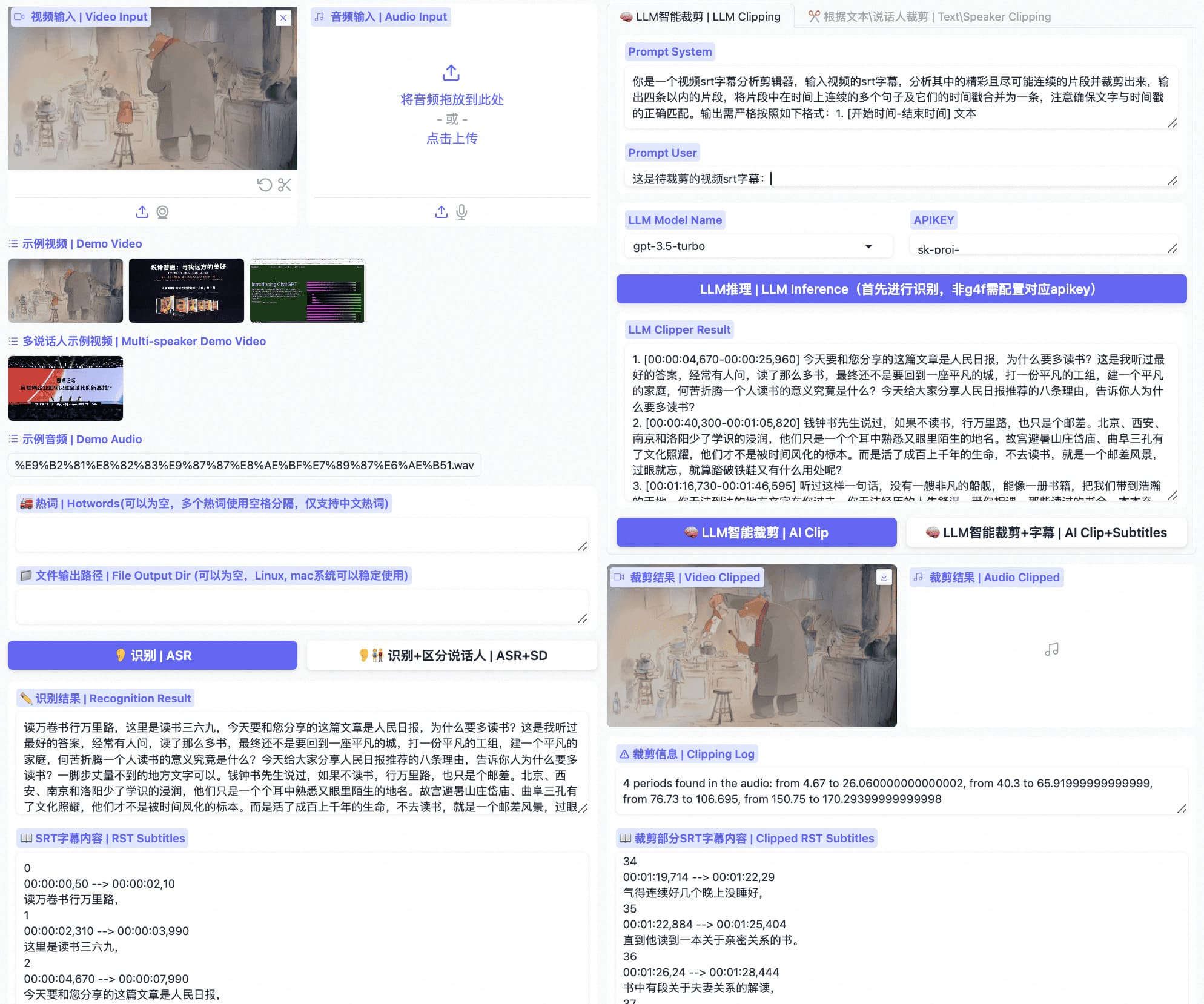
FunClip
Core parameters and statistics
Main Type: Productivity/Business Application. Although it is an open source local tool, its delivery form is closer to a "ready-to-run content production tool" rather than a basic model platform.
| Projects | Public Information |
|---|---|
| Official positioning | Fully open-source, locally deployed automated video clipping tool |
| Core Engine | FunASR Paraformer Series + CAM++ + Optional LLM |
| Deployment method | Local Python context Gradio service, command line |
| Language capabilities | Latest update supports Fun-ASR-Nano in 31 languages |
| Intelligent capabilities | Speaker recognition, hot words, subtitle output LLM auxiliary editing |
| Open Source License | MIT License |
| Community size | GitHub about 5.8k stars, 702 forks |
| Latest update | 2026-05-20 |
Brief review in one sentence: The value of FunClip is not to do fancy video editing, but to automate the most time-consuming task of "first understanding the long video, and then cutting it according to text or speaker".
Publicity Verification: The warehouse's description of "automatic editing" is basically true, but a more accurate expression should be "automatic completion of rough editing and subtitle time positioning". The final release-level film usually still requires manual proofreading of rhythm, subtitles and boundaries.
User and market recognition
Open Source Approval: GitHub currently publishes about 5.8k stars and 702 forks, indicating that it is not a niche experimental warehouse and has formed a stable Chinese video processing user group.
Model Endorsement: README explicitly relies on the FunASR system, of which Paraformer-Large has been downloaded more than 13 million times in ModelScope, which provides strong ecological endorsement for its Chinese recognition quality.
Real Location of Tools: FunClip is more like an internal production tool for the content team and course team, rather than a video platform directly facing end consumers. Its market recognition comes mainly from editing efficiency rather than the aesthetics of the finished film.
Cost advantage
C-side/Individual: Open source and free, only Python is needed to run basic functions locally; for individual creators, the cost of explicit software is very low.
Developer/Self-deployment: If LLM smart clipping or higher-precision models are required, the real cost turns to computing power, model API, disk and video encoding and decoding dependencies. In particular, Whisper-like English models will be more sensitive to video memory when accessed in the future.
Team/Enterprise: When the team uses it as an internal strip cutting tool, the biggest saving point is not software licensing, but the time it takes for the editing assistant to repeatedly drag the timeline, type subtitles, and find clips.
Quantification of cost reduction and efficiency improvement: Take the cutting of 10 short videos in one hour as an example. The traditional method often requires listening to the entire material before positioning the clips. Manual rough cutting usually takes 2 to 3 hours; FunClip's text positioning + batch cutting can reduce this stage to 10 to 30 minutes. This is a reasonable deduction based on the tool mechanism, not an official commitment.
Boundary of Human-Computer Collaboration: Automatic recognition, text cutting, and automatic generation of subtitles can be highly automated; manual confirmation must be retained for subtitle correction, bad habits cleaning, brand rhythm, and deletion of sensitive content before final release.
Main functions
- Voice Recognition Positioning: Convert the video into searchable text and timestamp to solve the problem of "finding spots for long materials".
- Clip by text segment: Directly enter the content you want to keep and let the system cut back to the corresponding time period.
- Clip by speaker: Use CAM++ to identify the speaker and cut out the speech of a certain speaker independently.
- Hot word enhancement: Improve the recognition rate of professional nouns, personal names and brand words through SeACo-Paraformer hot word configuration.
- Subtitle synchronization output: Automatically return the entire SRT and the target segment SRT, reducing the rework of the subtitle axis.
Expert View: The most useful synergy of FunClip is to connect "Recognition -> Search -> Cropping -> Subtitles" into a line. Many teams have separate ASR tools and separate editing software, but cutting strips is slow because they jump back and forth between the two.
Model and version evolution
Updated on 2026-05-20
The latest public node is 2026-05-20, which supports Fun-ASR-Nano and SenseVoice. The former has upgraded multilingual recognition to 31 languages, and the latter has brought in emotion recognition and audio events, indicating that the product has begun to extend from "recognizing text" to "understanding voice content attributes."
2024-05-13 v2.0.0
This is the key node for FunClip to move from rule-driven slicing to "LLM smart clipping". It allows users to combine prompt words with subtitles and let the model decide which clips are worth keeping.
2024-05-09 v1.1.0
This version is more practical for engineering, and has fixed a number of issues that really affect daily production efficiency around the output directory, intermediate result UI and offset configuration.
Technical advantages
Mechanism -> Effect -> Scenario: It first uses Paraformer to do timestamp recognition, and then uses the recognition results for text retrieval, speaker filtering and segment output, so it is especially efficient in interviews, meetings, courses and podcast slicing.
Local deployment advantages: Compared with purely online tools, FunClip is more suitable for teams that are sensitive to material security or that process videos in batches for a long time. Video material does not need to be uploaded to a third-party platform first, and is suitable for internal content such as courses, corporate training, and original interviews.
Engineering controllability: Gradio has dual entrances to service and command lines, which means it can not only click buttons for operations students, but also allow technical teams to plug in their own content pipelines.
Does not fit the boundaries: It is not responsible for advanced transitions, complex visual effects, color correction, and narrative rhythm. It cannot be used as a replacement for Final Cut or Premiere.
How to use
| Entrance | Suitable for the crowd | Usage |
|---|---|---|
python funclip/launch.py |
Operation and editing assistant | Start the local Gradio page to upload videos and cut them directly into strips |
| ModelScope / Hugging Face Space | First trial users | Online experience recognition and cropping logic |
videoclipper.py command line |
Technical team | Enter the automated batch pipeline |
3 minutes to get started: The official and most typical local method is to install the dependencies first and then execute python funclip/launch.py. If you need multi-language recognition, you can add -m fun-asr-nano, if you need emotions and audio events, you can add -m sensevoice, and for English recognition, you can use -l en.
git clone https://github.com/alibaba-damo-academy/FunClip.git
cd FunClip
pip install -r ./requirements.txt
python funclip/launch.py -m fun-asr-nano
Tips to avoid pitfalls: Use a real long video test for the first time to get started. First check whether the recognition accuracy and subtitle timeline are acceptable, and then decide whether to use LLM smart editing. Don't burn the model call fee as soon as you get started.
Product Pricing
Open Source Pricing: FunClip is free and can be freely used and modified under the MIT license.
True Cost:
| Cost layer | Main components |
|---|---|
| Personal | Local CPU/GPU, disk ffmpeg, optional imagemagick |
| Team | Server resources, batch video storage, maintenance costs |
| Smart clipping | External LLM API Key or local model computing power |
The free truth: The software itself is free, but the time, computing power and dependence on long video batch processing are not free. For novice users, installation and dependency configuration are the main thresholds.
Procurement/Adoption Risk Assessment: If the team does not have basic operational capabilities or does not accept command line configuration at all, the total cost of ownership of FunClip will appear higher than online SaaS.
Application scenarios
- Podcast/Interview Slicing: Quickly cut distributable segments from long videos by keyword or speaker.
- Course and training content splitting: Split long courseware into short videos based on chapter semantics, with automatic subtitles.
- Meeting minutes and speech organization: first transcribe, then filter speakers, and then export key segments to facilitate secondary editing and archiving.
Dimensionality reduction attack scenario: Chinese long video striping, high-frequency subtitle generation and designated speaker extraction are its most enjoyable use areas.
Applicable people
- Content Operations Team: Cut short videos frequently from lectures, interviews, and live broadcast replays.
- Course and Knowledge Payment Team: Long courses should be divided into chapters or marketing videos.
- Technical content production team: Able to accept local deployment and hope to script the cutting process.
Dissuade / Not suitable for people: Users who only need to do video refinement once in a while, who do not know how to deploy locally, or who value visual effects more than semantic positioning, should not use it as their first choice.
Not suitable for boundaries: It is good at voice-driven rough editing and subtitles, but not good at advanced narrative editing and heavy visual design.
Summary and Outlook
The value of FunClip is very real: it can automate the most eye-consuming and time-consuming aspects of long videos, such as retrieval, positioning, and slicing. It does not seek to replace professional editing desks, but rather helps content teams cut down a large portion of the time "from materials to editable rough drafts".
The most interesting things to watch in the future are two lines: one is the expansion of speech understanding brought by multilingual recognition and SenseVoice, and the other is whether LLM intelligent editing can stably output clips that are more like those selected by human editors. For adoption, it is recommended to test 3 to 5 real-life themes in the internal material library first, focusing on verifying the recognition accuracy, subtitle rework rate, and dependency stability; when it comes to public release, brand communication, and compliance-sensitive content, manual final review is still required. This is its core adoption risk assessment.
Related tools: runway, pika
Version Info
- Fun-ASR-Nano / SenseVoice Update :The latest update record of README shows that FunClip has supported Fun-ASR-Nano and SenseVoice. The former covers higher-precision recognition in 31 languages, and the latter adds emotion recognition and audio event detection.
- LLM smart editing version :FunClip v2.0.0 introduces intelligent editing based on large models, supports combining subtitles with prompt words, and automatically extracts the time period to be cut.
- UI and offset configuration updates :v1.1.0 adds output directory configuration, intermediate result saving UI upgrade, and paragraph-level start and end offset configuration, and fixes serious editing errors.
User Reviews