 Finalize PPT
Free
Finalize PPT
Free
Drafting PPT is Drafting's PPT template resource library and AI intelligent generation service. It provides a large number of online editable presentation templates, covering various scenarios such as work reports, business plans, teaching courseware, etc. It supports AI one-click PPT generation, online editor revision, intelligent typesetting and other functions, and cooperates with the drafting ecosystem to realize template selection, content modification, and rapid draft completion.
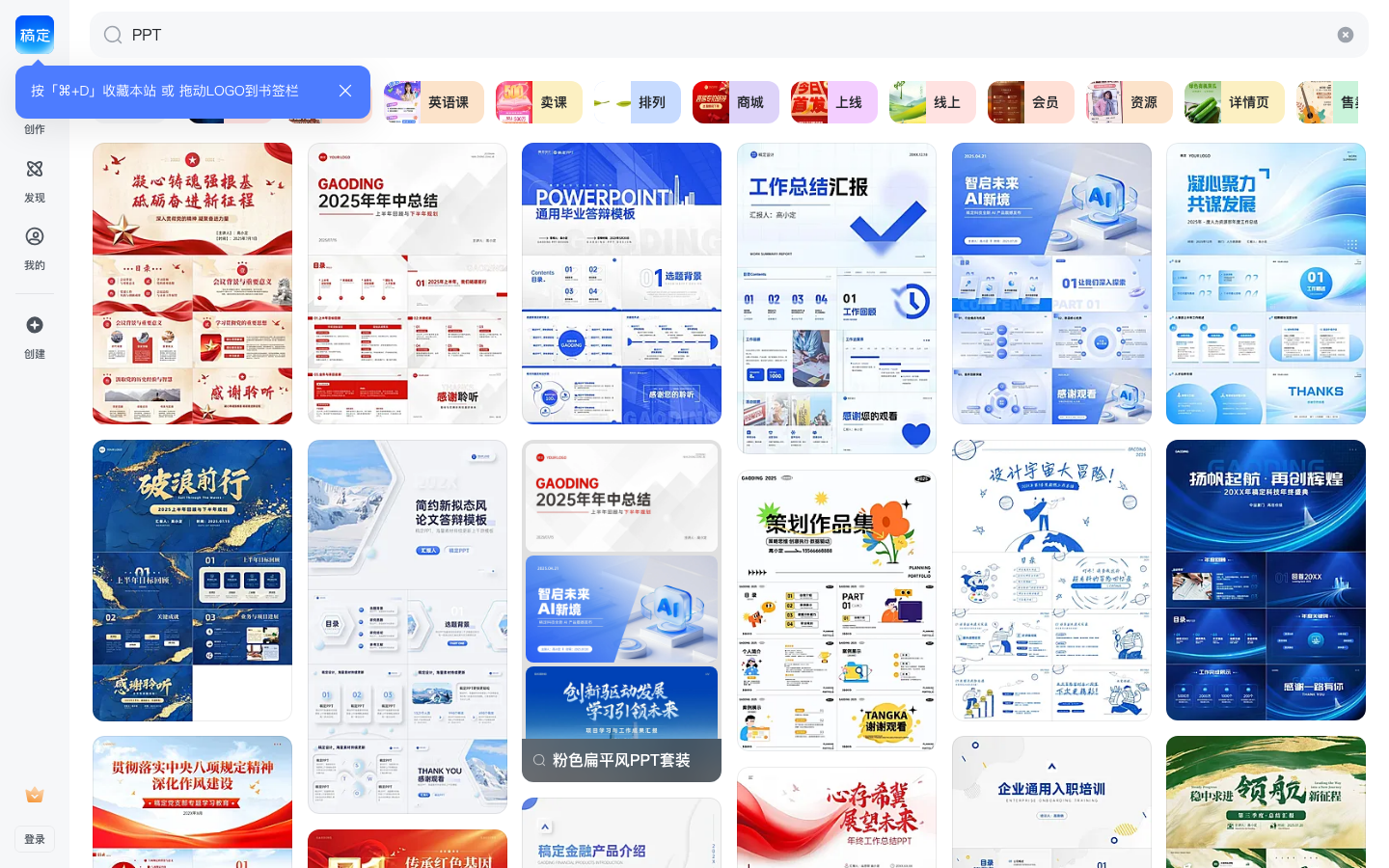
Finalize PPT
Finalize the core parameters and statistics of PPT
Drafting PPT is a product line under the drafting design platform that focuses on presentation production. It is positioned as a three-in-one presentation tool of "PPT template resource library + AI intelligent generation + online editor". The problem it wants to solve is very specific: when making PPT, "typesetting from scratch is too slow, uninspired, and not exquisite." Drafting PPT allows users to start from a large number of ready-made templates, or use AI to directly generate a first draft, and then make fine adjustments through the online editor.
| Projects | Public Information |
|---|---|
| Producer | Drafted (Xiamen) Technology Co., Ltd. |
| Product Positioning | PPT Template Resource Library + AI Intelligent Generation + Online Demonstration Production |
| Core capabilities | Massive PPT templates AI one-click generation of PPT, online editor, intelligent typesetting |
| Template covers scenarios | Work reports, business plans, teaching courseware, marketing proposals, personal presentations, etc. |
| How to use | Web online (browser access) |
| Place of Belonging | China |
| Membership system | Free version / Template membership (starting at 8 yuan/month) / Big membership (starting at 16.5 yuan/month) |
| Supported platforms | Web, mobile browsers |
Template driven + AI assisted: The core value of drafting PPT is the three-layer superposition of "ready-made templates + AI intelligent generation + online editing". Users can retrieve finished templates by scene from the template library and modify them directly, or they can enter a theme and let AI automatically generate a presentation framework and then fine-tune it, changing the starting point for making PPT from a blank page to a nearly completed first draft, significantly reducing typesetting time and design threshold.
In-depth connection with Yaoding Ecology: Yaoding owns Yaoding Design (online graphic design), Yaoding AI (AI image/video generation), Huaban.com (design inspiration community) and other product matrices. As one of the presentation vertical modules, Drafted PPT shares Drafted's material library, font library, AI engine and editor infrastructure. This means that users can complete the production of a full set of visual materials from posters, Xiaohongshu illustrations to PPT under the same account system, reducing the cost of switching between tools.
Finalize user and market recognition of PPT
Drafting PPT relies on Drafting's mature online design platform, and its recognition mainly comes from its template scale, ease of use, and expanding AI capabilities. Drafting has accumulated a large user base in the field of Chinese online design, and its platform strategy has enabled the PPT module to benefit from overall brand recognition.
Platform user level: The drafting design platform has a high penetration rate in search, social media e-commerce design and other scenarios. According to the official page of drafting, its users cover Xiaohongshu bloggers, e-commerce sellers, corporate marketing departments, education practitioners and other groups. The drafted PPT shares this user pool and forms a natural extension in office presentation scenarios.
Core logic of efficiency positioning: For workplace users and teachers who frequently produce PPT, template library + AI generation directly corresponds to the rigid need of "publishing manuscripts in half an hour". In the traditional workflow of making PPT, typesetting and color matching often take up more than 60% of the time. However, drafting PPT reduces this proportion to less than 20% through templates and AI. Users only need to focus on content organization and logical sorting.
Industry benchmarking perspective: Compared with iSlide (PPT plug-in tool), Canva (international online design platform), WPS presentation template library and other products, the difference of Draft PPT lies in the integrated experience of "template + AI generation + online editing". Canva has wider coverage of global templates, iSlide has stronger PPT plug-in depth, and Draft PPT has local advantages in localized templates (domestic workplace reports, e-commerce promotions, teaching courseware, etc.) and AI Chinese generation capabilities.
Prerequisites for implementation: Template library + AI generation are suitable for standardized and universal presentation needs; for presentations that require strong brand consistency, strict visual specifications or highly customized original visual design, AI drafts and templates are more suitable as the starting point rather than the final product, and professional design intervention is still required for secondary polishing.
The cost advantage of finalizing PPT
The cost advantage of drafting PPT is reflected in three levels: C-side individual users, team collaboration scenarios and enterprise-level deployment. The core logic is to use "template reuse + AI to replace mechanical typesetting" to compress the labor cost of a single PPT production.
C-side/individual users: The drafted PPT provides free templates for basic use. The free version supports basic editor functions, but the work includes watermark downloads and a storage space of 600 MB. Individual users can complete basic PPT production for 0 yuan per month, which is suitable for low-frequency users or student groups. For users who need high-definition downloads without watermarks, high-quality templates and commercial authorization, template membership costs 8 yuan/month (annual payment is about 22.2 yuan/month) to unlock high-definition downloads and personal commercial authorization for massive templates. Premium membership costs 16.5 yuan/month (annual payment is about 40.8 yuan/month) and includes additional benefits such as AI creation capabilities and copyrighted image downloads.
| Fee type | Free version | Template membership | Big membership |
|---|---|---|---|
| Monthly fee | 0 yuan | Starting from 8 yuan/month (annual payment is about 22.2 yuan/month) | Starting from 16.5 yuan/month (annual payment is about 40.8 yuan/month) |
| Template download | With watermark | High-definition without watermark | High-definition without watermark |
| Commercial use authorization | None | Personal commercial use authorization | Personal commercial use authorization |
| AI generation capability | Limited experience | Limited experience | Fully available |
| Storage | 600 MB | 50 GB | 50 GB |
| Monthly free beans | Register and get 6 free beans | 100 beans/month | 150 beans/month |
Quantitative deduction of time cost: A medium-complexity work report PPT (15-20 pages), which takes about 3-6 hours to manually produce from scratch (including template finding, typesetting, color matching, and icon material search). Using the standard process of finalizing PPT - retrieving templates (5 minutes) → replacing content (30-60 minutes) → fine-tuning layout (15-30 minutes) - takes about 50-95 minutes in total, saving about 60%-75% of man-hours compared to traditional methods. Combined with the AI-generated PPT function, a framework is automatically generated after entering a topic. Users only need to review the content and make local adjustments, and the total time can be further reduced to 20-40 minutes. The above is a workflow deduction based on product characteristics. The actual efficiency is affected by user proficiency and content complexity.
Team/Enterprise Cost: The team version template membership (starting from 27 yuan/month, including 1-10 seats) and enterprise version (on-demand pricing) are currently available. The team version has 500 GB of shared storage space and supports multi-person editing and annotation, brand specification customization, and team asset sharing and reuse. The enterprise version additionally includes sensitive word detection, professional training and regular data reports, and the commercial license covers small and medium-sized enterprises and large enterprises. For teams that frequently use demonstrations, such as the marketing department and design department, the cost advantage of the pay-per-seat model is significant compared to recruiting full-time designers.
Explicit cost vs. implicit cost: The explicit cost is the membership subscription fee, and the implicit cost mainly lies in three aspects - the risk of template style homogeneity (extensive use of the same template may cause brand visual fatigue), the cost of quality review of AI-generated content (the logical framework and copywriting generated by AI require manual verification), and the availability of downloaded templates after membership expires (some templates may not be able to continue editing after membership expires). It is recommended that the team confirm the "permanence of template use" and "copyright ownership after secondary creation" in the authorization terms before purchasing.
Finalize the main functions of PPT
The draft PPT focuses on the core goal of "quickly creating usable presentations" and integrates AI generation of template resources and online editing into a complete workflow.
-
Massive PPT template library: PPT templates covering various scenarios such as work reports, business plans, teaching courseware, marketing proposals, graduation defenses, personal resumes, etc. Each template contains a complete page structure and preset color scheme, and users can directly replace the content. Templates are classified multi-dimensionally by scene, style, and color, and support keyword retrieval and filtering. Focus on acceptance: Whether the page layout of the template is flexible (such as whether it supports adding and deleting pages, replacing pictures, and adjusting chart data), rather than just changing text.
-
AI generates PPT with one click: Enter the presentation topic and page requirements, and AI automatically generates a presentation framework including an outline, title of each page, and body content. The generated results are based on the finalized AI model and incorporate the design styles in the template library. Users can make content adjustments and visual fine-tuning through the online editor based on the first draft generated by AI. This function further advances the starting point of PPT production from "template selection" to "input requirements", which is suitable for rapid creation scenarios from scratch. Usage Tips: The logic and factual accuracy of the content generated by AI require manual verification. It is recommended that the AI output be used directly as an inspiration draft rather than the final product.
-
Online Editor: A browser-based visual editor that supports text replacement, image insertion, chart editing, color adjustment, page drag and drop sorting and other operations. The editor and the draft design platform share a technical base and support a rich font library, illustration material library and background resources. Core editing capabilities include: batch application and modification of complete sets of templates, layer management, table editing, material color replacement, size extension, PSD conversion to templates, etc. The editor saves in real time and supports version history and manual saving.
-
Intelligent typesetting and design assistance: Provides auxiliary functions such as intelligent size extension (one-click adaptation to 16:9/4:3 ratio), image edge feathering, similar material recommendation, format brush and other auxiliary functions during the editing process. The purpose of these capabilities is not to replace users in making creative decisions, but to automatically maintain visual consistency on the page when users make content adjustments and reduce the problem of "the layout collapses after changing text".
-
Multi-terminal collaboration and team collaboration: Online editing naturally supports cross-device access (computers, tablets, and mobile browsers are all available). The team version additionally supports simultaneous editing and annotation by multiple people, customization of brand specifications (default corporate color matching logo and fonts), and sharing and reuse of team assets. The enterprise version includes a sensitive word detection function and is suitable for use in industries with strict marketing review.
The collaborative logic of these functions is: templates solve the problem of "no design ability", AI solves the problem of "no content framework", and online editors solve the problem of "inconvenient modification". The three layers are superimposed to form a process from inspiration acquisition to finished product output. Users do not need to switch back and forth between design tools and presentation tools, the entire process can be completed in one browser tab.
Finalize the model and version evolution of PPT
As a vertical module of the Drafting design platform, the version evolution of Drafting PPT is synchronized with the iteration of the Drafting overall platform, rather than releasing version numbers independently. The following summarizes its development history by business milestones.
Template library stage (about 2023)
It is decided to launch a PPT template resource library based on the existing online design platform. The core capability at this stage is "select templates - modify content - export", focusing on providing enough PPT templates that cover common scenarios. Users can find suitable templates through scene classification and keyword search, replace text, pictures and charts in the online editor and then export them for use. The drafting of PPT at this stage is essentially an extension of the drafting template ecology in the presentation category.
AI intelligence generation stage (about 2025)
It has been drafted to introduce AI demonstration generation capabilities into its platform. The user enters the topic in the draft PPT module, and AI can automatically generate a complete presentation framework including title, text, and picture suggestions. The launch of this capability marks the upgrade of the draft PPT from "passive template retrieval" to "active content generation". At the same time, the AI platform (gaoding.art) was drafted and launched functions such as AI image generation and AI video creation, which complement the capabilities of the PPT module.
Current version (~2026-05)
The currently drafted PPT has formed a three-tier product architecture of "template library + AI generation + online editing". Template coverage continues to expand to 100+ segmented scenarios, and the content relevance of AI generation capabilities in Chinese demonstration scenarios continues to be optimized. The editor side introduces advanced tools such as smart size extension, PSD conversion to templates, and batch creation. The pricing system has also matured, forming a complete gradient of free version, template membership, big membership, team version, and enterprise version.
Version update frequency: The template library of Draft PPT is updated daily, and multiple sets of templates are added every day; the editor function is iteratively released on a weekly/monthly basis; the update of the AI generation model is synchronized with the Draft AI platform, and there is no independent version number. The specific update content shall be subject to announcements on the official website and help center.
The technical advantages of finalizing PPT
The advantage of drafting PPT does not come from a single technological breakthrough, but from the systematic integration of "template asset accumulation + online editor engineering + AI generation capabilities".
The flywheel effect of template assets and scene coverage: The core barrier to finalizing the PPT is the template library accumulated over many years, covering a large number of scenarios from report summaries to e-commerce promotions. Each template is hand-polished by professional designers and includes a complete set of colors, fonts, icons and layout plans. Users' usage and feedback data on templates in turn guide the creation direction of new templates - frequently used scenarios receive more template supply, and inefficient scenarios are gradually eliminated. This data-driven template iteration mechanism allows the "hit rate" of the template library to continue to improve over time.
Integrated project of online editor: The online editor of Draft PPT shares the same technology stack with the Draft design platform, which means that the PPT editor can directly call the material resources (pictures, fonts, illustrations, icons, etc.) accumulated by the Draft platform without the need for users to switch between multiple tools. The core challenges of the editor—complex typesetting performance on the browser side, multi-terminal adaptation, and real-time collaborative conflict handling—have been engineered and solved in the platform operation that has been drafted for many years. The direct effect on the user side is: the editing response is smooth, the preview and export are highly consistent, and there is no need to worry about "it looks good in the browser, but it is messed up when exported to PowerPoint".
AI-generated Chinese scene adaptation: The drafted AI generation model has been specifically trained for Chinese presentation scenarios, and has better localization performance than the general English model in tasks such as Chinese outline generation, title polishing, and copywriting expansion. The AI-generated PPT framework directly reuses the design style of the final template library, ensuring the quality of the visual starting point. However, the content generated by AI in the current version still contains a certain proportion of "talking words" and factual bias. For data-sensitive presentations (financial statements, industry analysis, etc.), it is recommended to use AI output as a structural reference rather than a data source.
Implicit efficiency of ecological collaboration: Yaoding owns multiple product lines such as Yaoding Design (graphic design), Yading AI (AI generation), Huaban.com (inspiration collection), etc. After opening up the account system, users can complete the entire link of "from inspiration collection (petals) → visual creation (Draft design) → presentation production (Draft PPT) → AI-assisted generation (Draft AI)" in one workflow. This kind of ecological synergy is particularly efficient for operational positions that need to produce posters, official account images, and PPT at the same time.
How to use draft PPT
The finalized PPT is completely based on the use of a web browser and does not require the installation of client software. Typical usage paths are divided into two types: template path and AI generation path.
| How to use | Suitable for people | Features |
|---|---|---|
| Template search + online editing | Workplace/teaching users who need to quickly complete drafts | Start from ready-made templates and replace the content to complete |
| AI one-click generation + manual fine-tuning | Quick creation scenarios from scratch | Automatic generation of input themes, suitable for scenarios without ready-made content frameworks |
| Team version collaborative editing | Multi-person collaboration scenarios such as marketing department, design department, etc. | Supports simultaneous editing by multiple people, unified brand specifications, and asset sharing |
| Enterprise version customization | Compliance needs of large enterprises | Sensitive word detection, customized training, enterprise-level commercial authorization |
Typical steps for template paths:
- Visit the official website of the draft (www.gaoding.com) and log in/register an account.
- Find the "PPT Template" entry in the top navigation or template market and enter the template classification page.
- Search for appropriate PPT templates by scenario (work report, business plan, teaching courseware, etc.) or keywords.
- Click on the template to enter the online editor and replace text, pictures and chart content page by page.
- Use the editor’s smart layout tools to maintain visual consistency on the page.
- After the preview is confirmed to be correct, choose high-definition export without watermark (membership required) or export with watermark (free version).
Typical steps for AI generation path:
- Log in to the official website and enter the AI generation entrance of the PPT module.
- Enter the presentation topic, approximate number of pages, and key content tips (such as target audience, core information points).
- AI automatically generates a presentation framework including table of contents, page titles, and text suggestions.
- The user reviews the AI-generated content, adjusts the logical structure, replaces images, and polishes the copywriting in the online editor.
- If you are not satisfied with the generated style, you can change the template style with one click.
- Export for use.
Export options: The finalized PPT supports exporting to PPTX, PDF, pictures and other formats. The files exported by the free version contain a final watermark; template members or above can export a high-definition, watermark-free version. For scenes that require detailed editing in PowerPoint, it is recommended to use the PPTX export format.
Finalize product pricing for PPT
The pricing model is subject to the official real-time page. Usually a freemium or subscription system is adopted, basic functions can be used for free, and advanced functions or high-frequency use require payment.
Finalize the application scenarios of PPT
The scenario coverage of the draft PPT is mainly characterized by "standardization, high frequency, and pursuit of efficiency". The following four types of scenarios have been fully verified.
-
Workplace work reports (high-frequency rigid needs): weekly reports, monthly reports, quarterly summaries, project reports, work reports, etc. The characteristics of this type of scenario are that the logical structure is relatively fixed (progress → problem → plan), and there are basic requirements for layout sophistication but no excessive design is required. The drafted PPT template can quickly match the reporting styles of different industries and ranks. Users only need to fill in the data and adjust the charts. Efficiency Tip: It is recommended that individual users collect or save commonly used report templates as personal templates. The next time they are used, they can be directly retrieved from the template library, which can further shorten the production time.
-
Business proposal and roadshow (output quality sensitive): business plan, product introduction, financing roadshow, partner presentation, etc. This type of scene requires a high degree of visual expertise, but usually has clear time pressure ("Proposal tomorrow"). The business templates of the finalized PPT cover BP, product launches, market analysis and other segmented scenarios. With the AI generation function, the framework can be quickly built. Acceptance focus: For business proposal scenarios, it is recommended that 30% of the time be invested in content refinement and unified replacement of brand elements (logo, color matching, fonts) after AI generation to avoid the problem of inconsistency between template style and brand tone.
-
Teaching courseware and training (batch production requirements): course demonstrations, training materials, academic reports, student defenses, etc. Teachers and trainers often need to produce multi-chapter courseware in batches, and the "reusability" of templates is higher than the "uniqueness". The teaching template of the finalized PPT supports a chapter structure, and with the page reuse function of the editor, a series of courses can be quickly built. Usage Tips: For courseware scenarios, it is recommended to give priority to simple, large-sized, and high-contrast template styles to ensure readability under classroom projection conditions.
-
Personal display and social content (low threshold creation): resume presentation, event introduction, travel album, wedding invitation PPT, etc. This type of scene is characterized by low frequency, personalization and emotional expression. The draft PPT template covers personal portfolio, resume, invitation letter and other scenarios. The AI generation function can help users without design background quickly obtain a finished product with a visual foundation.
Not suitable for scenarios: Drafting PPT for the following scenarios may not be the best choice - presentations that require highly customized original illustrations and hand-drawn visuals (it is recommended to use professional design tools Canva or Figma + illustrators); chart analysis reports with extremely large amounts of data (it is recommended to use Excel/BI tools to chart first, and then import PPT); scenarios that require extremely high file offline editing and cross-platform format compatibility (such as seamless switching between macOS Keynote and Windows PowerPoint, it is recommended to use native PPT tools directly).
Finalize the applicable groups of PPT
-
White-collar workers in the workplace (high-frequency reporting groups): Positions such as marketing, operations, sales, product managers, etc. that require frequent reports and proposals. The value of drafting PPT is to compress "making PPT" from a burden that takes up time after get off work to a controllable and regular part of the daily work process. Prerequisite: Basic content organization skills are required. Templates and AI assist presentation rather than the content itself.
-
Teachers and trainers (courseware batch producers): Teaching groups who need to quickly produce a series of course demonstrations. The template reusability and chapter management capabilities of the finalized PPT directly correspond to the "batch production" needs. Not suitable for boundaries: In teaching design scenarios that have high requirements for courseware interactivity (embedded tests, animation path control, hyperlink navigation, etc.), the online editor for drafting PPT is not as deep as the native PowerPoint software.
-
Self-media and e-commerce practitioners (simultaneous production of multiple materials): Xiaohongshu bloggers, Douyin creators, e-commerce sellers and other groups who need to produce multiple visual materials at the same time. As part of the drafting ecosystem, the drafting of PPT is completed under the same account system as posters, product images, and social media images, reducing the time loss of switching between tools. Recommended action: Subscribe to the draft membership at the same time, and get the rights to AI image generation and copyrighted material downloads, which can cover all visual needs from PPT to social media illustrations in one subscription.
-
Student group (low-frequency and low-cost demand): Coursework, graduation defense, club activity demonstrations and other scenarios. The free version can meet basic needs and is suitable for student users with limited budget but basic requirements for PPT quality. Tips to Dissuade: If you only need to do 1-2 PPTs and do not want to register an account, it may be faster to directly use Microsoft PowerPoint built-in templates or Google Slides free templates.
-
Corporate Marketing Department and Design Department (Team Collaboration Requirements): Teams that need to unify brand specifications and have multiple people collaborate to create presentations. The commercial licensing coverage of the Enterprise Edition and Team Edition is wider, and the brand specification customization function can ensure that all external PPTs comply with corporate visual standards. Procurement Suggestion: It is recommended to use the team version as a small-scale pilot (1-3 seats) first to verify the template coverage, collaboration fluency, and matching of the authorization terms with corporate compliance requirements, and then decide whether to expand to the entire department.
Summary and Outlook
The core value of drafting PPT lies in the three-layer superposition of capabilities of "massive templates + AI generation + online editing", which advances the starting point of PPT from a blank page to a nearly completed first draft, significantly reducing the man-hour cost of a single presentation. In the field of Chinese PPT production tools, it has formed structural advantages in template localization, AI Chinese generation quality and drafting ecological collaboration, and is especially suitable for standardized and high-frequency presentation scenarios.
Current Limitations and Uncertainties:
- Homogenization of template styles - A large number of users use the same set of popular templates, which may cause visual fatigue in presentations. It is recommended to make customized adjustments based on the templates (such as changing brand colors and adding original illustrations).
- Accuracy of AI-generated content - A considerable proportion of AI-generated copywriting and logical frameworks in the current version still require manual correction, and must be fully verified in data-sensitive demonstration scenarios.
- Insufficient offline capabilities - the finalized PPT is completely based on a web browser, without an offline editor, and is dependent on network stability; there may be some style differences (mainly font and animation compatibility) when the exported PPTX is opened in local PowerPoint.
- Transparency of version information - the draft PPT will not disclose the independent version number and release instructions to the public. The rhythm and direction of function iteration are determined by the overall planning of the platform. Users cannot obtain version update announcements like independent software.
Procurement/Adoption Risk Assessment: Individual users can start a trial from the free version, and then upgrade to membership after confirming that the template coverage and AI generation quality meet their needs. Teams and enterprise users are advised to focus on the "use restrictions" and "authorization validity period" in the commercial authorization terms. Especially teams involved in e-commerce promotion materials and overseas business expansion need to confirm whether the authorization scope covers specific business scenarios. For organizations that already have Microsoft 365 or WPS premium members, the incremental value of drafting PPT mainly lies in AI generation capabilities and localized template coverage. It is recommended to first evaluate whether the template library of existing tools is sufficient. Capability directions worthy of attention in the future include: continuous improvement of AI generation quality, optimization of mobile editing experience, and in-depth integration with enterprise collaboration tools (Feishu, DingTalk, and WeChat Enterprise).
Pricing transparency evaluation: The draft fully displays the prices and rights boundaries of each level of membership on the pricing page. The limitations of the free version and the scope of commercial authorization for members are explained, and there are no hidden charges. For users with clear commercial needs, it is recommended to subscribe to at least a template membership to ensure watermark-free export and compliance authorization.
Related tools:  Notion AI, google-workspace
How to use the finalized PPT
- Web client: You can use it by visiting the official website and registering an account. Most functions do not require installation.
- API Access: Provides RESTful API, developers can obtain the API Key and integrate it into their own applications.
Version Info
- Finalize the PPT online template library and AI to generate the current version :The draft PPT is a continuously updated online template library and AI demonstration production service, and the version number has not been disclosed to the public. The current version has integrated AI-generated PPT, intelligent typesetting AI canvas and other functions. Templates and functions are continuously updated with the platform. There is no official precise version date, and the real-time information on the official website shall prevail.
- PPT AI intelligent generation finalized and launched online :The drafted PPT introduces AI-generated PPT capabilities based on the template library, supports inputting a topic to generate a presentation framework with one click, and cooperates with the online editor to fine-tune the content. The specific time is subject to official information.
- Finalized PPT template resource online :The PPT template resource library has been finally launched, relying on the online editor to provide the ability to select templates and modify content. Templates and scene coverage will continue to be expanded in the future. The specific time is subject to official information.
User Reviews