 Geek Sidebar
Free
Geek Sidebar
Free
Geek Sidebar is a browser extension tool that integrates AI assistant and bookmark cloud management. It supports the world's top large models such as ChatGPT, Claude, DeepSeek, Gemini, and Grok, and provides functions such as AI dialogue, document analysis, web page summary, screenshot analysis, image generation, intelligent bookmark classification and cross-browser synchronization, split-screen browsing, and cloud sticky notes. You can use mainstream AI models for free without API Key.
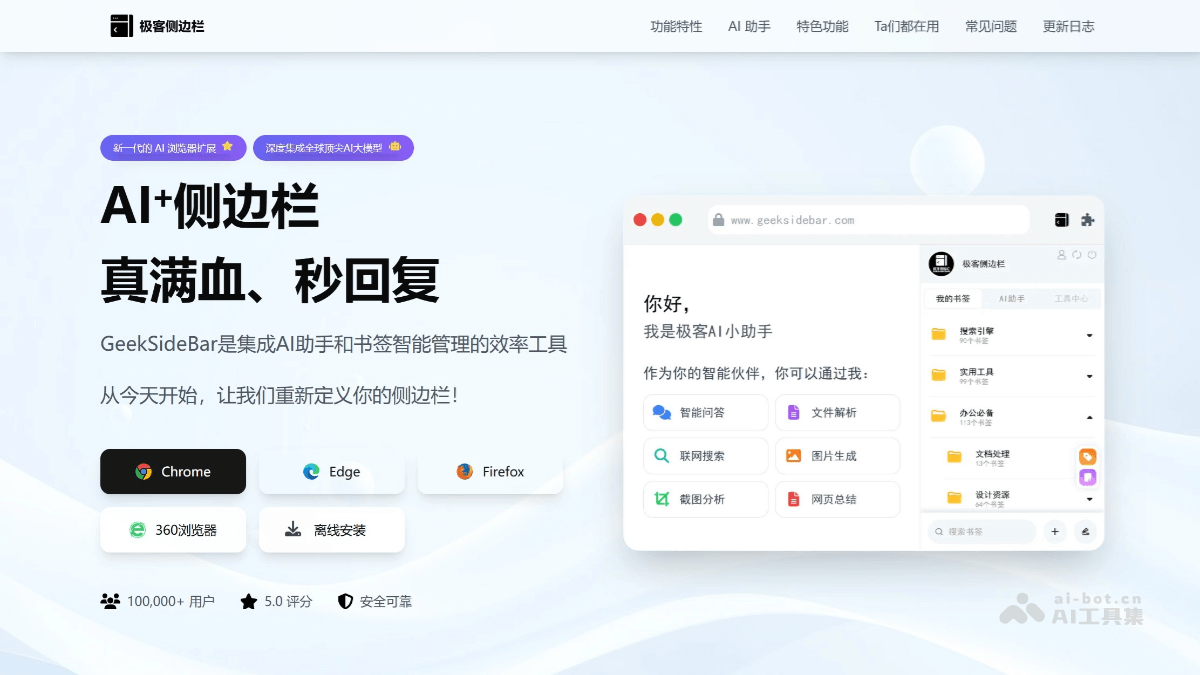
Geek Sidebar
Core parameters and statistics of Geek Sidebar
| Project | Details |
|---|---|
| Product name | Geek Sidebar |
| Product Type | AI Browser Efficiency Enhancement Extension |
| Operating entity | Wuhan Fengchao Technology Co., Ltd. |
| Delivery Form | Browser Extension (Chrome/Edge/Firefox/360 Browser) |
| Latest version | v2.9.5 (2025-10-31) |
| Extended size | 2.63 MiB |
| Supported languages | Simplified Chinese, Traditional Chinese, English |
| Chrome Store Rating | 4.1 / 5 (40 reviews) |
| Chrome users | About 20,000 users |
| Browser compatibility | Chrome, Edge, Firefox, domestic browsers based on Chromium |
| Login method | Mobile phone number / WeChat / Google account |
| Privacy Encryption | TLS 1.3 Communication AES-256 Data Encryption bcrypt Credential Protection |
One sentence positioning: "Compress" the large AI model to the browser sidebar, allowing users to invoke AI dialogue, document analysis, image generation and intelligent bookmark management capabilities without switching when browsing any web page.
Boundary Description: The core value of Geek Sidebar lies in "the sidebar is the workbench" - it converges AI operations that originally require opening a separate web page or application to the edge of the browser, reducing the fragmentation of attention caused by window switching. It’s not a standalone AI chat client or deep writing tool, but a browser-bound suite of productivity enhancements. The depth of its functionality is limited by the capabilities of the Manifest V3 extension API, and heavy AI users still need to use a dedicated client.
Geek Sidebar’s users and market recognition
Chrome Web Store Performance: As of October 2025, Geek Sidebar has a 4.1/5 rating (40 reviews) on the Chrome Store, with approximately 20,000 installed users. In addition, Edge Add-ons, Firefox Add-ons and 360 browser extension stores have been listed.
Media and user reputation: The product has been recommended by Niche Software, Wuyou, etc. User reviews focus on the three dimensions of "direct use of mainstream large models without API Key", "automatic synchronization of bookmarks across browsers" and "significant improvement in office efficiency in the sidebar". Many self-media bloggers have listed it as one of the must-install browser extensions.
Competitive Landscape: The main competing products in this track include Monica, Sider, Noted AI Sidebar, etc. The differentiation of Geek Sidebar is reflected in three points: first, bookmark management and AI deep binding (collection is classification, automatic tagging, duplicate detection); second, complete free mode - you can use DeepSeek-R1, ChatGPT and other models without bringing your own API Key; third, wider cross-browser support (Chrome / Edge / Firefox / 360 browser), and bookmark data is encrypted and synchronized end-to-end.
| Comparative Dimensions | Geek Sidebar | Monica | Sider | Noted AI Sidebar |
|---|---|---|---|---|
| AI model access | DeepSeek / ChatGPT / Claude / Gemini / Grok | GPT / Claude / Gemini | GPT / Claude / DeepSeek / Gemini / Grok | GPT / Claude / Gemini / DeepSeek |
| Free model quota | Direct use without API Key | Some are free | Some are free | You need to bring your own API Key |
| Bookmark cloud synchronization | Deep integration, end-to-end encryption | Basic functions | Not supported | Not supported |
| Independent window mode | Supported | Partially supported | Supported | Supported |
| Browser coverage | 4 types (including 360 browsers) | 3 types | 3 types | 2 types |
Geek Sidebar’s cost advantage: Zero-threshold AI entrance without API Key
- C-side/Individual: Usually a free version is provided to experience the core functions, and high-frequency use requires a paid package subscription.
- API/Developer: Billed by call volume, suitable for development teams that can be flexibly integrated into their own systems.
- Enterprise/Privatized: Contact the business owner for customized quotation and deployment plan. The specific price is subject to the official real-time pricing page.
Main functions of Geek Sidebar
AI multi-model dialogue
- Integration of the world's top large models: Integrate multiple mainstream models such as DeepSeek-R1-0528, ChatGPT, Claude, Gemini, Grok, etc. in the sidebar. Users can switch between different models on the same interface to compare answer quality.
- Expert Viewpoint: There is an implicit linkage between model selection and task type - the deep reasoning + code generation that DeepSeek is good at is suitable for technical Q&A, ChatGPT's creative generation is suitable for copywriting, and Claude's long context is suitable for document analysis. Users can "shuttle" between multiple models without jumping out of the current page, which is a context-preserving experience that traditional AI chat clients are difficult to provide.
Intelligent analysis of documents and web pages
- File Analysis: Supports drag/paste upload of multi-format files such as PDF, Word, pictures, etc. AI automatically extracts key information and generates summaries. Supports batch upload of multiple files (from v2.6 onwards).
- Webpage Summary: Click "Webpage Summary" in the sidebar of any webpage you are currently browsing, and AI will automatically extract the core points and condense a long text of 10,000 words in 1 second.
- Screenshot analysis: regional screenshot + OCR text recognition + screenshot translation + screenshot content summary four-in-one. v2.9 adds batch screenshot analysis function.
- Expert view: "Webpage summary + screenshot analysis + file analysis" form a complete information intake solution: users can summarize valuable content in real time when browsing, screenshots and analysis of pictures/charts, and documents that require in-depth reading can be dragged and analyzed. The three entrances cover most online information consumption scenarios.
Intelligent bookmark management
- Cross-browser cloud synchronization: Bookmark data is synchronized between Chrome, Edge, and Firefox through an end-to-end encrypted channel, supporting real-time incremental synchronization.
- AI⁺ Bookmarks: When bookmarking web pages, AI automatically recommends category directories, eliminating the need to manually select folders; supports batch intelligent organization and automatic tagging.
- Bookmark Toolset: Duplicate detection (automatic interception of redundant collections), website validity detection (batch verification of whether links are invalid), bookmark recycle bin (from v2.7).
- Built-in bookmark library: Thousands of high-quality industry websites are selected and can be directly saved to the personal bookmark library.
- Expert View: "Collect and organize" is an accurate solution to the high-frequency pain point of bookmark management - most users are too lazy to classify when collecting bookmarks, causing the bookmark library to become a garbage dump. The combined chain of AI automatic classification + automatic labeling + duplicate detection realizes "collection is ordering" and turns bookmarks from "gray links" into "searchable knowledge bases".
Image generation and editing
- Multi-model image generation: Integrate multiple image generation models such as NanoBanana, 4o-image, Flux.1 Kontext, Sora2, etc., and support directly generating or modifying images from natural language prompts.
- Quick Operation: v2.9 adds AI drawing secondary editing and quick download functions. The generated pictures can be regenerated directly after adjusting the prompt in the sidebar.
Productivity Enhancement Kit
- Web page split screen: Open any web page that supports nesting in the sidebar to achieve dual-view reading on the left and right.
- Cloud Sticky Notes: Supports Markdown rich text format, can insert remote pictures, videos and other multimedia resources, and synchronize across multiple terminals.
- AI code running: The HTML code generated by AI can be previewed and run directly in the sidebar, what you see is what you get (from v2.5).
- Dark Mode: Automatically switch with the system theme, or set manually (from v2.2).
Geek Sidebar’s model and version evolution
Geek Sidebar has maintained an intensive monthly iteration rhythm from v2.1 in March 2025 to v2.9 in October 2025.
Mainline version context
| Version | Release Date | Core Changes |
|---|---|---|
| v2.1 | 2025-03-17 | Initial version system established: AI automatic directory selection, WeChat login, bookmark directory search |
| v2.2 | 2025-03-27 | Dark mode, screenshot support file protocol, shortcut key system |
| v2.3 | 2025-04-15 | Mathematical formula rendering, Google login, data management center (bookmark export/duplication check/validity detection) |
| v2.4 | 2025-04-22 | International Milestone: i18n multi-language (Simplified Chinese/Traditional Chinese/English), drag-and-drop file AI analysis, dynamic icon switching |
| v2.5 | 2025-05-13 | Independent window mode AI generates HTML preview run, cross-process communication |
| v2.6 | 2025-06-11 | AI Major Reconstruction: Comprehensive rewrite of chat engine, cloud message storage, multi-file parsing, settings page |
| v2.7 | 2025-07-18 | Bookmark recycle bin, shortcut key system, bookmark search optimization, memory usage optimization |
| v2.8 | 2025-07-29 | Bookmark batch movement, cloud synchronization folder memory, validity detection enhancement |
| v2.9 | 2025-10-15 | Message quotation, continued conversation, batch screenshot analysis AI drawing editing |
Evolution Trend: Three directions are advancing in parallel. First, the AI capabilities continue to deepen (v2.4 multi-language v2.6 chat rewriting v2.9 screenshot batch analysis); second, the bookmark management system moves from basic synchronization to intelligent management (v2.3 duplication check/validity v2.7 recycle bin v2.8 batch move); third, platform adaptation and performance optimization run throughout (dark mode, memory optimization, cross-browser compatibility).
Technical advantages of Geek Sidebar
Manifest V3 extended architecture
Built on Chrome's latest extension standard Manifest V3, keeping memory footprint low in the sidebar environment (extension package only 2.63 MiB). The sidebar process is isolated from the main page rendering process, and AI conversations and bookmarks are synchronized and executed in the background Service Worker, which does not slow down the loading speed of the foreground web page.
End-to-end encrypted synchronization mechanism
Bookmark data is encrypted using client-side AES-256 and transmitted to the cloud, and the encryption key does not leave the device. IndexedDB layered encryption via WebCrypto API. The communication layer enforces the use of TLS 1.3 protocol and disables weak cipher suites such as RC4/DES. User credentials are stored using the bcrypt algorithm (cost factor=12). This three-layer encryption (transport layer + storage layer + credential layer) is a high security standard in the browser extension category.
AI multi-model routing and local processing
Integrate multiple large model interfaces (DeepSeek, ChatGPT, Claude, Gemini, Grok) in the sidebar, so the user does not need to register an API separately for each model. Some tasks are performed locally - web page DOM analysis only collects structured text and removes cookie and password fields; image OCR deletes the original file immediately after extracting the text locally. This hybrid architecture of "local preprocessing + cloud inference" not only ensures response speed, but also reduces the risk of privacy leaks.
Third-party AI service chain
The privacy policy discloses that its AI conversation service relies on Silicon Flow, Volcano Ark and Dark Side of the Moon to provide reasoning computing power, and web search relies on Baidu search. This means that Geek Sidebar itself does not maintain large model inference clusters, but serves as an aggregation gateway to connect to multiple domestic compliant AI service providers to ensure that data does not flow overseas.
Cross-browser compatible
Maintain a consistent bookmark and configuration experience among Chrome, Edge, Firefox, and 360 browsers through a unified encrypted data format and synchronization protocol. Different from extensions that rely on a specific browser ecosystem (such as the Sidepanel API only available in Chrome), Geek Sidebar also implements complete sidebar functions on Firefox.
How to use Geek Sidebar
Installation entry
| Browser | Installation | Links/Instructions |
|---|---|---|
| Chrome | Chrome Web Store | Search for "Geek Sidebar" or visit the extension ID gjkfnalkblnjkalnipilmaacibikciin |
| Edge | Edge Add-ons | Search for "Geek Sidebar" or visit the extension ID knjieajghhpkapchjhopobjmaknfplbn |
| Firefox | Firefox Add-ons | Search for "Geek Sidebar" |
| 360 Browser | 360 Extension Center | Search "Geek Sidebar" |
| Offline installation | Official direct link | The official website provides CRX offline installation package |
Typical usage steps
- Installation and Login: After installing the extension in the corresponding browser app store, click the Geek Sidebar icon on the browser toolbar and log in using the mobile phone number verification code, WeChat scan code or Google account.
- AI Dialogue: Click the AI icon in the sidebar to enter the dialogue interface, select a model (DeepSeek / ChatGPT / Claude, etc.), enter a question or drag and drop files for multi-modal analysis. Supports network search switch (memorizes current conversation network status since v2.8).
- Webpage Summary: Press the shortcut key (can be customized) on any webpage or click the "Webpage Summary" button, and AI will automatically extract the key information of the current page. Suitable for long text reading, research reports, product documentation and other scenarios.
- Bookmark Management: Click the bookmark area in the sidebar to synchronize local bookmarks to the cloud. AI automatically recommends category directories when collecting new web pages; already collected bookmarks support AI batch classification, duplicate detection, validity detection, and recycle bin recovery (starting from v2.7).
- Split screen and sticky notes: Click "Split screen browsing" to open the current web page in the sidebar; click "Post-it notes" to record Markdown notes, and the data will be automatically synchronized to the cloud.
- Image generation: Select the image generation model in the AI dialogue, enter prompt to generate images, and support secondary editing and quick download (from v2.9).
Configuration suggestions
- Independent window mode (from v2.5): You can turn on an independent sidebar window in settings to "float" AI conversations and bookmark management above the main browser window, suitable for multi-monitor workflows.
- Dark Mode (from v2.2): In the settings, you can choose to follow the system theme or switch manually to reduce visual fatigue after long-term use.
- Shortcut keys (from v2.7): Assign shortcut keys to "Webpage Question" and "New AI Conversation" to shorten the sidebar AI call-up time to less than 1 second.
Product Pricing for Geek Sidebar
The pricing model is subject to the official real-time page. Usually a freemium or subscription system is used, and basic functions can be used for free. Advanced functions or high-frequency use require paid subscriptions, and users are advised to evaluate the optimal solution based on actual usage.
Application scenarios of Geek Sidebar
Study and Research
- Scenario Description: Graduate students/scholars do not need to repeatedly switch browser tabs and ChatGPT windows when reading multiple academic papers. Open the sidebar on the paper page, use the web summary to refine the summary, and directly ask questions about concepts you don't understand. When in-depth analysis is needed, drag the PDF to the sidebar for full-text analysis.
- Efficiency calculation: In the traditional process, it takes 15-20 minutes to extract information from a paper (reading + switching applications to take notes). Using Geek Sidebar can compress the time to 3-5 minutes (complete summary + notes in the sidebar).
New media content creation
- Scenario Description: When operators browse hot news, the sidebar AI directly generates summaries, refines keywords, and rewrites multiple versions of titles. When you need to add images, switch to the raw image model to quickly generate a cover image without leaving the browser.
- Efficiency estimation: The traditional process of "discovering hot spots → organizing materials → generating copy → making accompanying images" for a social media material takes about 30 minutes. With the help of Geek Sidebar, it can be completed in the sidebar, which can be shortened to 8-10 minutes.
Bookmark knowledge base construction
- Scenario description: Knowledge management enthusiasts browse a large number of web pages every day, and traditional bookmark management has a serious problem of "collecting but not reading". Geek Sidebar's AI automatic classification + automatic labeling + duplicate detection combination chain changes the collection behavior from "storage" to "warehousing". Build a searchable personal knowledge base for long-term use.
- Efficiency estimation: It takes 30-45 minutes to manually organize 100 book signings, AI automatic sorting can complete the initial classification within 1-2 minutes, and manual fine-tuning only takes 5 minutes.
Multi-device office
- Scenario description: The user uses Chrome at work, Edge at home, and Firefox on business trips. The bookmarks, sticky notes, and AI conversation history of the three devices are kept unified through cloud synchronization. The split-screen function can open work documents and reference webpages in the sidebar at the same time, achieving a simulated dual-screen experience.
Quick coding for developers
- Scenario Description: When developers browse technical documentation or GitHub repositories, sidebar AI can explain code snippets, debugging suggestions, or refactorings. The HTML/CSS/JS code generated by AI can be previewed directly in the sidebar without switching to external tools such as CodePen.
Geek Sidebar is suitable for people
- Knowledge Workers (High Adaptation): Researchers, analysts, and consultants who need to handle a large number of browser tabs on a daily basis. Sidebar AI converges information intake, understanding, and organization into the same interface, reducing context switching losses. It is recommended to set the "Webpage Summary" shortcut key for high-frequency operations.
- New Media Operations and Content Creator (High Adaptation): Positions that require fast tracking of hot topics, generation of copywriting, and production of materials. The full link of AI dialogue + web page summary + image generation is available in the sidebar, so there is no need to switch between different AI tools. Free models can cover daily production needs.
- Multi-device/cross-browser users (medium fit): People who want their bookmarks and notes to remain consistent across browsers. Geek Sidebar's end-to-end encrypted synchronization is smoother than the browser's own bookmark export/import experience, and it comes with AI organizing capabilities.
- AI light to moderate users (medium adaptation): Groups who do not need to deeply customize the AI workflow, but want to call AI capabilities at any time in daily browsing. The free model has zero threshold and can be used immediately after installation.
- Not applicable to people:
- Users who need in-depth writing assistance for long articles (such as full-length paper-level assistance) are recommended to use professional AI writing tools.
- Enterprise-level scenarios that require highly customized AI workflows or private model deployment are difficult to meet the boundaries of extended APIs.
- Users who are extremely sensitive to data privacy - Although Geek Sidebar uses end-to-end encryption and local pre-processing, the AI conversation data still needs to go through a third-party inference service provider, which is not suitable for confidentiality scenarios.
- Users who pursue the ultimate UI beauty - the extended interface design is more practical-oriented, and the visual sophistication is different from that of independent apps.
Summary and outlook of Geek Sidebar
Core Competencies: Geek Sidebar's differentiation lies in the intersection of three lines - AI multi-model API-free access lowers the threshold for use, intelligent bookmark management solves the common industry problem of "collecting and collecting dust", and end-to-end encrypted synchronization covers the pain point of bookmark fragmentation for cross-browser users. The three are integrated through the interactive form of the sidebar, forming an information processing system of "browse → understand → collect → retrieve".
Current limitations: First, the AI dialogue capability is limited by the interface quality and stability of the third-party model service provider, and Geek Sidebar itself does not control the quality of inference; second, the Manifest V3 sandbox of the browser extension limits some advanced functions (such as in-depth system interaction), and some heavy users may feel that the sidebar is not as smooth as an independent app; third, multi-language support currently only covers Chinese and English, and support for East Asian languages such as Japanese and Korean has yet to be improved.
Follow-up observation points: The speed of product iteration (monthly high-frequency updates) shows that the team has strong execution capabilities. Directions worthy of attention include: whether custom API Key access will be opened (allowing users to use their own model quotas), whether mobile adaptation will be launched (currently only browser extensions), and the clarification of the payment model - the current pricing page has not disclosed the specific subscription price, and the commercialization pace is still in the early stages.
Procurement/Adoption Risk Assessment: For individual users, the free tier can fully evaluate the product value, and the decision-making risk of zero-cost trial and error is extremely low. For team/enterprise users, the following terms need to be confirmed before adoption: whether the AI conversation data will be used for model training (the user agreement mentions that "in order to improve AI models and services, input content and output content can be used"), and the data sovereignty boundary of bookmark synchronization (data is stored in domestic partners). It is recommended that individual users use 1-2 weeks after installation to experience the quality of AI answers and the stability of bookmark synchronization before deciding whether to upgrade to a paid plan.
Related tools:  Notion AI, google-workspace
How to use Geek Sidebar
- Web client: You can use it by visiting the official website and registering an account. Most functions do not require installation.
- API Access: Provides RESTful API, developers can obtain the API Key and integrate it into their own applications.
Version Info
- v2.9 :Added AI chat message citation and conversation continuation functions, added batch AI analysis of web page screenshots, added AI drawing secondary editing and quick download, optimized long text input performance in AI dialog boxes, and fixed multiple known issues.
- v2.8 :Added recording of conversation networking status, new bookmark single-select/multi-select batch move function, new cloud synchronization to automatically select the last folder, new bookmark validity detection status code filtering and invalid webpage preview.
- v2.7 :Added a new bookmark recycle bin, added shortcut keys (webpage questions and new AI dialogue), added a new option to automatically select the last folder when adding a bookmark, and optimized the AI mathematical formula UI style and bookmark search performance.
- v2.6 :Comprehensively rewrite AI chat and add cloud storage for AI chat messages, add multi-file AI analysis (drag/paste), add a sidebar settings page, and greatly optimize the real-time rendering performance of AI chat.
- v2.5 :Added a floating ball to view current website notes, a new sidebar independent window, a new AI-generated HTML code to run and download, a new cross-process communication message forwarding mechanism, and optimized runtime memory usage.
- v2.4 :Added i18n multi-language support (Simplified Chinese/Traditional Chinese, English), added dragging/pasting files to the sidebar to perform AI file analysis, and added dynamic switching plug-in icons (following the system theme).
- v2.3 :Added AI reply message mathematical formula rendering, added webpage summary/screenshot/split screen shortcut keys, added Google login, and added personal center section (settings center, data management page).
- v2.2 :Added screenshots to support the file protocol page, a new theme to switch to dark mode, a new default shortcut key for plug-in functions, and optimized algorithm performance for searching bookmarks and deleting bookmarks.
- v2.1 :Added AI automatic directory selection, added AI model description, added WeChat code scanning to destroy accounts, added bookmarks to add directory search, and optimized multiple UI interaction details.
User Reviews