 Gemini Spark
Free
Gemini Spark
Free
Gemini Spark is a 24/7 personal AI Agent launched by Google. It runs based on the Gemini 3.5 model and the Antigravity framework. It is deeply integrated with Google Workspace tools such as Gmail, Docs, and Slides. It supports periodic trigger MCP extended connections and complete workflow creation, and can continue to execute tasks in the cloud background even after the device is turned off.
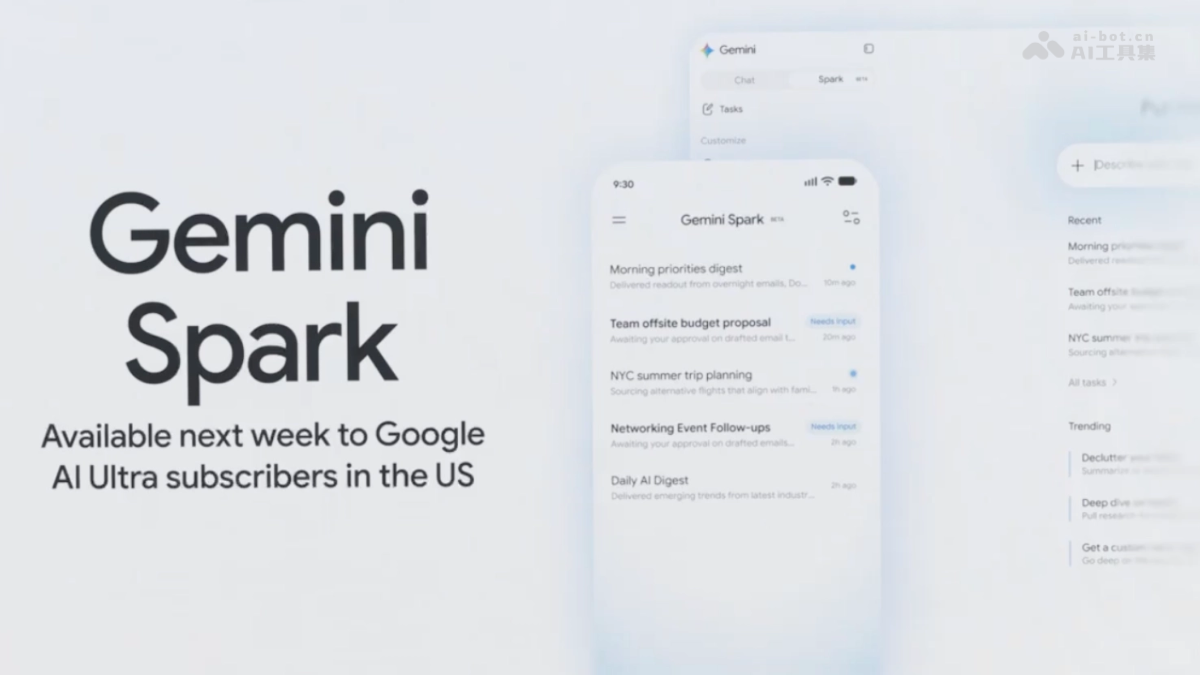
Gemini Spark: Google’s 24/7 Personal AI Agent
Core parameters and statistics
| Project | Specifications |
|---|---|
| Product Name | Gemini Spark |
| Category | AI Agent |
| Delivery form | Web (cloud background operation) |
| Support Platform | Web |
| Supported languages | zh-CN, en-US |
| Target users | Google Workspace users, personal efficiency seekers, corporate employees |
| User scale | Public beta phase, gradually open to Google AI Ultra subscribers |
| Pricing model | Free for private/public beta (requires Google AI Ultra subscription) |
Interpretation of core parameters: Gemini Spark is a 24/7 personal AI Agent launched by Google, running based on the Gemini 3.5 model and the Antigravity framework. The core difference is that "the cloud background continues to execute after the device is offline" - after the user sets the task and turns off the device, the Agent still runs in the cloud according to the preset logic. Deeply integrated with Gmail, Docs, Slides, Calendar and other Google Workspace tools, it supports periodic triggers, MCP extended connections and complete workflow creation. The product is currently in public beta and will gradually become available to Google AI Ultra subscribers.
User and market recognition
| Dimensions | Data |
|---|---|
| Product Status | v1.0 Public Beta (2026-07) |
| Open Scope | Google AI Ultra subscribers are gradually opening up |
| Core Model | Gemini 3.5 |
| Running Framework | Antigravity |
| Integrated Ecosystem | Gmail, Docs, Slides, Calendar and other Workspace tools |
| Extension mode | MCP protocol extension connection |
Gemini Spark represents Google’s important strategic layout in the field of AI Agent. Different from other AI Agents on the market (such as ChatGPT Tasks, Claude's automation function), Spark's core differentiation lies in: (1) Always online - it continues to execute in the cloud even after the user device is turned off; (2) Deep integration - natively embedded in the Google Workspace ecosystem, and can read and write Gmail, Docs, Slides and other data; (3) Framework-level support - based on the Antigravity framework, supports periodic triggers and MCP extensions, rather than simple conversational automation.
As an official product of Google, Spark is backed by Google's AI infrastructure (Gemini 3.5 + Google Cloud) and has natural advantages in data security, compliance and ecological coverage. User feedback during the current public beta phase will directly affect the functional iteration direction of the product.
Cost advantage
| Cost Dimension | Description |
|---|---|
| Public beta period | Free (requires Google AI Ultra subscription, about $19.99/month) |
| Official version | Pricing to be announced (estimated in the second half of 2026) |
| Included services | Gemini 3.5 model calling + cloud execution + Workspace integration |
Cost comparison of competing products:
| Comparison dimensions | Gemini Spark | ChatGPT Tasks | Claude Automation | Self-built Agent solution |
|---|---|---|---|---|
| Monthly fee (estimate) | $19.99 (including AI Ultra) | $20 (ChatGPT Plus) | $20 (Claude Pro) | High development + operation and maintenance costs |
| Continuous operation in the cloud | ✅ Continues execution even when the device is offline | ❌ Requires a connection | ❌ Requires a connection | ✅ Configurable |
| Workspace integration | ✅ Native deep integration | ❌ Requires third party (zapier) | ❌ Requires third party | Requires self-build |
| Periodic Triggers | ✅ Support | ❌ Basics | ❌ | ✅ Configurable |
| MCP Extension | ✅ Open Protocol | ❌ | ❌ | N/A |
| Learning threshold | Low (natural language setting) | Low | Low | High |
The value of Gemini Spark is reflected in "saving manpower time" rather than "reducing software license costs" - users set the Agent to perform repetitive tasks (such as organizing the inbox every week, automatically generating weekly report summaries), freeing themselves from low-value repetitive work. Risk Warning: The official version pricing has not yet been announced, and the free trial during the current public beta period does not guarantee a free continuation.
Main functions
- 24/7 cloud background execution: After the user sets the task and turns off the device, the Agent continues to execute in the Google Cloud. After the task is completed, the results will be pushed via notification or email. The execution process supports breakpoint resumption and automatic retry on exceptions.
- Google Workspace deep integration: can read and write Gmail (email retrieval, automatic reply, archiving and organization), Docs (document creation, summary editing, template filling), Slides (slide generation, batch update), Calendar (scheduling, meeting record summary) and other Workspace tools. The Agent's access rights to Workspace data are consistent with those of the user.
- Periodic Trigger: Supports setting timed triggers based on Cron expressions or natural language (such as "sorting yesterday's unread emails every morning at 9 am"). Agent automatically wakes up at the specified time to execute the preset workflow.
- Complete Workflow Creation: Users can orchestrate multi-step Agent task sequences - for example "Read invoice emails in inbox → Extract key information → Write to Google Sheets → Generate monthly statements in Docs". Support conditional branching and error handling logic.
- MCP Extended Connection: Connect third-party services and self-built systems through the MCP (Model Context Protocol) protocol to expand the agent's capability boundaries. The MCP server ecosystem is jointly maintained by Google and third-party developers.
- Task Monitoring and Auditing: Users can view the execution history of the Agent, the operation logs of each step, and the processing results. Supports pausing, modifying and canceling ongoing tasks.
Model and version evolution
| Version | Date | Key Changes |
|---|---|---|
| 0.9 (internal beta version) | ~2026-05 | Internal beta gradually opened to Google AI Ultra subscribers, core Agent background execution capability verification |
| 1.0 (Public Beta) | 2026-07 | All-weather background execution, periodic triggers, MCP extended connections, Google Workspace deep integration |
Version records are subject to Google’s official announcement. The public beta version focuses on the verification of Agent’s core capabilities, and the official version is expected to be released in the second half of 2026.
Technical advantages
- Antigravity Framework: Google's self-developed Agent runtime framework supports Agent migration to the cloud for continuous execution after the user device goes offline. The framework manages the Agent's life cycle (creation→scheduling→execution→monitoring→termination) and state persistence.
- Gemini 3.5 model-driven: Based on the understanding and reasoning capabilities of Gemini 3.5, Agent can handle complex multi-step tasks and understand the implicit constraints and priorities in user intentions. Models support function calling and structured output.
- Google Cloud Infrastructure: Agent runs on Google Cloud's global infrastructure, using Cloud Tasks for task scheduling, Cloud Functions to execute lightweight logic, and BigQuery to store execution logs. Automatic expansion and contraction ensures that execution will not be blocked during peak periods.
- Native Workspace integration: Agent reads and writes user data directly through the Google Workspace API, without the need for OAuth redirects or third-party bridging. Access permissions strictly follow the user's Workspace permission settings.
- MCP Protocol Extension: A standard protocol for connecting external tools and services through MCP (Model Context Protocol). Google released the official MCP server specification, allowing community and third-party developers to contribute extensions.
- Security & Compliance: Google Cloud's security infrastructure - data encryption (TLS 1.3 for transport, AES-256 for storage), access audit logs, compliance with compliance standards such as SOC 2/ISO 27001. Agent execution logs can only be viewed by the user.
How to use
| Entrance | How to use | Applicable people |
|---|---|---|
| Web side | Visit gemini.google.com to create and manage Agents in the Spark panel | All users |
| Google Workspace Sidebar | Invoke Spark directly in Gmail/Docs to perform context-sensitive tasks | In-depth users |
| API (Planning) | Create and trigger Spark workflows via API | Developers |
Typical steps:
- Confirm that you have a Google AI Ultra subscription (public beta qualification)
- Enter the Spark panel in the Gemini Web interface
- Use natural language to describe task goals (such as "Every Friday at 5 pm, summarize all unread project-related emails in this week's inbox, extract to-do items, generate a weekly report and write it into Doc")
- Agent generates execution plan, user reviews and confirms
- Agent starts executing tasks according to the set trigger conditions
- Users can view execution status and logs at any time through the Spark panel
Product Pricing
| Package | Price | Contents |
|---|---|---|
| Public Beta | $19.99/month (includes Google AI Ultra subscription) | Gemini 3.5 + Spark Agent + Workspace integration |
| Official version | To be announced (expected in the second half of 2026) | Estimated tiered pricing |
Currently using Gemini Spark requires a Google AI Ultra subscription ($19.99/month). The pricing strategy for the official version has not yet been announced, and the user experience during the public beta period does not guarantee free continuation.
Application scenarios
- Automated email management: Agent automatically organizes your inbox on a daily/weekly basis - marking important emails, archiving processed emails, extracting to-do items and writing them into Google Tasks. Verification: Compare the weekly email processing time before and after use.
- Automatic generation of weekly reports: Agent reviews this week's document editing records, meeting invitations and email communications, and automatically generates a draft of a structured weekly report and writes it into Google Docs. Users only need to review fine-tuning. Verification: Compare the change in weekly report writing time from manual to AI-assisted.
- Meeting follow-up automation: After the Calendar meeting, Agent automatically extracts the meeting record summary (Google Meet transcription has been integrated), generates to-do items and assigns them to participants. Verification: Verify the consistency of the to-do items extracted by the Agent and the manual records.
- Contract/Document Template Population: The Agent automatically populates the contract template in Docs and sends an approval request based on the customer information received in Gmail. Verification: Compare the efficiency and error rate of batch contract generation.
- Cross-platform information aggregation: Connect third-party tools (such as Jira, Slack, Notion) through MCP, and the Agent summarizes the project progress of each platform according to scheduled triggers and generates a unified daily report. Verification: Verify the completeness and accuracy of Agent aggregated data.
Applicable people
| Crowd | Adaptation value | Restrictions |
|---|---|---|
| Google Workspace heavy user | Automate repetitive office tasks and free up manpower | AI Ultra subscription required |
| Personal efficiency pursuers | 24/7 backend Agent handles personal affairs | Official version pricing has not been announced |
| Enterprise employees | Integrate existing Workspace workflows | Administrator needs to enable Workspace API permissions |
| Developers | Expanding Agent capability boundaries through MCP protocol | MCP development documentation is still being improved |
Unsuitable Scenarios: Non-Google Workspace users (the core value relies on the Workspace ecosystem); Scenarios that require the Agent to access local files or local systems (currently only cloud services are supported); Scenarios that require extremely high autonomy in Agent decision-making (the accuracy and reliability of the AI Agent are still being optimized); Scenarios where the organization's compliance with the AI Agent is not yet clear.
Comparison of competing products
| Comparison dimensions | Gemini Spark | ChatGPT Tasks | Claude Automation | Self-built Agent (n8n/Make) |
|---|---|---|---|---|
| Core differences | 24/7 cloud + Workspace native integration | ChatGPT task schedule | Claude automated process | Flexible but requires technical investment |
| Keeps running in the cloud | ✅ Continues after device goes offline | ❌ | ❌ | ✅ (Self-hosted) |
| Office Ecosystem Integration | ✅ Google Workspace native | ❌ Requires third party | ❌ Requires third party | ✅ Self-built integration |
| Periodic Trigger | ✅ Support | ⚠️ Basics | ❌ | ✅ Complete |
| Extended Protocol | ✅ MCP Protocol | ❌ | ❌ | ⚠️ Customized for each platform |
| Learning threshold | Low (natural language setting) | Low | Low | Medium-high |
| Data Security | Google Cloud Compliance | OpenAI Compliance | Anthropic Compliance | User Control |
| Official version pricing | To be announced | $20/month | $20/month | Free + self-hosted cost |
Summary and Outlook
Gemini Spark represents an important step in the evolution of AI Agent from "conversational assistance" to "autonomous execution around the clock." Its ability to continue running in the cloud after the device is offline - combined with native Google Workspace integration and the Antigravity framework - is a clear differentiator in the current AI Agent market.
Core advantages: True 24/7 cloud backend execution, users do not need to stay online; deep native integration of Google Workspace (Gmail/Docs/Slides/Calendar), no need for third-party bridging; backed by Google AI infrastructure (Gemini 3.5 + Google Cloud), security and compliance are guaranteed; MCP protocol open ecosystem supports third-party extensions.
Known limitations: The product is still in the public beta stage, and its functions and stability are still being improved; the official version pricing has not yet been announced, and the long-term cost of use is unclear; the core value relies on the Google Workspace ecosystem, and non-Google users have limited benefits; the reliability of the Agent's decision-making still needs to be verified in complex multi-step tasks.
Risk Disclosure: (1) The functions and APIs of the public beta version may change with the release of the official version, and solutions developed and integrated based on the public beta version need to reserve adaptation time; (2) The official version pricing strategy has not been announced, and the cost after the official release in the second half of 2026 may exceed the expectations of the public beta period. It is recommended to pay attention to the official pricing announcement; (3) The Agent’s access rights to Workspace data are equal to the user itself, and the user needs to evaluate whether to allow the Agent Automatically operate sensitive data (such as automatically replying to emails, modifying documents); (4) The execution results of the Agent rely on the reasoning capabilities of the Gemini 3.5 model. For tasks involving important decisions (such as automatically replying to customer emails), it is recommended to set up a manual review link; (5) The MCP expansion ecosystem is still in its early stages, and the number and maturity of available third-party connectors are limited.
Follow-up observation directions: Official version pricing and open scope (second half of 2026), MCP ecological expansion speed and number of third-party connectors, Agent’s success rate benchmark data in complex multi-step tasks, and whether to launch an enterprise-oriented management and audit version.
Related tools:  CrewAI,
  LangChain
Version Info
- Public beta version :The public beta version of Gemini Spark is released, supporting round-the-clock background task execution, periodic trigger MCP extended connections and deep integration with Google Workspace.
- Early beta version :Gemini Spark is in the early internal testing phase and will be gradually opened to Google AI Ultra subscribers. The core Agent background execution capabilities are verified.
User Reviews