 Ghost
Free
Ghost
Free
GHOST is an AI-native slide editing tool that uses the GPT-5 model to quickly transform ideas into professional presentations. It supports GPU-accelerated editing, speaker notes, drag-and-drop sorting, presentation mode and one-click PDF/PNG export. It is suitable for business presentations, academic reports, education and training and other scenarios.
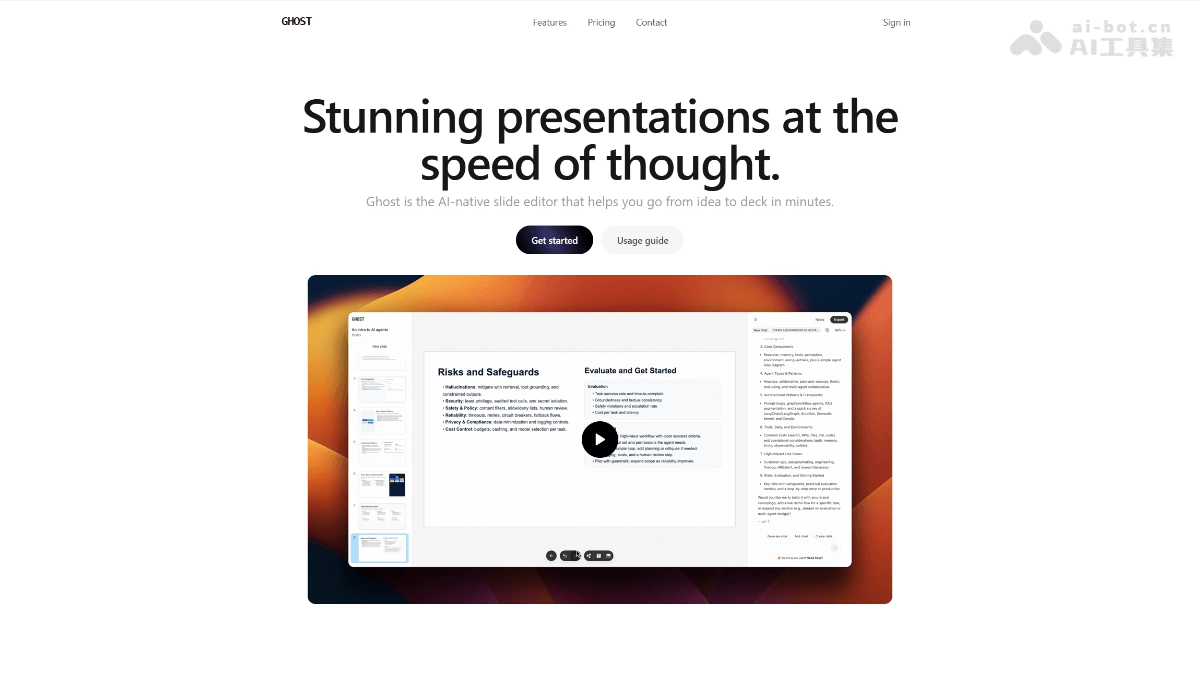
GHOST: AI native PPT generation tool
Core parameters and statistics
| Project | Details |
|---|---|
| Product Name | GHOST |
| Product Type | AI Office and Efficiency |
| Delivery Form | Web/SaaS |
| Underlying model | GPT-5 (built-in) |
| Supported languages | Chinese, English |
| Target users | Individuals, teams, companies |
| Key capabilities | AI-generated slides, GPU-accelerated editing, speaker notes, drag-and-drop sorting, presentation mode, one-click export to PDF/PNG |
GHOST is an AI-native slide editing tool whose core value lies in compressing the process of "from zero idea to finished presentation" from hours to minutes. Unlike traditional PPT/Keynote tools, GHOST embeds the GPT-5 model directly into the editing canvas. Users only need to enter the topic or prompt words to get a complete first draft of the slide structure, and then quickly fine-tune it through GPU-accelerated drag-and-drop editing, and finally export it to PDF or PNG without watermarks with one click.
This process of "AI generates first draft → manual fine-tuning → one-click export" eliminates the hassle of creating a new blank document, manual typesetting, and repeatedly adjusting styles in traditional tools. For high-frequency demand scenarios such as daily and weekly reports and solution demonstrations, the implicit efficiency improvement is 5-10 times faster than manual production.
User and market recognition
Since its launch, GHOST has been adopted by individual users, freelancers and small and medium-sized enterprise teams. The users cover business proposals, academic reports, marketing weekly reports and other scenarios. Judging from user feedback disclosed on the official website, designers, developers, and marketers have all given positive reviews - the core focus is on three aspects: "the first draft generated by AI is reasonably structured", "shortcut keys + GPU acceleration make fine-tuning smooth", and "PDF/PNG export quality is high".
- C-side users: Personal bloggers and freelance consultants can use the free version to produce weekly reports/proposals. The AI generation function reduces the time for a single deck production from 2-3 hours to 15-30 minutes.
- B-side team: Some entrepreneurial teams have used it as the main tool of Pitch Deck, replacing the traditional PPT+AI plug-in combination solution.
- Market positioning: A lightweight native player on the AI PPT track, competing with Gamma, Beautiful.ai, MagicSlides, etc. The difference lies in the editing experience of GPT-5 built-in + GPU acceleration.
Cost advantage of GHOST
| Cost Dimension | Description |
|---|---|
| C-side free version | $0, unlimited slides + GPU accelerated editor + basic creation and export functions |
| C-side entry version | $9.99/month/user, including all features of the free version + 20 GPT-5 mini + 20 GPT-5 nano + 3 GPT-5 messages |
| C-side Professional Edition | $19.99/month/user, including all features of the entry version + 40 GPT-5 mini + 40 GPT-5 nano + 10 GPT-5 messages |
| Enterprise plan | Undisclosed, quoted by seat |
The cost advantage of GHOST is reflected in two levels:
- Replace multi-tool combination: A team originally needs a four-piece set of PPT + AI writing plug-in + material library + screenshot tool. GHOST one-stop covers the entire process from copywriting generation to layout and export, implicitly saving the team's tool procurement costs and switching time.
- Time cost compression: AI-generated first draft eliminates the need for manual construction starting from a blank page, and the single deck production cycle for heavy users is reduced from half a day to less than 30 minutes.
The core difference between the paid versions is the GPT-5 message quota - the free version does not include GPT-5 messages, 3 messages/month for the entry level, and 10 messages/month for the professional version. If you only manually edit slides, the free version is completely sufficient; if you need to frequently use AI to generate content, the professional version is more cost-effective.
Main functions of GHOST
- AI generation and editing: Built-in GPT-5 model, enter the topic or prompt words to automatically generate the slide content and structure. Supports modification history and context continuation, and the first draft generated by AI can be adjusted directly on the canvas by dragging and dropping.
- GPU Accelerated Editing: The editing canvas is based on GPU rendering, and operations such as dragging and dropping, zooming, and moving elements are smooth without lag, and 60fps smoothness can be maintained even if it contains a large number of vector elements.
- Speaker Notes and Presentation Mode: Notes can be attached to each slide. In presentation mode, the speaker has exclusive notes and the audience only sees the main screen. It is suitable for live lectures and recording scenarios.
- Drag-and-drop sorting and shortcut key operations: Supports drag-and-drop sorting by page, ⌘+D to copy, ⌘+Z to undo/redo, ⌘+X/C/V to cut, copy, and paste, and other shortcut keys. The keyboard-first interaction design is for high-frequency users.
- One-click export to PDF/PNG: Export watermark-free PDF or PNG images, maintaining typesetting accuracy, suitable for Slack sharing, projection presentation, printing and other output needs.
Expert View: The core synergy of GHOST lies in "AI generation → GPU real-time editing → one-click export of ternary closures". In the traditional process, users need to first generate copy in ChatGPT, copy it to PPT, then manually format it, and finally export it - GHOST merges these steps into the same canvas, eliminating the context break of cross-software switching. In addition, the binding of speaker notes and presentation mode also avoids rework when the notes are not aligned until after the layout is completed.
GHOST’s model and version evolution
GHOST has built-in GPT-5 as the AI generation engine, and the current public version is the 1.0 public beta version. Version evolution is roughly divided into:
| Version | Time | Key Changes |
|---|---|---|
| 0.9 (early version) | ~2026-06 | Internal trial run, AI generation + basic editing completed |
| 1.0 (Public Beta) | 2026-07 | Public access, new features such as GPU acceleration, presentation mode, speaker notes, one-click export, etc. |
The future feature roadmap (subject to official announcement) includes: importing PowerPoint/Keynote/PDF files, version history, team collaboration editing, etc. Feedback on specific priorities can be submitted through the official Tally form.
GHOST’s technical advantages
- GPT-5 native embedding: The AI engine is integrated directly into the editor, allowing users to generate and modify slide content without switching to external AI tools. GPT-5 is superior to GPT-4o commonly used by competing products in long text generation and structural organization, and multi-page presentations have stronger structural coherence.
- GPU Accelerated Canvas: Traditional slide editors rely on CPU rendering, which is prone to lag when there are many elements and complex animations. GHOST migrates the editing canvas to the GPU pipeline, enabling smooth dragging, zooming, and real-time preview, which is especially critical for heavy users who need to frequently adjust the layout.
- Keyboard-first interaction: A full shortcut key operating system (copy/paste/undo/redo/copy elements/align, etc.), coupled with GPU acceleration, allows skilled users to operate at a much faster pace than traditional mouse-driven PPT.
- SaaS Zero Deployment: Browser-ready, backend automatically updated, users always use the latest version, no need to manually upgrade.
How to use GHOST
| Entrance | Description |
|---|---|
| Web official website | https://www.useghost.io/, use it directly in the browser after registration |
Typical process:
- Visit https://www.useghost.io/ and click "Get started" to complete the registration
- Click "Create New Deck" to create a new presentation
- Enter the topic or prompt word (such as "Q3 Market Strategy Proposal") in the AI chat box and select the GPT-5 model strength
- AI automatically generates the first draft of slide structure and content
- Adjust the layout through drag-and-drop sorting and shortcut keys, and add speaker notes
- Click "Export" and select PDF or PNG format to export (no watermark)
Getting started: You can experience GPU-accelerated editing and basic export functions with the free version. If you use AI generation frequently, it is recommended to upgrade to the Starter or Pro plan to get more GPT-5 message quota.
GHOST’S PRODUCT PRICING
GHOST adopts a three-tier subscription system, billed on a per user/month basis:
| Package | Price | Core Benefits |
|---|---|---|
| Free | $0 | Unlimited slideshows GPU accelerated editor, basic creation and export capabilities |
| Starter | $9.99/user/month | Includes Free all features + 20 GPT-5 mini + 20 GPT-5 nano + 3 GPT-5 messages |
| Pro | $19.99/user/month | Includes all Starter features + 40 GPT-5 mini + 40 GPT-5 nano + 10 GPT-5 messages |
Pricing Strategy Analysis:
- The free version has a very low threshold and is suitable for experience and light manual editing users
- GPT-5 message quota is the core difference of paid tiers - "mini" and "nano" are lightweight inferences with lower consumption; "GPT-5 messages" are full-volume inferences with richer content generated in a single time
- Comparing competing products Gamma (free + $10/month) and Beautiful.ai (starting at $12/month), the entry price of GHOST is in the same range, and the difference lies in GPU acceleration and keyboard-first experience
- The enterprise plan has not been made public, and it is speculated that it can be customized as needed.
Application scenarios of GHOST
- Business presentation (dimensionality reduction strike scenario): Slide production for project proposals, product launches, and investment roadshows. The combination of AI-generated first draft + GPU editing has particularly obvious efficiency advantages when producing multi-version proposals in batches - it only takes 15-30 minutes from outline to finished product.
- Academic Report: Thesis defense, academic conference speech. GHOST's speaker notes function and presentation mode make the on-stage experience of academic presentations better, and the PDF export format meets journal and conference submission requirements.
- Education and Training: Production of courseware and training materials. Teachers or trainers can use AI to quickly generate multi-page syllabus, and then manually add cases and exercises, which is 3-5 times faster than building it page by page from Keynote.
- Team Weekly Report/Marketing Update: Weekly market report, data review. Non-designer team members can also use GHOST to directly output professionally formatted update decks without relying on design resources.
- Personal brand display: resume deck, portfolio presentation. The free version is sufficient for moderate personal use.
Does not fit boundaries:
- For scenarios that require highly customized visual design (such as brand manual-level VI specifications), GHOST’s template freedom is limited
- AI generation consistency may decrease for very large presentations (50+ pages)
- Does not support PowerPoint/Keynote file import (marked as planning in the official roadmap)
Applicable groups of GHOST
- High-frequency presentation production crowd: consultants, marketing managers, entrepreneurs, academic researchers - need to produce more than 1 presentation per week, GHOST's AI generation + GPU editing combination can significantly compress the production cycle.
- Non-designer team members: For team members with non-design backgrounds such as marketing operations and sales HR, GHOST's built-in typesetting and spacing control allows them to produce professional-quality decks without relying on the design department.
- Entrepreneurial Team: Early stage financing requires frequent iterations of pitch decks. GHOST's rapid generation and version iteration capabilities are suitable for this fast-paced scenario.
Dissuade the crowd:
- Enterprise users who require strictly branded VI templates (current template customization capabilities are limited)
- Heavy PowerPoint user (relying on VBA macros, complex chart plug-ins, advanced animations, etc.)
- Security-sensitive industries that require offline or local deployment
- For serious long-form document writing (such as the text of a business plan), it is recommended to use professional document tools
Summary and Outlook
GHOST is positioned as an AI-native lightweight slide editing tool. Its core competitiveness lies in the ternary relationship of "GPT-5 generation of first draft + GPU accelerated editing + one-click export", which addresses the pain points of building a deck from scratch for high-frequency presentation production groups. The free version has a low threshold and the paid version is moderately priced, making it suitable for individuals and small and medium-sized teams to get started quickly.
Core Advantages: Keyboard-first interaction design + GPU accelerated canvas, making the editing efficiency of skilled users significantly higher than traditional PPT. The structural quality of AI-generated content is at an above-average level among similar tools.
Current shortcomings: The template style library is not rich enough, it does not support the import of external files (PPT/Keynote), and the team collaboration function has not yet been launched. Compared with competing products such as Gamma and Beautiful.ai, differentiation still needs to be consolidated through functional expansion.
Procurement/Adoption Risk Assessment: GHOST is in the public beta stage, and the speed of feature iteration and service stability have not been tested for a long time. For individual and light team use, the risk is low; for organizations that require strict SLA and enterprise-level permission management, it is recommended to fully verify through the free version before deciding whether to purchase in bulk. The copyright of AI-generated content belongs to the user (the official has not clearly stated whether it will be used for model training, and it is recommended to pay attention to privacy policy updates).
Related tools:  Notion AI, google-workspace
Version Info
- Public beta version :Ghost, version details are subject to the official website announcement. , built-in GPT-5, GPU accelerated editing, speaker notes, presentation mode, and one-click export to PDF/PNG.
- earlier version :Early trial version, no official precise date yet.
User Reviews