 Google Opal
Free
Google Opal
Free
Google Opal is an experimental AI agent and no-code AI mini-app building tool launched by Google Labs. It supports the use of natural language and visual editors to string user input, model generation, tool invocation and output steps into shareable mini-applications.
GoogleOpal
Core parameters and statistics
Google Opal is an experimental AI mini-app building tool launched by Google Labs. The official entrance is opal.withgoogle.com. The product positioning given on the developer documentation page is "Build, edit and share mini-AI apps using natural language". It is neither a traditional code IDE nor a single chatbot. Instead, it puts natural language description, visual step orchestration, model calling, tool calling and release sharing in the same web product, which is suitable for quickly turning an AI idea into a small runnable application.
| Project | Current Public Information |
|---|---|
| Official product form | Google Labs experimental web product |
| Core positioning | Build, edit and share AI mini-app with natural language |
| Main entrance | https://opal.withgoogle.com/ |
| Official documentation | https://developers.google.com/opal |
| First public release | 2025-07-24, Google Developers Blog announced the US public beta |
| Latest public document node | 2026-02-24, Google Developers FAQ updated |
| Editing method | Gallery Remix, natural language editor, visual editor |
| Step Type | User Input, Generate, Output, Static Asset |
| Examples of built-in tools | Web search, map search, weather and other tools can be referenced through @ |
| Supported platforms | Web; the editing view is mainly for desktop computers, and created applications can be viewed or used on mobile phones |
| Public price | Undisclosed fixed fee range, please refer to the official real-time page |
Product Boundary: Opal focuses on solving the problem of "stringing prompt words and tools into runnable mini-apps" and is not suitable to replace a complete software engineering platform, production-grade backend, enterprise application development with complex permissions, or a high-compliance data processing system. Its value lies in quickly validating processes and interactions rather than delivering an arbitrarily scalable enterprise-grade system.
User and market recognition
Opal's market signals mainly come from Google's official releases and Google Developers documentation system, rather than public user numbers, revenue or third-party financing data. The Google Developers Blog on 2025-07-24 listed it as a new experiment of Google Labs, and clearly stated that the first launch was a public beta in the United States; the Google Developers FAQ subsequently listed a list of publicly accessible countries, indicating that it has expanded from a single regional trial to a wider public availability stage, but the official did not disclose the number of active users, retention rate, template usage, or number of enterprise customers.
Official Endorsement: Opal appears on both the Google Developers product page of the Google Labs product site and the Google Developers Blog, indicating that it is not a community imitation tool, but a Labs experimental project officially released by Google. For users, this reduces the trial risk of "unknown entrances and unknown sources", but the experimental nature also means that functions, regions, quotas and commercial terms may still be adjusted.
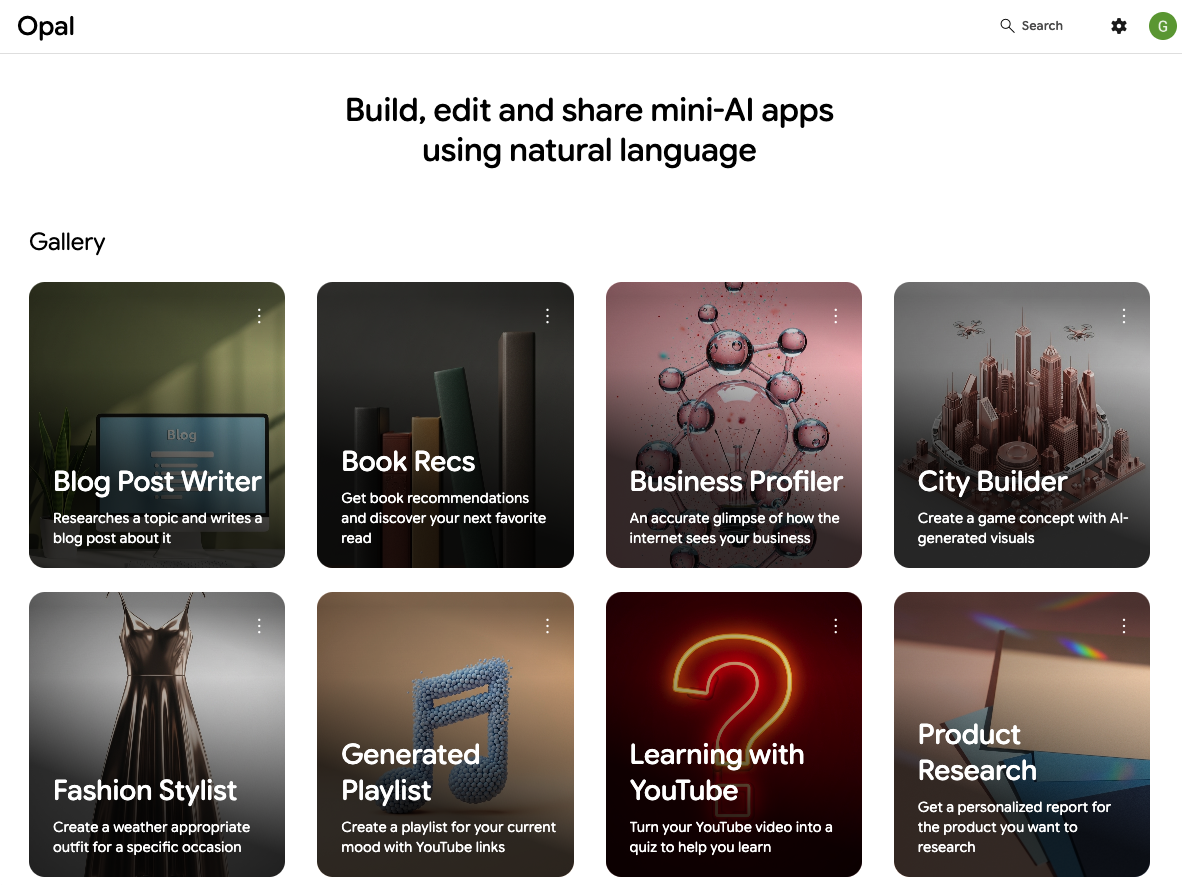
Template and Gallery Signal: The official Gallery provides sample Opal created by Google, users can view Remix and transform it into their own applications. The examples in the Gallery include Blog Post Writer, Book Recs, Business Profiler, City Builder, Fashion Stylist, Generated Playlist, Learning with YouTube, Product Research, etc., reflecting Google’s core usage expectations for Opal: content production, research summaries, personalized recommendations, lightweight games/idea generation, and multi-step knowledge tasks.
Undisclosed information: Google does not disclose Opal’s user size, usage limits, paid conversions, enterprise customer list, model invocation cost details and SLA. When it comes to procurement, compliance or large-scale deployment, Google's current Terms of Service, Privacy Policy FAQ and product pages should prevail.
Cost advantage
Opal's cost advantage mainly comes from "no need to write code first, no need to deploy web services by yourself, and first use visual workflow to verify application logic." The Google Developers product page explains that Opal can host mini-apps and allow users to share and publish them immediately. This allows individuals and small teams to verify whether an AI mini-app is useful without first preparing the front-end, back-end, authentication, model API orchestration and deployment environment.
- C-side/Individual: The public page does not display fixed subscription prices or volume-based prices. For individual creators, researchers and product managers, explicit costs are subject to official real-time available policies; implicit costs are mainly prompt word debugging, process design, output acceptance and privacy boundary judgment.
- Developer/API: Opal is currently publicly positioned as a codeless mini-app builder for the Web, and has not officially disclosed independent APIs, SDKs, CLIs or embeddable runtimes. The cost advantage for developers lies not in secondary development interfaces, but in using Opal to quickly create requirement prototypes, demonstration flows, and interactive POCs.
- Enterprise/Private: Officially, the enterprise version, privatized deployment SLA, exclusive model, audit log or contract price are not disclosed. If an enterprise hopes to use it on a large scale, it needs to independently verify the Google account type Workspace management policy, data processing terms, sharing permissions and regional availability.
Cost Boundary: Opal can reduce the time cost of "from idea to running demo", but it does not mean reducing all long-term operating costs. As long as the process enters real business, there will be prompt word maintenance, model output quality, human review mechanism, authority isolation, data asset sharing and compliance review costs.
Main functions
Opal's function revolves around "generating a runnable AI mini-app". The official documentation splits the working method into Gallery, Opal apps, visual editor, natural language editor and sharing and publishing.
- Natural language generation workflow: Users describe the application they want to build, and Opal will help generate an editable workflow. This mechanism is suitable for turning "I want to make an application that inputs questions, retrieves information, and generates pages" into the initial process, instead of manually dragging each step from a blank canvas.
- Visual Editor: Users can add steps, connect steps, adjust arrangement, and run from a step. This design allows non-engineering roles to understand the input, generation and output relationships of the process, and also facilitates debugging of intermediate results.
- Steps and Assets: User Input is used to collect user input, Generate is the core of model generation for most Opal, and Output controls the final rendering method; static assets can upload files or provide YouTube links as contextual references.
- Tool Reference: A step, asset or tool can be referenced via
@in the prompt word. Examples of tools listed in the official documentation include searching the web, searching maps, and getting current weather, which are suitable for embedding external information retrieval into the generation step. - Gallery and Remix: Sample Opals created by Google can be viewed and remixed, making it easier for new users to start the design process from scratch.
- Share and Publish: Opal is private by default; when sharing, you can choose to specify individuals or anyone with a link to access, and you can control whether to allow editing views and Remix.
During actual acceptance, you should not only look at whether the application can generate results once, but also look at the interpretability of each step, the retry path after failure, the permission exposure after sharing, the input format constraints and whether the final output can be directly used by the business party.
Model and version evolution
Opal does not disclose traditional software version numbers; it is more suitable to understand them in terms of official milestones. The current verifiable context includes a public beta release on 2025-07-24, and a usability and best practices update to the Google Developers FAQ on 2026-02-24.
Mainline release
- 2025-07-24: US Open Beta. Google Developers Blog introduces Opal, a new experiment from Google Labs that can use natural language and visual editing to string prompts, models, and tools into AI mini-apps; the first stage is public beta in the United States.
- 2026-02-24: Documentation and FAQ updated. The Google Developers FAQ clearly lists the accessible countries, desktop optimization of the editing view, created applications that can be viewed or used on mobile devices, and data usage and sharing boundaries.
Ability context
The focus of Opal's evolution is not a single model name, but the mini-app building experience: starting from the Gallery template, remixing and modifying it with natural language, and then visualizing the steps to fine-tune and share the release. The Generate step allows selecting an AI model and configuring prompts, but the full model list, model versions, context length, rate limits, or per-model billing details are not officially disclosed.
Version Risk: As a Labs experiment, Opal's buttons, tool menus, regional availability, model selection, and sharing strategies are subject to change. When used for team training or internal process pilots, it is recommended to archive the current interface screen recording and process description together to avoid subsequent interface adjustments that may affect recurrence.
Technical advantages
Opal's technical advantage comes from the combination of "natural language planning + visual flowchart + managed application output" rather than a single point model parameter.
Natural language to workflow: Users describe applications in ordinary language, and Opal generates editable processes. The benefit of the mechanism is that it directly converts early demand expressions into runnable structures, reducing the first translation cost between product managers, operations, and engineering; it is suitable for verifying AI function prototypes, content generation links, and multi-step research tasks.
Step Maps Debuggable: The visual editor breaks input, generation, output, and tool references into nodes. The effect is that the responsibilities of each step are clearer. Users can run from specific steps, check intermediate results, and then adjust the prompt or connection method; it is suitable for POCs that need to review the source of errors, rather than black box chat-style trial and error.
Integrated hosting and sharing: Opal handles the hosting and sharing of mini-apps, and users do not need to configure a Web server. This mechanism allows application prototypes to be quickly handed over to colleagues or interviewees for trial use; suitable for internal demonstrations, user interviews, classroom exercises, and process requirements reviews.
Google ecological connection potential: Opal official examples and configurations involve Google account Drive file web search, maps, weather YouTube links and Google Drive spreadsheet output and other capabilities. For teams that are already using the Google ecosystem, Opal’s trial path is shorter; for non-Google Workspace environments, additional confirmation of accounts, permissions, and data sharing rules is required.
How to use
The entrance to Opal is opal.withgoogle.com. The official documentation suggests that you can use Gallery Remix or create a new one using a natural language editor or visual editor.
| Usage path | Suitable for the scene | Key actions | Precautions |
|---|---|---|---|
| Gallery Remix | First time trying and want to see the sample structure quickly | Open the Gallery sample and click Remix to generate your own copy | The sample logic is suitable for learning and should not be directly used as a production process |
| Natural language editor | Have an application idea but not sure how to break down the steps | Describe the mini-app to be built or modified in the prompt area | You still need to check the prompt and connection of each step after generation |
| Visual editor | Need to fine-tune input, generation, and output relationships | Add User Input, Generate, Output, drag and drop to connect and preview | Complex processes must avoid overlapping steps and confusing references |
| Share and publish | Need to be tried or reused by others | Choose to specify individual or link access to control the editing view and Remix | Sharing Opal will also share Drive files, sensitive prompts should not be shared |
The typical process can be broken down into four steps: first select the Gallery example or create a new Opal; then describe the application target in natural language; then check the User Input, Generate, Output and tool references in the visual editor; finally use Preview to run and test the input and output. Before publishing, at least four types of normal input, abnormal input, empty input and sensitive content input should be tested.
Product Pricing
Opal's public page does not display fixed price lists, subscription tiers, pay-per-volume API prices or enterprise contract prices. What the current document can confirm is that it provides a public entrance as a Google Labs experimental web product; whether there is a region, account, call volume or model usage limit, please refer to the official real-time page and Google account prompts.
- Personal Trial: The public price has not been disclosed; suitable for verifying the value of the mini-app prototype first to avoid committing to long-term costs before the price is clear.
- Team Pilot: The cost focuses on permissions, sharing, process maintenance and manual acceptance. If you use a Google Workspace account, you also need to confirm whether the organizational policy allows access to Labs experimental products.
- Enterprise Procurement: The enterprise version price SLA, privatization or exclusive support terms are not disclosed; Google's official business or service terms need to prevail.
Compared with traditional low-code platforms, Opal's advantage is that it is closer to AI prototype building; compared with direct connection to model APIs, its advantage is less code writing and faster sharing; compared with enterprise workflow platforms, its shortcomings are insufficient information on public governance, auditing, and contract terms.
Application scenarios
Opal is suitable for quickly turning "an AI workflow idea" into a trial-ready mini-app. It is especially suitable for scenarios with medium and low risks that can be manually reviewed and require feedback from multiple people.
- Content production and research drafts: such as Blog Post Writer, Product Research, data summaries, and competitive product comparison drafts. The value lies in stringing together topic input, retrieval, generation and output pages; the focus of acceptance is fact checking and citation quality.
- Personal Productivity Gadgets: such as book recommendations, travel inspiration, study Q&A YouTube content-to-quizzes. The value lies in solidifying repeated prompt words into reusable applications; the focus of acceptance is input experience and output stability.
- Team POC and requirements review: Product managers or operations personnel can use Opal to create an interactive process to allow colleagues to directly experience the target function. The value lies in shortening the demand communication link; the focus of acceptance is whether the process covers the real business branches.
- Education and Workshops: Teachers or training teams can let students use the Remix Gallery application to understand the AI workflow, input and output, and model calling boundaries. The focus of acceptance is permission setting and content security.
- Creative and lightweight game prototypes: Concept generation applications such as City Builder are suitable for exploring interactive and generative materials; they are not suitable for directly undertaking high concurrency or complex state management.
Unsuitable scenarios include high-risk automated decision-making in finance, medical, legal, etc., internal processes containing sensitive data, enterprise processes that require strict audit logs, and production systems that require stable APIs, private deployments, or SLAs.
Applicable people
Opal's target audience is not a single group of developers, but anyone who wants to turn an AI idea into a small application.
- Product Manager and Innovation Team: Suitable for turning demand hypotheses into clickable, runnable, and shareable POC for user interviews and internal reviews.
- Content, operations and marketing staff: Suitable for solidifying repeated prompt processes into mini-apps, such as content drafts, research summaries, event ideas and personalized recommendations.
- Educators and Trainers: Suitable for teaching AI workflow, allowing students to understand the causal relationship between input, generation, tool invocation and output.
- Lightweight Developers and Prototype Designers: Suitable for verifying process logic, data input and output forms before writing formal code.
The boundaries are also clear: people who need production-level permission control, complex databases, team-level auditing, version management, automated testing, stable APIs, and private deployment should not treat Opal as a complete application platform. Opal is more like "AI application sketches and working prototypes" than an enterprise software delivery pipeline.
Summary and Outlook
The core value of Google Opal is to reduce the threshold for building AI mini-apps from code and deployment to natural language and visualization steps. It is suitable for quickly verifying whether an AI workflow is established: what the user inputs, what the model processes, what the tool checks, and what is finally output. For individuals or teams that already use Google accounts and the Google ecosystem, Opal’s trial path is very short, and Gallery and Remix also significantly reduce learning costs.
The current limitations are equally important: Opal is still a Google Labs experimental product; the public page does not disclose the complete model list, call quotas, price lists, enterprise SLAs, privatized deployments, audit logs, or long-term roadmaps; the FAQ clearly reminds Opal that errors may occur, and you need to check prompts and test the app; sharing also involves Drive file sharing, and sensitive prompts or internal data should not be placed in shareable Opal.
The suggestion for implementation is to first select 1 to 2 low-risk process pilots, such as content drafts, learning aids, or research summaries, use Gallery Remix or a natural language editor to quickly generate the first version, and then use a visual editor to clarify the input and output of each step. Four things need to be confirmed before expansion: account and region availability, data and sharing boundaries, model output acceptance mechanism, and future migration path when entering the production system.
Related tools:  CrewAI,
  LangChain
Version Info
- Opal public beta docs update :The Google Developers Opal FAQ page, last updated on 2026-02-24, publicly explains accessible countries, desktop optimization, sharing, data usage and best practice boundaries.
- Opal wider public availability :Google Developers FAQ shows that Opal is publicly available for many officially listed countries, and states that the editing view is mainly for desktop computers; the specific available areas are subject to the official real-time page.
- Opal US public beta :Google Developers Blog released Opal, positioned as a Google Labs experimental tool that supports the use of natural language and visual editing to string prompt words, models and tools into shareable AI mini-apps; it will be launched as a public beta in the United States.
User Reviews