 Instant AI PPT
Free
Instant AI PPT
Free
Touch AI PPT (7niuai.com) is an AI-driven presentation automatic generation tool that can generate professional-grade PPT in 10 seconds by inputting a title or document. Core differentiated functions include Excel data linkage (automatic synchronized updates of charts), in-depth optimization of Chinese typesetting (Chinese fonts/punctuation/blank rules), multi-format import (Word/Excel/Markdown/URL) and online team collaboration. Covering multiple scenarios such as business reporting, education and training, data dashboards, and academic defenses.
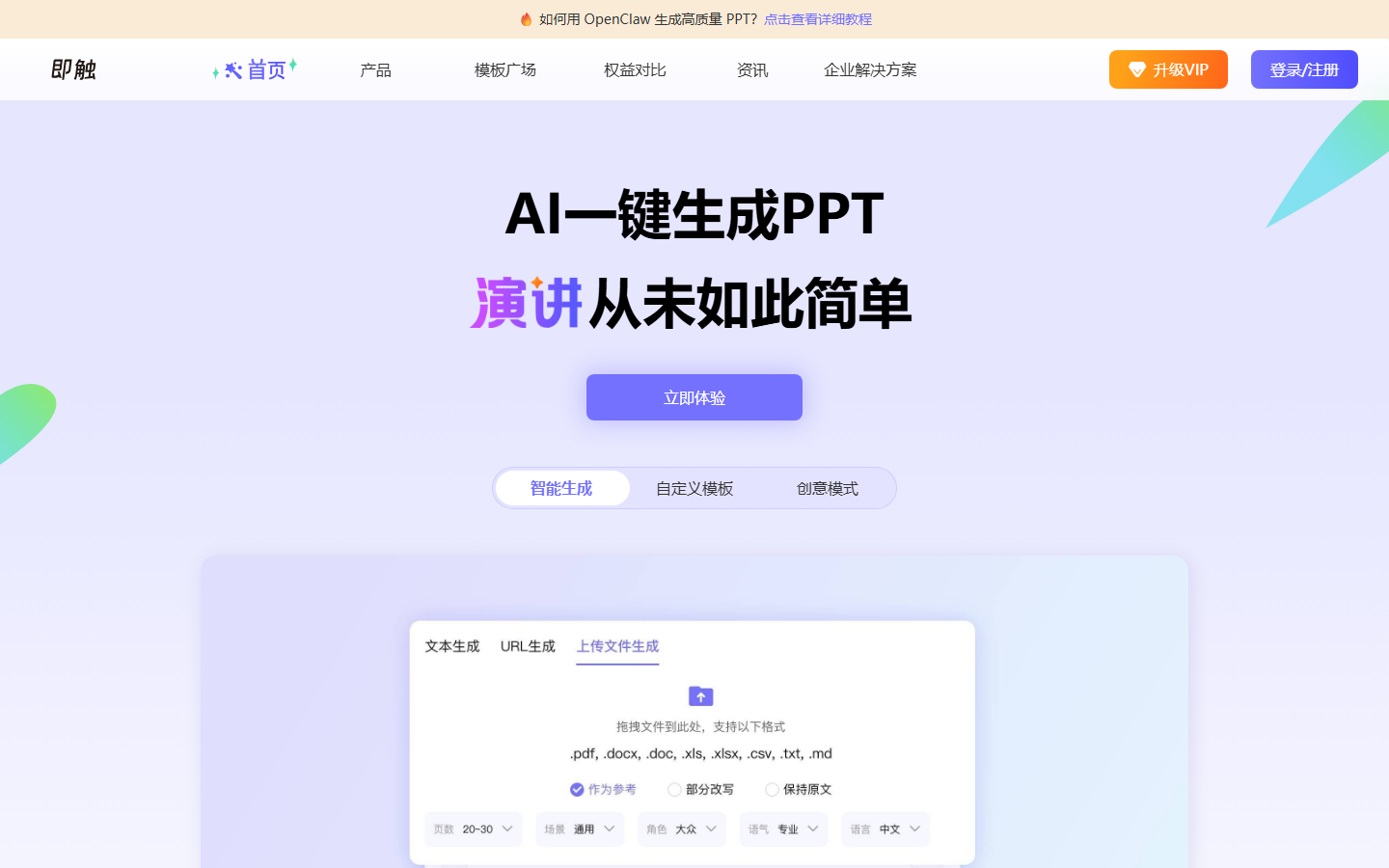
Touch AI PPT: Evaluation of AI one-click presentation tool generation
Core parameters and statistics
Instant AI PPT is positioned as an AI-driven presentation generation tool that solves the time-consuming problem of repetitive operations such as "template selection, layout, color matching, and animation" in traditional PPT production. Users only need to provide a title or related documents, and AI can generate a PPT file containing complete structure, visual design and content layout in about 10 seconds. The tool also supports Excel data linkage, multi-format import and team collaboration, significantly reducing the overall time threshold for making presentations.
| Project | Specifications |
|---|---|
| Product name | Instant AI PPT (7niuai / 7niu AI) |
| Field | AI office efficiency - automatic generation of presentations |
| Delivery form | Web online service (SaaS) |
| Target users | Corporate white-collar workers, educators, market operations, and financial analysts |
| Core functions | Title/document → PPT automatic generation, Excel data linkage, intelligent editing |
| Applicable industries | Business, education, marketing, finance, academia |
| Integrate with core system | Excel data linkage, Word/TXT/Markdown/URL import |
| Generation speed | Outputs the first draft in about 10 seconds (average 15-30 seconds for similar products) |
| Output format | PPTX / PDF / PNG sequence |
| Platform entrance | Web browser (responsive design, supports mobile access) |
| Developer | Beijing Qiniu Technology |
| Place of Belonging | China (CN) |
Product positioning: Different from the traditional three-stage PPT production process of "first writing content, then finding templates, and finally typesetting", Touch AI PPT combines three steps into one - after the user inputs the content, AI simultaneously completes the three tasks of content structuring, layout matching and visual rendering. This means that the generated PPT is not "putting text into a template", but AI automatically matches the most suitable page layout and visual presentation method based on the content characteristics (number of paragraphs, data type, information level).
User and market recognition
Instant AI PPT (formerly known as 7Niu AI) has accumulated a stable user group on the AI PPT generation track.
User Feedback: According to the data collected by the AI Tool Navigation Station, this tool has long been at the forefront of the office efficiency category. User feedback focuses on three core advantages: generation speed (the first draft is produced in 10 seconds, compared with an average of 15-30 seconds for similar products), template richness (covering multiple fields such as business/education/technology/creativity), and Excel data linkage (a differentiated function rarely available in domestic AI PPT tools). On platforms such as Zhihu and Bilibili, multiple tutorials introduce its use process, indicating that this tool has a good foundation for word-of-mouth communication among the workplace population.
Competitive Landscape: Currently, competition in the domestic AI PPT track is fierce - international tools such as Gamma and Beautiful.ai have entered the Chinese market, and local products such as iFlytek and WPS AI are also accelerating iterations. Touch AI PPT relies on its two differentiated functions of Excel data linkage and Chinese layout optimization to remain competitive in market segments. Among them, the Excel linkage function is especially popular among financial and operational personnel - because "charts are automatically synchronized after data is updated" solves the biggest pain point of repetitive labor in regular reporting scenarios.
Market Boundary: User reviews of this tool are mainly concentrated in the Chinese Internet workplace community, and its visibility in the English market is relatively low. For enterprise users with international presentation needs, international tools such as Gamma may have better support for English templates and global collaboration. In addition, the tool does not disclose specific quantitative data such as the number of registered users, paid conversion rates, and customer cases, and the information transparency for market verification is limited.
Cost advantage (including quantitative deduction of cost reduction and efficiency improvement)
| Cost Dimension | Traditional Method | Use Touch AI PPT |
|---|---|---|
| Single PPT production | 30 minutes to several hours (including organizing data, finding templates, typesetting, and adjusting the format) | About 10 seconds for the first draft + 20 minutes for editing and optimization |
| Manual input (weekly report scenario) | About 4.5 hours/week (3 PPTs × 1.5 hours) | About 1 hour/week (3 PPTs × 20 minutes) |
| Tools/Licensing Fees | Microsoft Office Subscription ($100-150/year) | Free version $0 / Standard version paid |
| Training cost | Medium (requires mastering PPT layout and animation skills) | Low (generated as input, zero threshold to get started) |
| Data chart update | Manual screenshot → paste → adjust position (single time 30 minutes +) | Excel linkage automatic synchronization (single time 1 minute) |
The above efficiency data are reasonable deductions based on product positioning. The actual improvement rate varies depending on the industry, team proficiency and business process complexity. It is recommended to evaluate ROI after small-scale validation in your own scenarios.
Quantitative deduction - market operation weekly report scenario: A market operation staff produces 3 weekly report PPTs every week. The traditional method takes about 1.5 hours per copy (30 minutes for sorting data, 20 minutes for finding templates, 30 minutes for typesetting, and 10 minutes for format adjustment), which is about 4.5 hours per week. After using Touch AI PPT, it takes about 10 seconds to generate the first draft, and subsequent editing and adjustment takes about 20 minutes per copy, about 1 hour per week. Saving approximately 3.5 hours per week and approximately 14 hours monthly. At an average salary level of $30/hour, the monthly hidden cost savings is approximately $420, which far exceeds the subscription cost of the tool itself.
Quantitative deduction - monthly financial reporting scenario: A financial team updates the operating analysis PPT every month. The traditional method requires taking screenshots, pasting data tables, and adjusting chart positions every month, which takes about half a day (4 hours) at a time. After using Excel data linkage, you only need to update the source Excel file, and the PPT chart will be automatically refreshed synchronously, in about 1 hour at a time. Saved approximately 9 hours per quarter.
The free truth: The free version can be generated a limited number of times per day (about 5-10 times per day), only basic templates and functions are available, and the generated PPT has a brand watermark. For high-frequency users who produce 2-3 PPTs per week, the price-performance inflection point of the standard version (unlimited generation + no watermark + full templates + Excel linkage) is after "monthly production exceeds 60 pages". Enterprise editions often include private deployment options and are suitable for users in the financial, government, and healthcare industries who have additional requirements for data security.
Main functions
Each function point follows the causal logic of "mechanism → effect → scene".
-
One-click generation of PPT (core function): Mechanism - The user inputs a title or 3-5 core content points, and the AI typesetting engine automatically decomposes the input content into a structured presentation with a cover, table of contents, 3-7 pages of text, and a back cover. The structuring of text content (which information goes on one page, what is the focus of each page) and visual layout (font level, color scheme, image selection) are completed simultaneously. Supports outline mode - the user first lists the chapter structure with key points, and AI generates it page by page according to the outline. Effect - Simplify PPT production from the two-line parallel task of "content arrangement + layout design" to the single-line task of "content input". Scenario - The project manager enters three key developments and two risk points of the week 15 minutes before the deadline of the weekly report, and 10 seconds later gets a first draft of PPT that can be used directly for the weekly meeting.
-
Excel data linkage (core differentiation): Mechanism - Supports importing data from Excel files, AI automatically identifies data types and recommends the most appropriate chart style (bar chart/line chart/pie chart/radar chart/scatter chart). Data binding adopts a "real-time link" mechanism - after the source Excel file is updated, the corresponding chart in the PPT automatically completes data refresh and color remapping, without manual adjustment. Linkage supports cross-Sheet references and multi-file associations. Effect - Change the process of "data update → PPT chart update" from manual operation (screenshot/paste/adjust position) to automatic synchronization, eliminating the biggest duplication of work in regular reporting scenarios. Scenario - The financial analyst binds the quarterly income statement Excel to the monthly operating analysis PPT. After the data is updated, the PPT chart is automatically refreshed, eliminating the need for manual replacement every month.
-
Multi-format file import: Mechanism - Supports content import from multiple sources such as TXT, Word, Excel, Markdown and URL links. When importing from a Word document, AI automatically recognizes the title level and body paragraph structure, and logically splits them into different pages. When importing from a URL, AI captures the text content of the page and extracts key information as PPT material. Effect - Users do not need to rearrange existing materials into the specified format, any form of text content can be used as input. Scenario - The trainer uploads the existing Word version of the course syllabus, and AI automatically extracts the directory structure and generates the courseware framework.
-
Intelligent editing and optimization: Mechanism - After the first draft is generated, users can perform refined editing through natural language instructions (such as "Change the list on the third page into a flow chart", "Add a dark background to the title page", "Swap the positions of the fifth page and the second page"). Supports text polishing (expanding/simplifying/rewriting tone), image replacement (built-in gallery or user upload), and layout rearrangement. Effect - The editing operation has changed from "drag and adjust element by element" to "using natural language to command AI to make adjustments", which greatly reduces the editing time. Scenario - The user inputs "Change the color color of the entire PPT from blue to green", and AI automatically completes the color reorganization of all pages.
-
Template style switching: Mechanism - Provides a template library for multiple fields such as business reports, academic defenses, product releases, education and training, and brand solutions. After the user generates the first draft, he can switch the overall style with one click. AI will automatically re-color, adjust fonts and rearrange the page layout according to the visual rules of the new style, rather than simply "changing the background image". Effect——Quickly try multiple visual presentation methods while keeping the content structure unchanged. Scenario - For the same project report PPT, switch from "Technology Blue" style to "Business Gray" style with one click to adapt to the aesthetic preferences of different audiences.
-
Team Collaboration: Mechanism - Supports multiple people to edit the same PPT online at the same time, and displays the editing location and operations of collaborators in real time. The comment function supports feedback flow for a single page or a single element, and modification suggestions can be marked as "pending confirmation/adopted/closed" status. Historical version management supports tracing back to any editing records. Effect - Eliminates the collaboration confusion of "multiple versions of files being passed around via email/IM", and the unified version management and review process improves team collaboration efficiency. Scenario - Three members of the marketing team edit a press conference PPT at the same time. One adjusts the copy, one replaces the accompanying images, and one adds data charts. All operations are visible in real time.
-
Cloud Storage and Sharing: PPT is automatically saved to the cloud in real time, and supports generating public or encrypted sharing links. Visitors can browse online but cannot edit it (suitable for sending to external customers or leaders for preview). The export format supports PPTX, PDF, PNG sequence and picture version PDF.
Model and version evolution
The bottom layer of Touch AI PPT uses a combination of self-developed AI layout engine and content generation model. The typesetting engine has been specially optimized for the visual specifications of Chinese presentations - including Chinese font rendering (cross-platform compatibility such as Song, Hei, Kai, and Microsoft YaHei), automatic spacing adjustment for mixed Chinese and Western text, head and tail avoidance rules for Chinese punctuation (periods/commas are not placed at the beginning of the line), and white space ratio settings that conform to Chinese reading habits. The content generation model is fine-tuned based on the large language model, and the information density control and structured output capabilities are optimized for PPT scenarios.
| Stage | Time | Key changes |
|---|---|---|
| Early version | ~2026-01 | Basic title→PPT generation function is online, supporting basic template switching |
| Current version | ~2026-07 | Added Excel data linkage (automatic synchronization of data binding), multi-format import (Word/Excel/MD/URL), intelligent editing (natural language instructions), online team collaboration, multi-format export |
Version evolution features: The platform continues to iterate in an online SaaS manner, and each update does not require users to manually upgrade. From the early days to the current version, the product has evolved from a "single PPT generation tool" to a "PPT production platform that supports data linkage and team collaboration". Excel data linkage is the most critical differentiating capability - it upgrades Instant AI PPT from "a tool that replaces manual typesetting" to "a work platform that is deeply integrated with office data flow".
Possible technical directions in the future: Content recommendation based on user historical demonstration data (automatically generate a style that conforms to the company's PPT template specifications), voice input generation (directly generate PPT through voice description requirements), AI-assisted content review (automatically detect data consistency, terminology accuracy and brand compliance in PPT), deeper Office ecological integration (two-way data interoperability with Word/PowerPoint/Teams).
Technical advantages
The technical architecture of Touch AI PPT is built around the core goal of "presentation automation":
-
Business Adaptability—Content-Driven Layout Engine: The AI typesetting engine automatically matches the best layout plan and color strategy based on the content type of each page (title page/text/data chart/comparison page/summary page). Typesetting decisions are not based on fixed rules, but on real-time analysis of content characteristics - for example, when there are four parallel key points on a page, the engine automatically selects a four-column layout and reduces the font size; when a page is dominated by data tables, it automatically enlarges the table area and puts away unnecessary decorative elements. This "content-driven layout" strategy ensures that each page generated effectively conveys information, rather than rigidly applying templates.
-
Engineering Reliability—Excel Data Linkage Mechanism: The bottom layer of the linkage module realizes real-time synchronization of PPT charts and source Excel files through data binding. Supports common chart types (bar chart, line chart, pie chart, bar chart, scatter chart), and the chart automatically switches to the most appropriate display form after the data type is changed. The binding relationship is two-way - after modifying the data in the PPT, AI will automatically prompt whether to write the modifications back to the source Excel file. Data updates use incremental synchronization rather than full replacement to reduce transmission and rendering overhead.
-
Ease of Use—Natural Language Editing Instructions: Users do not need to drag elements or search for function menus when editing PPT, they can directly use natural language descriptions. AI understands the instructions and converts them into specific typesetting operations. The engineering basis of this capability is the API call chain that maps user intent parsing to the underlying layout engine.
-
Scalability—Template layered architecture: The template system adopts a three-layer structure of "global template → chapter template → single page layout". The global template defines the overall color, font, and tone; the chapter template defines the unified layout style of specific chapters (such as cover, table of contents, text, and back cover); the single-page layout allows users to make independent adjustments to specific pages while maintaining a consistent overall style. This layered design balances brand consistency with creative flexibility.
-
Special optimization for Chinese typesetting: The platform has carefully processed the typesetting specifications of Chinese presentations - including cross-platform compatibility of Chinese fonts (Song typeface/Hei type/Kail type/Microsoft YaHei, etc.), automatic spacing adjustment when Chinese and Western text are mixed, head and tail avoidance rules for Chinese punctuation marks (periods/commas are not placed at the beginning of the line), and white space ratio settings that conform to Chinese reading habits. These details are easily overlooked in most international PPT tools (such as Gamma, Beautiful.ai), but they have a significant impact on the actual use experience of Chinese users.
Human-machine collaboration boundary
When using Instant AI PPT, it is recommended to clarify the following dividing line between automation and manual confirmation:
| Links | Degree of automation | Manual confirmation points |
|---|---|---|
| Content input (title/document) | User manual input/upload | Input accuracy and completeness checks |
| PPT first draft generation | Fully automatic (about 10 seconds) | — |
| Data chart generation | Fully automatic (based on Excel data) | Check whether the chart type selection is correct and whether the data labels are complete |
| Text content editing | AI assistance (natural language instructions) | Accuracy review of key data, proper nouns, and externally released content |
| Template style switching | Fully automatic (one-click switching) | Check whether the page layout is misaligned after style switching |
| Final export and sharing | Fully automatic | Final review before external release (especially scenarios involving customers/leaders) |
| Publish/external display | Manual confirmation required | Irreversible operation, only share or export after confirming that the content is correct |
Recommended SOP: For important external presentations (customer proposals, investor roadshows, executive reports), it is recommended to arrange at least two rounds of manual review after the AI generates the first draft - the first round is for the content person in charge to review the text accuracy, and the second round is for the visual person in charge to review the layout consistency. For internal scenarios such as internal weekly/monthly reports, the review standards can be appropriately relaxed and the AI draft can be directly used to speed up manual scanning.
How to use
| Entrance | How to use |
|---|---|
| Web | Browser access 7niuai.com → Register/Login → New PPT → Enter content → Generate → Edit → Export |
Typical usage process:
- Method 1: Quick title generation—Visit the official website and register and log in, click "New PPT", and enter the presentation topic or one sentence of core content (such as "2025 Q3 E-commerce Business Review"). It is suitable for scenarios where time is tight and you only need to quickly obtain an outline-level PPT draft.
- Method 2: Document import and generation - Upload reference materials such as Word/Excel/URL, AI automatically identifies the title level, extracts key data and core ideas, and splits it into multi-page PPT according to the logical structure. Suitable for scenarios where you already have detailed content materials but don’t want to manually layout them.
- Template Selection: Choose the appropriate direction from categories such as business reports, academic defenses, product releases, education and training, and brand plans. You can also skip this step and use the default style, and switch it with one click after generation.
- Generate first draft: Click "Start Generation", and in about 10 seconds you will get the complete first draft of PPT including cover, table of contents, 5-10 pages of text and back cover.
- Intelligent editing: Adjust page by page in the editor - replace schematic images, modify text descriptions, and adjust data charts. Support natural language instructions (such as "change the bar chart on the third page to a line chart").
- Excel Data Linkage: If you need to import data from Excel, click "Data Linkage" to upload the file, and AI will automatically identify the data dimensions and recommend chart types. After confirmation, the chart is generated and embedded in the corresponding page.
- Export and Share: After the inspection is completed, export it as a PPTX, PDF or PNG sequence. You can also generate a sharing link and send it directly to collaborators.
Product Pricing
Instant AI PPT is charged on a subscription basis, and different versions differ in terms of number of times of generation, template scope, and team functions. The platform launches limited-time offers and annual package discounts from time to time, and the specific prices are subject to the official website announcement.
| Package | Price | Core Benefits | Applicable Objects |
|---|---|---|---|
| Free version | $0 | Daily limited generation (5-10 times/day), basic template, including brand watermark | Light users, students, trial trial |
| Standard version | Monthly/year subscription (subject to the official website) | Unlimited generation + full template library + Excel data linkage + no watermark export | Personal workplace users (high-frequency use) |
| Professional Edition | Monthly/year subscription (subject to the official website) | Standard Edition benefits + Team collaboration (from 5 people) + Priority generation queue + Advanced templates | Small and medium-sized teams, cross-department collaboration |
| Enterprise Edition | Business Quotation | Customized Template + Privatized Deployment + API Access + Dedicated Customer Support + SLA Guarantee | Large Enterprises, Educational Institutions, Government |
The truth about free: The daily limit of the free version is sufficient for users who "occasionally need to do PPT", but for high-frequency users in the workplace who produce 2-3 PPTs per week, the upper limit will usually be reached within 1-2 weeks. The PPT generated by the free version has a brand watermark and is not suitable for external display. The price-performance inflection point of the standard version is after "the monthly production volume exceeds 60 pages." The private deployment of the enterprise version is suitable for financial, medical and government users who have strict requirements for data security, but the price is usually several times that of the standard version, and the necessity needs to be evaluated based on actual compliance needs.
Cost Tip: It is recommended to evaluate the input-output ratio on a monthly basis. Take a standard version user as an example: the monthly fee is about $10-20 (estimated estimate). If you save 10+ hours of PPT production time, based on $30/hour, the monthly ROI is about 15-30 times.
Application scenarios
-
Scenario 1: Business report and quarterly summary (individual/small team efficiency improvement) - The user inputs quarterly key data and work progress points, and AI automatically generates a clearly structured presentation. In the quarterly summary PPT, the Excel data linkage function automatically updates financial and operational data charts. Manual time consumption vs tool time consumption: Traditional method takes about 2-3 hours per copy → Instant AI PPT takes about 10 seconds for first draft + 20 minutes for editing. Verification method: Check whether the business data generated by AI is consistent with the source Excel and whether the chart type is appropriate.
-
Scenario 2: Data reporting and business analysis (standardization of financial/operations teams) - Financial personnel import monthly Excel reports into Touch AI PPT, and AI automatically recognizes the data structure and generates corresponding chart pages. PPT charts are automatically synchronized after the data is updated. You can save the monthly report PPT as a template, and only need to update the source Excel data the next month. Collaboration Value: The financial team uses the professional version for multi-person collaboration, data entry personnel update Excel, report production personnel refresh PPT simultaneously, and reviewers make online comments. Verification method: Confirm the accuracy of data binding - after modifying a data point in Excel, verify whether the PPT chart is updated simultaneously.
-
Scenario 3: Mass production of marketing materials (enterprise integration scenario) - The marketing team inputs product selling points, target audience information and competitive analysis materials, and batches generates promotion PPTs of different styles. For companies that need to customize presentation solutions for different customers, they can use the template hierarchical architecture (global template to maintain brand consistency + single-page layout for customer customization). Data Security Solution: Involving undisclosed market strategies and customer information, it is recommended to evaluate the privatized deployment options of the enterprise version to ensure that data does not leave the enterprise network.
Applicable people
-
Corporate white-collar workers and managers: Professionals who need to produce various types of reporting PPT on a daily basis - weekly/monthly reports, project reports, quarterly summaries, annual plans, etc. Touch AI PPT can significantly reduce the time required for typesetting, allowing you to focus on content refining and data interpretation. Typical user portrait: product manager, project manager, operations director, sales director.
-
Education and Training Workers: Teachers, trainers and course designers who need to frequently produce courseware. AI-assisted generation can improve the efficiency of courseware production and leave more time to polish teaching content and classroom interaction design. Typical user portrait: K12 teachers, university lecturers, corporate trainers.
-
Marketing and Operations Staff: A marketing team that needs to quickly output various promotion plans. The batch generation capability helps to complete multi-version material production in a short period of time. Excel linkage function makes data-driven marketing reporting more efficient. Typical user portrait: Brand manager, marketing, event planning.
-
Data analysis and financial personnel: Positions that regularly produce data reporting PPTs. The Excel linkage function eliminates the repetitive work of taking screenshots and entering data tables, and the production efficiency of data dashboard PPT is most significantly improved. Typical user portrait: data analyst, financial analyst, BI engineer.
-
Not suitable for boundaries: The core positioning of Instant AI PPT is an "efficiency tool" rather than a "design tool". Not suitable for: ① Key visuals or advertising-level presentations for brand conferences that require extremely high visual creativity and customized design; ② Innovative typesetting requirements that require a complete separation from the template system; ③ Scenarios involving sensitive business data (such as undisclosed financial data, mergers and acquisitions plans, etc.). The data in the SaaS model resides on the public cloud, and security risks need to be assessed; ④ Professional presentations that require fine control of PPT animations (AI-generated animations are based on preset templates and are not as precise as manual production by professional Keynote users).
Comparison of competing products
| Comparative dimensions | Touch AI PPT | Gamma | Beautiful.ai | iFlytek | WPS AI |
|---|---|---|---|---|---|
| Core positioning | Chinese workplace efficiency tools | Modern design orientation | Brand design orientation | Chinese AI office | Comprehensive office suite |
| Generation speed | About 10 seconds | About 15 seconds | About 20 seconds | About 15 seconds | About 15 seconds |
| Pricing model | Free + Subscription | Free + Pro/Business | Free + Pro/Enterprise | Free + Membership | WPS membership included |
| Excel data linkage | ✅ Automatic synchronization binding | ❌ Not supported | ❌ Not supported | ⚠️ Limited support | ⚠️ Partially supported |
| Chinese typesetting optimization | ✅ In-depth optimization (font/punctuation/blank space) | ⚠️ English priority | ⚠️ English priority | ✅ Chinese adaptation | ✅ In-depth optimization |
| Number of template styles | Business/education/technology/creativity/academic, etc. | Modern simplicity/creativity/brand | Design orientation/typesetting priority | Formal/business style | Rich (ecological accumulation) |
| Team Collaboration | Pro Support | Built-in (Free/Pro) | Built-in (Pro+) | Enterprise Support | Team Support |
| Free quota | Daily limit (5-10 times) | Limited free (10 pages/piece) | Limited free (5 pages/piece) | Daily limit | Limited free |
| Offline use | ❌ SaaS mode | ❌ SaaS mode | ❌ SaaS mode | ❌ SaaS mode | ✅ Desktop offline |
| Data privatization | Enterprise private deployment | ❌ Cloud only | ❌ Cloud only | Enterprise plan | Enterprise plan |
Decision Suggestion: If you work in a Chinese workplace environment, need to frequently produce Chinese PPT, and have a strong need for Excel data linkage, Touch AI PPT is the most suitable choice. If your presentation requires more modern/design-oriented visuals and your target audience is English-speaking users, Gamma or Beautiful.ai are more suitable. If you have already used the WPS office suite extensively, WPS AI may be more convenient as an integrated solution. It is recommended to use the free version of Touch AI PPT to experience the core functions (especially Excel linkage) first, and then decide to pay after confirming the match.
Summary and Outlook
Touch AI PPT has found a clear differentiated positioning in the AI PPT generation track - not only focusing on "fast", but also focusing on "accuracy". Detailed functions such as Excel data linkage, Chinese typesetting in-depth optimization, and multi-format import make it competitive in practical workplace scenarios. In particular, the Excel linkage function is a scarce capability among similar tools and has significant value for financial and operational personnel. The degree of automation of the product "from content to PPT" has reached the practical stage, and the quality of the first draft is enough to cover most daily work reporting scenarios.
Core advantages: (1) Leading generation speed (first draft in 10 seconds, average 15-30 seconds for similar products); (2) Excel data linkage is a rare differentiated function among domestic AI PPT tools; (3) In-depth optimization of Chinese typesetting (font/punctuation/blank/head and tail avoidance rules), which is difficult for international tools to match; (4) Multi-format import support, reducing user migration costs; (5) Natural language editing instructions, lowering the editing threshold.
Current limitations: (1) SaaS model - data resides on the public cloud, and scenarios involving sensitive commercial data need to assess security risks; (2) Export restrictions - English market and international template support are weaker than international tools such as Gamma; (3) Generation quality fluctuations - the more ambiguous the input information is, the more the generated content will be biased towards a general templated framework; (4) Brand compliance - the free version contains a brand watermark, and some organizations may not allow the use of generated results with external brand logos; (5) There is no public version number system - it is difficult to track the launch time of specific functions.
Procurement/Adoption Risk Assessment:
- Data Security: Under the SaaS service model, the user's presentation data is stored in the cloud. For enterprise users who contain customer privacy, undisclosed business plans, or compliance-sensitive information, they should confirm the service provider's data encryption standards (transport layer TLS + storage layer AES-256), data residency region, and deletion policy. Enterprise editions typically support private deployments or hybrid cloud scenarios to address this issue.
- Vendor Lock: PPTX and PDF formats are highly versatile, but whether the Excel data linkage function retains the binding relationship after exporting to PPTX needs to be verified before purchase to avoid data link breaks when migrating tools in the future.
- Generation quality fluctuation: The quality of content generated by AI is greatly affected by the completeness of input information. It is recommended to provide as detailed content points as possible when entering to obtain more targeted generation results. For important external presentations, it is recommended to arrange two rounds of manual review by the content leader and visual leader.
Future Outlook: Possible follow-up development directions include: content recommendation based on user historical presentation data (automatic generation of styles that conform to the company's PPT template specifications); deeper Office ecological integration (two-way data interoperability with Word/PowerPoint/Teams) ); mobile editing and voice control generation capabilities; a professional template system for industry scenarios (such as medical academic reports, government work reports, project acceptance PPT, etc.); and AI-assisted content review functions (automatic detection of data consistency, terminology accuracy, brand compliance and other issues in PPT).
Related tools:  Notion AI, google-workspace
Version Info
- Current online version :It supports one-click generation of PPT for titles/documents, automatic chart updating via Excel data linkage, TXT/Word/Excel/Markdown/URL multi-format import, online team collaboration, natural language editing instructions, and multi-format export (PPTX/PDF/PNG). The platform continues to iterate online, eliminating the need for users to manually upgrade.
- initial public version :The basic PPT generation function is online, supporting title input generation and basic template switching. For historical iteration details, please refer to the official website update log.
User Reviews