 AICamp
AICamp focuses on AI office collaboration, supporting team sharing sessions, permission management and knowledge base Q&A.
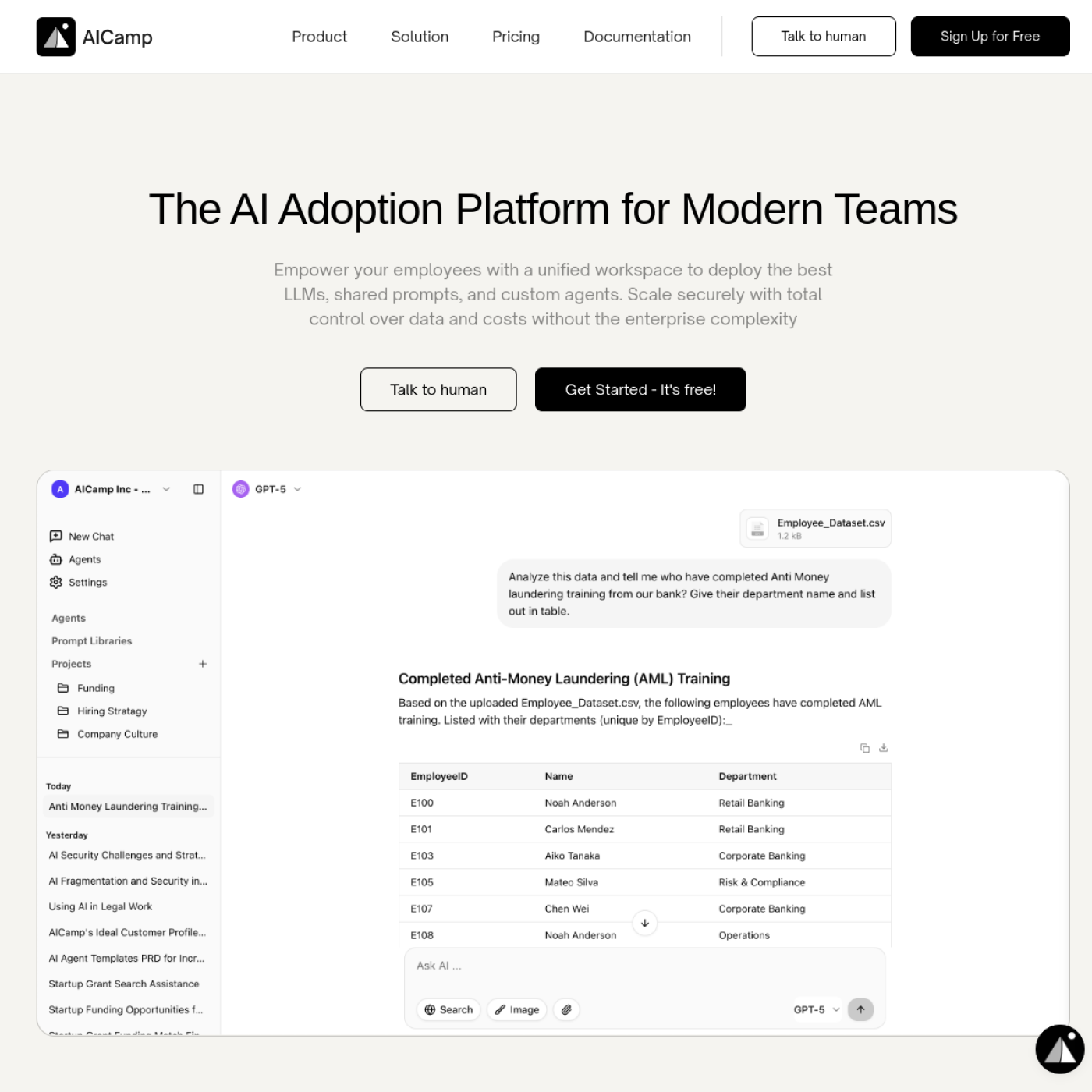
AICamp - Enterprise AI adoption and collaboration platform
Tool introduction
Brief review in one sentence: AICam is not an independent chat robot, but a governance collaboration platform that helps enterprises "use AI for all employees" - unified management of multi-model access, shared knowledge base, custom Agent and team prompt lexicon, allowing AI capabilities to transform from individual experiments to organizational-level infrastructure.
AICamp was co-founded in 2024 by Shreya Ranpariya and Nishchit Dhanani and is headquartered in the United States. It is positioned as an AI Adoption Platform. Its core mission is to help small and medium-sized enterprises and large teams safely and compliantly use cutting-edge LLM for all employees without increasing management complexity. As of 2026, the platform has integrated mainstream models such as GPT-5.1, Claude Opus 4, Gemini 2.0, etc., and its services cover multiple department scenarios such as marketing, product research and development, operations, and sales. (Source: aicamp.so/about)
Publicity Verification: The official emphasizes that "no API key is required, available to all members, safe and compliant". After verification, the Managed Model does support one-click activation of GPT-5.1/Claude 4, etc., without the need for users to prepare their own keys; the BYOK (Bring Your Own Key) mode is retained at the same time, and the two methods are flexible and optional. In terms of security, it has passed ISO 27001 certification and SOC 2 Type II audit, and is GDPR compliant. The hype is basically true.
Core functions
1. Unified Multi-Model Chat
- Seamlessly switch between GPT-5.2, Claude 4, Gemini and other models in one interface, and choose the model that best suits the task for each conversation.
- Hidden linkage: In the same conversation, you can reference knowledge base files, upload images (OCR recognition), enable the Web Search plug-in to obtain real-time information, and call DALL·E 3 to generate images - no need to switch back and forth between multiple tools, solving the core pain point of moving data across platforms.
2. Shared Knowledge Base/RAG
- Upload PDF, DOCX, CSV, XLSX, PPT, Markdown, TXT, EPUB, JSON and other format files to build a searchable knowledge base for the team.
- Hidden linkage: The knowledge base is not only used for chat references, but can also be mounted on a custom Agent to implement the Strict Knowledgebase Mode (strict mode) in which the Agent only answers based on uploaded files, greatly reducing the hallucination rate. In a multi-department scenario, different groups can mount different knowledge bases to achieve data isolation. (Source: docs.aicamp.so)
3. Customize AI Agent (Agent Builder)
- Supports the creation of custom Agents with role settings, exclusive instructions, documentation knowledge base and Conversation Starter.
- Agent Store (launched in 2025): Commonly used Agent templates (financial report analysis, release note generation, procurement assistant, test case generation, HR help desk, marketing strategist, etc.) are preset and can be directly selected or customized by the team.
- Hidden linkage: Agent can set the permission scope (visible only to itself/specific groups/all members), and in the future will support calling third-party APIs to perform actions (Perform Actions) through the OpenAPI specification, evolving from a question and answer assistant to an automated executor.
- Tool open list (Agent's ability to expose large models):
upload file(file upload and parsing),search knowledge(knowledge base retrieval),web search(network search),image generation(image generation),memory read/write(memory reading and writing),OCR(image text extraction).
4. Collaborative Prompt Library
- High-performance prompt word templates can be saved, shared, and discovered within the team. Supports Workspace level (visible to all members) and group level sharing.
- Hidden linkage: The prompt word is deeply bound to the Agent and the project - a preset prompt word can directly serve as the Agent's Conversation Starter, or can be mounted to a specific project as a standardized process entry to avoid starting from scratch every time.
5. Project-based workflow (Projects)
- Classify related chats, files, and custom instructions by project to support sharing and collaboration within the team.
- Hidden linkage: Each Project can independently configure the knowledge base context and Custom Instructions to achieve project-level AI context isolation, which is suitable for agency scenarios with multiple customers and multiple business lines. (Source: aicamp.so/blog/aicamp-project/)
6. Usage Insights and Cost Control (Usage Analytics)
- Provide team-level AI usage analysis panel, including query times, active users, model distribution and other indicators.
- Supports model access control by user/group to prevent high-cost models from being abused and maximize output within budget.
Architecture link (control flow and data return flow)
User (Web UI) → Workspace/Project/Agent → AICam Control Layer
  ├─ Permission engine (RBAC) + usage routing
  ├─ Model Gateway (Managed Model / BYOK)
  │ ├─ OpenAI (GPT-5.1, GPT-5, o4-mini...)
  │ ├─ Anthropic (Claude Opus 4, Sonnet 4...)
  │ ├─ Google (Gemini 2.0 Flash, 1.5 Pro...)
  │ └─ OpenRouter (aggregated long-tail model)
  ├─ Knowledge engine (RAG + file parsing + OCR)
  ├─ External plug-ins (Web Search, DALL·E 3, future API Actions)
  └─ Audit and Usage Log → Analysis Panel
Pricing strategy
AICam uses a three-tier pricing model (source: aicamp.so/pricing):
| Package | Price | Applicable scale | Core benefits |
|---|---|---|---|
| Starter (Free) | $0 | Team of less than 3 people | 14-day free trial, $5 AI model credit BYOK (brings your own model key), basic chat and prompt word functions |
| Business (Team) | $20/user/month | Within 500 people | All features include SSO/SAML, US/Europe dual-region hosting model BYOK, 14-day free trial |
| Enterprise | Business quotation | More than 500 people | Exclusive deployment of AI Guardrails (guardrail strategy), customized support SLA guarantee |
The free truth: Although the Starter free plan has a very low threshold, it only includes a $5 hosting model quota - for teams that frequently use GPT-5.1/Claude 4, the quota will be consumed quickly; in addition, it is limited to 3 people, and you must upgrade if you exceed it. Suitable scenarios: A small team initially evaluates the suitability of the platform, or as a lightweight management interface in BYOK mode.
C-end/developer/enterprise three-tier cost breakdown:
- C-side/Individual: Starter is free + BYOK (with your own API key), the actual expenditure only depends on the number of personal model calls.
- Small and medium-sized teams: The Business package is billed by seats, $20/person/month including the hosting model quota; if the team brings its own key (BYOK), the platform cost can be further reduced.
- Large Enterprise/Compliance Sensitive: Enterprise business quotation, including dedicated deployment, data residency SLA, etc., the cost is higher than the SaaS suite but lower than the self-built AI platform.
Advantages and Disadvantages Analysis
Advantages
- Zero-threshold multi-model access: There is no need to register APIs and manage keys separately for each model. One account covers mainstream models such as GPT-5.1, Claude 4, Gemini, etc., and the UI is unified and conversations can be shared.
- Outstanding governance capabilities: RBAC permissions (model/Agent/prompt word/project level four), usage monitoring, model-level access control - this is professional-level among similar tools, far exceeding open source alternatives such as LobeChat.
- Built-in knowledge base + Agent engine: Not a simple chat client, but a collaboration platform with RAG and Agent execution capabilities, suitable for medium and large organizations that require document Q&A + automation.
- Complete Compliance: ISO 27001, SOC 2 Type II, GDPR, data is not used for model training, supports data retention policy settings - friendly to strongly regulated industries such as finance, medical, and legal.
- Active product iteration: From the beginning of 2024 to the present, it has been updated 2-4 times a month, and core functions such as Agent Builder, Projects, Memory, Managed Models, and Dark Mode have all been implemented within a year.
Disadvantages
- Limited deep customization capabilities: The current Agent only supports API calls based on OpenAPI (coming soon), and does not yet have Playwright/Selenium-level browser automation capabilities. Complex multi-step workflows still need to be supplemented by external tools.
- The integration ecosystem is still developing: Most of the officially listed Integrations are labeled Coming Soon (Google Drive, Slack, third-party applications); currently only Web Search and DALL·E 3 plug-ins are supported, and the ecosystem is weaker than tools such as Notion AI and Glean that are deeply embedded in office scenarios.
- Free quota is low: The $5 hosting model quota is only enough for medium-sized teams to get an initial experience, and continuous use must be paid. It competes directly with ChatGPT Team ($25/person/month). If the team only needs a single model, the cost-effective advantage is not obvious.
- Insufficient Chinese localization: The UI and documents are all in English, the prompt dictionary is mainly Chinese and English templates, and the semantic optimization and sensitive word filtering of Chinese scenes have not been publicly explained.
Comparison with competing products
| Dimensions | AICam | ChatGPT Team | LobeChat (Open Source) | Glean |
|---|---|---|---|---|
| Multi-model support | ✅ GPT/Claude/Gemini/OpenRouter | ❌ OpenAI only | ✅ Aggregate multiple models | ❌ Self-research + some third parties |
| Knowledge Base RAG | ✅ Built-in | ❌ No native RAG | ✅ Plug-in support | ✅ Deep integration |
| Custom Agent | ✅ Agent Builder | ❌ GPTs (OpenAI only) | ✅ Custom Assistant | ❌ Search-based |
| RBAC Permissions | ✅ Granular Model/Agent/Project Level | ❌ Workspace Level Only | ❌ Limited | ✅ Enterprise Level |
| Hosted model (BYOK free) | ✅ | ✅ | ❌ Need to bring your own key | ❌ Need to bring your own key |
| Compliance Certification | ISO 27001, SOC2, GDPR | SOC2 | ❌ None | SOC2, GDPR |
| Open Source | ❌ | ❌ | ✅ | ❌ |
| Starting price (seat) | $20/person/month | $25/person/month | Free (self-hosted) | Business quote |
Applicable scenarios
Dimensionality reduction strike scene
- Marketing/Content Team: Use Prompt Library to standardize various copywriting templates (cold email SEO blog posts, advertising copywriting), and cooperate with Agent generation + knowledge base brand manual verification to compress the production time of a single piece of content from 3-4 hours to 30-45 minutes.
- Cross-department knowledge Q&A: HR policy documents, IT operation and maintenance manuals, legal contract templates, etc. are uploaded to the knowledge base, and all employees can query in natural language, reducing repeated questions and information gaps between departments. Deduction: For a company with 200 employees, the HR Q&A week will be reduced from 8 hours to 2 hours.
- Agency/Consulting Company: Create projects according to customers, isolate the knowledge base and dialogue context, and SOP work (first draft of proposal, competitive product analysis, meeting minutes) can be partially completed by Agent.
- Enterprise AI pilot and scale: Start with a team of 3-5 people (Starter is free), verify the value of the scenario and expand to the entire organization (Business/Enterprise) with one click, and the governance and authority system will be smoothly upgraded with scale.
Discourage/Inapplicable people
- Requires in-depth long article writing or academic publishing: Although AICam has generation capabilities, it is not a dedicated writing tool and does not have in-depth writing functions such as LaTeX/citation management/version comparison.
- RPA scenarios that rely heavily on browser automation: Agent does not have visual browser control capabilities yet, and needs to wait for API Actions to come online or to use external tools such as Playwright MCP.
- Individual users with extremely limited budget: The $5 limit of the free version is only enough for light use. Heavy users of a single model are more suitable to directly use ChatGPT/Claude official subscription.
- Requires private deployment and budget is less than 50 people: Enterprise exclusive deployment is for organizations with more than 500 people. Small and medium-sized enterprises can only use the SaaS version and cannot achieve full localization.
Efficiency improvement comparison (including tables)
The following is an estimate of some job efficiency changes based on official customer service cases (source: aicamp.so customer evaluation page) and product deductions (note that the deductions are theoretical values based on functional analysis, unofficial commitments):
| Position/Task | Traditional method takes time | After AICam assistance | Efficiency multiplier | Description |
|---|---|---|---|---|
| Marketing copywriting (single blog draft) | 3-4 hours | 30-45 minutes | ~4-6x | Prompt word template + Agent first draft + manual polishing |
| Competitive product analysis report (including data retrieval) | 6-8 hours | 1.5-2 hours | ~3-4x | Web Search real-time retrieval + knowledge base historical data comparison |
| HR FAQ responses (weekly total) | 8 hours | 1.5-2 hours | ~4-5x | Knowledge base self-service Q&A, only complex exceptions require manual work (deduction) |
| Code Review (PR basic inspection) | 30 minutes/time | 10-15 minutes | ~2-3x | Code Reviewer Agent automatically marks potential problems (deduction) |
| Financial report summary (quarterly) | 4-5 hours | 30-60 minutes | ~4-5x | Agent automatically generates trend summary after uploading financial data (deduction) |
| New employee AI tool training | 2-day intensive training | 30-minute self-study | ~32x | Prompt vocabulary + Agent comes with guidance, no special training required |
The above data is partly from AICam official customer case (Adrian Kempiak, CTO @Neadoo Digital: "streamlining our workflow"), and partly based on logical deduction of product functions. Actual results vary based on team familiarity and task complexity.
Automation Boundary
Based on type classification: AICamp belongs to Productivity/Business-side Application (the main delivery form is SaaS collaboration platform), and also has the sub-type characteristics of Agent/Automation Tool. The following is detailed according to the rules:
Can be 100% automated and organized
- Standardized content generation: template-based emails, newsletters, and social media copywriting, with Strict Knowledgebase Mode to complete the first draft.
- Knowledge Base Search Q&A: After uploading SOP/policy documents, frequently asked questions can be fully covered by AI without manual intervention.
- Data summary and trend analysis: Upload CSV/Excel, and the Agent can automatically generate structured summaries and visual suggestions.
- Classification and Routing: Support Triage Agent can automatically classify user feedback and assign it to the corresponding team.
Must be manually confirmed/cannot be automated (Human-in-the-loop)
- Strong Compliance Approval: Involving legal contract modifications, bidding quotations, medical diagnosis recommendations - Agent can generate first drafts, but the final output must be reviewed by compliance personnel.
- Irreversible payment/release operations: The current platform does not have a direct payment interface, but after API Actions are launched in the future, operations involving deletion, payment, and transfer should set confirmation points/whitelists.
- High-value customer delivery: Final deliverables such as consulting reports and customized design plans. AI output is only used as material draft, and manual integration and judgment are irreplaceable.
- Key brand communication: official external statements, crisis public relations copywriting, etc. AI-generated content must be reviewed by the brand person in charge before being released.
Engineering Pitfall Guide (Agent Automation Scenario)
- Dead-end loops are related to Token inflation control: Set
max_steps(maximum number of iteration steps) and timeout threshold in Agent or Project to prevent the model from idling and burning Tokens when executing complex tasks. It is recommended to set the upper limit of steps for Agents involved in Web Search to 5-8 steps. - Knowledge Base Content Overload: When uploading a large number of documents (>50), RAG search quality may degrade. It is recommended to adopt a split-library strategy—split the knowledge base by department/project instead of one database containing all content; and turn on Strict Knowledgebase Mode to reduce illusions.
- Model selection rationality: Not all tasks require GPT-5.1 level models. Administrators should configure differentiated model whitelists for different groups in the Model Management panel: GPT-4.1-mini/Claude Sonnet for daily Q&A, and GPT-5.1/Claude Opus for deep inference to control costs.
Security and Compliance
AICam has invested significantly in security compliance and ranks first among similar SaaS AI platforms:
- ISO 27001 Certification: Information Security Management System Certification (Source: aicamp.so official website Security chapter).
- SOC 2 Type II Audit: Service Organization Controls Audit Passed (same source as above).
- GDPR Compliant: Data and models are hosted in the EU region (Azure) and meet GDPR data residency requirements (source: aicamp.so/pricing Security section).
- Data is not used for model training: Neither AICam nor its integrated model providers will use user data for secondary training (source: aicamp.so official website FAQ).
- Customized data retention policy: Administrators can configure the automatic data deletion cycle (Coming Soon more fine-grained settings).
- AI Guardrails (Enterprise version): You can set ethics and compliance policy guardrails to constrain the behavioral boundaries of AI output.
- Model-level access control: Restrict access to different models by role to prevent high-risk models from being used by unauthorized personnel.
- SSO/SAML/SCIM (Enterprise edition): Integrates with enterprise identity providers (Okta, Microsoft Entra) for centralized access management.
Potential risks: Although the data is not used for model training, requests made through AICam hosted models still need to go through third-party model APIs (such as OpenAI, Anthropic). The security of the data transmission link depends on the security agreement between AICam and the provider. For extremely high-standard data isolation requirements (such as military industry and government secrets), Enterprise exclusive deployment is a necessary condition.
Integrated Ecosystem
The current integration ecosystem of AICam is at the stage of core readiness and ecological expansion:
| Integration Type | Current Status | Description |
|---|---|---|
| AI model provider | ✅ Supported | OpenAI (GPT-5.1/5/4.1/o4), Anthropic (Claude Opus 4/Sonnet 4), Google (Gemini 2.0/1.5), OpenRouter (long tail model) |
| Managed Model | ✅ Already supported | Dual-region hosting in the United States (AWS) and Europe (Azure), no need to prepare your own keys |
| BYOK (bring your own key) | ✅ Supported | Can connect personal OpenAI/Anthropic/Google/OpenRouter API keys |
| Web Search (Google) | ✅ Supported | Chat intranet real-time search |
| Image Generation (DALL·E 3) | ✅ Supported | Integrated as RAG Extension |
| SSO/SAML/SCIM | ✅ Enterprise | Supports Okta, Microsoft Entra and more |
| Google Drive Integration | 🔄 Coming Soon | Knowledge base automatic synchronization |
| Third Party Application Integration | 🔄 Coming Soon | Connecting with internal enterprise tools |
| Agent API Actions | 🔄 Coming Soon | Call third-party services through OpenAPI |
| Native desktop/mobile | 🔄 Coming Soon | Currently only available on the web |
Core value of current integration capabilities: Although third-party application integration has not yet been fully launched, the depth of integration at the AI model level (Managed + BYOK dual mode, multi-region hosting) and identity management (SSO) have covered the basic threshold for enterprise-level procurement. For scenarios that require deep integration of document/knowledge management with AI, a built-in knowledge base is already available; the missing Slack/Teams/Drive integration can be temporarily alleviated through manual uploading and copy-pasting within workflows.
Implementation suggestions
Recommended implementation path (from pilot to large-scale)
Phase 1: Scenario Validation (1-2 weeks) -Team size: 3-5 seed users (recommended to be from the same department)
- Plan: Starter Free + BYOK (use existing API key)
- Goal: Select a high-frequency and low-complexity scenario (such as knowledge base Q&A or copywriting template) to verify the efficiency improvement effect
- Key actions: Build 1-2 knowledge bases, create 5-10 prompt word templates, and create 1 custom Agent
Phase 2: Department Expansion (2-4 weeks) -Team size: 10-50 people -Plan: Upgrade to Business plan ($20/person/month) or continue BYOK
- Goal: Expand proven scenarios to the entire department and supplement governance tools
- Key actions: enable usage monitoring, assign model permissions by group, and establish project-level context isolation
Phase 3: Organizational Level Promotion (4-8 weeks) -Team size: 50-500 people
- Plan: Business or Enterprise plan
- Goal: Cross-department coverage to form organizational-level AI usage specifications
- Key actions: SSO access to AI Guardrails configuration, regular usage audit, team training material deposition
Phase 4: Deep Embedding (8 weeks+) -Team size: 500+ people
- Plan: Enterprise Business Plan
- Goal: AI becomes the infrastructure for organizational operations
- Key actions: exclusive deployment, API integration of custom compliance rules (waiting for the Actions function to be launched), continuous ROI evaluation
Procurement/Adoption Risk Assessment
Risk 1: Vendor Lock-in AICam currently does not have an export tool, and the knowledge base files can be retained by manual downloading, but the migration cost of the conversation history Agent configuration and permission system is high. It is recommended to ensure independent backup of core knowledge assets before Phase 2.
Risk 2: Feature Promise and Roadmap Dependence Some key integrations (Google Drive, API Actions) are marked Coming Soon. If these functions are indispensable to business processes (such as automatic synchronization of Drive files), you need to evaluate the replacement cost of manual uploading, or confirm the delivery timeline of AICam before making a purchasing decision.
Risk 3: Insufficient Chinese localization For work environments that are mainly in Chinese, the UI and prompt word templates are all in English, which may increase training costs for initial use. It is recommended that seed users select team members with strong English skills to pilot the project first.
Risk 4: Costs grow non-linearly with scale The Business package is priced per person, with a monthly fee of $10,000+ for 500 people. Compared with self-built open source solutions (LobeChat + self-owned API), AICam saves operation and maintenance and governance costs, but it may be higher than self-built based purely on API call volume. It is recommended that a detailed TCO (total cost of ownership) comparison be completed prior to Phase 3.
Summary
AICamp's differentiation lies in its governance-first AI adoption platform - it is not the cheapest AI chat client on the market, nor is it the most feature-rich Agent platform, but it will do the most complete job of allowing enterprises to safely use AI. The product combination of multi-model gateway + RBAC permissions + shared knowledge base + Agent Builder + usage monitoring covers the entire path of enterprises from trial with a few people to rollout across the entire organization. For medium and large organizations that already have an AI budget but are concerned about security compliance, AICam is an intermediate choice that is more flexible than ChatGPT Team (multi-model BYOK) and lighter than Glean (quick deployment, no search infrastructure dependency).
Not suitable for boundaries: Not suitable for small teams that require deep browser automation (such as Playwright MCP-level control), rely heavily on deep integration of third-party applications (currently only Coming Soon), or have extremely limited budgets (the free version has a low limit).
Purchase Suggestion: It is recommended that organizations with a team of 20-200 people, a budget of $500-4,000/month, and rigid needs for multi-model access and permission governance should be prioritized for evaluation. Before purchasing, be sure to confirm the match between key scenarios and the current feature set (especially the integration ecosystem and Agent capability boundaries) to avoid project delays due to roadmap dependence. In the long term, AICam's product iteration speed and compliance investment are worthy of trust, but Chinese localization and ecological expansion still require continued observation.
Main functions of AICam
- Core Processing Capabilities: Provides core AI capabilities in relevant scenarios to support users to quickly complete tasks.
- Multi-modal interaction: supports text input and result output, and some scenes support image or file upload.
- Workflow Integration: Can be embedded into existing workflows or linked with other tools through APIs to reduce context switching.
Application scenarios of AICam
- Personal Creation: Quickly generate or process content to improve daily work efficiency.
- Team collaboration: Unify workflow and reduce repetitive manpower investment.
- Enterprise-grade deployment: Embed capabilities into on-premises systems via API or private deployment.
AICam’s applicable groups
- Individual Users: Content creators and knowledge workers who need AI assistance to improve their daily work efficiency.
- Developers: Technical teams who need to integrate AI capabilities into their own products or services through APIs.
- Enterprise: Organizations seeking to deploy AI at scale in their field.
AICam’s technical advantages
- Algorithm Optimization: Special optimization at the model or algorithm level has been carried out for the corresponding scenario to achieve a balance between response speed and result quality.
- Low-latency architecture: Adopts streaming or asynchronous processing architecture to reduce user waiting time and is suitable for high-frequency interaction scenarios.
AICamp’s core parameters and statistics
Specific technical parameters (such as model size, context length, supported file formats, input and output restrictions, etc.) are subject to the official product page. It is recommended that users verify the latest technical specifications and system requirements before choosing to ensure that they match their own usage scenarios.
AICam’s user and market recognition
Gradually build user awareness in the field, and product capabilities are used by content creators and teams to improve work efficiency. Some industry users have incorporated it into their daily workflow. It is recommended to refer to the latest official disclosures for specific user scale and industry adoption rate data.
AICam’s cost advantage
- C-side/Individual: Usually a free version is provided to experience the core functions, and high-frequency use requires a paid package subscription.
- API/Developer: Billed by call volume, suitable for development teams that can be flexibly integrated into their own systems.
- Enterprise/Privatized: Contact the business owner for customized quotation and deployment plan. The specific price is subject to the official real-time pricing page.
AICam’s Summary and Outlook
It provides competitive solutions in its field, and its core value lies in lowering the threshold for AI use in this field. With technology iteration, products are expected to continue to improve in functional coverage and performance.
Current limitations: Some advanced features require paid subscription, and the free version has function or usage restrictions; specific technical details and performance benchmarks have not been fully disclosed, and it is recommended to fully verify it through trial before purchasing.
Related tools:  Notion AI, google-workspace
AICam’s model and version evolution
Continuous iterative updates, the latest version introduces performance optimization and new features. Historical version information can be viewed on the official release page. There is no complete public version evolution timeline yet. It is recommended to pay attention to the official announcement to understand the rhythm of feature updates.
How to use AICam
- Web client: You can use it by visiting the official website and registering an account. Most functions do not require installation.
- API access: Provides RESTful API, developers can obtain the API Key and integrate it into their own applications.
AICam’s Product Pricing
The pricing model is subject to the official real-time page. Usually a freemium or subscription system is used, and basic functions can be used for free. Advanced functions or high-frequency use require paid subscriptions, and users are advised to evaluate the optimal solution based on actual usage.
Version Info
- Workspace Governance Update :Added fine-grained permissions and audit logs to improve organizational governance capabilities.
- Team Workspace Launch :Publish team workspaces and shared sessions.
User Reviews