 Basecamp AI
Basecamp AI is the built-in AI layer of the Basecamp project management and team communication platform. It provides AI project summary generation, intelligent message classification and search enhancement, helping teams reduce information overload in the "communication-driven" project management paradigm.
BasecampAI
Core parameters and statistics
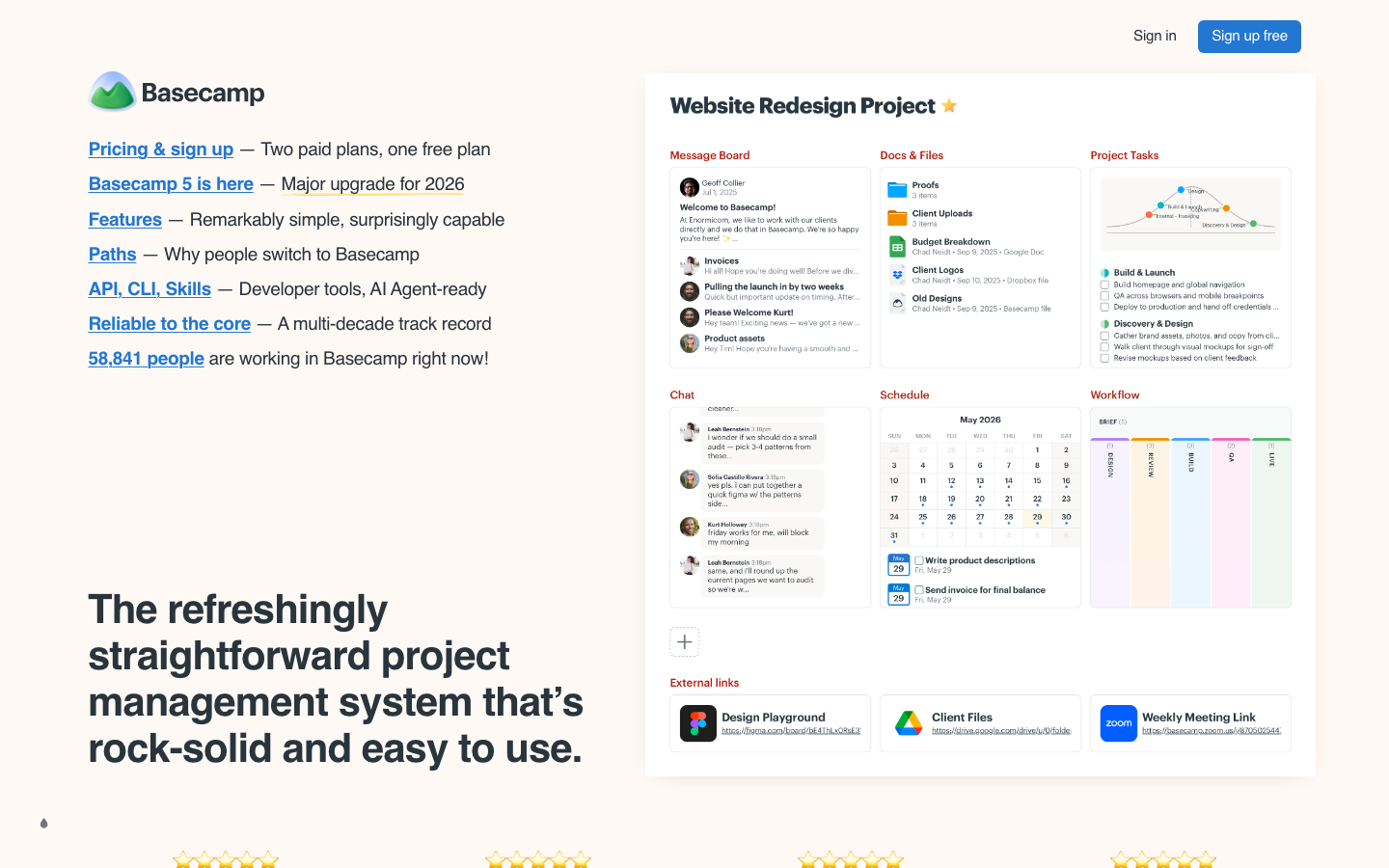
Basecamp AI is the AI capability layer built into the Basecamp platform. The important thing is - Basecamp is not a project management tool in the traditional sense, it is a team collaboration platform with "communication as the core". Its core structure is "Pings (Chat) + Message Board (Announcement) + To-dos (Task) + Docs & Files (Document)". The AI layer is naturally designed around these scenarios.
| Projects | Public Information |
|---|---|
| Product form | Basecamp platform’s built-in AI capabilities |
| Core capabilities | AI project summary, intelligent message classification, search enhancement, automatic summary suggestions |
| Coverage Modules | Pings, Message Board, To-dos, Docs & Files |
| Deployment method | Cloud SaaS |
| Product Philosophy | Communication-first, not task-driven |
| Pricing model | Uniform fixed monthly fee, not per seat |
| Company background | 37signals, independently operated, no VC background |
| Core Competitive Products | Slack + Asana/Monday Combination |
Fundamental difference from mainstream PM tools: Basecamp's product philosophy is against "over-management". Its founders, DHH and Jason Fried, have repeatedly criticized the "feature bloat" and "management burden" of traditional project management tools. Therefore, Basecamp AI will not have "management" AI functions such as Sprint planning, intelligent allocation, and risk prediction. Its AI value is to help teams "reduce information noise" rather than "improve management efficiency."
User and market recognition
- Customer Base: Basecamp has over 100,000 paying corporate customers, ranging from small startups to large organizations like Shopify early-stage teams. It has high customer retention rates because its product philosophy and fixed pricing model keep customers committed to long-term use.
- Brand Influence: 37signals has extremely high thought leadership in the global product circle through blogs (Signal v. Noise), books (Rework, Remote) and other channels. Basecamp’s product philosophy influenced a generation of startups and product teams.
- Market positioning: Basecamp is not a regular in Gartner's Magic Quadrant, but it has a loyal user base in its "anti-traditional PM" positioning. Its users often turn to Basecamp due to fatigue with the complex configuration of Asana/Jira.
- AI Adoption Status: Basecamp’s investment in AI is relatively conservative. AI features are launched as part of Basecamp 5, but the number and depth of features are much lower than competing products such as Asana/Monday.
Cost advantage
Basecamp’s pricing model is unique among PM/collaboration tools—it doesn’t charge per seat, but rather a fixed monthly fee.
- Basecamp Pro Unlimited: Fixed $99/month, unlimited users. This means a team of 10 costs the same as a team of 100, with AI capabilities included. For teams of 50+, the cost per head is much lower than Asana/Monday/ClickUp.
- Basecamp Personal: Free version, suitable for personal or very small projects, limited AI capabilities.
So the "cost advantage" of Basecamp AI is structural - because Basecamp's AI functionality is included in the fixed monthly fee, there is no "AI included in the plan" problem like Asana Intelligence, nor is there the "AI add-on" problem of ClickUp AI.
Main functions
- AI Project Summary: Automatically extract key points from Message Board posts, Ping chat records and To-dos changes within the specified time range to generate a concise project progress summary. Suitable for managers to quickly understand project dynamics.
- Intelligent Message Classification: AI automatically identifies the topic and urgency of the message, and recommends classifying it into the appropriate Message Board or thread to reduce the situation of "message sent to the wrong place".
- Search enhancement: AI-enhanced full-text search, supporting natural language queries (such as "What was the conclusion of last week's discussion about front-end frameworks"), comprehensive retrieval from chats, messages, documents and tasks.
- Automatic summary suggestions: In long Message Board posts or chat threads, AI automatically suggests summaries for users to confirm posting, helping reduce information noise.
- AI-assisted task creation: Identify items that can be converted into To-dos from chats or messages, and suggest creating tasks.
Expert View: The functional positioning of Basecamp AI is highly consistent with its product philosophy - not to "let managers manage more", but to "make team communication more efficient". The AI project summary is one of the features that best meets the needs of Basecamp users: because Basecamp’s project progress information is scattered in messages and chats rather than concentrated on a task panel, the AI summary can help managers quickly understand the overall situation without having to scroll through all messages.
Model and version evolution
Relevant information has not been made public, please refer to the official real-time page.
Technical advantages
AI friendliness of flat data structure: Basecamp's project structure is very flat (there are only four sections under one project: Pings, Message Board, To-dos, Docs & Files). Compared with Jira, which often has dozens of custom fields and complex workflows, Basecamp's data structure is more friendly to AI retrieval - AI does not need to understand complex configuration logic.
Search cross-module synthesis: Basecamp’s AI search can retrieve Pings (chat), Message Board (announcements), To-dos (tasks), and Docs (documents) at the same time, returning comprehensive results. This is more useful in a "communication-driven" collaboration model than single module retrieval.
AI technology sharing with HEY: 37signals also operates the email product HEY, with a team focused on AI and natural language processing. Basecamp AI’s technical accumulation comes partly from the HEY team’s NLP experience.
How to use
| How to use | Applicable people | Features | Cost |
|---|---|---|---|
| Basecamp Personal | Personal/very small projects | Limited AI functionality | Free |
| Basecamp Pro Unlimited | 10-100+ team | AI full functionality + unlimited number of users | $99/month fixed price |
Typical paths to use: Managers view AI-automated progress summaries on projects → AI-suggested automatic summaries when team members post long posts → Query project information using natural language in the search box → AI identifies createable tasks from Pings chats and suggests them.
Product Pricing
- Personal (Free): 3 projects, 20 users, 1GB storage, no AI functionality.
- Pro Unlimited ($99/month): Unlimited number of projects, unlimited users, 500GB storage space, including all AI functions. This is Basecamp’s only major paid plan.
Compare Costs: A team of 50 people costs $15.99×50=$799.5/month with Asana Advanced and only $99/month with Basecamp Pro Unlimited. The difference in additional AI costs is similar.
Application scenarios
Management Project Overview (Deduction): Basecamp's project progress is scattered in messages. The traditional way for managers to check the status of each project is to flip through the message list or ask questions one by one. AI project summary reduces this process from about 30 minutes/day of manual browsing to about 5 minutes/day of AI summary reading + verification.
Information-intensive teams: Marketing, administrative, personnel and other teams that require frequent communication but do not require complex work order management. Basecamp AI's search enhancement can help members quickly find the information they need in a large number of messages.
Flat Organization and Remote Teams: Basecamp's design philosophy is "less meetings, more asynchronous". AI message summarization and intelligent classification further strengthen this concept, helping members reduce information loss during asynchronous communication.
Applicable people
- Leaders of medium and large teams: For roles that need to understand the progress across projects but do not want to do fine management on the task board, the AI project summary best meets the needs.
- Teams that are fatigued by "over-management": Teams that previously used Asana/Jira but found the management burden was too heavy, turned to Basecamp and then the AI features assisted their original lightweight philosophy.
- Remote or distributed teams: For remote teams that focus on asynchronous communication, AI search and summarization can alleviate information synchronization problems caused by time differences.
Human-machine collaboration boundary: The project summary generated by AI is of a suggestion nature and is not automatically released; the results returned by AI search are based on existing message and document permissions; the creation of tasks recommended by AI requires manual confirmation by the user. All AI operations do not change Basecamp’s permissions model.
Dissuade people: Teams that require fine-grained task management (Gantt chart sprints, dependencies) - Basecamp's capabilities in these areas are far weaker than dedicated PM tools; organizations that have high-level needs for AI functions (cross-project risk prediction, intelligent allocation); teams that are accustomed to "the more features, the better".
Summary and Outlook
Basecamp AI is a natural extension of Basecamp’s product philosophy—it’s not about “doing more management,” but “less management noise.” For teams that agree with Basecamp’s philosophy, AI functionality is the icing on the cake; for teams that don’t agree with Basecamp’s philosophy, AI functionality cannot change the core positioning of the product itself.
Not Fitting the Boundary: Teams that require granular task management and complex workflows are not a good fit for Basecamp; organizations with high expectations for the depth of AI functionality will also be disappointed - Basecamp AI has far fewer features than Asana/Monday/Jira.
Acquisition/Adoption Risk Assessment: Basecamp’s $99/month fixed pricing is extremely low risk and AI functionality is included. It is recommended that teams first use the Basecamp trial period (usually 30 days) to verify whether the product itself is suitable for the team's collaboration style, and the AI capabilities are evaluated as added value. If the team is accustomed to more sophisticated PM tools, the adaptation cost of moving to Basecamp may be a more important decision factor than the AI capabilities.
Related tools:  Notion AI, google-workspace
Version evolution of Basecamp AI
Basecamp's product iteration speed is relatively slow among similar products (a major version takes about 3-4 years), and the AI function is a new capability of Basecamp 5. The currently public AI features are limited, and it is expected that more AI enhancements will be gradually added in subsequent versions.
| Version | Time | AI related changes |
|---|---|---|
| Basecamp 4 | ~2022-03 | No AI functionality |
| Basecamp 5 | ~2025-06 | Introducing AI search enhancements and message summary suggestions |
Business process integration and ROI analysis
As a productivity tool for enterprises or professional positions, the true value of Basecamp AI depends on the depth of integration with existing workflows and the quantifiable efficiency improvement effect. The following is a systematic analysis from three core dimensions.
System integration and data interoperability The ability to interoperate with existing business systems is a key prerequisite for productivity tools to be integrated into workflows. It is recommended to focus on evaluating the following integration dimensions: the openness and documentation quality of the RESTful/GraphQL API (whether a complete API reference and SDK examples are provided), the support scope of Webhook event notifications (which business event types are supported for automatic push), the number and depth of pre-built integrations with common collaboration SaaS tools (WeChat Enterprise, DingTalk, Feishu, Slack, Notion, Jira, etc.), and enterprise-level identity authentication support (SSO/SAML/OAuth and LDAP/AD directory integration). Products that lack integration capabilities are easily isolated into information islands, which in turn increases the cognitive cost and operational friction for teams to switch between different tools.
Efficiency Quantification and ROI Estimation Methodology Before purchasing decisions, it is recommended to quantify the input-output ratio through a structured method: Step 1, choose 3-5 Standardized tasks that are frequently repeated and time-consuming in each team are used as test samples; in the second step, the average time consumption of a single task before and after tool intervention, first-time pass rate or error rate, and the number of links requiring manual intervention are recorded under controlled conditions; in the third step, the saved manpower time is converted according to the comprehensive cost of the position (salary, benefits, management sharing), and soft benefits (increased employee satisfaction, standardization of work quality, and improvement in response speed to core business) are superimposed to obtain a comprehensive ROI estimate. It is recommended to continue tracking ROI trends on a monthly basis, as the value of a tool usually increases over time as team proficiency increases and workflows are optimized.
Phase-based implementation strategy and risk control It is recommended to adopt a three-stage implementation path of "pilot verification-gradual promotion-continuous optimization". In the pilot stage (1-2 weeks), a single team or a single business scenario is selected for small-scale verification. The core goal is to verify technical feasibility and user acceptance, and establish preliminary usage specifications and success standards; in the promotion stage (2-4 weeks), after the pilot verification is passed, the coverage is gradually expanded, and standardized activation processes and training materials are developed; in the optimization stage (continuous), the workflow configuration is continuously adjusted based on actual usage data and user feedback, and more high-value application scenarios are explored. Clear quantitative key result indicators should be set at each stage to avoid blindly expanding the scope of use without data support.
Version Info
- Basecamp 5 with AI :Basecamp 5 introduces initial AI capabilities, including intelligent search enhancements and message snippet suggestions.
- Basecamp 4 :Major UI redesign, introducing "work countdown" and simplifying the project structure.
User Reviews