 Bibcitation
Free
Bibcitation
Free
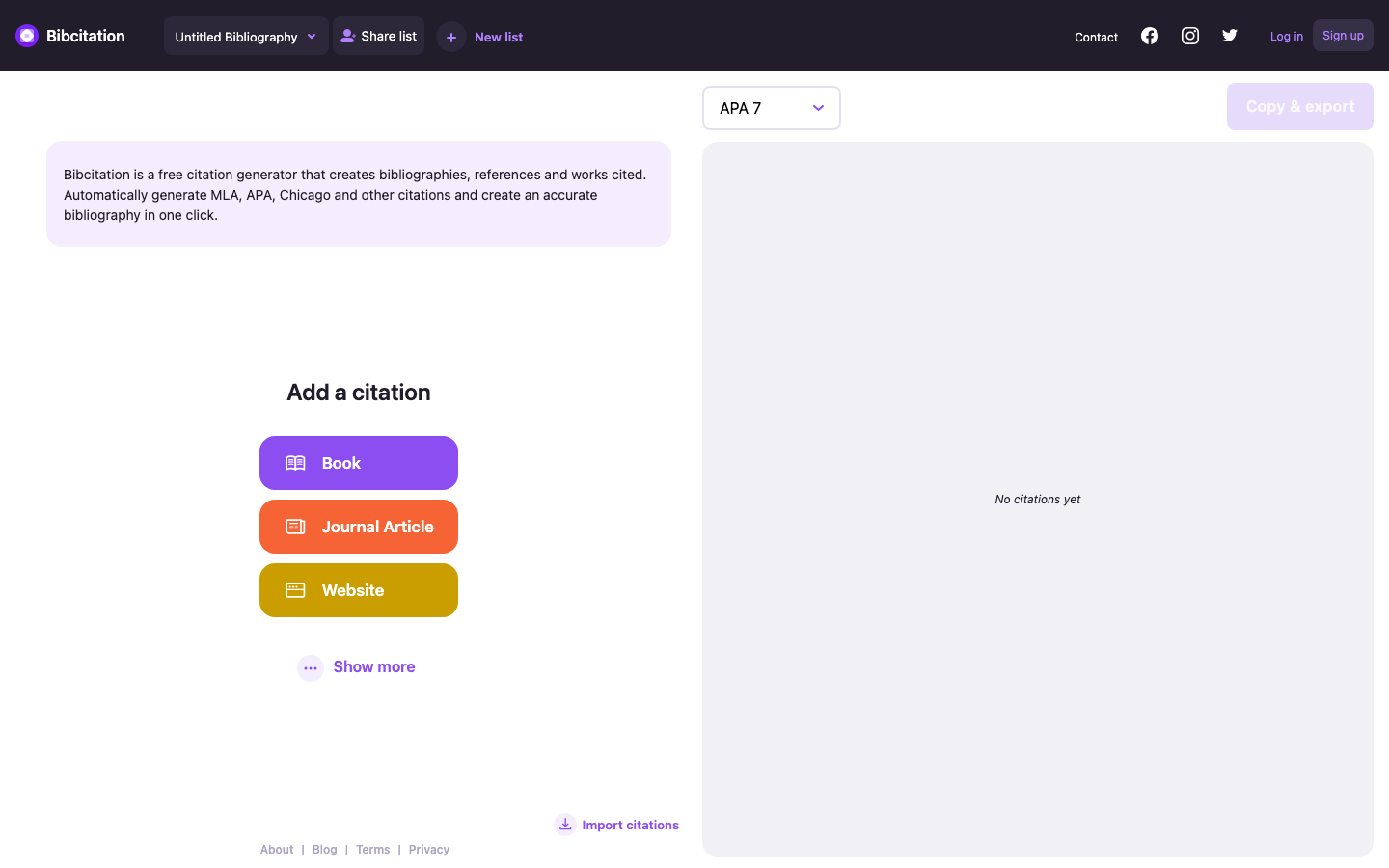
Bibcitation is an online bibliographic citation generation tool that quickly generates standardized reference entries from URL, DOI, ISBN or manual entry.
Bibcitation
Core parameters and statistics of Bibcitation
Bibcitation's value proposition is extremely simple - it does not do document management, does not do PDF storage, does not do team collaboration, but does "generating a reference in a standard format" to the extreme. The product page shows that it is based on the CSL (Citation Style Language) 1.0.2 specification and supports more than 9,000 citation format variations, covering all common citation scenarios from undergraduate papers to top journals.
| Projects | Public Information |
|---|---|
| Official Positioning | Free Online Reference Citation Generator |
| Core Specification | CSL (Citation Style Language) 1.0.2 |
| Number of formats supported | 9,000+ citation format variations |
| Mainstream format coverage | APA 7th, MLA 9th, Chicago/Turabian, Harvard, IEEE, Vancouver, ACS, AMA, etc. |
| Input method | URL, DOI, ISBN, PubMed ID, manual input OCR scanning |
| Citation source types | Web pages, journal articles, books, book chapters, conference papers, news reports, videos, bills, reports, etc. 20+ types |
| Export method | One-click copy Google Docs export Microsoft Word export, plain text output |
| Platform coverage | Web, Chrome browser extension Google Docs plug-in Microsoft Word plug-in |
| Cost of use | Completely free (no paid tier, no ads, no limit on the number of citations) |
| Organizational Embedding | Support web page embed button, free integration into library/university/corporate website |
| Home | US |
Core Difference: Bibcitation forms a clear complementary relationship with traditional literature management tools such as Zotero, Mendeley, EndNote, etc. rather than replacing it. The latter focuses on "management" - managing PDFs, tagging, taking notes, team collaboration, and automatic metadata synchronization; Bibcitation focuses on "production" - outputting a reference or a set of references in a standard format as quickly as possible at the moment when a citation is needed. It gives up the heaviness of a "document database" in exchange for the lightness of "ready-to-use". For students who only need to generate a few citations per week, Bibcitation is more reasonable than installing hundreds of megabytes of bibliographic management software.
Bibcitation’s users and market recognition
Bibcitation's market validation comes primarily from academic libraries and educational institutions, not venture capital or media exposure.
University rollout: The product page displays the logos of at least 6 universities that have connected to Bibcitation, including the University of British Columbia (UBC), University of Bradford, Duke University, University of West Florida, and Michigan State University, covering North America and the Commonwealth. These universities integrate citation generation functions into library portals or course pages through website embed buttons, which is a trust signal at the "institutional endorsement" level.
Channel Coverage: Bibcitation is available on the Chrome Web Store (extension), Google Workspace Marketplace (Google Docs add-on), and Microsoft AppSource (Word add-on). The cumulative installation volume of the three terminals has not been disclosed, but the multi-platform strategy has reduced access friction. The product page states that it has served "thousands of college students."
Social Media & Content: Runs an independent blog (bibcitation.com/blog) providing complete APA/MLA/Chicago formatting guidelines and academic writing tips. Active on Instagram (@bibcitation), Twitter (@bibcitationapp), Facebook and YouTube. Content marketing focuses on SEO long-tail traffic and has natural ranking competitiveness on keywords such as "free citation generator".
Market Position: In the citation generation track, Bibcitation faces competing products such as MyBib, Cite This For Me, Citation Machine, and EasyBib. The differences are that it is completely free (most competing products contain paywalls or advertisements), is based on CSL standards (high format accuracy), and has no account requirements. User activity data such as DAU/MAU is not disclosed.
Cost Advantages of Bibcitation
Bibcitation’s cost structure is at the most aggressive end of the citation generation tool market—it’s completely free, with no paid upgrade path in place.
C client/individual users: zero cost, zero restrictions: You can use core functions without registration; obtain reference list persistence storage after registration. There is no limit on the number of citations generated, the number of format switches, the number of exports, and no advertising interference. The only "cost" is time - automatically grabbing metadata takes a few seconds, and manual correction takes tens of seconds to minutes. Sustainability of the free model: The source of operating funds has not been disclosed, and it is speculated to rely on the team's own funds, potential donations embedded by institutions, or a future enterprise version. Free has no SLA guarantee, no data recovery commitment, and no offline usage capabilities.
Organization/Institution Embedding: Free Integration: Academic libraries, corporate websites, or academic platforms can embed the citation generation button into their own web pages, completely free of charge. Integration requires just one line of link code with ISBN/DOI parameters, no API keys, and no server maintenance required. Embedding is promotion. Every time an organization embeds, there will be one more channel to reach new users.
Enterprise/Advanced Demand Tier: Bibcitation has undisclosed Enterprise Edition pricing. The product page includes a separate page for-organizations that offers Calendly demo appointments. Enterprise-level requirements (customized CSL styles, privatized deployment, batch import and export API, brand customization) need to be confirmed through business communication. There is currently no public API call pricing page.
Hidden Cost Analysis:
- Rework Cost: The accuracy of automatically crawled metadata depends on how structured the target website is. Some sites are missing Open Graph or Schema.org markup, resulting in blank or incorrect fields. Users need to manually correct it, and each reference will add 30-120 seconds to the verification and completion time.
- Switching Cost: Bibcitation does not support standard bibliographic exchange formats such as RIS/BibTeX/EndNote XML. When users migrate to Zotero or Mendeley in the future, the generated reference lists cannot be imported in batches. It is more suitable for "use and go" scenarios and is not suitable for long-term literature database construction.
- Lock-in risk: The reference list is only stored locally in the browser or in the account cloud, and there is no local file backup mechanism. Clearing the cache or account anomalies may cause the reference list to be lost.
Main functions of Bibcitation
Bibcitation's functional line revolves around the single-chain workflow of "input -> parsing -> formatting -> export". Each section does not stack functions, but pursues the shortest path from A to B.
-
URL automatic citation: Paste the web page URL, automatically crawl the page Open Graph, Twitter Card, Schema.org structured metadata, HTML title/date and other information, and fill in the corresponding reference fields. Expert View: The actual experience depends on the SEO quality of the target website - the metadata of large platforms (NYT, Wikipedia, PubMed) has high integrity and almost zero correction; small blogs or personal sites often lack author and publication time fields, which require users to manually complete them. This is an inherent problem of the Web metadata ecosystem and not a capability flaw of Bibcitation.
-
DOI/ISBN/PubMed ID automatic search: Enter DOI to get complete bibliographic records from Crossref or PubMed; enter ISBN to search Google Books or Open Library to get book details. Expert View: The DOI search hit rate is much higher than that of automatic URL crawling - the DOI metadata of academic papers is highly standardized and requires almost no manual correction. The ISBN search has good coverage for books published after 2000, but it fails to hit older books (before the implementation of the ISBN system).
-
9,000+ format engine (CSL driver): Based on the Citation Style Language specification, covering mainstream formats such as APA 7th, MLA 9th, Chicago 17th, Harvard, IEEE, Vancouver, ACS, AMA and 9,000+ academic journal-specific styles. Format switching takes effect in real time, and different format versions coexist in the list. Expert View: The breadth and maintenance quality of the CSL format library are core barriers. Competing products such as Citation Machine commonly use self-developed engines, which usually cover less than 1,000 formats; Bibcitation directly reuses the open source CSL ecosystem, and naturally has support for 9,000+ formats, and its support for unpopular journal formats is better than most competing products.
-
Citation list and session management: Multiple citation entries can be accumulated in a single session and a reference list can be generated uniformly. Supports reordering, deletion, and drag-and-drop adjustment. After registering an account, the list can be synchronized across multiple devices. Copy the entire list with one click or export to Google Docs/Microsoft Word.
-
Multi-platform portal collaboration: Chrome browser extension allows one-click citation when browsing the web; Google Docs plug-in allows formatted references to be inserted directly in the document editing area; Microsoft Word plug-in covers Office desktop users. Expert View: The multi-entry strategy has changed from "users come to Bibcitation to generate citations" to "Bibcitation provides services where users work". The value of Chrome extensions is particularly outstanding - when reading a paper, you can directly click on the extension icon to generate citations without leaving the current page.
-
Institutional Embed Button: Provides embeddable citation generation button for library, university and corporate websites. When users visit a book or paper page on an institution's website, they can click a button to generate a citation based on the URL/ISBN without having to jump to a third-party page. The embed code only requires a one-line
hreflink and no JavaScript SDK is required.
Bibcitation model and version evolution
Bibcitation is not a large model-driven AI product and does not involve model version iteration. Its version evolution revolves around three clues: reference format support range, platform expansion and metadata capture capabilities.
Mainline version context
| Version | Release Date | Key Changes |
|---|---|---|
| v1.0 | ~2025-06 | The first public version, supports basic citation generation (URL/DOI/ISBN), three major formats of APA/MLA/Chicago, and can be used online on the Web |
| v2.0 | ~2026-03 | Added DOI auto-completion, expanded citation format to 9,000+ variants, launched Chrome extension and Google Docs plug-in, introduced institution embedding function |
Platform and extended version context
Bibcitation's platform expansion and feature updates are promoted at an independent pace and are not completely dependent on the web version number:
- Chrome Extension: It has been put on the Chrome Web Store and supports quick reference by right-clicking on any web page or clicking the extension icon. The update frequency is in monthly units, mainly fixing metadata crawling compatibility issues and optimizing the UI.
- Google Docs Plug-in: Distributed through the Google Workspace Marketplace, supports the insertion of formatted citation lists directly within documents. Version iteration revolves around format rendering consistency and cross-document reference management.
- Microsoft Word Plug-in: Distributed via Microsoft AppSource, covering Word for Windows and Mac. The feature set is aligned with the Google Docs plug-in, but is limited by the Office plug-in API, and some interaction processes are not as smooth as the web version.
- Organization Embedding Function: An independent function line launched after v2.0, which is not bound to the web version number. The embedding method continues to be optimized, evolving from the early iframe solution to the current pure link jump solution, lowering the technical threshold for integration.
Release Notes
Bibcitation has not disclosed the complete version release log. The above version date is inferred based on the milestone information on the product page (~YYYY-MM is the suspected month, subject to official real-time data). Version evolution presents the characteristics of "low-frequency large versions + high-frequency platform adaptation", which is different from the weekly update rhythm of large-scale SaaS, but meets the scenario requirements of reference generation tools - the "version" of such tools is not significant to the user's perception, as long as the format library and crawling engine are kept updated.
Bibcitation’s technical advantages
Bibcitation's technical advantage lies not in computing power or model scale, but in its deep integration of the CSL ecosystem, its multi-source fusion strategy for metadata capture, and its extremely low integration threshold.
CSL standards-driven format engine: Bibcitation is one of the few citation generation tools built directly on the CSL (Citation Style Language) open source standard. CSL is an XML description language that defines citation formats and is widely used by professional document management tools such as Zotero, Mendeley, and Papers. Bibcitation's format output shares the same set of format definitions with mainstream tools in the academic publishing industry, and there will be no format compatibility differences. When a journal releases a new CSL style, Bibcitation supports it without any engineering adaptation. Mechanism -> Effect: 9,000+ format coverage is not the result of manual configuration one by one, but an "incidental bonus" of the CSL ecosystem - the official CSL warehouse maintains more than 10,000 style files, and Bibcitation can directly access them.
Multi-source metadata fusion strategy: The URL reference is not to simply grab the page title, but to query the Open Graph protocol Twitter Card, Schema.org JSON-LD/microdata HTML <title> and <meta> tags in order of priority, and finally use the release date heuristic algorithm to find out. For DOI citations, two databases, Crossref REST API and PubMed E-Utilities, are queried, with Crossref as the main one and PubMed as the supplement. ISBN citation queries Google Books API and Open Library API. This multi-source fusion strategy gives Bibcitation an advantage in metadata integrity over tools that rely solely on a single source. Applicable scenarios: The more structured the website metadata (such as news portals, academic databases, Wikipedia), the higher the accuracy of automatic crawling; for non-standardized personal blogs and dynamic single-page applications, manual verification is still required.
Zero-friction embedding architecture: Bibcitation's institutional embedding solution adopts a "link-ready" design - the embedder only needs to place a link or button pointing to https://www.bibcitation.com/, type=book&query=ISBN on the web page, and the user will jump directly to the Bibcitation page with pre-filled query parameters after clicking it, without pop-up windows, iframes, or API integration. This kind of lightweight embedding has almost zero maintenance costs for the embedding party, and provides users with a smooth "click-to-cite" experience. Compared with heavy-duty embedding solutions that require loading the complete JavaScript SDK, Bibcitation's link-based embedding also has significant advantages in page loading performance.
Front-end architecture: Built on Next.js (product page URL pattern is _next/static), server-side rendering ensures SEO friendly and fast first-screen loading. The citation generation process completes parsing and formatting on the client side, reducing server load and protecting the privacy of user queries. No specific information on the back-end technology stack has been disclosed.
How to use Bibcitation
Bibcitation provides 5 independent entrances, covering different levels of needs from complete anonymity to deep integration.
| How to use | Entrance | Whether registration is required | Suitable scenarios | Additional instructions |
|---|---|---|---|---|
| Web online version | bibcitation.com | No (the list can be persisted after registration) | Ready to use, generates a small number of citations | The most complete core functions, supporting all input methods and export formats |
| Chrome extension | Search "Bibcitation" in Chrome Web Store | No | Quickly reference the current page when browsing the web | Right-click menu or click the extension icon, no need to switch tabs |
| Google Docs plug-in | Google Workspace Marketplace | Google account required | Insert references directly in document editing | Inserted references are managed in the sidebar and do not interfere with the document text |
| Microsoft Word plug-in | Microsoft AppSource | Microsoft account required | Desktop Word document writing | Functions are aligned with Google Docs plug-in, limited by Office plug-in API |
| Institutional embed | Embed link to institutional website | No | Library/course page citation | Click button to jump to Bibcitation page with pre-filled query parameters |
Web version standard usage process:
- Open bibcitation.com, and the page will automatically enter the citation list view.
- Select the citation source type (book/journal article/website/more), and the system displays the corresponding input box.
- Enter the URL, DOI, ISBN or fill in the fields manually, and the system will automatically retrieve and fill in the metadata.
- Select the target format (APA/MLA/Chicago, etc.) in the format selector on the right and refer to the real-time switching format.
- After repeatedly adding multiple citations, click "Copy all" to copy the complete reference list with one click, or export to Google Docs/Word through "Export".
- If you need to save the list, the reference list will be automatically synchronized to the cloud after registering an account.
Chrome extension quick operation: After installing the extension, right-click on any web page and select "Cite this page", or click the Bibcitation icon on the toolbar. The extension will automatically grab the current page URL and metadata, and a citation preview window will pop up. After confirmation, the reference will be automatically added to the list and can be exported by visiting the extension management page at any time.
How to use institutional embedding: The embedder adds a link similar to <a href="https://www.bibcitation.com/, type=book&query=9780674979857">Cite this book</a> on the web page. After the user clicks to open the Bibcitation page, the ISBN is automatically filled in and the citation is directly generated.
Product Pricing for Bibcitation
Bibcitation currently features completely free, single-tier pricing with no individual premiums, no ads, and no subscription plans. This strategy is among the most aggressive positioning in the citation generation tools market.
| Pricing dimensions | Bibcitation | Competitor reference (Citation Machine) | Competitor reference (EasyBib) |
|---|---|---|---|
| Personal Basic Edition | Completely free | Free (including ads + format restrictions) | Free (including ads) |
| Personal Premium | Does not exist | ~$9.95/month (ads removed + format extensions) | ~$9.95/month (ads removed + advanced formats) |
| Institution/Library | Free Embedding | Request a quote for the Enterprise Edition | Request a quote for the Enterprise Edition |
| Advertisements | None | Free version available | Free version available |
| Quotation limit | None | Free version available | Free version available |
Business logic of the free model: Bibcitation's free strategy does not rely on advertising revenue or subscription payments, but achieves sustainability through the following methods - institutional embedding brings brand exposure and user growth without incurring direct server costs (citation generation is completed on the client); potential enterprise version/customized version is the future commercialization direction; team size is extremely small and operating costs are low. Hidden Cost Tip: The free model has no data recovery SLA, no priority technical support, no offline capabilities, and no API access. For institutional users who require high availability guarantees, there is currently no public paid service agreement to sign.
Organizational Embedding Layer: Bibcitation’s institutional embedding feature is completely free and requires no payment or contract from the embedding party. The embedder only needs to provide a piece of HTML link code, and the system automatically identifies the traffic source through UTM parameters. It was not disclosed whether there is a separate partnership agreement for high-traffic embedders.
Enterprise/Volume Demand: The product page includes a "Book a Demo" entry (reservation via Calendly), implying that there is a customized solution for libraries, universities, or enterprises. Specific pricing, functional scope and SLA terms have not been disclosed and need to be confirmed through business communication. It is speculated that the enterprise version may include: customized CSL style management, customized branding, batch DOI/ISBN import and export API, and user usage statistics dashboard.
Application scenarios of Bibcitation
Bibcitation's "input and output" feature determines that it is most suitable for high-frequency, lightweight, and standardized citation generation needs, rather than in-depth document management.
-
Course paper reference generation (student side): When students write course papers, paste the DOI of each paper or the ISBN of the book into Bibcitation. Standard APA citations will be generated within 30 seconds, and the complete list will be accumulated and pasted to the end of the paper with one click. Cost reduction and efficiency improvement: The traditional manual verification of APA format takes 3-5 minutes per item. Using Bibcitation, it is reduced to 30-60 seconds/item, and the efficiency is increased by 3-10 times. Implementation Tips: Focus on checking the order of author names, publication year and DOI fields - these three fields are the most error-prone locations for automatic crawling.
-
Manuscript format conversion (researcher side): The manuscript is rejected by journal A and then transferred to journal B. Journal B requires Chicago format instead of APA. Researchers do not need to rewrite references item by item. They can complete the full conversion by switching the list format in Bibcitation. Human-computer collaboration boundary: The citation list after format switching should be verified item by item - the format conversion accuracy of the CSL format engine for cross-language citations (such as Chinese references in English papers) is low, and this part requires manual confirmation. Irreversible submission operations (such as final submission) must set up manual verification nodes.
-
Library/course website embedding (institutional side): The university library adds a "Cite this book" button on the book details page. Students click to jump to the Bibcitation page with the ISBN pre-filled to generate MLA/APA/Chicago citations. Cost reduction and efficiency improvement: Traditional library services require students to manually copy bibliographic information field by field, or rely on librarians to query the format on their behalf. After embedding the button, students can complete citation generation independently, freeing librarians from repetitive citation queries, and each librarian is expected to save 30-60 minutes per day. Integration of Institutional Embed takes about 10 minutes (copy and paste one line of link code).
-
Classroom citation standard teaching (professor end): The professor shows how to correctly cite a web page news in class, uses Bibcitation to generate a standard format on the spot, and then analyzes the meaning of each component field by field (why does the author add quotation marks? Why is the date format YYYY, Month DD?). Applicable Boundary: Bibcitation is suitable for demonstrating "what the standard format is like", but not suitable for teaching "why the APA format is designed this way" - such meta-rules need to refer to the APA official manual or the original text of the CSL specification.
-
Chrome extension quick citation (academic reading scenario): When researchers are reading PubMed or arXiv papers, they can click the Chrome extension icon to directly save the citations generated by the current paper to the list without interrupting the reading flow to switch pages. Scenario value: The efficiency advantage of Bibcitation is most obvious in this scenario - it only takes one click from "discover paper" to "save citation", which is 5-10 times faster than opening the literature management software and manually entering fields. But references still need to be manually imported into Zotero/Mendeley for persistence management.
Applicable people for Bibcitation
A common characteristic among Bibcitation's core users is "the need to generate citations, but not to manage them". The following three types of roles stand to benefit most:
-
Undergraduates and Masters and Ph.D. students: A critical need group for academic writing, who need to generate 5-30 citations per week. Sensitive to formatting accuracy but simple need for document management functionality (no need to manage hundreds of PDFs). Prerequisite: Ability to differentiate between APA/MLA/Chicago and choose the correct format version. Not suitable for boundaries: Students who are writing a doctoral thesis or review paper (needing to manage 100+ documents and take notes and annotations) should use Zotero or EndNote as the main tool, and Bibcitation can only be used as a supplement to quickly generate a single citation.
-
University teachers and researchers: Frequent preparation of references for course syllabuses, courseware, submitted papers and project applications. The time cost is high and the accuracy of the citation format is strict. Prerequisite: Be familiar with the citation standard version number of the target journal or course (such as APA 7th vs APA 6th). Not suitable for the boundary: Researchers engaged in meta-analysis, systematic review, etc. that require structured literature screening and large-scale literature databases need EndNote, Zotero or Covidence to complete the full workflow.
-
Librarians and Academic Support Staff: Responsible for providing citation format consultation to teachers and students or maintaining the library citation tool page. Embedding Bibcitation can significantly reduce repetitive queries such as "how to cite a certain book". Prerequisite: Have permission to modify the library website page HTML (embedded link integration). Not suitable for boundaries: Libraries that need to customize different citation formats for different colleges and use a unified brand interface may need the enterprise version of Bibcitation (not disclosed, subject to business confirmation).
-
Content creators and bloggers (suboptimal fit): When blogging needs to cite data sources or cite other people's opinions, use Bibcitation to generate a standard format. Prerequisite: The content involves academic citations. Not suitable for boundaries: For self-media content that does not have strict requirements for citation format, manually writing a line of "Source: xxx" is more efficient than using a citation generation tool, and there is no need to introduce Bibcitation.
Summary and Outlook
In the extremely segmented track of citation generation, Bibcitation has chosen the extreme route of "minimalist and free" - no feature expansion, no paywalls, no reliance on advertising, and the single-chain workflow of "input URL/DOI/ISBN -> output standard format citation" to the extreme. For most undergraduates and light academic writers, this is a lightweight alternative to the Zotero/Mendeley introductory experience.
Current core advantages: 9,000+ format coverage based on CSL standards, superior to most competing products in support of unpopular journal formats; completely free and unlimited pricing strategy lowers the threshold for use; multi-platform coverage of Chrome extension + Google Docs + Word realizes "providing services wherever users are"; institutional embedding solutions have zero cost and zero maintenance.
Current major limitations: It does not export standard document exchange formats such as RIS/BibTeX, and user migration costs are high; the accuracy of automatic metadata crawling on non-standardized websites is unstable; there is no API interface and high-order batch processing capabilities; the long-term sustainability of the free model is questionable - if the team shuts down due to cost pressure or stops maintenance due to energy transfer, users will lose the guarantee of continuous update of the citation format. Although the CSL format library is extensive, Bibcitation, as a product of an independent small team, may be slower to respond to format error fixes from the upstream CSL community than large open source projects such as Zotero.
Not suitable for boundaries: Bibcitation is not suitable for doctoral thesis/review writing scenarios that need to manage more than 100 documents and make in-depth note annotations. It is not suitable for team collaboration scenarios that need to share literature databases with others. It is not suitable for LaTeX writing processes that need to export BibTeX and synchronize to Overleaf. It is not suitable for institutional users who have strict requirements for data privacy and citation list persistence.
Follow-up observation points: Whether Bibcitation will launch a paid enterprise version to obtain sustainable income to support the long-term maintenance of the free version; whether to add BibTeX/RIS export function to open up the workflow connection with Zotero/Overleaf; whether the growth of institutionally embedded users can form a network effect to attract more universities to join; whether the format coverage of the CSL format engine for non-English citations (such as Chinese, Japanese, and Arabic) continues to expand.
Acquisition and Adoption Risk Assessment: For individual users, zero-cost adoption does not pose any financial risk. For universities and corporate institutions, it is recommended to confirm the following points before embedding - Bibcitation's operating entity and team background (the registered company information is not public, please refer to the official website contact entrance); institutional embedding does not generate contractual obligations and SLA guarantees. If Bibcitation is unavailable during key teaching activities (such as final exam week), backup solutions should be prepared (such as MyBib or ZoteroBib); Bibcitation should not be used Long-term dependence on the reference list persistence feature - core reference data should be backed up locally in plain text regularly.
Related tools:  originality.AI,
  GPTZero
Version Info
- Bibcitation v2.0 :There is no official precise date yet. Added DOI auto-completion and more citation format support.
- Bibcitation v1.0 :There is no official precise date yet. The first public version supports basic reference generation function.
User Reviews