 Cherry Studio
Free
Cherry Studio
Free
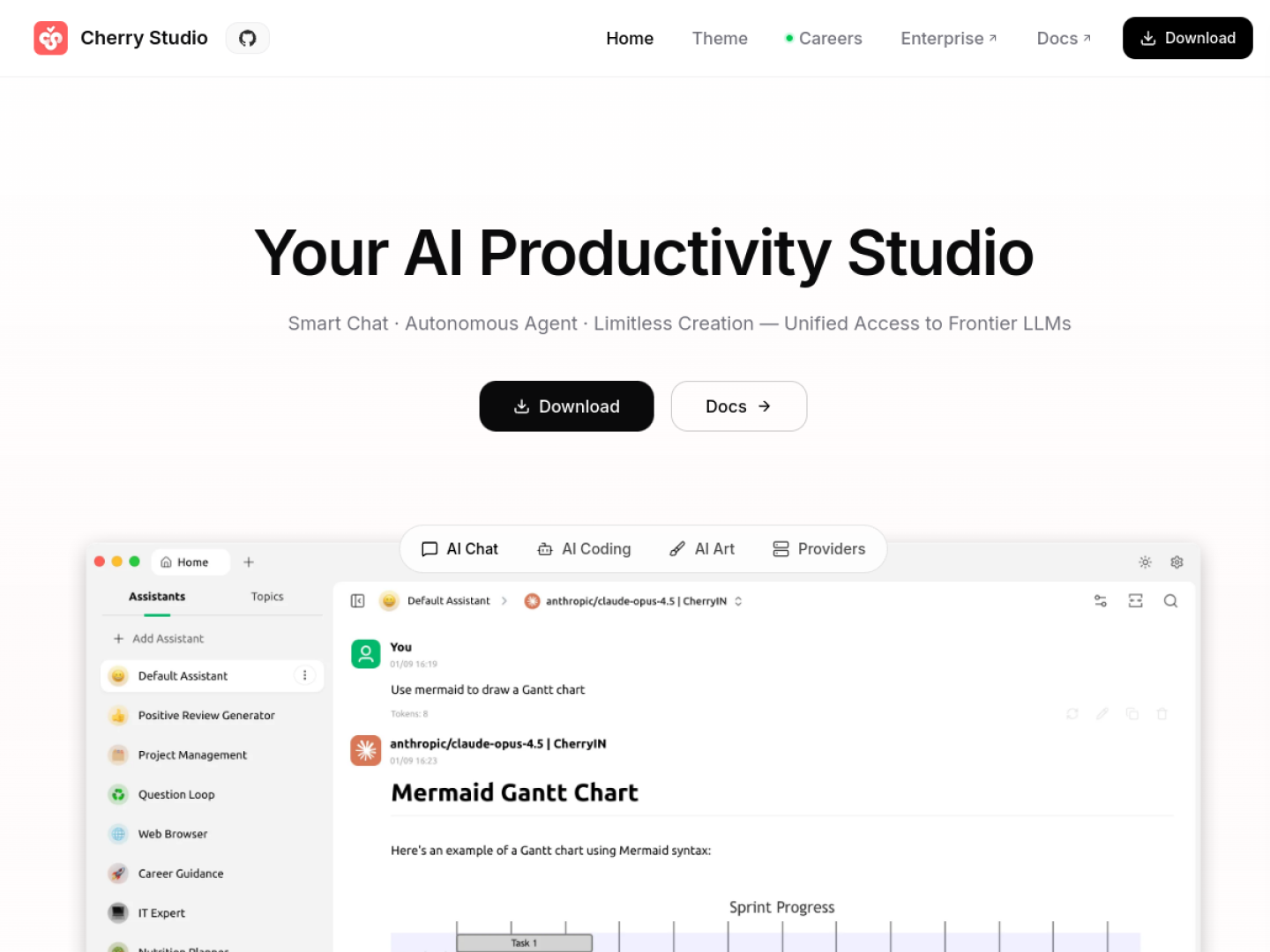
Cherry Studio is an open source multi-model desktop AI chat assistant that integrates multiple large cloud models, local models, knowledge bases and MCP tools into the same client, covering Windows, macOS and Linux.
CherryStudio
Core parameters and statistics
Cherry Studio is an open source desktop AI client. Its core value is to converge large models, local models, knowledge bases and external tools scattered from different vendors into the same local application. The English description of the official warehouse is "AI productivity studio with smart chat, autonomous agents, and 300+ assistants. Unified access to frontier LLMs", and the positioning is "a productivity workbench with unified access to frontier large models".
| Projects | Public Information |
|---|---|
| Official positioning | Desktop AI productivity client that provides unified access to multiple large models |
| Product form | Windows / macOS / Linux desktop client |
| Model access | Multiple cloud large model APIs + local models (such as Ollama) |
| Built-in capabilities | Agents, knowledge base MCP tools call 300+ assistant presets |
| Open source license | GitHub public warehouse, open source can be built by yourself |
| Community size | About 47,127 stars, 4,470 forks |
| Latest version | v1.9.11 (2026-06-07, GitHub Releases) |
| Warehouse creation | 2024-05 |
“Client not model” positioning: Cherry Studio itself does not train models, but acts as an aggregation layer for models and tools. Users bring their own API keys or local models, and the software is responsible for session management, prompt word organization, knowledge base retrieval and tool arrangement.
Community Size: GitHub has about 47,000 stars and 4,470 forks, indicating that it has formed a stable user and contributor base in the open source multi-model client segment, and problem feedback and version fixes have external verification.
Three-terminal coverage: The official release page also provides installation packages for Windows, macOS, and Linux, which is suitable for users who need to fix their workflow on the desktop and do not rely on a single browser tab.
User and market recognition
Cherry Studio's recognition is mainly reflected in open source community data and discussions on the Chinese AI tool ecosystem. The official number of paying users or revenue figures has not been disclosed.
Community popularity: Approximately 47,127 stars and 4,470 forks on GitHub. It is one of the leading projects in the category of "multi-model aggregation client" and has a high iteration frequency (1.9.x continues to be updated with minor versions).
Typical adoption scenarios: It is often used by individual developers, researchers and small and medium-sized teams who need to compare the output of multiple models at the same time, or who want to use the company's internal data as a local knowledge base. The ability to compare multiple models in parallel is a repeatedly mentioned point of difference.
Prerequisites: Cherry Studio does not come with a model quota, and its value depends on the user already holding an available model API Key or local computing power. For pure novice users who don’t want to configure the API at all and just want to use it out of the box, the threshold is higher than that of the integrated official web assistant.
Cost advantage
- C-side/Individual: Usually a free version is provided to experience the core functions, and high-frequency use requires a paid package subscription.
- API/Developer: Billed by call volume, suitable for development teams that can be flexibly integrated into their own systems.
- Enterprise/Privatized: Contact the business owner for customized quotation and deployment plan. The specific price is subject to the official real-time pricing page.
Main functions
The functions of Cherry Studio revolve around "one client to manage all models and tools":
- Unified access to multiple models: Access multiple large cloud models and local models on the same interface to facilitate horizontal comparison of the quality of answers to the same question from different models.
- Local knowledge base: Import documents to build a private knowledge base, implement retrieval and enhanced question and answer based on own data, and save the data locally.
- Agent and assistant presets: Built-in 300+ assistant/agent presets, which can be quickly called by role, and support custom prompt words and parameters.
- MCP Tool Call: Connect external tools and data sources to the dialogue through MCP, so that the model has the ability to "call the tool to complete the task" instead of generating pure text.
- Desktop Session Management: Provides organizational capabilities such as topic, grouping, and historical retrieval, suitable for long-term accumulation of dialogue and prompt word assets.
The key to functional implementation lies in the stability of the knowledge base segmentation and retrieval quality MCP tool, and the consistency of prompt words and context when switching between multiple models.
Model and version evolution
Continuous iterative updates, the latest version introduces performance optimization and new features. Historical version information can be viewed on the official release page. There is no complete public version evolution timeline yet. It is recommended to pay attention to the official announcement to understand the rhythm of feature updates.
Technical advantages
Cherry Studio's technical orientation is "aggregation and orchestration" rather than a self-developed model. Its advantages come from three mechanisms:
- Aggregation layer architecture → Reduce switching costs: Encapsulate the differences in APIs from different manufacturers into a unified interface. Users do not need to build separate tools for each model, so they can flexibly change models in one workflow, reducing the risk of being bound to a single supplier.
- Local-first data processing → Satisfies privacy scenarios: The knowledge base and session data are stored locally, and with the local model, the data does not leave the device/intranet, adapting to research and corporate intranet scenarios that are sensitive to data sovereignty.
- MCP standardized access → controllable expansion: Access external tools through the MCP protocol, allowing the tool ecosystem to expand in a standard way and avoid writing one-time glue code for each integration.
These mechanisms jointly determine that it is more suitable for advanced users who "need to be controllable, customizable, and private" rather than light users who pursue zero configuration.
How to use
Cherry Studio uses the desktop client as the main entrance. The typical usage path is as follows:
- Get the client: Download the corresponding Windows/macOS/Linux installation package from the official website or GitHub Releases.
- Configuration Model: Fill in the API Key of each large model in the settings, or access the local model (such as through Ollama), and you can switch between them in the conversation.
- Build knowledge base: Import local documents to generate a knowledge base, and enable retrieval and question-answering based on the knowledge base in the conversation.
- Access Tools: Configure the MCP service on demand, allowing the model to call external tools and data sources during the conversation.
Since the software does not have a built-in model quota, you need to prepare at least one available model API Key or local model before using it for the first time, otherwise you cannot initiate a valid conversation.
Product Pricing
The pricing model is subject to the official real-time page. Usually a freemium or subscription system is used, and basic functions can be used for free. Advanced functions or high-frequency use require paid subscriptions, and users are advised to evaluate the optimal solution based on actual usage.
Application scenarios
- Multi-model comparative evaluation: Researchers or developers send the same question to multiple models at the same time to compare the quality and style of answers horizontally to assist in model selection.
- Private Knowledge Base Q&A: Import internal documents, manuals, and research materials into the local knowledge base, perform retrieval and enhanced Q&A based on your own data, and keep the data locally.
- Tool-enhanced workflow: Connect to external tools through MCP, allowing the model to query data and call interfaces in conversations to complete tasks beyond plain text generation.
The verification focus of each type of scenario is different: comparative evaluation focuses on model switching and context consistency, knowledge base Q&A focuses on segmentation and retrieval accuracy, and tool workflow focuses on MCP service stability and permission boundaries.
Applicable people
- Individual developers and technology enthusiasts: Hope to use one client to manage multiple models and local models, and customize prompt words and tools.
- Research and content workers: Users who need to compare multiple models or turn a large amount of data into a searchable knowledge base.
- Small and medium-sized teams that value data privacy: Hope to process sensitive data on the intranet or locally, and achieve data controllability with the help of open source and local models.
Not suitable for boundaries: For pure entry-level users who don’t want to configure API Keys at all and just want to click and use, it will be more worry-free to use the integrated web assistant; for large enterprises that require strong SLA, compliance contracts and official technical support, they need to evaluate the support boundaries of open source projects by themselves.
Summary and Outlook
The core competitiveness of Cherry Studio is to use an open source, cross-platform desktop client to converge multiple large models, local models, knowledge bases and MCP tools into a unified workflow, and meet privacy scenarios through local data processing. The community size of approximately 47,000 stars and the high-frequency iteration of 1.9.x indicate that the project is under active maintenance. The current limitations are: it relies on users bringing their own model quota, and its out-of-the-box use for pure novices is limited; enterprise-level commercial support and licensing terms have not been officially disclosed.
Implementation suggestions: Individuals and small teams can directly download the client, and first use an existing model API Key to run through the two core scenarios of multi-model comparison and local knowledge base; if you plan to deploy it on a large scale in the enterprise intranet, you should first verify the stability and retrieval quality of the local model + knowledge base in an isolated environment, and confirm with the official on commercial authorization, technical support and compliance terms before expansion.
Related tools:  DeepSeek,
  ChatGPT
Version evolution of Cherry Studio
The Cherry Studio warehouse was created in 2024-05. After going through the early stages of 0.x, it entered the 1.x stable mainline. It currently maintains high-frequency small version iterations in the 1.9.x segment.
Mainline release
- v1.9.11 (2026-06-07): The latest stable version that can be verified by GitHub Releases currently, which is the baseline for deployment evaluation.
- v1.0.0 (~2024-12): A sign of entering the 1.x stable mainline, establishing the product skeleton of multi-model client + knowledge base + three-terminal distribution. There is no official precise date yet.
Early stage
- 0.x early version (~2024-07 onwards): Focus on multi-model access and basic conversation experience, establishing the positioning of the "aggregation layer". There is no official precise date yet.
Since 1.9.x minor versions are updated frequently, it is more appropriate to lock a stable version for a closure evaluation when deploying it in production or for a team, and then upgrade after confirming the compatibility of the knowledge base and MCP in the update log.
Comparison of competing products
| Comparison dimensions | Cherry Studio | Competitor A | Competitor B |
|---|---|---|---|
| Core Differences | — | — | — |
| Price | — | — | — |
| Target Users | — | — | — |
Note: The above comparison is based on product public information, and actual differences are based on user experience.
Version Info
- Cherry Studio v1.9.11 :The latest stable version released by GitHub Releases, iterates along the main line of desktop multi-model clients, and continues to improve the ability to call agents, knowledge bases and MCP tools.
- Cherry Studio v1.0.0 :Entering the iconic version of the 1.x stable mainline, establishing a product form of multi-model client, knowledge base and desktop distribution. There is no official precise date yet, please refer to the official release page.
- Cherry Studio 0.x early version :The warehouse was created in 2024-05. The 0.x stage focuses on multi-model access and basic conversation experience. There is no official precise date yet, please refer to the official release page.
User Reviews