 Gamma
Free
Gamma
Free
Gamma is a AI office and efficiency tool that uses natural language to describe topics, and AI automatically generates beautifully designed presentations, documents or web pages without manual typesetting. Supports custom themes, real-time collaboration and one-click publishing, the free version offers 400 AI points, and the paid version starts from $10/month.
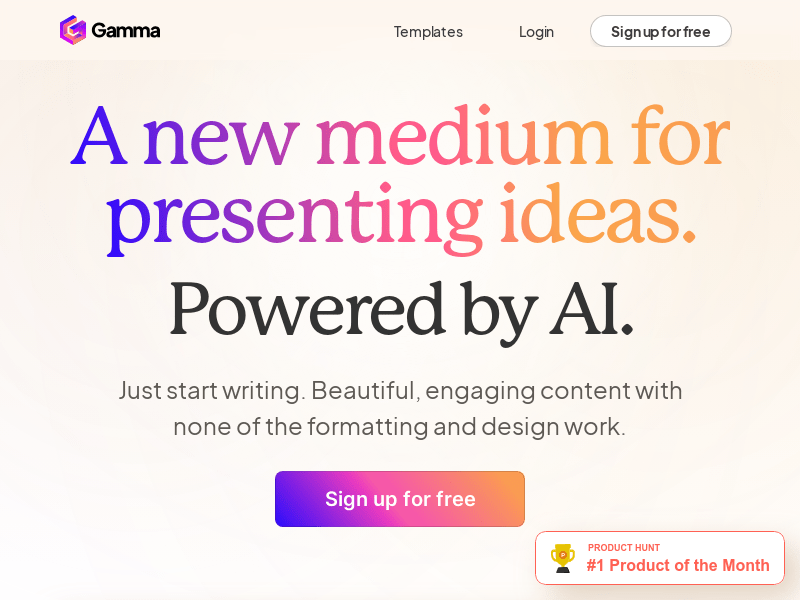
Gamma — AI-powered presentation, document and web page generation tool
Core parameters and statistics
| Parameters | Details |
|---|---|
| Place of Residence | United States (US) |
| Support Platform | Web |
| Free quota | 400 AI points (one-time) |
| Paid plan | Plus ($10/month), Pro ($20/month) |
| Support output formats | presentations, documents, web pages |
| AI generated input | Text description, outline, import file |
| Collaboration support | Real-time multi-person collaboration |
| Sharing method | Public link, embed code PDF/PPT export |
Gamma's AI points system is its core billing unit: when registering a free account, you will receive 400 points, which are used for AI generation operations. After the points are exhausted, you need to upgrade to a paid plan. The paid version of “Unlimited AI” essentially provides unlimited use of AI generation capabilities, which is of significant value to users who frequently create demo content. 400 points for the Free version will generate approximately 40 full presentations, which is enough to evaluate the product's suitability for workflows.
User and market recognition
Gamma has accumulated more than 10 million registered users since its launch and is widely used in education, consulting, marketing and entrepreneurial financing. The product has been rated as a "Day 1" hot product on Product Hunt many times, and has long maintained its top position in the AI office tool rankings.
The core user group of the platform comes from professionals who need to frequently create presentations, including startups quickly generating pitch decks before investor Demo Days, consultants preparing client proposals, teachers creating course materials, and marketers creating product introduction documents. Media reviews generally recognize Gamma's leading position in the dimension of "AI automatic generation + beautiful design". Compared with competing products such as Canva AI and Beautiful.ai, Gamma has advantages in content generation quality and operational simplicity.
Cost advantage
| Plans | Monthly Fees | AI Features | Description |
|---|---|---|---|
| Free | Free | 400 points (one-time) | Suitable for light trial, including Gamma watermark |
| Plus | $10/month | Unlimited AI | No watermark, suitable for individual users |
| Pro | $20/month | Unlimited AI + premium features | Custom domain names, advanced analytics, priority support |
| Comparison: Canva Pro | $15/month | Limited AI features | Rich design templates, AI-generated content quality is weaker than Gamma |
| Comparison: PowerPoint (Microsoft 365) | $7–$20/month | Copilot assistance | Traditional software, AI generation requires additional configuration |
For individual users, Gamma Plus ($10/month) is a cost-effective option, with a lower subscription fee than Microsoft 365 Personal ($7/month) and greater AI generation capabilities. For team users, Gamma’s per-person team version is often more cost-effective than a per-person combination of PowerPoint + AI tools.
Main functions
- AI generates presentations with one click: Enter a topic or outline, and AI will automatically plan the content structure, generate copy, and apply beautiful layout. No manual design is required throughout the process, and it is suitable for quickly producing pitch decks, reporting documents, and training materials.
- AI document generation: Generate structured long documents, supporting rich text formats such as title levels, lists, tables, code blocks, etc., suitable for product requirements documents, reports, and plans.
- AI web page generation: directly generates content into accessible web pages, supports custom domain name binding, and is suitable for creating product introduction pages, personal portfolios and event pages without programming.
- Customized Theme and Brand: Supports uploading logos, setting brand colors and fonts, and generating presentation content consistent with the corporate brand style. The Pro version supports fully customized themes.
- Real-time multi-person collaboration: Multiple people can edit the same document at the same time, support comments and version records, and the team collaboration experience is close to Google Slides.
- Import Conversion: Supports importing content from Word, PDF, and PowerPoint files, and AI automatically rearranges it into Gamma style, suitable for upgrading old content.
- One-click sharing and embedding: Generate a publicly accessible link or embed code, and the presentation can be played in full screen directly in the browser without installing any software.
- View Analysis: The Pro version provides presentation viewing data (number of visitors, length of stay on each page) to help optimize the content structure.
- Media Embedding: Supports embedding videos (YouTube/Loom), charts (Figma/Miro) and GIFs to enrich the multimedia expression of presentation content.
Model and version evolution
Gamma is a SaaS product and does not release traditional version numbers. It uses function iteration as its main update form.
| Milestone | Time |
|---|---|
| Internal testing goes online, launching AI presentation generation | 2022-06 |
| Public release, support document and web page generation | 2023-01 |
| Launching real-time collaboration and comment functions | 2023-09 |
| Added AI image generation integration (generating accompanying images) | 2024-01 |
| Launched the function of viewing data analysis | 2024-03 |
| Support import and conversion from files (Word/PDF/PPT) | 2024-06 |
| AI generation quality continues to improve, supporting more languages | 2025–2026 |
The continuous improvement of AI generation quality is Gamma's core iteration direction, including the rationality of content structure, aesthetics of typesetting, and the quality of support for non-English languages such as Chinese.
Technical advantages
Content + Design Simultaneous Generation: Gamma's core technical advantage lies in the deep coupling of content generation (LLM) and visual typesetting (design algorithm). AI not only generates text, but also simultaneously determines the layout, visual hierarchy and visual elements of each slide, achieving "beautiful generation" rather than "layout after generation", which is the key difference from pure AI writing tools.
Adaptive card layout: Gamma adopts a card layout system similar to responsive web pages. The presentation content automatically adjusts the layout under different screen sizes. It completely bids farewell to the problem of poor display of fixed-size slides on mobile devices in the PowerPoint era, and has a more modern feel.
Web native presentation: The content generated by Gamma is essentially a web application, which naturally supports animation, video embedding and interactive elements. Sharing only requires a URL link, and the audience does not need to install any software. The presentation experience is smoother and the problem of inconsistent file versions is eliminated.
AI iterative optimization: After generating content, users can use natural language instructions to ask AI to modify specific parts (such as "Change the tone of the third page to be more formal" or "Add a data summary slide at the end"). AI can accurately respond to local modification requests without affecting the overall structure.
How to use
| Entrance | Description |
|---|---|
| Web side | Visit https://gamma.app and register with a Google account or email |
| Import and convert | Upload Word/PDF/PPT files, AI will automatically rearrange them |
| Blank creation | Start with a blank, manually add cards and call AI-assisted fill |
Typical steps:
- Visit https://gamma.app and register with one click using your Google account (receive 400 AI points).
- Click "New with AI" and select the output type (presentation/document/webpage).
- Enter the topic description in the prompt box (such as "Pitch Deck for SaaS product investors, focusing on showing the market size and business model") and click Generate.
- After the AI is generated (about 30 seconds), adjust the content, change the theme color, or ask the AI to modify specific parts in the editor.
- After completion, click "Share" to generate a public link, or export it to a PDF/PPT file.
Product Pricing
Gamma adopts the pricing model of “free points + unlimited subscriptions”:
- Free: Get 400 AI points when you sign up (generates about 40 presentations), Gamma watermarked content, unlimited manual editing.
- Plus ($10/month): Unlimited AI generation, watermark removal, support for custom themes, suitable for daily use by individual users.
- Pro ($20/month): Unlimited AI generation, custom domain names, advanced viewing analytics, priority customer support, suitable for professionals and small teams.
Annual payment plans usually enjoy discounts, which are subject to the current price on the official website. The team version is billed on a per-seat basis and provides unified billing and team management functions.
Application scenarios
1. Quick production of startup financing pitch deck Entrepreneurs use natural language to describe the business model, market size, and team background before Demo Day or investor meetings. Gamma generates a fully structured and professionally designed pitch deck in minutes, and then quickly adjusts it according to specific investor preferences, greatly saving production time and allowing founders to focus on content rather than design.
2. Internal corporate reporting documents Product managers and analysts input quarterly data and project progress into Gamma, and AI automatically generates clearly structured reporting documents, embeds data charts and videos, and shares them with management through links, avoiding the cumbersome email transmission and version management of traditional PPT.
3. Educational courses and training materials Teachers and trainers input the course outline, and AI automatically generates courseware with pictures and structured key points. It supports embedded videos and interactive content. The production efficiency is several times higher than that of traditional PPT, and the final effect is more beautiful and more suitable for display on different devices such as tablets and projectors.
4. Product introduction page and event landing page The marketing team uses Gamma's web page generation function to quickly create product introduction pages or event registration pages without the need to develop resources. It can be directly bound to a custom domain name and published, which is suitable for marketing activities or product release warm-ups that need to be launched quickly.
Applicable people
- Entrepreneurs and Business People: Quickly produce high-quality pitch decks and business proposals, saving design communication costs.
- Marketing and Branding Team: Batch generate product introductions, customer cases and marketing reports to maintain visual consistency.
- Educators: Efficiently produce courseware and teaching materials, and embed multimedia content to enhance course interactivity.
- Consulting and Consulting Industry: Quickly generate client proposals and project reports, focusing on content strategy rather than layout details.
- Not suitable for scenarios: Professional design drafts that have extremely high requirements for typesetting accuracy (it is recommended to still use professional tools such as Figma/Adobe); web pages that require highly customized interactive effects (Gamma's web page generation function is suitable for display content rather than complex interactive applications); confidential documents that have strict requirements for content data privacy.
Summary and Outlook
With the product concept of "AI generation is design completion", Gamma has successfully compressed presentation creation time from hours to minutes, and produced results with visual quality far superior to ordinary PowerPoint without requiring users to have design skills. The scale of more than 10 million users confirms the market recognition of this value proposition.
The core competitiveness lies in: the technical advantages of synchronous generation of content and design, the adaptation of card-style responsive layout to modern display scenarios, and the extremely high operational efficiency achieved at a low price. The current main limitations include: there is still room for improvement in the layout and semantic understanding of Chinese content; highly customized corporate branding needs require the Pro version to fully support; the web page generation function does not yet support complex interaction logic.
Follow-up focus: the continued improvement of AI generation quality (especially Chinese content), integration with enterprise internal knowledge bases (such as Notion, Confluence), improvement of team version functions, and whether it will enter the competition field of office suites (similar to Google Workspace).
Related tools:  Notion AI, google-workspace
Business process integration and ROI analysis
As a productivity tool for enterprises or professional positions, Gamma's true value depends on the depth of integration with existing workflows and the quantifiable efficiency improvement effect. The following is a systematic analysis from three core dimensions.
System integration and data interoperability The ability to interoperate with existing business systems is a key prerequisite for productivity tools to be integrated into workflows. It is recommended to focus on evaluating the following integration dimensions: the openness and documentation quality of the RESTful/GraphQL API (whether a complete API reference and SDK examples are provided), the support scope of Webhook event notifications (which business event types are supported for automatic push), the number and depth of pre-built integrations with common collaboration SaaS tools (WeChat Enterprise, DingTalk, Feishu, Slack, Notion, Jira, etc.), and enterprise-level identity authentication support (SSO/SAML/OAuth and LDAP/AD directory integration). Products that lack integration capabilities are easily isolated into information islands, which in turn increases the cognitive cost and operational friction for teams to switch between different tools.
Efficiency Quantification and ROI Estimation Methodology Before purchasing decisions, it is recommended to quantify the input-output ratio through a structured method: Step 1, choose 3-5 Standardized tasks that are frequently repeated and time-consuming in each team are used as test samples; in the second step, the average time consumption of a single task before and after tool intervention, first-time pass rate or error rate, and the number of links requiring manual intervention are recorded under controlled conditions; in the third step, the saved manpower time is converted according to the comprehensive cost of the position (salary, benefits, management sharing), and soft benefits (increased employee satisfaction, standardization of work quality, and improvement in response speed to core business) are superimposed to obtain a comprehensive ROI estimate. It is recommended to continue tracking ROI trends on a monthly basis, as the value of a tool usually increases over time as team proficiency increases and workflows are optimized.
Phase-based implementation strategy and risk control It is recommended to adopt a three-stage implementation path of "pilot verification-gradual promotion-continuous optimization". In the pilot stage (1-2 weeks), a single team or a single business scenario is selected for small-scale verification. The core goal is to verify technical feasibility and user acceptance, and establish preliminary usage specifications and success standards; in the promotion stage (2-4 weeks), after the pilot verification is passed, the coverage is gradually expanded, and standardized activation processes and training materials are developed; in the optimization stage (continuous), the workflow configuration is continuously adjusted based on actual usage data and user feedback, and more high-value application scenarios are explored. Clear quantitative key result indicators should be set at each stage to avoid blindly expanding the scope of use without data support.
Version Info
- Gamma current version :The current version supports AI-generated presentations, documents, and web pages. It provides complete functions such as custom themes, real-time collaboration, comments, embedding multimedia content, and one-click publishing of sharing links. It continues to iterate on the quality of AI generation.
- Real-time collaboration and analysis go online :Launched real-time multi-person collaborative editing capabilities and presentation viewing data analysis to support team co-editing and track audience engagement.
- Gamma Public Release :Officially open to the public, supporting document and web page generation, launching a paid subscription plan, and the number of users has grown rapidly.
- Gamma closed beta version :Gamma was launched as a closed beta test and launched an AI-based presentation generation core function, which received positive feedback from early users.
User Reviews