 Google Slides AI
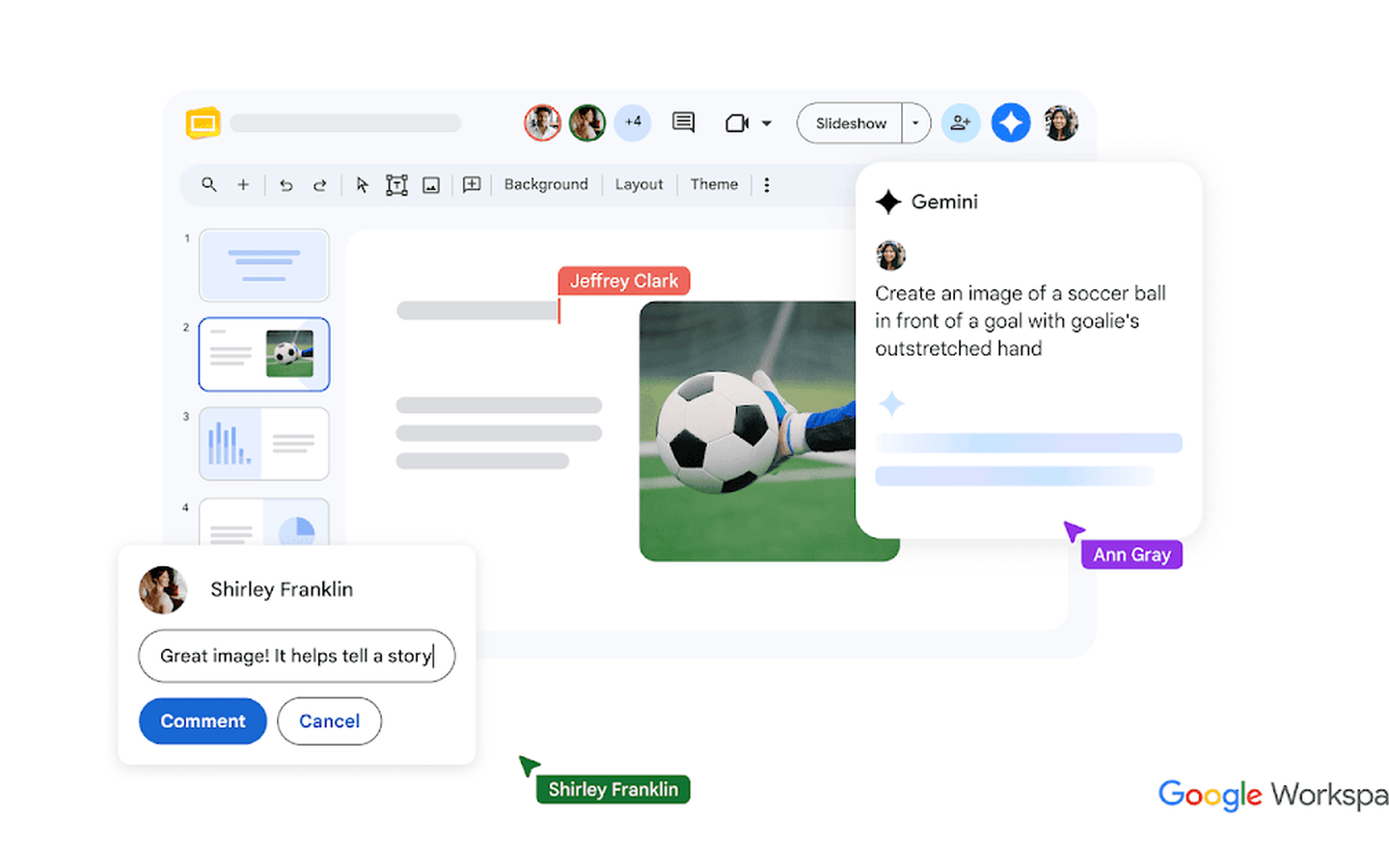
Google Slides AI is an AI-enhanced presentation tool in Google Workspace. It integrates Gemini AI assistant and supports AI image generation, intelligent layout and collaborative editing.
GoogleSlidesAI
Core parameters and statistics of Google Slides AI
Google Slides AI is not a standalone product, but an AI-enhanced form of the presentations module in the Google Workspace suite. Its underlying AI engine is Google Gemini, which embeds the slide editing process through two entrances, the sidebar panel and contextual commands. It is aimed at "presentation needs in daily office collaboration" rather than professional design scenarios.
| Parameter item | Description |
|---|---|
| Product Form | Google Workspace Suite Embedded AI Module |
| AI Engine | Google Gemini (the free tier is Gemini, and the commercial tier is Gemini Ultra) |
| AI core capabilities | AI image generation, content suggestions, intelligent typesetting, speaker note generation, real-time translation of subtitles |
| Collaboration capabilities | Real-time multi-person collaborative editing, comment annotation, version history, cross-application data linkage (Sheets/Docs/Gmail) |
| Platform coverage | Web (main), iOS, Android |
| User base | Over 2 billion monthly active Workspace users worldwide (including free version) |
| Latest version | 2026.07 — Google Slides with Gemini |
Quantitative anchor point for efficiency improvement: Before the intervention of AI, a 10-page quarterly report took an average of 4-6 hours from draft to finalization. After connecting to Gemini, the content suggestion compressible framework can be built in 15 minutes, AI image generation saves the need to switch external tools for an average of about 30 minutes, and intelligent note generation reduces speech preparation time from 1 hour to less than 10 minutes. However, the above efficiency gain depends on the user's familiarity with Prompt - "Generating a page of beautiful PPT in one sentence" often requires 2-3 rounds of iterative adjustments in actual use.
Boundary Statement: Google Slides AI is not intended for scenarios that require pixel-level design control. Its AI generation is more suitable for "just enough" internal team presentations, rather than highly customized proposals for clients or external communication materials with a strictly unified brand vision.
User and market recognition of Google Slides AI
Huge user pool but low AI penetration: Google Slides itself has the world's largest presentation user base - relying on Google Workspace's over 2 billion monthly active users and zero-threshold use of free Google accounts. But the actual penetration rate of AI capabilities is far lower than the user base. The Gemini sidebar will be gradually rolled out to Workspace users starting in 2025, but as of mid-2026, a large number of free users are still using only the basic Slides function, and the active usage rate of AI capabilities is estimated to be less than 15% (based on public third-party survey reference, unofficial data).
Differentiation of adoption by B-side enterprises: Google Workspace Business Edition customers’ adoption of AI functions focuses on two types of scenarios—real-time translation of subtitles for multinational teams (solving pain points in multilingual meetings) and content suggestions in cross-department collaboration (reducing “blank slide anxiety”). Large customers (enterprise contracts for over a thousand seats) tend to use Gemini Ultra for integrated workflows, such as generating first drafts of Slides presentations directly from Gmail message digests. Small and medium-sized enterprises are more stuck in the "early adopter" stage, and AI functions have not yet become the core driving force for paid upgrades.
Market Benchmarking: Compared with Microsoft Copilot for PowerPoint, the core difference of Google Slides AI lies in the depth of ecological collaboration - it does not pursue the aesthetic perfection of single-page design, but emphasizes "the seamless flow from data to presentation." Compared with independent AI PPT tools (such as Gamma, Beautiful.ai), Google Slides AI has higher template freedom but lower consistency in the designs generated by AI.
Cost Advantages of Google Slides AI
The cost structure of Google Slides AI needs to be broken down into three layers to avoid binary misjudgments of “free/paid”:
C client/individual users: Basic editing of Google Slides is completely free. AI capabilities are available through the Gemini free tier for a limited number of conversations (subject to Google's real-time policies) and can be used for content suggestions and simple image generation. Unlocking full AI capabilities (unlimited Gemini conversation Gemini Ultra model access) requires a subscription to Google One AI Premium ($19.99/month) or Workspace Business Edition (starting at $12/month). For individual users, if they only produce 2-3 simple demonstrations per month, the free quota is usually enough; high-frequency producers (such as freelance lecturers and consultants) need to upgrade and pay.
Developer/API layer: Google Slides AI does not provide a standalone presentation generation API. Developers can use the Google Workspace API (Slides API) for template filling and data-driven slide generation, but this is not an "AI generated presentation" interface, but a traditional structured operation API. If you want to embed Gamma-like AI demonstration generation capabilities in your own products, you need to follow the Gemini API route of Google Cloud Vertex AI, which is billed by tokens. The typical cost is about $1-3/million input tokens (based on Gemini Pro 1.5 reference price), and you need to build the front-end logic for demonstration generation by yourself.
Enterprise/Organizational Tier: Enterprise costs are calculated by seat and not by usage. Workspace Enterprise pricing is subject to business confirmation (no fixed pricing is disclosed) and includes Gemini Ultra access, unlimited storage, and advanced security and compliance features. The core consideration for enterprise procurement should not be the price of a single seat, but the "cost of migrating the existing Google ecosystem" - if the team has intensively used Gmail/Calendar/Drive/Docs, the marginal cost of Slides AI is extremely low. On the other hand, if the team’s primary office suite is Microsoft 365, the cost of switching to Slides AI far exceeds the subscription fee itself.
Key features of Google Slides AI
-
AI Image Generation (Gemini Vincentian Pictures): Generate images directly in the slides through natural language, without switching to Midjourney or DALL·E. Expert point of view: Its real value does not lie in the image quality (currently not as good as professional AI drawing tools), but in the contextual linkage of "image-copywriting-typesetting" - the generated image automatically adapts to the slide ratio, and multiple variations can be generated on one page based on the same Prompt, which reduces the cost of cross-software switching of "finding an image - adjusting the size - changing the color".
-
AI content suggestion and outline generation: After entering the title or topic, Gemini automatically generates the content points, layout plan and recommended images for the page. Expert View: This is the most effective function to reduce "blank page anxiety". In actual use, it is recommended to use Gemini to generate the content framework first, and then manually adjust the details instead of relying entirely on the AI draft. The synergy is that content suggestions can be linked to existing documents in Google Docs, and presentation outlines can be generated directly from document summaries.
-
Intelligent speaker note generation: Automatically generate structured speaker notes from slide text and lecture notes, marking key nodes and transitions. Hidden benefits: For teams that need cross-language speeches, this function can also translate notes into multiple languages with one click, and use real-time subtitles to achieve "a Slides multi-language speech".
-
Real-time translated subtitles (live demo): In a Google Meet integrated demo, AI provides real-time translated subtitles covering 100+ languages. Scenario value: This is the irreplaceable advantage of Google Slides AI compared to all offline/independent PPT tools - it natively opens up the entire link of "production-presentation-remote collaboration". Especially in the context of multinational company meetings, AI subtitles convert communication barriers into readable text.
-
Intelligent recommendation of templates and themes: Based on the type of presentation content (quarterly report, project proposal, teaching courseware), AI automatically recommends matching color schemes and font combinations. Implicit limitations: Although the template library is rich, the degree of customization is limited - in-depth customization of brand colors and specific font families requires manual adjustment, and AI does not currently support automatic adaptation based on Brand Guidelines.
Google Slides AI model and version evolution
The evolution of Google Slides' AI capabilities is closely bound to the iteration rhythm of the Gemini model and Workspace's Feature Rollout strategy, rather than independent Slides version number increments.
2024 — Preliminary period: Google will demonstrate the "Help me visualize" feature for the first time at Google I/O in May 2024, marking the entry of AI generation capabilities into Slides. At this time, only basic Vincent graphics are supported, Gemini is embedded in the form of a sidebar, and the response speed and image quality are in the early stages.
2025 - Deep Integration Period: Gemini sidebar is fully rolled out in Slides, and three new capabilities are added: "Help me write", "Help me format" and "Help me generate notes". In the second half of the same year, the real-time subtitle translation function was launched and deeply integrated with Google Meet. At this stage, the quality of AI generation has improved significantly, but it is still limited to the "auxiliary" role - AI suggestions require user confirmation page by page before they can be applied.
January 2026 - AI enhanced version: Introducing Gemini content suggestions and intelligent layout, AI begins to actively understand the slide structure and make multi-page linkage optimization suggestions (such as automatically splitting an overly dense page into multiple pages). This is a key step for Slides AI to move from “page-level assistance” to “presentation-level understanding.”
July 2026 — Google Slides with Gemini: The latest version, a fully functional version with deep integration of Gemini AI. Newly added theme consistency optimization of AI image generation (multi-page image styles are unified), intelligent note creation (automatic extraction of key data points to generate speech prompts), and multi-lingual synchronization of real-time translated subtitles.
Version Note: Google Slides itself does not have a version number in the traditional sense. The above nodes are a summary of public milestones, and the precise release date is subject to the Google Workspace update blog.
Technical advantages of Google Slides AI
Gemini multimodal inference as a service: Google Slides AI does not run models on the client, but implements text generation, content generation and translation through the Gemini API in the cloud. This means that every AI function call can obtain the latest model capabilities at that time - users do not need to manually update the "model version", Gemini's backend upgrade automatically takes effect. Mechanically, Gemini encodes the slide context (text, layout, existing images) into multi-modal Prompt, and outputs structured suggestions or generative content combined with user instructions.
Workspace data linkage pipeline: This is the technical barrier that is least likely to be copied by Google Slides AI. When a user asks to "generate a chart page referencing Q2 sales data," AI can pull the numbers directly from the Google Sheets data range tied to the presentation, automatically create the chart and embed it in the slide. This cross-application data pipeline relies on Google Workspace's unified permission model and real-time data synchronization architecture, which cannot be reproduced by independent AI PPT tools.
Real-time collaboration and conflict resolution: The core technical advantage of Slides lies in the OT (Operation Transformation) algorithm for real-time editing by multiple people. The content generated by AI also follows collaboration constraints - in the same demonstration, while user A uses AI to generate illustrations, user B can continue to edit text, and the two operations will not conflict. This is crucial for teams to edit scenes simultaneously, and is also a technical blind spot for most AI demonstration tools (single-user editing).
Context window and presentation-level understanding: Gemini 1.5 Pro supports 1 million tokens of context, which means that AI can "read" the content of all pages of the entire presentation, keeping the global style and narrative logic consistent when suggesting new pages. Compared with AI PPT tools that generate each page independently, Google Slides AI has architectural advantages in cross-page coherence.
How to use Google Slides AI
The usage entrance of Google Slides AI is divided into three levels, and different entrances correspond to different control granularities:
| Entrance | Trigger method | Applicable scenarios | Restrictions |
|---|---|---|---|
| Gemini sidebar | Slides right panel of editing interface | Content suggestions, image generation, translation | You need to click apply manually, AI does not automatically modify |
| Inline command (/) | Enter "Help me..." in the slide input box | Quickly generate single-page content or images | Only takes effect on the current page and cannot operate across pages |
| Google Workspace API | Through Apps Script or REST API | Batch creation/update demo, template filling | Non-AI generated interface, developers need to build it themselves |
Typical steps:
- Open Google Slides and create a new presentation, or select a template.
- Click the "Gemini" icon on the right to expand the AI sidebar.
- Enter the requirements in the sidebar (such as "Generate an 8-page outline for the Q3 product launch plan"), and AI will return content suggestions and recommended layouts.
- Review the AI-generated content page by page, click "Insert" to apply, or manually adjust and apply.
- Use inline commands (type "Generate a picture for me about XX") to illustrate a specific page.
- If you need real-time translation, turn on the subtitle function in presentation mode and select the target language.
Launch Configuration: No additional installation required. With a Google account, you can access basic AI functions (frequency limits), and Workspace subscribers can get full AI capabilities.
Product Pricing for Google Slides AI
The pricing of Google Slides AI is divided into three progressive levels, and the completeness of AI functions increases linearly with the subscription level:
| Package level | Applicable objects | Monthly fee | AI capability scope | Storage space | Key limitations |
|---|---|---|---|---|---|
| Free (free for individuals) | All Google users | Free | Gemini basic conversations (limited times) | 15 GB | AI image generation frequency limit, no advanced layout suggestions |
| Google One AI Premium | Individual Premium | $19.99/mo | Gemini Full + Gemini Ultra | 2 TB | No enterprise-grade management and security features |
| Workspace Business Starter | Small Teams | $6/user/month | Gemini Full Capabilities | 30 GB/user | No advanced security auditing |
| Workspace Business Standard | Medium teams | $12/user/month | Gemini + Advanced Security | 2 TB/user | No Vault and compliance features |
| Workspace Business Plus | Compliance Requirements Team | $18/user/month | Gemini + Enterprise Security | 5 TB/user | Includes eDiscovery and retention policies |
| Workspace Enterprise | Large Organizations | Customized | Gemini Ultra + Full Enterprise Features | Unlimited | Annual Contract Required, SLA Guaranteed |
Quantitative deduction of cost reduction and efficiency improvement (unofficial commitment): Taking a 200-person marketing team as an example, after switching from traditional Office PPT to Google Slides AI, the presentation production time is reduced from an average of 6 hours/time to 2 hours/time. Calculated as one presentation per person per week, the entire team saves about 800 working hours per week, which is equivalent to an implicit labor cost saving of about $40,000/week (estimated based on the median salary of $50/hour). But this is based on the premise that the team has completed the Google ecological migration-the ecological switch itself is a 3-6 month hidden cost period.
The Boundary of Human-Computer Collaboration: Slides AI can be 100% automated, including basic illustration generation, speech note generation, real-time subtitle translation, and single-page content suggestions. Some sections that must retain human confirmation points are - chart content involving financial data (AI may extract wrong data ranges), client-facing presentation design style, slide wording involving compliance-sensitive information. It is recommended that enterprise users set up a three-stage process of "AI proposal → manual review → release" in the deployment strategy.
Google Slides AI application scenarios
-
Internal quarterly reporting and OKR review: Team collaboration to produce a 20-40 page quarterly business review presentation. Gemini AI automatically extracts key indicators from the weekly report in Google Docs to generate a content framework, obtains chart data from Sheets and embeds it in real time, and the AI-suggested layout ensures consistent layout of multi-page content. Efficiency Deduction: In this scenario, AI can reduce the framework construction time from 3 hours to 30 minutes, but page-by-page verification of data accuracy still needs to be completed manually.
-
Multinational company-wide all-staff meeting presentation: CEO or department head synchronizes strategic direction to global employees. Using the real-time subtitle translation function, an English presentation can simultaneously display subtitles in 50+ languages, eliminating the huge cost of multi-language courseware production. Hidden Cost: The domain terminology accuracy of AI subtitles is about 85-90% when first used (taking the technical field as an example), requiring manual post-editing correction when internal company terminology or industry abbreviations are involved.
-
Educational courseware production and multi-language teaching: Teachers use AI images to generate abstract concept illustrations (such as "generate a schematic diagram showing the photosynthesis process"), and real-time translation assists multi-language class teaching. Not suitable for boundaries: For thesis defense demonstrations that require strict academic citation formats, the AI-generated content lacks reference sources and does not meet the requirements of academic standards.
-
Sales Proposal Rapid Prototyping: The sales team quickly generates a customized solution demonstration 30 minutes before the customer visit, and AI extracts key information from customer emails and past proposals to fill the template. Key points for human-machine collaboration: In this scenario, the adoption rate of the first draft generated by AI can exceed 70%, but the pricing page and contract terms page of the final version must be manually confirmed, and confirmation points must be set for irreversible delivery.
Who is Google Slides AI suitable for?
-
Google Workspace heavy users (project managers, operations, marketing): This is the most suitable group of people. They already live in the Google ecosystem, and the marginal learning cost of Slides AI is almost zero. Gains in AI capabilities are “overlayed on top of existing workflows” rather than “switching to a new tool.” Does not fit the boundary: If the team's main files are still circulated in the local Office format (.pptx/.docx), the compatibility loss of Slides AI may offset the efficiency gains brought by the AI function.
-
Freelance Lecturer and Trainer: High-frequency production of teaching courseware requires fast graphics and multi-language support. Slides AI’s AI image generation and real-time translation directly address two core pain points. Prerequisites: A stable network is required (AI functions are all online dependent), and the teaching content does not involve highly customized animation interactions.
-
Entrepreneurial team (10-50 people): The team structure is flat, the need for document collaboration is strong, and the aesthetic requirements for the presentation are "just enough." Workspace Business Starter costs significantly less than a standalone Gamma or Beautiful.ai subscription at $6/user/month, and you get an entire office collaboration suite rather than a single presentation tool. Unsuitable conditions: If the team frequently needs to pitch external investors or large customers, the design precision of Slides AI may not meet expectations. It is recommended to use Canva or Figma for final design polishing.
-
People who are not recommended to use Google Slides AI: Professional graphic designers (insufficient design control granularity), users who need to work offline (AI functions cannot be used without a network), film and television/advertising industry practitioners who rely on advanced animation and complex transition effects, government affairs/confidential agencies with strict compliance requirements for data sovereignty (data is processed by Google Cloud).
Google Slides AI Summary and Outlook
Core Competencies: The core advantage of Google Slides AI is not in the single depth of AI capabilities, but in the "breadth of integration of AI and collaborative ecosystem." It is the only solution that packages AI demonstration generation, real-time translation, multi-person collaborative editing, and cross-application data linkage under a unified permission model. For organizations that have adopted Google Workspace, Slides AI is a low-margin cost increment of efficiency; for non-Google ecosystem users, the switching cost is likely to exceed the value of the AI functionality.
Current limitations: The quality of AI image generation still lags behind Midjourney and DALL·E 3 in terms of detail accuracy (especially text rendering, character faces). The style consistency of AI-generated content relies on prompt quality and lacks a brand-level style locking mechanism. The accuracy of real-time translation subtitles fluctuates greatly in technical terms and strong accent scenarios (measured between 80-95%). The version evolution rhythm is subject to the Google Workspace global update strategy, and there are regional and time differences in the push of new features.
Follow-up observation points: The pace at which Gemini model upgrades will improve the quality of AI images (Google may introduce the latest capabilities of Imagen in image generation), whether Google will open the third-party API of Slides AI (currently only available within Workspace), the degree of ecological openness between Google Workspace and third-party applications (such as connecting Figma design drafts to directly convert them into slides), and whether the competitive pressure of Microsoft Copilot for PowerPoint will promote more radical functional iterations.
Procurement/Adoption Risk Assessment: For decision makers, it is recommended to use a team of less than 50 people as a pilot unit, select the "internal reporting" rather than the "customer demonstration" scenario, and evaluate the actual AI function usage and workflow integration after running for 1-2 months. Before expanding to the entire organization, you need to verify data sovereignty clauses (whether the Google Cloud data processing agreement meets industry compliance requirements), confirm copyright ownership of AI-generated content (the "AI Generated Content" clause in the Google Workspace contract), and evaluate actual availability in low-network bandwidth areas.
Related tools:  Notion AI, google-workspace
Version Info
- Google Slides with Gemini :Deeply integrated with Gemini AI, it supports AI image generation, smart note creation and real-time subtitle translation.
- Google Slides AI enhanced version :Introducing Gemini sidebar to support AI content suggestions and intelligent layout.
User Reviews