 Open Interpreter
Free
Open Interpreter
Free
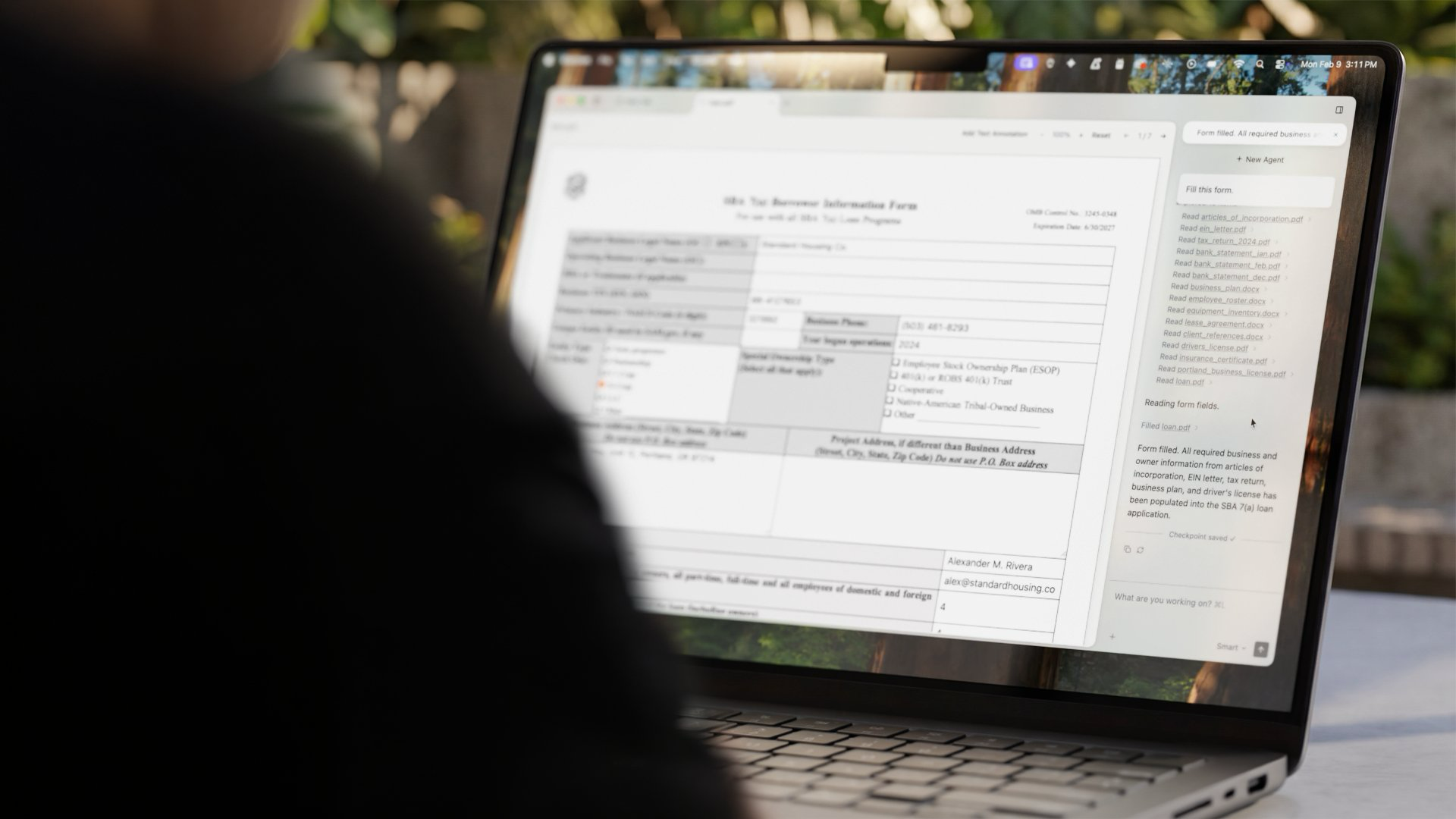
Open Interpreter is an open source project that allows large language models to generate and execute code locally, using natural language to complete tasks such as file processing, data analysis, browser and desktop operations; its desktop product Interpreter further builds it into a desktop agent that can edit documents and fill out PDF forms.
Open Interpreter
Open Interpreter is an open source project whose core idea is to "let natural language directly drive the computer." It connects the large language model to the local code execution environment. The model generates Python, JavaScript, Shell and other codes based on the user's spoken instructions and runs them on the local machine, thereby completing tasks such as data analysis, file batch processing, chart drawing, and system operations. Unlike an assistant that only returns text in a dialog box, its value lies in "saying a word, the computer really does the work." On this basis, the team launched the desktop product Interpreter, which packages this set of capabilities into a desktop agent that can edit documents and fill in PDF forms.
Core parameters and statistics
Open Interpreter has two product lines at the same time: the open source command line kernel (open-interpreter) and the desktop application (Interpreter). The former is aimed at developers and scriptable scenarios, while the latter is aimed at a more direct desktop operating experience.
| Projects | Information |
|---|---|
| Product positioning | A natural language interface that allows LLM to execute code locally and operate the computer |
| Open Source License | AGPL-3.0 |
| Main languages | Python |
| Running form | Local command line kernel + desktop application |
| Model access | You can access cloud models such as GPT and Claude, or connect local models through Ollama/LM Studio |
| Execution context | Run the generated code directly on the machine (Python/JS/Shell, etc.) |
| GitHub Stars | About 63.8k |
| Fork count | About 5.5k |
| Latest version | v0.4.2 (2024-10-24) |
| Official website | openinterpreter.com |
Boundaries need to be clear: Because the code is actually executed on the local machine, it is both powerful and risky - it can directly modify files and call system commands, so it is suitable for use in a controlled environment and requires manual confirmation of sensitive operations.
User and market recognition
Gradually build user awareness in the field, and product capabilities are used by content creators and teams to improve work efficiency. Some industry users have incorporated it into their daily workflow. It is recommended to refer to the latest official disclosures for specific user scale and industry adoption rate data.
Cost advantage
- C-side/Individual: Usually a free version is provided to experience the core functions, and high-frequency use requires a paid package subscription.
- API/Developer: Billed by call volume, suitable for development teams that can be flexibly integrated into their own systems.
- Enterprise/Privatization: Contact the business owner to obtain customized quotation and deployment plan. The specific price is subject to the official real-time pricing page.
Main functions
- Natural language execution code: use dialogue to issue tasks, model generation and local running code completion, covering data processing, file operations, drawing, etc.
- Local file and system access: Directly read and write local files and call system commands, suitable for tasks that need to fall on real disks and applications.
- Operating system mode (OS mode): Control the mouse, keyboard and application interface through Computer API, allowing the model to "see the screen and operate by hands".
- Model pluggable: Supports access to cloud models or local models, and can be freely switched according to cost and privacy requirements.
- Desktop Interpreter: The desktop can edit documents, fill in PDF forms, and packages code execution capabilities into a more intuitive desktop assistant.
Implementation focus: Since the code and system operations will be actually executed, it is recommended to set up manual confirmation in the isolation environment or key steps to avoid misoperations affecting important files.
Model and version evolution
Main line evolution
- First public version (approximately 2023-09): Provides a natural language interface for "locally running LLM to generate code" in the form of a command line to establish the product form.
- v0.4.0 (2024-10-24): Strengthen the local "operating system mode" and Computer API, so that the model can control the desktop and applications more stably, and expand from a command line assistant to an agent that can operate the computer.
- v0.4.2 (2024-10-24): 0.4 series revision, fixes stability issues and consolidates the local execution experience.
- Desktop Interpreter (Continuous Advancement): Transform capabilities into desktop agents that can edit documents and fill out forms, representing the current product direction.
Version context description
The semantic version of the open source kernel stopped at 0.4.x, and the team's focus gradually shifted to desktop products. This means that users with different concerns should choose different entrances: users who need scriptable and embeddable processes should use the open source kernel; users who need an out-of-the-box desktop experience should focus on the Interpreter desktop version.
Technical advantages
Mechanism: It combines the "generation capability" of LLM with the local "execution capability" - the model outputs code, the local interpreter executes it and sends the results (including error reports) back to the model, forming a "generation-run-error correction" cycle. OS mode further allows the model to operate a graphical interface through the Computer API.
Effectiveness: Compared with assistants that only return code snippets, this closure allows the model to self-correct according to the actual execution results, significantly improving the success rate of "complete multi-step tasks in one sentence"; local execution also means that the user's real files and applications can be directly accessed, rather than in a restricted sandbox.
Applicable scenarios: When tasks need to fall on local data and systems (batch processing, local analysis, desktop automation), this mechanism is more direct than the cloud sandbox. The price is that the security boundary is borne by the user - local real execution brings flexibility, and also requires users to manage permissions and confirm properly.
How to use
- Command line kernel: Install
open-interpreterthrough pip, configure the model used (cloud API Key or local model endpoint), and issue tasks in natural language on the terminal. - Connect to local model: With local inference backends such as Ollama and LM Studio, it can run completely offline with zero calling fees.
- Desktop Interpreter: Get the desktop application from the official website, and use the graphical interface to directly let the agent edit documents and fill in forms, eliminating the need for command line configuration.
- Security Practice: Maintain manual confirmation for operations involving deletion, overwriting, and networking, and run them in an isolated user or virtual environment if necessary.
Product Pricing
The pricing model is subject to the official real-time page. Usually a freemium or subscription system is used, and basic functions can be used for free. Advanced functions or high-frequency use require paid subscriptions, and users are advised to evaluate the optimal solution based on actual usage.
Application scenarios
- Local data and file processing: Use dialogue to complete table cleaning, batch renaming, format conversion, and report generation. The focus of verification is to back up important data before operating.
- Desktop Task Automation: Let agents fill in forms, organize documents, and move information across applications. The focus of verification is the accuracy and reversibility of operations.
- Developer Scripts and Prototypes: Embed natural language execution into automated processes for rapid verification. The verification focuses on the impact of model selection on cost and quality.
Applicable people
- Individual users who need local automation: People who want to let AI directly handle local files and repeated operations, but do not want to write scripts themselves.
- Developers and Data Practitioners: Technical users who need local execution capabilities that are embeddable, scriptable, and model-switchable.
- Team focusing on privacy and cost: Hope to use local models to achieve lightweight automation scenarios with zero calling fees and no data leaving the local machine.
Unsuitable boundaries: It is not appropriate to release execution permissions unattended on production servers or environments where critical data is stored; users who lack security awareness and cannot manage local execution risks should use it with caution, or give priority to using restricted cloud sandbox solutions.
Summary and Outlook
The core competitiveness of Open Interpreter is to combine "LLM generated code" with "local real execution", so that natural language can directly drive the computer to complete multi-step tasks, and extend to desktop operations through OS mode. Its limitations are also clear: local real execution brings flexibility and leaves the security boundary to the user; the version pace of the open source kernel slows down, and the focus shifts to desktop products.
It is worth observing the maturity and commercialization path of desktop Interpreter in the future, as well as its reliability in specific scenarios such as document editing and form filling. The implementation suggestion is to first use the open source kernel to conduct a small-scale pilot in an isolated environment, and then consider introducing the desktop version into the daily workflow after confirming the task success rate and security controllability; for scenarios involving sensitive data or regulated, the applicability of the AGPL protocol and data processing methods need to be verified before purchasing.
Related tools:  CrewAI,
  LangChain
Version Info
- Open Interpreter v0.4.2 :The revised version of the 0.4 series fixes stability issues based on the local OS operating capabilities introduced in the "New Computer Update" and consolidates the core experience of executing code locally and calling the desktop and browser to complete tasks.
- Open Interpreter v0.4.0 :The 0.4 mainline version strengthens the local "operating system mode" and Computer API, allowing the model to control the mouse, keyboard and applications more stably, and extending the command line assistant into an agent that can operate the desktop.
- Open Interpreter first public version :The first widely disseminated public version of the project provides a natural language interface for "running LLM locally to generate code" in the form of a command line, laying the foundation for a product form that uses dialogue to complete files, data and system tasks; this early stage is a continuous iteration, and there is no single official precise release date.
User Reviews