 Gitingest
Free
Gitingest
Free
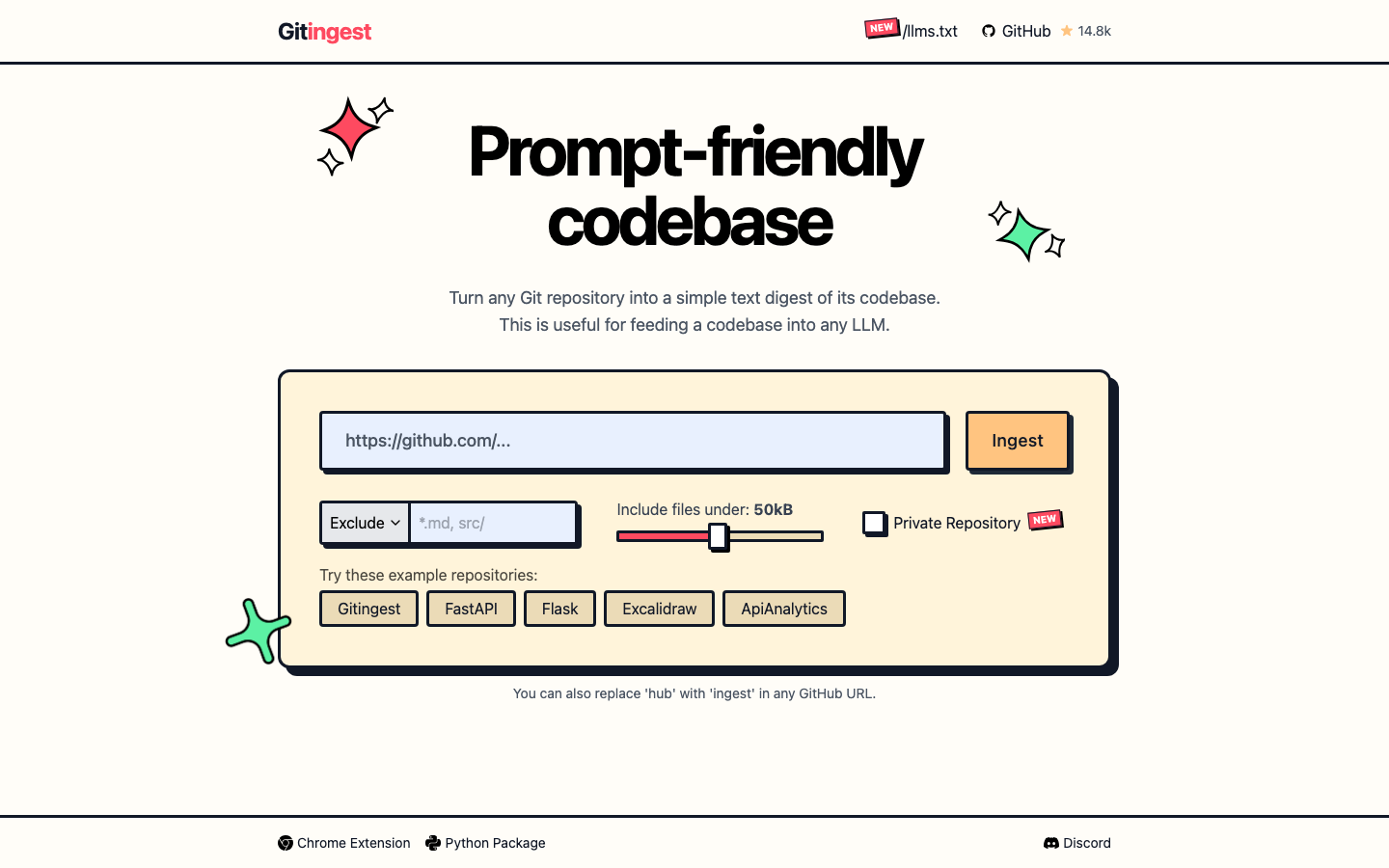
Gitingest is a AI programming developer tool that can convert any GitHub repository or local directory into a structured text summary, specially optimized for LLM prompt word scenarios. By replacing "hub" with "ingest" in the GitHub URL, you can generate the code base's summary, directory tree, and file contents with one click.
Gitingest
Core parameters and statistics
Gitingest's official positioning is "Prompt-friendly codebase" - it does not do code audits or vulnerability scanning, and only does one thing: convert Git repositories into structured text that LLM can directly understand. Its core value lies in eliminating the manual labor of developers manually copying file contents, organizing directory structures, and estimating tokens.
| Projects | Public Information |
|---|---|
| Official positioning | Prompt-friendly codebase — Convert Git repository to LLM-friendly text summary |
| Usage | Replace "hub" in GitHub URL with "ingest", Web UI, CLI, Python SDK, browser plug-in |
| Support portal | Web (gitingest.com), CLI (pip), Python SDK (pypi), Chrome/Firefox/Edge plug-in |
| Deployment path | Cloud hosting / Docker self-hosting (Docker Compose supports dev/prod dual mode) |
| Open Source License | MIT License |
| Code repository | github.com/coderamp-labs/gitingest — 15.1k stars, 1.1k forks, 59 contributors |
| Technology stack | Python 81.4%, Jinja 10%, JavaScript 7.3% — FastAPI + Tailwind CSS + Jinja2 |
| Latest version | v0.3.1 (2025-07-31) |
| Maximum file processing | Default 5MB, upper limit 100MB (adjustable) |
| Token estimation engine | tiktoken (OpenAI) |
Core Capability Boundary: Gitingest does not modify the warehouse, does not execute code, and does not retain binary files. It only does one-way conversion of "read → structured → output". For warehouses with extremely large single files (>100MB), dense binaries, or extremely deep nested submodules, you need to use --max-size and --exclude-pattern in the CLI for tailoring.
Use form diversity: The most lightweight way is to change the hub of the GitHub URL to ingest (such as https://gitingest.com/owner/repo) directly in the browser, without any installation. For deep integration scenarios, Python SDK and CLI provide complete parameterized control (file filtering, branch selection token injection).
Users and market recognition of Gitingest
GitIngest's market recognition is mainly reflected in the popularity of the open source community and the usefulness of developer tools, rather than in the traditional sense of enterprise sales or revenue data (the latter is not public).
Open source community size: As of the current time, GitHub shows 15.1k stars, 1.1k forks, and 59 contributors. Star's growth curve steepens in mid-2025, indicating that it has moved beyond the early validation stage and entered a word-of-mouth cycle among the developer community. 1.1k forks shows that there is stable demand for secondary development and custom deployment.
Ecological Extension: The community has contributed three major browser plug-ins (maintained by lcandy2/gitingest-extension): Chrome, Firefox, and Edge, as well as download data available on PyPI (tracked by pepy.tech). The existence of the browser plug-in shows that its target users are not limited to developers who "download pip packages through the terminal", but also include front-end engineers and technical writers who directly operate GitHub through the browser.
Industry benchmarking and positioning: In the segmented track of "code warehouse → LLM text", GitIngest is currently the most well-known and most complete open source solution. Similar tools include Repomix (NPM/JS ecosystem) and GitHub’s official /llms.txt specification, but GitIngest covers the trinity of access methods of Web UI + CLI + SDK, and supports private warehouses (PAT authentication), an enterprise-level requirement.
Prerequisites for implementation: The effectiveness of the tool itself is highly dependent on the usage scenario. For heavy users of AI programming who need to frequently inject the code base into the LLM context (such as using Claude/Cursor/DeepSeek for code review, refactoring, and documentation generation), GitIngest is a significant efficiency lever. It is of limited value to traditional development processes that rarely collaborate with LLM.
Cost advantage
GitIngest's cost model is a minimalist structure among this type of tools: the core functions are completely free and open source, and there is no tiered paid design of "the free version is not enough and you must upgrade to Pro".
C client/individual users: completely free. The Web UI service (gitingest.com) is free and open to all users, with no quota or usage limit. CLI tools and Python packages are installed via pip/pipx and are completely open source and free. Browser plug-ins are free to install from various app stores. The cost of use for individual users is zero - you only need to pay for your own network traffic and learning time.
Developer/API integration: Zero license fee, maintenance costs are at your own expense. The Python SDK can be imported and used, and the automated pipeline can be directly embedded through the ingest() or ingest_async() function. Developers only need to worry about integration and code maintenance costs, not API calls. If you choose self-hosting (Docker), you need to bear the cost of server infrastructure: a single container running on a lightweight VPS can meet medium and low-frequency usage (FastAPI backend, resource requirements are not high), and only high-concurrency scenarios require multi-instance deployment.
Enterprise/Private Deployment: License is free, but you need to build your own infrastructure. The open source MIT license means that companies can freely fork, modify, and redistribute it without paying any license fees. The explicit cost of privatized deployment is GPU computing power? No - GitIngest does not require a GPU. Its backend is just a Python web service (FastAPI), which requires very little computing power to run. The real cost is: DevOps manpower to maintain S3 storage (cache summary files) of the private instance, and network bandwidth. Docker Compose's built-in dev/prod dual-mode configuration simplifies the deployment process. Enterprises only need to configure ALLOWED_HOSTS, S3 storage and contextual variables to go online.
Explicit vs Implicit Costs: Explicit costs are close to zero. The hidden cost is mainly reflected in the fact that "output quality depends on the input strategy" - if the include/exclude pattern is not carefully configured, the generated summary may contain too many irrelevant files, leading to token waste and LLM context pollution. This part requires the team to accumulate usage specifications.
Main features of Gitingest
The function of GitIngest is designed around the core goal of "turning the code base into a lunch for LLM" and does not pile up irrelevant features.
-
One-click URL replacement: the core "entry design". Replace
hubwithingestin any GitHub URL to jump directly to the text summary page of the corresponding repository. This zero-friction design lowers the threshold of use to the extreme - no registration, no installation, no need to learn any CLI parameters. Hidden synergy: This design is naturally suitable for embedding in documents, tutorials, and issue discussions. Readers can click on the link to obtain the code context without manually cloning the repository. -
Structured three-column output: Each summary consists of three parts - ① warehouse metadata (number of files, estimated token amount), ② directory tree (complete project structure), ③ file-by-file content (marked with delimiters). The output format is strictly plain text, without markdown interference, and LLM can be parsed directly. Expert View: This fixed structure seems simple, but it solves the "format inconsistency" problem when LLM processes the code base - the model does not have to guess which are file names, which are codes, and which are directory structures, each part has its own clear semantic boundaries.
-
CLI parameterized filtering:
--include-pattern/--exclude-patternsupports wildcard filtering,--max-sizecontrols the upper limit of a single file,--branchspecifies a branch,--output -directly outputs to STDOUT to facilitate pipeline chaining. Collaborative value: These parameters can be combined to achieve fine extraction such as "only fetch <100KB test code in Python files", and directly input LLM or analysis scripts with the shell pipeline chain to form a one-stop workflow from warehouse → filtering → AI analysis. -
Private warehouse support: Supports analysis of private warehouses through GitHub Personal Access Token (PAT) authentication. Token can be passed in through the context variable
GITHUB_TOKENor function parameters and is not exposed in the URL. Enterprise Significance: This is the key threshold from toys to productivity tools. Without private repository support, GitIngest's value to most enterprises will be reduced by more than 60% - core business code is almost all in private repositories. -
Self-hosting and S3 cache: Docker Compose one-click deployment, supports dev/prod dual mode; built-in S3 summary cache (MinIO), the cached results are directly returned when the same warehouse is repeatedly requested, reducing Git clone overhead. Engineering value: The caching mechanism is especially important for repeated triggering in CI/CD pipelines - re-cloning the entire warehouse for every build will create unnecessary network and IO overhead.
-
Multi-platform entrance: CLI (pip/pipx), Python SDK (
from gitingest import ingest), Web UI, browser plug-in (Chrome/Firefox/Edge), self-hosted API. Covers all scenarios from interactive use to automated integration.
Gitingest’s model and version evolution
GitIngest's version iteration follows the standard semantic versioning rhythm of GitHub Release, from initial submission in 2024 to reaching a stable state of relatively complete functionality in July 2025.
Current mainline: v0.3.x
- v0.3.1 (2025-07-31): The latest official version. Fixed the problem of cache sub-path awareness - when the same warehouse but different sub-directories are requested, the cache can correctly distinguish and return the corresponding results.
- v0.3.0 (2025-07-30): Introducing loguru logging system, cached digest service (serve cached digest if available) and S3 integrated storage. These capabilities enhance observability and operations capabilities, paving the way for self-hosted production deployments.
Feature-dense v0.2.x
- v0.2.1 (2025-07-27): Fix the logarithmic conversion bug in the maximum file size processing logic, and correctly handle the file upper limit in KB units.
- v0.2.0 (2025-07-26): This is a feature-rich milestone. Main new additions:
include_submodulesoption Prometheus metric export (facilitates monitoring), S3 storage integration (summary persistence), Tailwind CSS front-end rewriting (improves UI consistency), CI/CD comprehensive upgrade Windows long path compatibility improvements.
Earlier version
Prior to v0.2.0 there was the v0.1.x series (like v0.1.5), which established the core functional skeleton of GitIngest: basic URL replacement logic CLI tooling and PyPI package publishing. Specific changes to these releases are documented in detail in CHANGELOG.
Version Management Implications: GitIngest's version cadence (an official release approximately every 1-4 weeks) shows that the project is still in active development. For self-hosted instances in the production environment, it is recommended to lock the v0.3.1 version and verify the new version before upgrading in the staging environment.
Technical advantages
GitIngest's technical route does not do any "heavy innovation" in AI or code understanding. Its cleverness lies in subtraction - doing exactly what LLM needs but developers don't want to do.
Mechanism - Plain text summary pipeline: The conversion link from Git repository to LLM input is: Git clone (or local scan) → filter files according to .gitignore/custom pattern → tiktoken estimation token → splice into "metadata + directory tree + file content" three-part plain text. Each step of this link is uncomplicated, but combined it solves the biggest pain points when developers describe code bases to LLM: missing structure and file fragmentation.
Effect — from "manual pasting" to "a link": In the traditional method, developers need to manually open the file manager, copy the file content, estimate tokens, and splice prompt words. For a medium-sized Python project with 50 files, manually preparing the context takes 10-20 minutes. GitIngest compresses this process to less than 5 seconds (Web UI) or a shell command (CLI). Efficiency improvements come not from "stronger AI" but from "better AI input preparation."
Why choose tiktoken instead of self-developed estimator: tiktoken is OpenAI’s open source tokenization library, which is completely consistent with the token count of the GPT series models. GitIngest directly reuses tiktoken, which means that its token estimation is accurate for users using mainstream models such as GPT/Claude/DeepSeek, and there will be no deviation of "estimate 10k tokens, actual consumption 15k tokens".
Engineering ingenuity of caching strategy: S3 cache is not a simple key-value, but a summary cache based on the three-dimensional combination of warehouse + sub-path + branch. This means that https://github.com/owner/repo/tree/main/src and https://github.com/owner/repo/tree/main/tests will be cached as two independent entries, avoiding the waste of "retrieving the entire warehouse summary but only needing the test code" caused by coarse-grained caching.
Architectural Constraints: GitIngest is not a real-time analytics system. Each request requires cloning (or pulling) the repository to a local temporary directory, and for large monorepos (several GB), the latency for the first request can reach 30-60 seconds. Caching will alleviate duplicate requests, but there's still a noticeable wait for the first cold start experience.
How to use
GitIngest provides four parallel usage paths, covering all scenarios from zero installation to deep integration.
| How to use | Suitable for the crowd | Entrance/command | Prerequisites |
|---|---|---|---|
| URL replacement (lightest) | All GitHub users | Replace github.com in the URL with gitingest.com |
None, just a browser |
| Web UI | One-time/low-frequency users | Visit gitingest.com and enter the warehouse URL | None |
| CLI Tools | Developers, Automation Scripts | pip install gitingest → gitingest <url> |
Python 3.8+ |
| Python SDK | Deeply integrated AI workflow | from gitingest import ingest |
Python 3.8+ |
| Browser plug-in | Daily GitHub browsing | Chrome / Firefox / Edge extension store installation | Browser |
| Self-hosted Docker | High security compliance requirements | docker compose --profile prod up -d |
Docker has context |
CLI Quick Start: After installation, execute the following command in the terminal to generate the summary:
# Generate digest from GitHub URL (default output to digest.txt)
gitingest https://github.com/user/repo

# Output to STDOUT to facilitate pipeline chaining
gitingest https://github.com/user/repo -o -

# Only include Python and Markdown files, limiting the maximum size of a single file to 100KB
gitingest https://github.com/user/repo -i "*.py" -i "*.md" -s 102400 -o -

# Analyze private warehouse (pass in Token through contextual variables)
export GITHUB_TOKEN=github_pat_xxx
gitingest https://github.com/user/private-repo -o -
Python SDK integration example: Embedding GitIngest into an AI workflow:
from gitingest import ingest

# Take the warehouse URL as input and obtain the three-stage output
summary, tree, content = ingest("https://github.com/coderamp-labs/gitingest")

# summary: Warehouse metadata (estimated number of file tokens)
# tree: directory structure tree
# content: File-by-file content of all files (including delimiter markers)

# Directly spell into the LLM context
llm_prompt = f"Please analyze the following code base:\n\n{summary}\n\n{tree}\n\n{content}"
Self-hosted deployment: For enterprises that are sensitive to data sovereignty, it is recommended to use Docker Compose’s production profile deployment:
# Core contextual variables (docker-compose or .env)
ALLOWED_HOSTS=your-domain.com,localhost
GITINGEST_METRICS_ENABLED=true # Enable Prometheus indicators
# S3 persistent cache (optional but recommended)
S3_ENDPOINT=https://your-s3-endpoint
S3_BUCKET_NAME=gitingest-cache
Product Pricing
GitIngest's pricing structure is the most transparent among tools of its kind: all core features are free, and there's no "enterprise version lock-in."
-
Web UI/URL Replacement: completely free, no registration required, no usage limit. Operating costs are covered through on-page Carbon advertising (visible at gitingest.com). The sustainability of the free model relies on advertising revenue and community contributions. If traffic costs rise significantly, the introduction of optional donations or paid value-added features in the future cannot be ruled out.
-
CLI/Python SDK: PyPI packages distributed via pip/pipx are completely free. There are no fees to install and use, and no API Key is required. This is the preferred path for developers and CI/CD integration, with zero license cost.
-
Browser Add-ons: Available in the Chrome Web Store, Firefox Add-ons and Edge Add-ons, completely free. The source code is open source at lcandy2/gitingest-extension.
-
Self-Hosted/Enterprise Deployment: The software itself is free (MIT License), but infrastructure costs are your own. A 2C4G cloud server (about ¥200-500/month) can stably run self-hosted instances of medium and low frequency. High concurrency scenarios require load balancing and multi-instance deployment, and the cost increases linearly based on actual traffic.
Enterprise Procurement Tip: Enterprise-level requirements often come from "Private Warehouse Analytics" and "Data Sovereignty". These features are fully supported in the open source version (PAT authentication + self-hosting) without any payment to CodeRamp Labs. However, enterprises should evaluate: ① Operation and maintenance labor costs (GitIngest does not provide commercial support SLA); ② S3 storage costs (cache persistence); ③ Future version compatibility risks (projects rely on community maintenance).
Application scenarios
GitIngest's four usage paths cover four differentiated application scenarios, ranging from personal efficiency to enterprise assembly lines.
-
AI-assisted code review and refactoring (developer personal scenario): Before preparing for large-scale refactoring or code review, developers use GitIngest to inject the code base of the target module into LLM to obtain refactoring suggestions, potential problem analysis, and architecture overview. Actual benefits: The time of "browsing the code → understanding the logic → preparing the context" is compressed from 20-30 minutes to 30 seconds. Implementation Tips: It is recommended to specify
--include-patternto only extract relevant files and reduce token waste. -
Automated document generation and code base Q&A (team collaboration scenario): Technical writers or DevRel teams use the GitIngest + LLM pipeline to automatically generate API document README or changelog drafts from the code base. The Python SDK can be embedded in a CI/CD process to automatically extract a summary of changed code with each release. Actual benefits: From "manual reading and writing of documents file by file" to "AI generation + manual review", the document production cycle is shortened from days to hours.
-
Context supply for AI programming agents (MCP/Agent scenario): When AI programming agents (such as Cursor, Claude Code, Continue) need to understand the entire project structure, GitIngest can be used as a context preprocessor. Spelling the return value of
ingest()directly into the agent's system prompt or conversation history gives the AI agent a complete view of the codebase from the beginning, not just the single file currently open. Actual benefits: The code generation quality of the AI agent is significantly improved, reducing the illusion of "generated code but referencing non-existent modules". -
Open source project learning and onboarding (education/community scenario): New contributors directly use the URL replacement technique to link their LLM conversations to the target repository and quickly get an overview of the project structure. Open source maintainers can post GitIngest links directly in CONTRIBUTING.md to help new contributors get started quickly. Actual benefits: Lower the threshold for participation in open source projects, from "you must clone locally to understand the project" to "you can discuss the project in LLM with a link".
Not suitable for scenarios: GitIngest is not suitable for ① projects with dense binary files (such as image, audio, and video warehouses) - text summaries are meaningless for binary files; ② very large-scale monorepo (hundreds of thousands of files, multi-GB warehouse) - the first clone and index time is too long, and the experience is poor; ③ Scenarios with extremely high real-time requirements - GitIngest is not suitable as a data source for real-time CI access control, and cache delay may lead to outdated summaries.
Applicable people
-
AI programming heavy users: developers who use Claude, DeepSeek, GPT and other models to assist coding on a daily basis. GitIngest is the fastest path to "preparing code context" for this type of user. They are the core user group of GitIngest and a major contributor to the project's star growth.
-
Technical Writers and DevRel Engineers: Professionals who frequently need to understand new code bases, write technical documentation, or create tutorials. GitIngest's URL replacement technique can be embedded in documents, blogs, and tutorials, giving readers context for your code without having to clone it.
-
Open Source Maintainers and Community Operations: Open source project maintainers who want to lower the entry threshold for contributors. Embedding GitIngest links in the CONTRIBUTING.md or Issue template of the repository can help new contributors understand the project structure faster.
-
AI Agent / MCP Developer: The engineering team that develops AI programming agents, code analysis agents, or MCP servers. GitIngest's Python SDK can serve as a "code base adapter" for these systems, standardizing any Git repository into a text format that can be consumed by LLM.
Not applicable to the group: ① Traditional development teams that do not need to collaborate with LLM - if the workflow does not involve AI code assistance at all, the value provided by GitIngest is close to zero; ② Teams that mainly use non-Git version control systems (such as SVN, Perforce) - GitIngest only supports Git warehouses; ③ Light maintenance scenarios that only need to "change a few lines of code" at a time - use GitIngest for single file modifications It is over-engineered, and it is faster to copy and paste directly in the editor.
Summary and Outlook
The core competitiveness of GitIngest is to compress the process of "making LLM understand the code base", which originally took 10-20 minutes of manual operation, into a zero-friction experience of less than 5 seconds. It does not rely on any AI model, does not do code analysis, and does not do semantic understanding - it only does one thing: transform the code base into a format that LLM can eat, and does it to the extreme. The community size of 15.1k stars and 59 contributors validates the existence and strength of this niche need.
Current limitations: ① Limited support for very large warehouses (the first clone time is long, and the output text exceeds the context window of most models); ② There is no built-in output compression/summarization function - for a warehouse of 1000 files, the output token amount may exceed 500k, which requires developers to cut it themselves; ③ The frequency of project maintenance has slowed down at the end of 2025 (the last release is 2025-07), there is uncertainty in the community-driven update cycle; ④ Browser plug-ins are maintained by third parties and directly managed by the unofficial core team.
Follow-up observation points: ① Whether to introduce incremental updates (instead of full clone every time) to improve the response speed of large repos; ② Whether to add higher-order structured information (such as function/class index graph) to the summary; ③ The direction of commercialization and enterprise support - whether the current completely free model can be sustained in the long term; ④ The depth of native integration with AI programming IDEs (Cursor, Continue, Windsurf).
Acquisition/Adoption Risk Assessment: GitIngest's open source MIT license and zero-cost structure means "acquisition" risk is low - no budget approval is required, and any developer can experience full functionality in ten minutes. The main risks for enterprise adoption are operational dependencies and project activity: If a team decides to self-host GitIngest as a core component of an internal code analysis pipeline, CodeRamp Labs' long-term maintenance intentions and community backup options need to be considered. It is recommended to position GitIngest as a "auxiliary efficiency tool" rather than a "critical path dependency" and evaluate alternatives (such as Repomix, GitHub official/llms.txt) as a backup before adoption.
Related tools:  GitHub Copilot,
  Cursor
Version Info
- Gitingest v0.3.1 :The semantic version released publicly by GitHub fixes the problem of cache sub-path awareness.
- Gitingest v0.3.0 :Introducing loguru logging system, cache summary service and S3 integrated storage.
- Gitingest v0.2.1 :Fix the maximum file size processing logic and remove the logarithmic conversion bug.
- Gitingest v0.2.0 :Major feature update, supporting submodules including Prometheus indicator S3 integration and Tailwind CSS pipeline.
User Reviews